Creating A PCB In Everything: Upverter

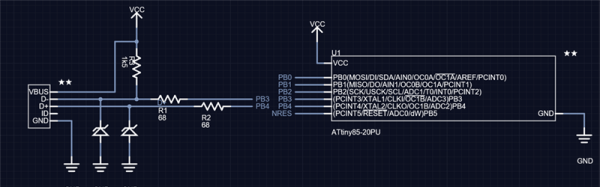
For the last five months, I’ve been writing a series of posts describing how to build a PCB in every piece of software out there. Every post in this series takes a reference schematic and board, and recreates all the elements in a completely new PCB tool.

There are three reasons why this sort of review is valuable. First, each post in this series is effectively a review of a particular tool. Already we’ve done Fritzing (thumbs down), KiCad (thumbs up), Eagle (thumbs up), and Protel Autotrax (interesting from a historical perspective). Secondly, each post in this series is a quick getting started guide for each PCB tool. Since the reference schematic and board are sufficiently complex for 90% of common PCB design tasks, each of these posts is a quick how-to guide for a specific tool. Thirdly, this series of posts serves as a basis of comparison between different tools. For example, you can do anything you want in KiCad and most of what you want in Eagle. Fritzing is terrible, and Autotrax is the digital version of the rub-on traces you bought at Radio Shack in 1987.

With that introduction out of the way, let’s get cranking on Upverter.

A little bit about Upverter

Upverter was founded in 2010 as an entirely web-based EDA tool aimed at students, hobbyists, and Open Hardware circuit designers. This was one of the first completely web-based circuit design tools and Upverter’s relative success has been a bellwether for other completely web-based EDA tools such as circuits.io and EasyEDA.

I would like to take a second to mention Upverter is a Y Combinator company (W11), which virtually guarantees this post will make it to the top of Hacker News. Go fight for imaginary Internet points amongst yourselves.

Upverter is a business after all, so how are they making money? Most EDA suites offer a free, limited version for personal, hobbyist, and ‘maker’ projects, and Upverter is no exception. The professional tier offers a few more features including CAM export, 3D preview, an API, simulation (coming soon), BOM management, and unlimited private projects for $125 per seat per month, or $1200 per seat per year.

To give you a basis of comparison for that subscription fee, Eagle CAD’s new license scheme gives you everything – 999 schematic sheets, 16 layers, and unlimited board area – for $65 per month, or $500 per year. Altium’s CircuitStudio comes in at $1000 for a one-year license. There are more expensive EDA suites such as Altium Designer and OrCAD, but you have to call a sales guy just to get a price.

Upverter is positioning itself as a professional tool at a professional price. There are better tools out there, of course, but there are thousands of businesses out there designing products with tools that cost $500 to $1000 per seat per year. In any event, this is all academic; the Hackaday crowd gravitates towards the free end of the market, whether that means beer or speech.

A big draw for Upverter is their Parts Concierge service. You’ll never have to create a part from scratch again, so the sales copy says. Apparently, Upverter is using a combination of very slick scripts to pull part layouts off a datasheet and human intervention / sanity check to create these parts. Does it work? We’re going to find out in the review below.


Continue reading “Creating A PCB In Everything: Upverter”

Books You Should Read: Making A Transistor Radio

When a Hackaday article proclaims that its subject is a book you should read, you might imagine that we would be talking of a seminal text known only by its authors’ names. Horowitz and Hill, perhaps, or maybe Kernigan and Ritchie. The kind of book from which you learn your craft, and to which you continuously return to as a work of reference. Those books that you don’t sell on at the end of your university career.

Ladybird books covered a huge range of topics.

So you might find it a little unexpected then that our subject here is a children’s book. Making A Transistor Radio, by [George Dobbs, G3RJV] is one of the huge series of books published in the UK under the Ladybird imprint that were a staple of British childhoods for a large part of the twentieth century. These slim volumes in a distinctive 7″ by 4.5″ (180 x 115 mm) hard cover format were published on a huge range of subjects, and contained well written and informative text paired with illustrations that often came from the foremost artists of the day. This one was published at the start of the 1970s when Ladybird books were in their heyday, and has the simple objective of taking the reader through the construction of a simple three transistor radio. It’s a book you must read not because it is a seminal work in the vein of Horrowitz and Hill, but because it is the book that will have provided the first introduction to electronics for many people whose path took them from this humble start into taking the subject up as a career. Including me as it happens, I received my copy in about 1979, and never looked back. Continue reading “Books You Should Read: Making A Transistor Radio”

Ask Hackaday: Are Unlockable Features Good For The User?

There are numerous examples of hardware which has latent features waiting to be unlocked by software. Most recently, we saw a Casio calculator which has the same features as its bigger sibling hidden within the firmware, only to be exposed by a buffer overflow bug (or the lead from a pencil if you prefer a hardware hack).

More famously, oscilloscopes have been notorious for having crippled features. The Rigol DS1052E was hugely popular on hacker benches because of it’s very approachable price tag. The model shipped with 50 MHz bandwidth but it was discovered that a simple hack turned it into the DS1102E 100 MHz scope. Tektronix has gotten in on this action as well, shipping modules like I2C, CAN, and LIN analyzation on the scope but requiring a hardware key to unlock (these were discovered to have a horribly insecure unlock method). Similar feature barriers are found on Rigol’s new reigning entry-level scope, the DS1054Z, which ships with protocol analyzation modules (among others) that are enabled only for the first 70 hours of scope operation, requiring an additional payment to unlock them. Most scope manufacturers are in on the game, and of course this is not limited to our tools. WiFi routers are another great example of hardware hosting firmware-unlockable features.

So, the question on my mind which I’d like to ask all of the Hackaday community is this: are unlockable features good for us, the people who use these tools? Let’s take a look at some of the background of these practices and then jump into a discussion in the comments.

Continue reading “Ask Hackaday: Are Unlockable Features Good For The User?”

Fail Of The Week: GitLab Goes Down

Has work been a little stressful this week, are things getting you down? Spare a thought for an unnamed sysadmin at the GitHub-alike startup GitLab, who early yesterday performed a deletion task on a PostgreSQL database in response to some problems they were having in the wake of an attack by spammers. Unfortunately due to a command line error he ran the deletion on one of the databases behind the company’s main service, forcing it to be taken down. By the time the deletion was stopped, only 4.5 Gb of the 300 Gb trove of data remained.

Reading their log of the incident the scale of the disaster unfolds, and we can’t help wincing at the phrase “out of 5 backup/replication techniques deployed none are working reliably or set up in the first place“. In the end they were able to restore most of the data from a staging server, but at the cost of a lost six hours of issues and merge requests. Fortunately for them their git repositories were not affected.

For 707 GitLab users then there has been a small amount of lost data, the entire web service was down for a while, and the incident has gained them more publicity in a day than their marketing department could have achieved in a year. The post-mortem document makes for a fascinating read, and will probably leave more than one reader nervously thinking about the integrity of whichever services they are responsible for. We have to hand it to them for being so open about it all and for admitting a failure of their whole company for its backup failures rather than heaping blame on one employee. In many companies it would all have been swept under the carpet. We suspect that GitLab’s data will be shepherded with much more care henceforth.

We trust an increasing amount of our assets to online providers these days, and this tale highlights some of the hazards inherent in placing absolute trust in them. GitLab had moved from a cloud provider to their own data centre, though whether or not this incident would have been any less harmful wherever it was hosted is up for debate. Perhaps it’s a timely reminder to us all: keep your own backups, and most importantly: test them to ensure they work.

Thanks [Jack Laidlaw] for the tip.

Rack server image: Trique303 [CC BY-SA 4.0], via Wikimedia Commons.

Hack Chat: The Incredible Sprite_tm And The ESP32

This Friday at 5pm PST, [Sprite_tm] will be leading a Hack Chat talking about the ESP32.

[Sprite_tm] should require no introduction, but we’re going to do it anyway. He’s can install Linux on a hard drive. He can play video games on his keyboard. He built the world’s tiniest Game Boy, and gave the greatest talk I’ve ever seen. Right now, [Sprite] is in China working on the guts of the ESP32, the next great WiFi and Bluetooth uberchip.

[Sprite] recently packed his bags and headed over to Espressif, creators of the ESP32. He’s one of the main devs over there, and he’s up to his neck in the varied and weird peripherals contained in this chip. His job includes porting NES emulators to a WiFi-enabled microcontroller. If you want to learn about the latest and greatest microcontroller, this is the guy you want to talk to, and he’s taking all questions.

Note that we usually do these things earlier in the day but this week we start rolling at 5 PM Pacific Friday to help match up with [Sprite’s] timezone. You can figure out when this event will happen with this handy time and date converter.

Here’s How To Take Part:

Buttons to join the project and enter the Hack Chat

Our Hack Chats are live community events on the Hackaday.io Hack Chat group messaging. Log into hackaday.io, visit that page, and look for the ‘Join this Project’ Button. Once you’re part of the project, the button will change to ‘Team Messaging’, which takes you directly to the Hack Chat.

You don’t have to wait until Friday; join whenever you want and you can see what the community is talking about.

And Tindie Too

In addition to [Sprite]’s Hack Chat on Friday, we’re going to have a Tindie Chat in the Tindie Dog Park on Friday at noon, Pacific time. You can figure out when that’ll be in your local time by following this link.

In the Tindie Chat, we’re going to be talking about all the aspects of selling hardware on Tindie. This is a phenomenal community that keeps on growing, and right now there’s some really, really cool hardware being offered up from makers and creators around the world.

Upcoming Hack Chats

We have a few more Hack Chats on the books. On February 10th, we’ll be talking RF with [Jenny List]. Sparkfun will be around for a Hack Chat on February 17th. If stats are your thing, we’ll have a chat on the ins and outs of R in a few weeks.

ENIAC: The Way We Were

When I first got interested in computers, it was all but impossible for an individual to own a computer outright. Even a “small” machine cost a fortune not to mention requiring specialized power, cooling, and maintenance. Then there started to be some rumblings of home computers (like the Mark 8 we recently saw a replica of) and the Altair 8800 burst on the scene. By today’s standards, these are hardly computers. Even an 8-bit Arduino can outperform these old machines.

As much disparity as there is between an Altair 8800 and a modern personal computer, looking even further back is fascinating. The differences between the original computers from the 1940s and anything even remotely “modern” like an Altair or a PC are astounding. If you are interested in that kind of history, you should read a paper entitled “Electronic Computing Circuits of the ENIAC” by [Arthur W. Burks].

These mid-century designers used tubes and were blazing new ground. Part of what makes the ENIAC so different is that it had a different design principle than a modern computer. It was less a general purpose stored-program computer and more of a collection of logic circuits that could be configured to solve problems — sort of a giant vacuum tube FPGA, if you will. It used some internal representations that proved to be suboptimal which also makes it seem strange. The EDSAC — a later device — was closer to what we think of as a computer. Yet the ENIAC was a major step in the direction of a practical digital computer.

Cost and Size

eniac
Programming the ENIAC in 1951 (±4 years)
[Image Source: Public Domain]
The size of ENIAC is hard to imagine. The device had about 18,000 tubes, 7,000 diodes, 70,000 resistors, 10,000 capacitors, and 6,000 switches. There were 5 million hand-soldered joints! ([Thomas Haigh] tells us that while this is widely reported, the real number was about 500,000.) Physically, it stood 10 feet tall, 3 feet deep, and 100 feet long. The tube filaments alone required 80 kW of power. Even the cooling system consumed 20 kW. In total, it took 150 kW to run the beast.

The cost of the machine was about $487,000. Almost a half-million dollars in 1946 is plenty. But that’s nearly seven million dollars in today’s money. What was worth that kind of expenditure? The military built firing tables for shell trajectories. From the [Burks] paper:

“A skilled computer with a desk machine can compute a 60-second trajectory in about twenty hours…”

Keep in mind that in 1946, a computer was a person. [Burks] goes on to say that a differential analyzer can do the same job in 15 minutes. ENIAC, on the other hand, could do it in 30 seconds and with a greater precision than the differential analyzer.

Continue reading “ENIAC: The Way We Were”

Fixing My 4×4: The Battle Of The Bent Valves

If you know me at all, you know I’m a car guy. I’m pretty green as far as hardcore wrenching skills go, but I like to tackle problems with my vehicles myself – I like to learn by doing. What follows is the story of how I learned a few hard lessons when my faithful ride died slowly and painfully in my arms over the final months of 2016.

For context, my beast of a machine was a 1992 Daihatsu Feroza. It’s a 4WD with a 1.6 litre fuel injected four-cylinder engine. It had served me faithfully for over a year and was reading around 295,000 kilometers on the odometer. But I was moving house and needed to pull a trailer with all my possessions on an 800 km journey. I didn’t want to put the stress on the car but I didn’t have a whole lot of choice if I wanted to keep my bed and my prized Ricoh photocopier. I did my best to prepare the car, topping up the oil which had gotten perilously low and fitting new tyres. I’d had a hell of a time over the winter aquaplaning all over the place and wasn’t in the mood for a big ugly crash on the highway. Continue reading “Fixing My 4×4: The Battle Of The Bent Valves”