I came across an interesting question this weekend: how do you establish your East/West location on the globe without modern technology? The answer depends on what you mean by “modern”, it turns out you only have to go back about three centuries to find there was no reliable way. The technology that changed that was a clock; a very special one that kept accurate time despite changing atmospheric conditions and motion. The invention of the Harrison H1 revolutionized maritime travel.
We can thank Andy Weir for getting me onto this topic. I just finished his amazing novel The Martian and I can confirm that George Graves’ opinion of the high quality of that novel is spot on. For the most part, Andy lines up challenges that Mark Watney faces and then engineers a solution around them. But when it came to plotting location on the surface of Mars he made just a passing reference to the need to have accurate clocks to determine longitude. I had always assumed that a sextant was all you needed. But unless you have a known landmark to sight from this will only establish your latitude (North/South position).
Legendary electrical engineer and linear IC trailblazer Bob Widlar was just like you. What I mean is that he would use everything available to him to mock up circuits, create prototypes, and make things work. One of the simplest and coolest tools he used was a conductive paper called Teledeltos. This wonderful stuff allowed him to define and test various configurations for the oddly-shaped ballast resistors he used in some of his high-performance circuit designs. But it wasn’t created for people like you and Bob. Teledeltos paper was created and trademarked by communications giant Western Union to drastically improve the convenience of telegrams.
Development of the electric telegraph ushered in the era of global communication. Suddenly, people could send messages to the other side of the world in a fraction of the time it took by post. The telegraph absolutely revolutionized human communication. It was the e-mail and the Twitter of its time. The telegraph’s efficiency made the Pony Express pretty much obsolete by the 1860s. And for a very long time it was much cheaper for people to send a telegram than make a long-distance phone call.
The Advantages of Facsimile
Translated from ancient Greek, ‘teledeltos’ basically means writing tablet at a distance. Western Union began developing Teledeltos paper in the 1930s for the purpose of transmitting telegrams by facsimile, a method that would greatly reduce the time it took to input messages into the system and get them out on the other side. As long as both the sender and the receiver had facsimile machines, a handwritten telegram could be transmitted without having to be typed by a clerk or translated into code. Teledeltos paper was also used in a variety of chart recorders, like seismographs and map plotters. The ability to feed a handwritten message, a photograph, or a map of enemy territory into a machine that transmitted an exact copy was a real game changer.
Because of its composition, Teledeltos paper could be easily marked without an electrolyte. It marked so well that photographs and other graphic information could be transmitted, and no processing was required on the receiving end. A dry recording paper is also much less sensitive to light and to temperature extremes. More importantly, properly stored dry paper is impervious to fungal growth. Teledeltos paper could sit around indefinitely without becoming useless. The only real disadvantage to this type of paper was the somewhat laborious process that went into achieving the desired resistance. Fax machines eventually moved on to digital transmission and thermal printing technology.
Teledeltos paper has a light gray electro-sensitive coating on one side, and the other side is carbon black. When a current is applied with a stylus to the coated side of the paper, the coating is instantly burned away, revealing the carbon black. Teledeltos paper could be marked using either AC or DC. Polarity didn’t matter, either, but the boys in the lab at Western Union had better luck when they used a positive stylus with DC rather than a negative one.
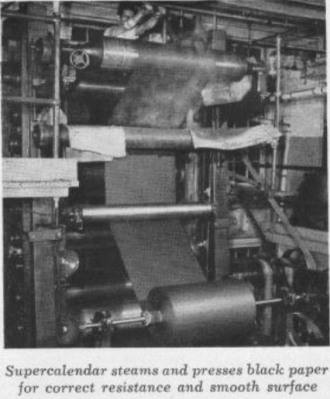
Teledeltos paper was made in two types—“L” for low resistance and “H” for high. The resistivity of a roll of Teledeltos paper depended on the quality of the conductive fibers that went into it. The paper’s electrical characteristics were also influenced by the fiber beating process and the distribution of the conductive fibers by the supercalender, a system of hard rollers used in papermaking and other processes that press and smooth paper and other materials to increase the density.
Teledeltos to the Rescue
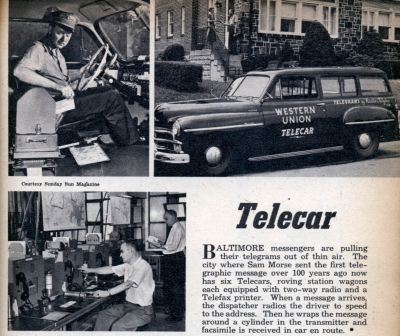
The Western Union Telecar printed telegrams on the go and delivered them to homes and businesses. Image credit: Modern Mechanix
Western Union was eager to extend its reach into private businesses and public places so that patrons who weren’t heavy telegram users didn’t have to visit a telegram office in order to share a bit of good news or to send their condolences. The company’s Telefax division came up with several types of machines to serve different business needs.
Some messages continued to be delivered by hand, but they weren’t printed at the central office. Western Union created a Telecar service to print telegrams transmitted to the car by the central office and deliver them to people’s homes. Messages were printed onto recording blanks that were cut automatically by a Telefax recorder situated in the car’s passenger area. The Telecar’s radio and amplification equipment was in the trunk.
The standard Telefax machine for office use was fairly large, like an early microwave oven. A smaller version called the DeskFax was only about the size of a breadbox, and these units occupied the desks of many businessmen and secretaries because of their convenience.
A Western Union DeskFax unit. Image from [B. Hilpert]Both the Telefax and the DeskFax scanned and recorded telegrams using a rotary drum mechanism. A message could either be typed or handwritten onto a telegram blank. The sender then wrapped the telegram around a drum and set the machine to send. The machine would scan the message optically and then transmit it to the central office.
Before sending it on to the recipient, an attendant at the telegram office had to remove the incoming message and wrap it around the drum of a transmitting machine. Once connected to the receiving party’s line, the far end unit would buzz to arouse attention. The receiving patron would then load a blank on to their DeskFax’s roller and set their machine to receive.
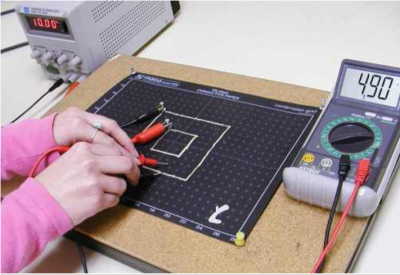
Conductive paper like Teledeltos has many applications aside from fax machines and Fathometers. For starters, it’s great for making one-offs of both standard and variable resistors. Conductive paint can be used as connection points for wires. The paper is also well-suited for simulating current flow through circuits using a fraction of the current intended in production. Vacuum tube designers used Teledeltos for modeling potentials. Teledeltos can also be used to visualize electromagnetic potentials and perform field plotting.
We’re sure that at least a few of our readers out there used Teledeltos or something like it in school or on the job. Did you know you can still buy it? Teledeltos paper itself is still available from two companies in the UK, Better Equipped and Timstar. In the US, you can get it from Pasco in packs of 50 and 100 sheets, with and without a grid pattern.
[Teledeltos paper image is a product photo from Better Equipped]
We love interrupts in our microcontroller projects. If you aren’t already convinced, go read the first installment in this series where we covered the best aspects of interrupts.
But everything is not sunshine and daffodils. Interrupts take place outside of the normal program flow, and indeed preempt it. The microcontroller will put down whatever code it’s running and go off to run your ISR every time the triggering event happens. That power is great when you need it, but recall with Spider-Man’s mantra: With great power comes great responsibility. It’s your responsibility to design for the implicit high priority of ISRs, and to make sure that your main code can still get its work done in between interrupt calls.
Put another way, adding interrupts in your microcontroller code introduces issues of scheduling and prioritization that you didn’t have to deal with before. Let’s have a look at that aspect now, and we’ll put off the truly gruesome side-effects of using interrupts until next time.
For most of us, hacking is a hobby, a pleasant diversion from reality. Yes, a lot of us work on projects which have the potential to change the world – witness the 2015 Hackaday Prize semifinalist list. But in general, almost any of us could walk away from the shop at any time without dire consequences. Indeed, that’s the reason a lot of our work benches are littered with projects started with the best of intentions but left unfinished for lack of funds, lack of interest, or lack of time. We’re free to more or less willingly shelve a project and come back to it whenever we please, or not at all.
But not everyone has that luxury. For some people, hacking is much more than a hobby – it’s a means of survival. Sometimes people are thrown into situations where they have to cobble together a solution to an immediate problem with whatever is at hand, when the penalty for failure is much higher than a cluttered bench and a bruised ego. I’ve already covered one such case, where biohacked insulin saved hundreds of lives in occupied Shanghai in WWII.
In this occasional series I’ll explore historical cases where hacking really counted; cases where lives were saved or improved by a hack performed under desperate conditions.
A Bustle in the Hedgerow
Unsurprisingly, war offers a lot of opportunities for field expedient solutions under dire circumstances, and battlefield conditions might be the most extreme example of hacking when it counts.
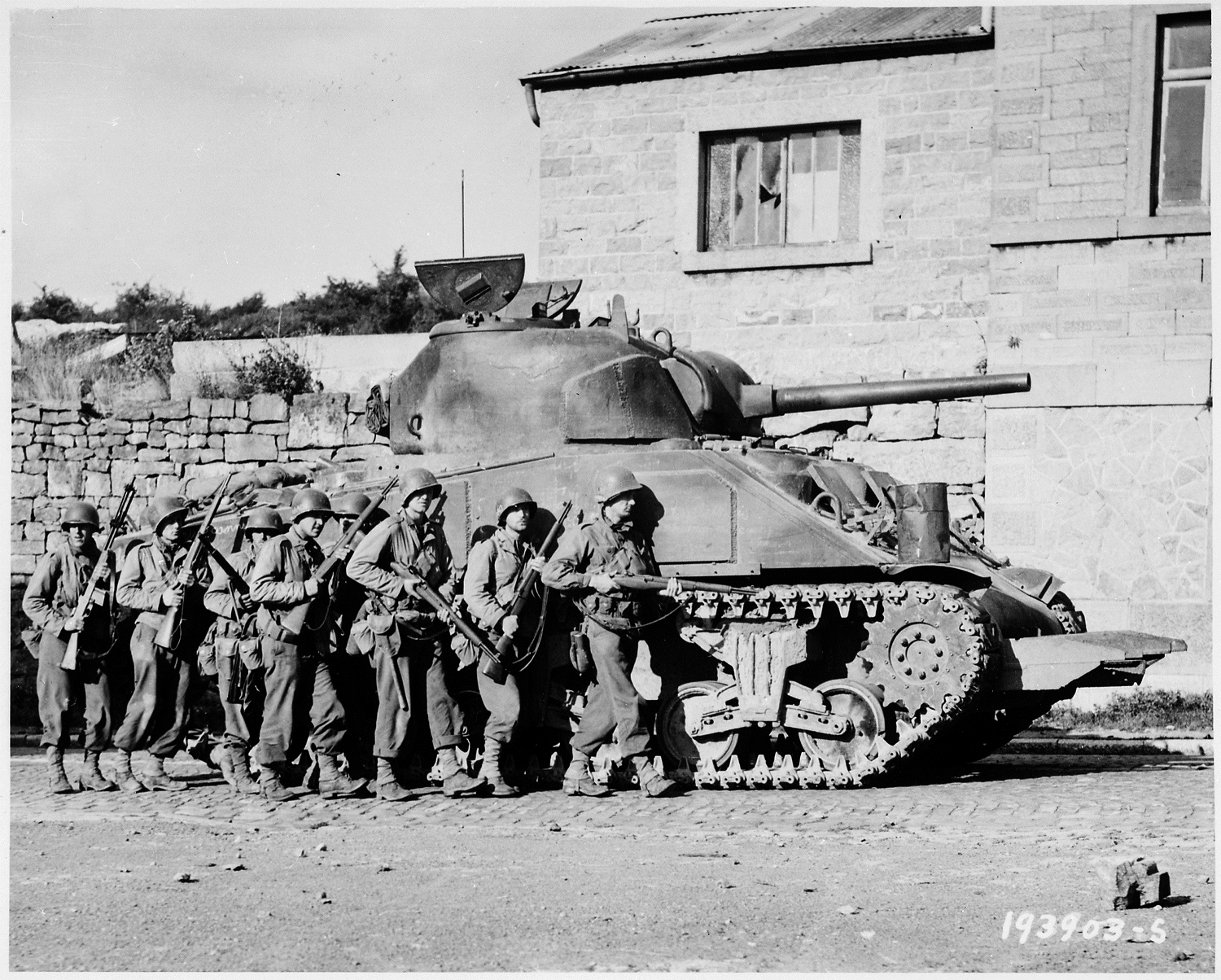
In the early days of the Invasion of Normandy during WWII, Allied forces were having a difficult time dealing with the bocage terrain of northern France. A mixture of pasture and woodland, the Normandy bocage was a natural killing field for Allied tanks because the woodlands took the form of hedgerows – earthen dikes topped with thick tangles of brush. Hedgerows separated pastures and kept livestock controlled, but also made things tough on infantry and mechanized cavalry alike. Climbing the steep hedgerows exposed the vulnerable bottom hull of the tanks to enemy fire, and waiting for engineers to demolish the hedgerows with explosive made them sitting ducks for German artillery. The Allied advance was seriously hampered by the hedgerows, and both men and materiel were being winnowed down from fixed German positions chosen specifically to take advantage of the bocage terrain.
Enter Sgt. Curtis Grubb Culin III. Sgt. Culin, a tanker himself, was acutely aware of how vulnerable he was in his Sherman M4. The hedgerows were the problem, one apparently known to Allied command prior to the invasion for which no provision had been made. In the tradition of soldiers at the front of every battle throughout history, Sgt. Culin and his fellow tankers had to improvise a solution.
While kicking around ideas, one of the men suggested setting saw teeth on the front of a tank to cut through the hedgerows. He later attributed the comment to “A Tennessee hillbilly named Roberts”, and it was met with general laughter from the group as a crackpot scheme. But Sgt. Culin saw the potential in the idea, and began to develop it into a prototype.
Raw materials for his prototype were not hard to come by. Czech hedgehogs, giant anti-tank barriers made of crossed steel beams, still littered the Normandy beaches. The failed German defenses were harvested with a cutting torch and welded to the underside of a tank to form a series of “tusks” across the hull between the tracks. Equipped with these tusks, the tank could now blast through the tangled roots of the brush-covered earth of the hedgerow dykes.
When demonstrated for General Omar Bradley, he was impressed enough to order them built in quantity for the tanks. Eventually the prototype became an engineered product (dubbed the “Culin Rhino Device”) that was fitted to many tanks before being shipped over from England. Rhino-equipped tanks ripped across Normandy and shredded the German battle plan, which assumed the hedgerows would funnel Allied forces through heavily defended chokepoints.
Without Sgt. Culin’s battlefield hack, and his inspiration by a hillbilly named Roberts whom history otherwise forgets, the invasion of Europe might have taken a very different course. The fact that he did the hack while under fire makes it all the more impressive, and is a perfect example of hacking when it counts.
Know of any more examples of hacking when it counts? Send us a tip for use in a future Hacking When it Counts article.
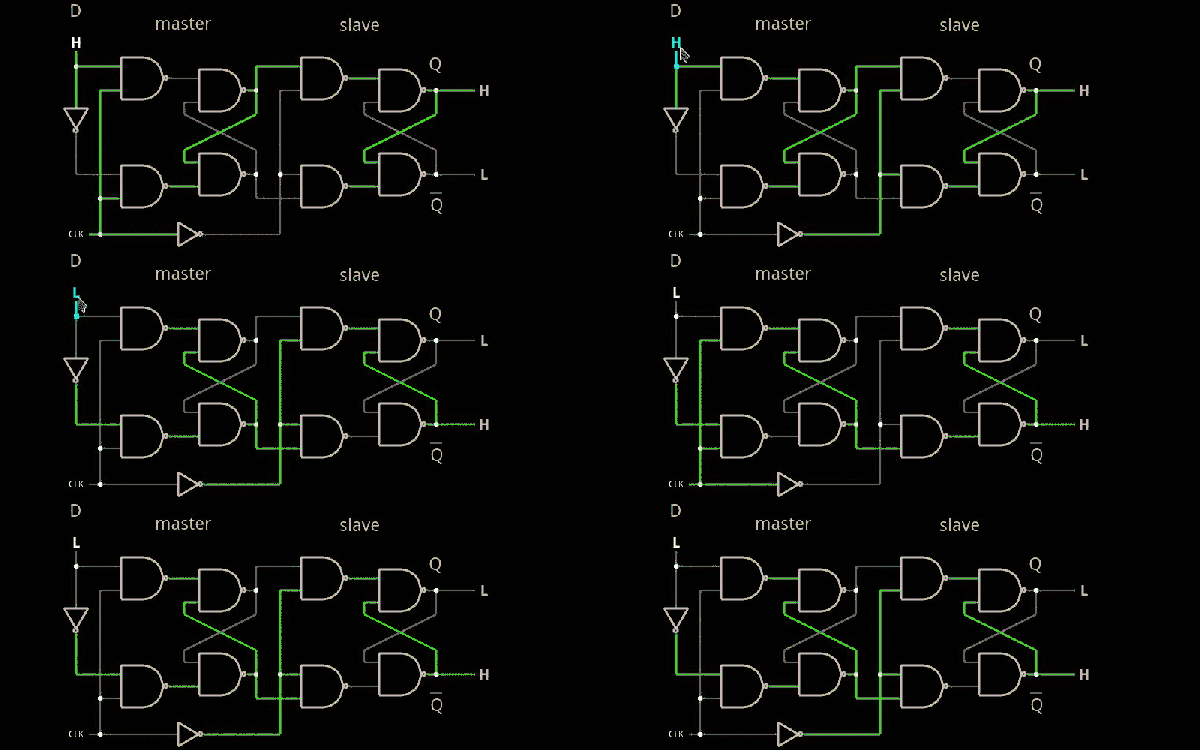
In the previous installment, we talked about why flip flops are such an important part of digital design. We also looked at some latch circuits. This time, I want to look at some actual flip flops–that is circuit elements that hold their state based on some clock signal.
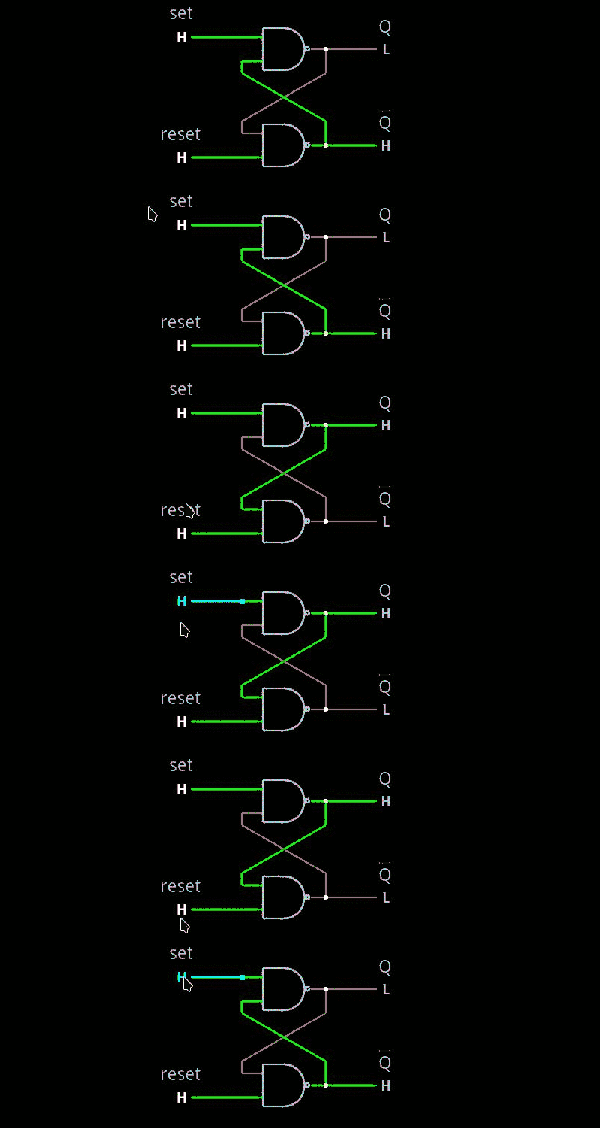
Just like last time, I want to look at sequential building blocks in three different ways: at the abstraction level, at the gate level, and then using Verilog and two online tools that you can also use to simulate the circuits. Remember the SR latch? It takes two inputs, one to set the Q output and the other to reset it. This unassuming building block is at the heart of many other logic circuits.
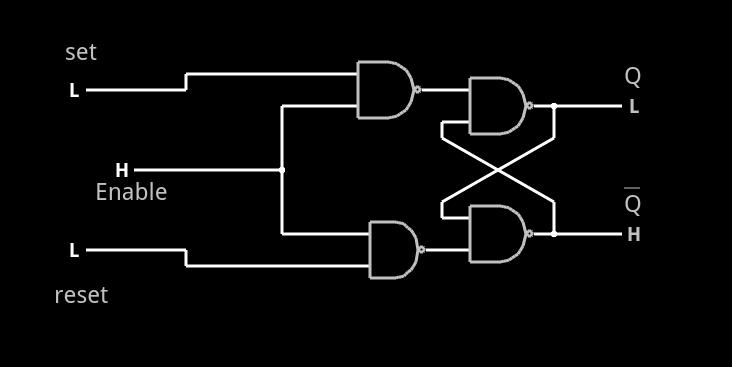
A common enhancement to the SR latch is to include an enable signal. This precludes the output from changing when the enable signal is not asserted. The implementation is simple. You only need to put an additional gate on each input so that the output of the gate can’t assert unless the other input (the enable) is asserted. The schematic appears on the right.
In the case of this simulation (or the Verilog equivalent), the SR inputs become active high because of the inversion in the input NAND gates. If the enable input is low, nothing will change. If it is high, then asserted inputs on the S or R inputs will cause the latch to set or reset. Don’t set both high at the same time when the enable is high (or, go ahead–it is a simulation, so you can’t burn anything up).(Note: If you can’t see the entire circuit or you see nothing in the circuit simulator, try selecting Edit | Centre Circuit from the main menu.)
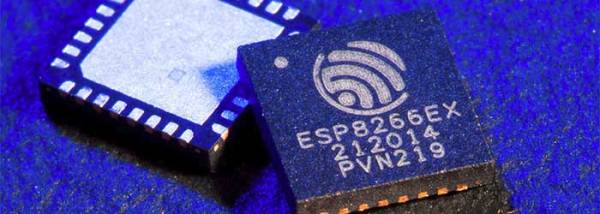
In August of 2014, something new started showing up in the markets of Shenzhen, the hi-tech area of China where the majority of the world’s electronics components are made. This is the ESP8266, a WiFi SoC (System on a Chip) that can connect to 802.11b/g/n networks on the 2.4GHz band. It can be addressed with SPI or a serial connection, and has an AT command set that makes it behave rather like an old-style modem. Basically, it has everything you would need to connect a device to a WiFi network, with the ESP8266 chip itself handling the complicated business of finding, joining and transmitting/receiving over a WiFi network.
That’s nothing particularly new in itself: WiFi connection devices like the TI CC3000 have been around for longer, and do much the same thing. The difference was the price. While the TI solution costs about $10 if you buy several thousand of them, the ESP8266 costs less than $7 for an individual board that can plug straight into an Arduino or similar. Buy the chip in bulk, and you can get it for less than $2.
The ESP8266 is more than just a WiFi dongle, though: it is a fully fledged computer in itself, with a megabyte of flash memory and a 32-bit processor that uses a RISC architecture. This can run applications, turning the ESP8266 into a standalone module that can collect and send data over the Internet. And it can do this while drawing a reasonably low amount of power: while receiving data, it typically uses just 60mA, and sending data over an 802.11n connection uses just 145mA. That means you can drive it from a small battery or other small power source, and it will keep running for a long time.
It wasn’t an easy ship to write applications for in the early days, though: it was poorly documented and required a dedicated toolchain to work with. This made it more of a challenge than many hackers were comfortable with. That changed earlier this year, though, when the Arduino IDE (Integrated Development Environment) was ported to the chip. This meant that you could use the much easier to write Arduino functions and libraries to write code for the chip, bringing it within reach of even the most casual hacker.
Digital design with combinatorial gates like AND, OR, and NOT gates is relatively straightforward. In particular, when you use these gates to form combinatorial logic, the outputs only depend on the inputs. The previous state of the outputs isn’t important in combinatorial logic. While this is simple, it also prevents you from building things like state machines, counters, and even CPUs.
Circuits that use their own outputs as inputs are known as sequential circuits. It is true that at the fundamental level, sequential circuits use conventional logic gates. However, you usually won’t deal with them as gates, but will deal with abstractions like latches, flip flops, and even higher level constructs. Learning about these higher level constructs will allow you to make more advanced digital designs that are robust. In fact, if you are using an FPGA, building blocks like flip flops are essential since a large portion of the chip will be made up of some kind of flip flop.



![A Western Union DeskFax unit. Image from [B. Hilpert]http://www.cs.ubc.ca/~hilpert/e/deskfax/](https://hackaday.com/wp-content/uploads/2015/09/deskfax.jpg?w=400)