“DB” = Abbreviated Microcontroller Debugging

We’ve all been there. When debugging a microcontroller project, we just want to put in a print statement to figure out what’s going on with the microcontroller in real time. However, advanced embedded programmers know that printf statements are verboten: they’re just too SLOW. While not fixing this plight entirely, [Atakan Sarioglu] has come up with a clever way to create readable debug messages with minimal runtime overhead.

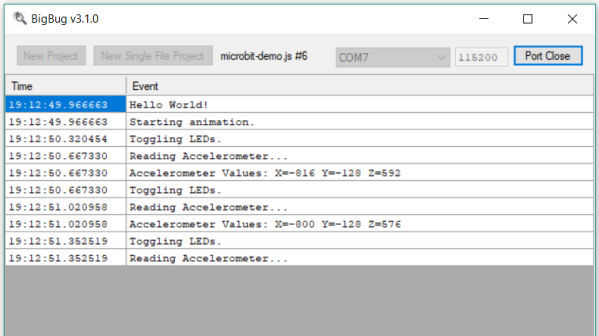
[Atakan Sarioglu]’s innovation, called BigBug (Github), is a dynamically-generated codebook. The codebook translates abbreviated messages sent over serial (UART here) to longer-form human-readable messages. To generate the codebook, BigBug automatically parses your comments to create a lookup between an abbreviation and the long-form message. When you are running your program on the microcontroller, BigBug will translate the short codes to long messages in real-time as you send log/debug data over serial. Continue reading ““DB” = Abbreviated Microcontroller Debugging”

A Deep Dive Into Low Power WiFi Microcontrollers

The Internet of Things is eating everything alive, and the world wants to know: how do you make a small, battery-powered, WiFi-enabled microcontroller device? This is a surprisingly difficult problem. WiFi is not optimized for low-power operations. It’s power-hungry, and there’s a lot of overhead. That said, there are microcontrollers out there with WiFi capability, but how do they hold up to running off of a battery for days, or weeks? That’s what [TvE] is exploring in a fantastic multi-part series of posts delving into low-power WiFi microcontrollers.

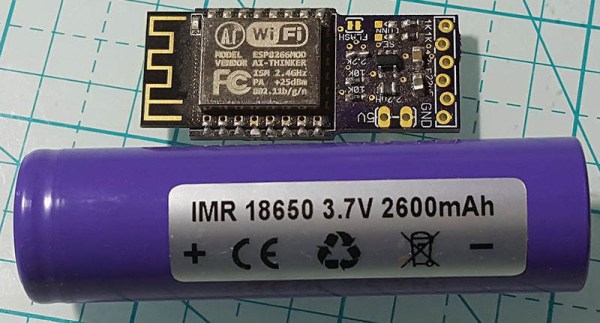
The idea for these experiments is set up in the first post in the series. Basically, the goal is to measure how long the ESP8266 and ESP32 will run on a battery, using various sleep modes. Both the ESP8266 and ESP32 have deep-sleep modes, a ‘sleep’ mode where the state is preserved, a ‘CPU only’ mode that turns the RF off, and various measures for sending and receiving a packet.

The takeaway from these experiments is that a battery-powered ESP8266 can’t be used for more than a week without a seriously beefy battery or a solar panel. Run times are much longer with an open network as compared to a secured network, and that security eats up a ton of power: connecting to a secure network every now and again means your ESP might only run for a day, instead of a week.

There is another option, though: the ESP32. While the ’32 is vastly more powerful and more capable than the ESP8266, it also has a few improved features that help with power consumption. Importantly, there’s a bug in the ESP8266 where it drops into modem sleep instead of light sleep about half the time. This error was fixed in the ESP32, but all that power does come at a cost. On the whole, if you’re concerned about security, the ESP32 is slightly better, simply because it does the ‘security’ part of connecting to a WiFi network faster. This is really a remarkable amount of testing that’s gone into this write-up, so if you’re developing something battery-powered with any ESP, it’s well worth the read.

Vintage Plotter Turned Fruit Spectrometer

Fruit can be a tricky thing: if you buy it ripe you’ll be racing against time to eat the pieces before they turn into a mushy mess, but if you buy the ones which are a bit before their prime it’s not always easy to tell when they’re ready to eat. Do you smell it? Squeeze it? Toss it on the counter to see if it bounces? In the end you forget about them and they go bad anyway. That’s why here at Hackaday we sustain ourselves with only collected rainwater and thermo-stabilized military rations.

But thankfully Cornell students [Christina Chang], [Michelle Feng], and [Russell Silva] have come up with a delightfully high-tech solution to this decidedly low-tech problem. Rather than rely on human senses to determine when a counter full of fruit has ripened, they propose an automated system which uses a motorized spectrometer to scan an arrangement of fruit. The device measures the fruit’s reflectance at 678 nm, which can be used to determine the surface concentration of chlorophyll-a; a prime indicator of ripeness.

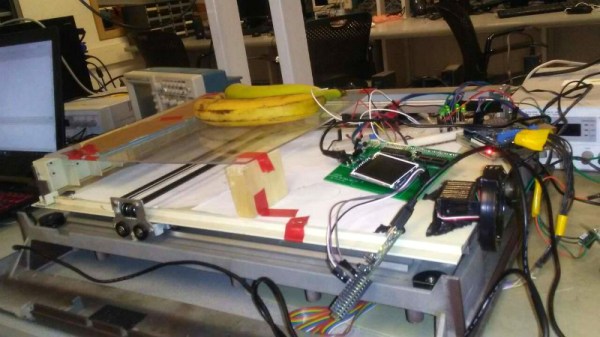
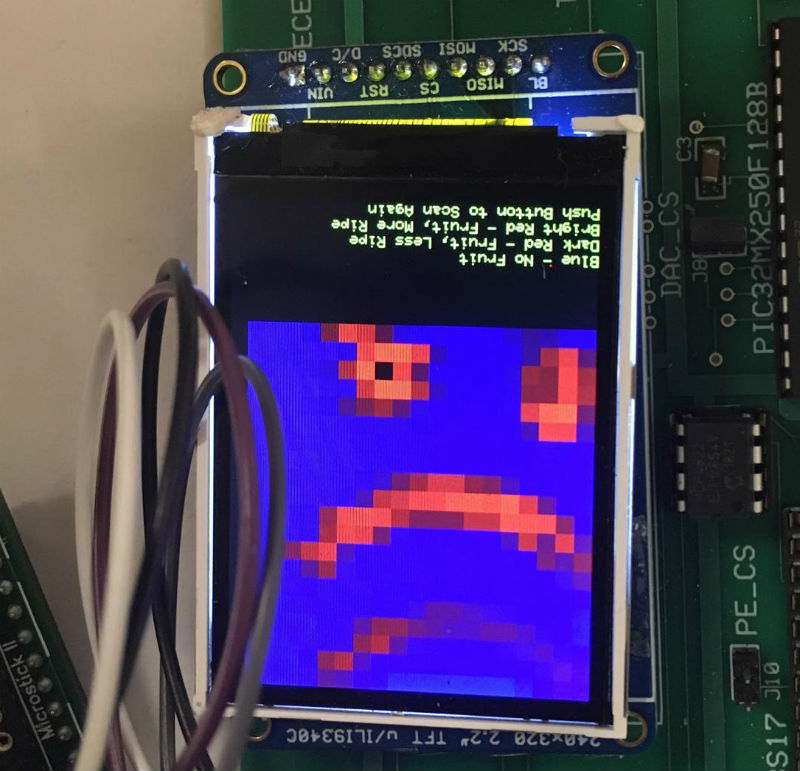
If that sounds a bit above your pay grade, don’t worry. The students were able to build a functional prototype using a 1980’s era plotter, a Raspberry Pi, and a low-cost AS7263 NIR spectral sensor from SparkFun which just so happens to have a peak responsivity of 680 nm. The scanning is performed by a PIC32MX250F128B development board with an attached TFT LCD display so the results can be easily viewed. The Raspberry Pi is used in conjunction with a Adafruit PCA9685 I2C PWM driver to control the plotter’s stepper motors. The scanning and motor control could be done with the PIC32 alone, but to save time the students decided to use the Raspberry Pi to command the PCA9685 as that was what the documentation and software was readily available for.

To perform a scan, the stepper motors home the AS7263 sensor module, and then passes it under the fruit which is laying on a clear acrylic sheet. Moving the length of the acrylic sheet, the sensor is able to scan not only multiple pieces of fruit but the entirety of each piece; allowing it to determine for example if a section of a banana has already turned. The relative ripeness of the fruit is displayed to the user on the LCD display as a heatmap: the brighter the color the more ripe it is.

At the end of their paper, [Christina], [Michelle], and [Russell] note that while the scanner worked well there’s still room for improvement. A more scientific approach to calculating how ripe each fruit is would make the device more accurate and take out the guess work on the part of the end user, and issues with darker colored fruit could potentially be resolved with additional calibration.

While a spectrometer might sound like the kind of equipment that only exists in multi-million dollar research laboratories, we occasionally see projects like this which make the technology much more accessible. This year we saw a compact spectrometer in the Hackaday Prize, and going a bit farther back in time we even featured a roundup of some of the most impressive spectrometer builds on Hackaday.io.

Continue reading “Vintage Plotter Turned Fruit Spectrometer”

From SPIDriver To I2CDriver

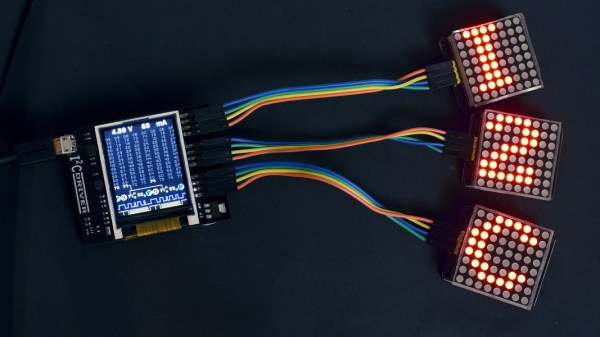
Communicating with microcontrollers and other embedded systems requires a communications standard. SPI is a great one, and is commonly used, but it’s not the only one available. There’s also I2C which has some advantages and disadvantages compared to SPI. The problem with both standards, however, is that modern computers don’t come with either built-in. To solve that problem and allow easier access to debugging in SPI, [James Bowman] built the SPIDriver a few months ago, and is now back by popular demand with a similar device for I2C, the I2CDriver.

Much like the SPIDriver, the I2C driver is a debugging tool that can be used at your computer with a USB interface. Working with I2C is often a hassle, with many things going on all at once that need to sync up just right in order to work at all, and this device allows the user to set up I2C devices in a fraction of the time. To start, it has a screen built in that shows information about the current device, like the signal lines and a graphical decoding of the current traffic. It also shows an address space map, and has programmable pullup resistors built in, and can send data about the I2C traffic back to its host PC for analysis.

The I2CDriver is also completely open source, from the hardware to the software, meaning you could build one from scratch if you have the will and the parts, or make changes to the code on your own to suit your specific needs. If you’re stuck using SPI still, though, you can still find the original SPIDriver tool to help you with your debugging needs with that protocol as well.

Negative Voltage Pushes AVR To New Heights

If we say that a hacker is somebody who looks at a “solved” problem and can still come up with multiple alternative solutions, then [Charles Ouweland] absolutely meets the grade. Not that we needed more evidence of his hacker cred given what we’ve seen from him before, but he recently wrote in to tell us about an interesting bit of problem solving which we think is a perfect example of the principle. He wanted to drive a salvaged seven segment LED display with an AVR microcontroller, but there was only one problem: the display needs 15V but the AVR is only capable of 5V. So what to do?

As it turns out, the first step to solving the problem was verifying there was actually a problem to begin with. [Charles] did some experimentation and found that the display didn’t actually need 15V to operate, and in fact would light up well enough at just 6.5V. This lowered the bar quite a bit, but it was still too high to power directly from the chip.

There were a few common ways to solve this problem, which no doubt the Hackaday reader is well aware of. But [Charles] wanted to take the path less traveled. More specifically, the path with the least amount of additional components he had to put on his PCB. He set out to find the absolute easiest way to make his 5V AVR light up a 6.5V LED, and ended up coming with a very clever solution that some may not even know is possible.

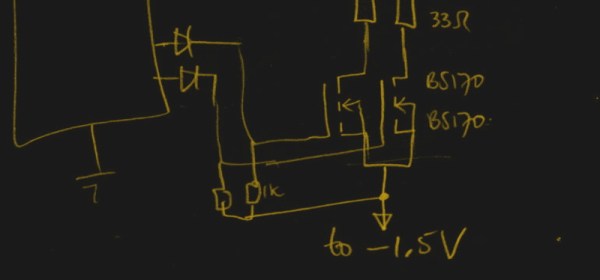
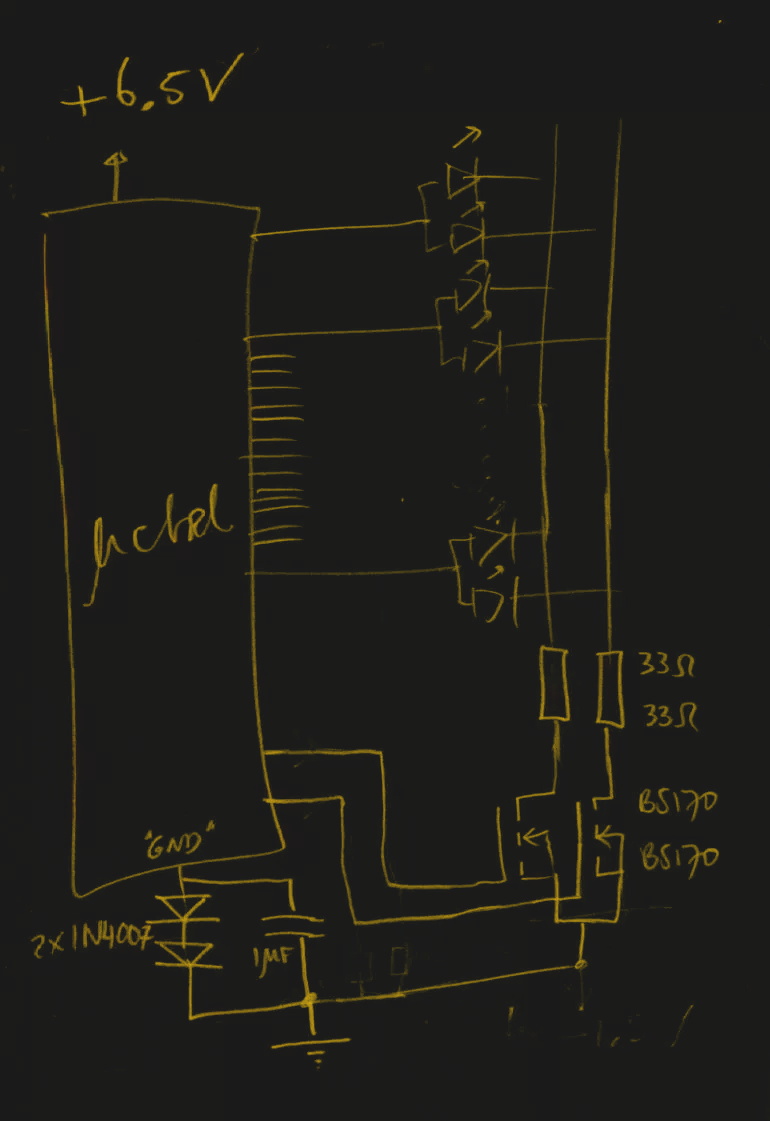
He reasoned that if he connected the source pins of two BS170 MOSFETs to a voltage of -1.5V, even when the AVR pin was 0V, they would be still be receiving 1.5V. This virtual “step ladder” meant that once the AVR’s pin goes high (5V), the relative voltage would actually be 6.5V and enough to drive his LEDs. Of course the only problem with that is that you need to have a source for -1.5V.

Getting a negative voltage would normally require adding more components to the design (which he set out to avoid in the first place), but then he came up with another clever idea. To pull the trick off, he actually feeds the AVR 6.5V, but raises the ground voltage by 1.5V with the addition of two 1N4007 diodes. This way the AVR gets a voltage within its capabilities and still can provide a relative 6.5V to the LEDs.

One might say [Charles] took the Kobayashi Maru approach, and simply redefined the rules of the game. But such is the power of the confounding negative voltage.

NTP Morse Code Clock Powered By ESP8266

We’ve featured a great many unique clocks here on Hackaday, which have utilized nearly every imaginable way of conveying the current time. But of all these marvelous timepieces, the Morse code clock has the distinct honor of simultaneously being the easiest to construct and (arguably) the most difficult to read. As such, it’s little surprise we don’t see them very often. Which makes this latest entry into the field all the more interesting.
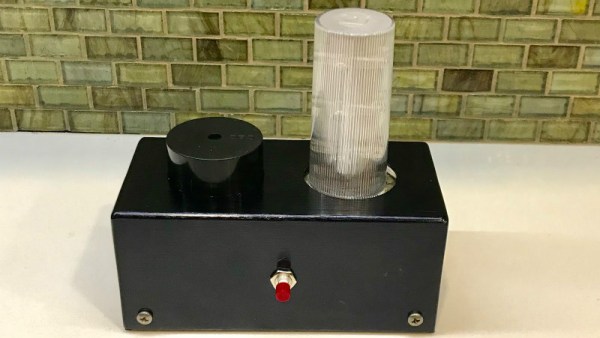
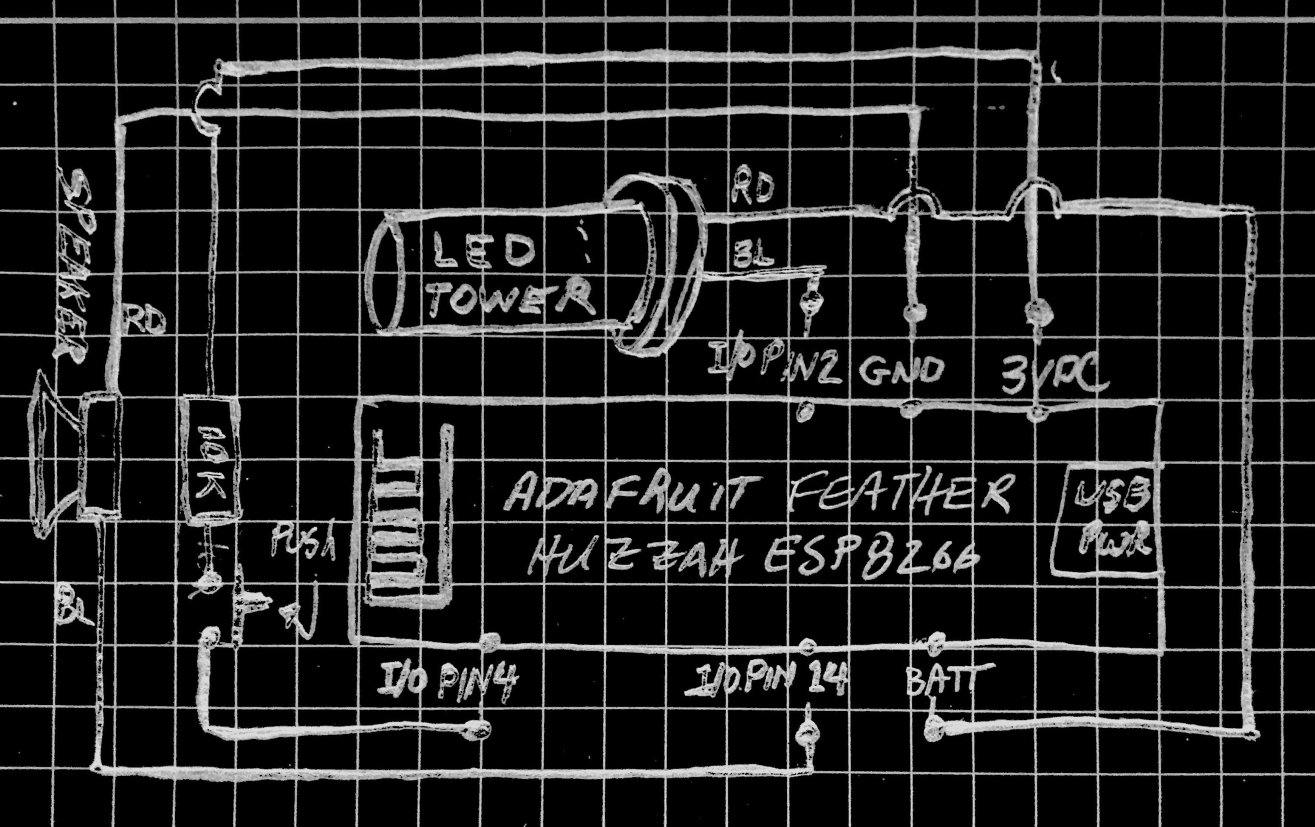
[WhisleyTangoHotel] has taken the basic concept of the Morse clock, which at its most simplistic could be done with a microcontroller and single LED, and expanded it into a (relatively) practical device. With both audio and visual signaling, and support for pulling the time from NTP, this is easily the most polished Morse code clock we’ve ever seen. Using it still requires you to have a decent grasp on Samuel Morse’s now nearly 200 year old encoding scheme of course, but on the bright side, this clock is sure to help keep your CW skills sharp.

For those following along at home, [WhisleyTangoHotel] provides a hand-drawn diagram to show how everything connects together in his Morse timepiece, but there’s nothing on the hardware side that’s likely to surprise the Hackaday reader. A single momentary push button represents the device’s sole user input, with the output being handled by a LED “tower” and speaker on their own respective pins on the microcontroller. Here a Adafruit Feather HUZZAH is used, but any ESP8266 would work in its place.

Of course, the advantage of using an ESP8266 board over your garden variety MCU is the Wi-Fi connectivity. This allows the clock to connect to an NTP server and get the current time before relaying it to the user. Some might think this overkill, but it’s really a critical feature; the lack of a proper RTC on the ESP means the clock would drift badly if not regularly synchronized. Assuming you’ve got a reliable Internet connection, this saves you the added cost and complexity of adding an external RTC.

[WhisleyTangoHotel] wraps up his blog post by providing his ESP8266 Arduino source code, which offers an interesting example in working not only with NTP and time zones on the ESP, but how to handle parsing strings and representing their principle characters in Morse code.

Interestingly enough, in the past we’ve seen a single LED clock that didn’t use Morse code to blink out the time, which might be a viable option as an alternate firmware for this device if you’re not in the Samuel Morse fan club.

Continue reading “NTP Morse Code Clock Powered By ESP8266”

The Electric Imp Sniffs Out California Wildfires

The wildfires in California are now officially the largest the state has ever seen. Over 50,000 people have been displaced from their homes, hundreds are missing, and the cost in property damage will surely be measured in the billions of dollars when all is said and done. With a disaster of this scale just the immediate effects are difficult to conceptualize, to say nothing of the collateral damage.

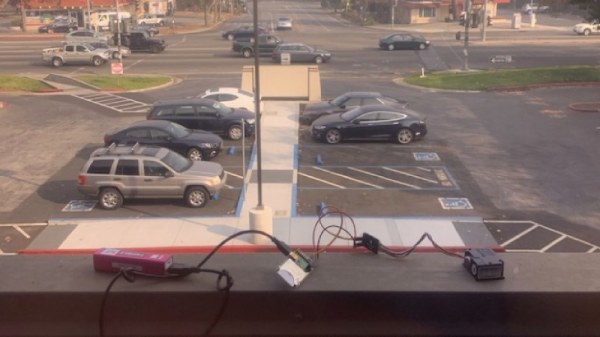
While not suggesting their situation is comparable to those who’ve lost their homes or families, Electric Imp CEO [Hugo Fiennes] has recently made a post on their blog calling attention to the air quality issues they’re seeing at their offices in Los Altos. To quantify the problem so that employees with respiratory issues would know the conditions before they came into work, they quickly hacked together a method for displaying particulate counts in their Slack server.

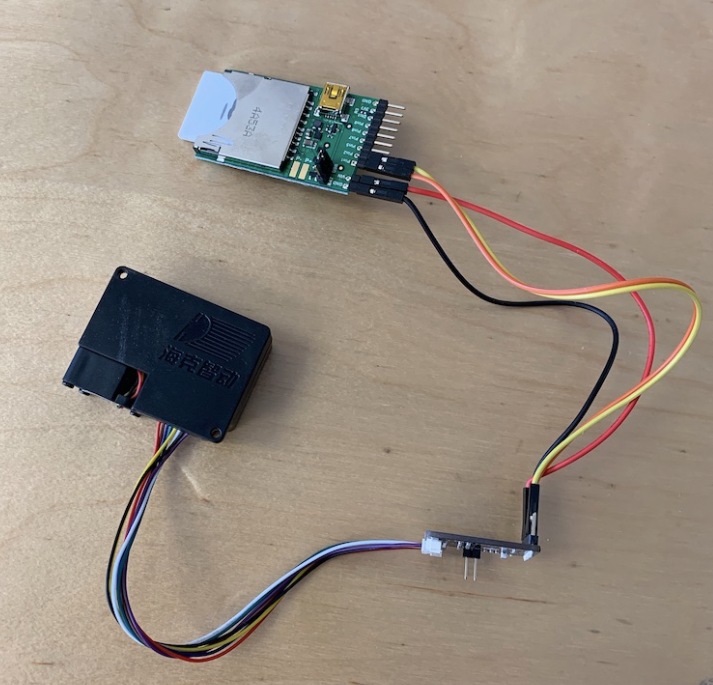
The key to the system is one of the laser particle sensors that we’re starting to see more of thanks to a fairly recent price drop on the technology. A small fan pulls air to be tested into the device, where a very sensitive optical sensor detects the light reflected by particles as they pass through the laser beam. The device reports not only how many particles are passing through it, but how large they are. The version of the sensor [Hugo] links to in his blog post includes an adapter board to make it easier to connect to your favorite microcontroller, but we’ve previously seen DIY builds which accomplish the same goal.

[Hugo] then goes on to provide firmware for the Electric Imp board that reads the current particulate counts from the sensor and creates a simple web page that can be viewed from anywhere in the world to see real-time conditions at the office. From there, this data can be plugged into a Slack webhook which will provide an instantaneous air quality reading anytime a user types “air” into the channel.

We’ve covered a number of air quality sensors over the years, and it doesn’t look like they’re going to become any less prevalent as time goes on. If anything, we’re seeing a trend towards networks of distributed pollution sensors so that citizens can collect their own data on their air they’re breathing.

[Thanks to DillonMCU for the tip.]