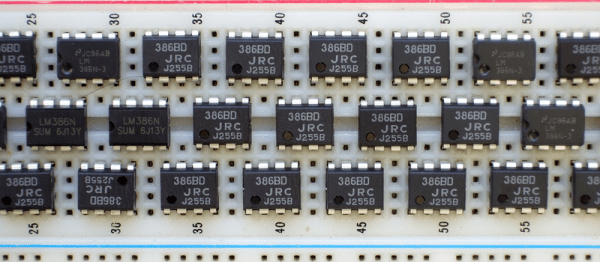
Everyone has a chip-of-shame: it’s the part that you know is suboptimal but you keep using it anyway because it just works well enough. Maybe it’s not what you would put into a design that you’re building more than a couple of, but for a quick and dirty lashup, it’s just the ticket. For Hackaday’s [Adam Fabio], that chip is the TIP120 transistor. Truth be told, we have more than one chip of shame, but for audio amplification purposes, it’s the LM386.
The LM386 is an old design, and requires a few supporting passive components to get its best performance, but it’s fundamentally solid. It’s not noise-free and doesn’t run on 3.3 V, but if you can fit a 9 V battery into your project and you need to push a moderate amount of sound out of a speaker, we’ll show you how to get the job done with an LM386.
You heard it here first: dash cams are going to be the next must-have item for your daily driver. Already reaching market saturation in some parts of the world but still fairly uncommon in North America, we predict that car makers will soon latch onto the trend and start equipping cars with dash cams as standard equipment. And you can just bet that whatever watered-down, overpriced feature set they come up with will be sure to disappoint, so you might want to think about building your own Raspberry Pi dash cam with an accelerometer and lots of LEDS.
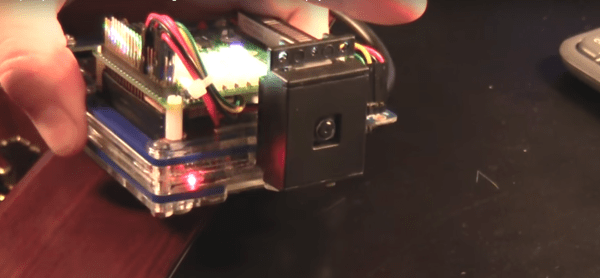
Still very much in the prototyping phase, [CFLanger]’s project is at its heart a dash cam, but it looks like he wants to go far beyond that. Raspivid and a PI NoIR camera take care of the video streaming, but the addition of a Pi SenseHAT gives [CFLanger] a bunch of options for sensing and recording the car’s environment. Not content with the SenseHAT’s onboard accelerometer, he added an ADXL345 to the sensor suite. The 64-pixel LED display is just for fun – it displays pitch and roll of the platform – and a yet-to-be-implemented bar-graph display will show acceleration in the X-axis. He figures the whole thing is good for a couple of days of video, but we hope he adds audio capture and perhaps ECU data from an OBDII-Bluetooth adapter.
Despite owning five, including the original Pebble, I’ve always been somewhat skeptical about smart watches. Even so, the leaked news that Fitbit is buying Pebble for “a small amount” has me sort of depressed about the state of the wearables market. Because Pebble could have been a contender, although perhaps not for the reason you might guess.
Pebble is a pioneer of the wearables market, and launched its first smartwatch back in 2012, two years before the Apple Watch was announced. But after turning down an offer of $740 million by Citizen back in 2015, and despite cash injections from financing rounds and a recent $12.8 million Kickstarter, the company has struggled financially.
An offer of just $70 million earlier this year by Intel reflected Pebble’s reduced prospects, and the rumoured $30 to $40 million price being paid by Fitbit must be a disappointing outcome for a company that was riding high such a short time ago.
If your introduction to digital electronics came more years ago than you’d care to mention, the chances are you did so with 5V TTL logic. Above 2V but usually pretty close to 5V is a logic 1, below 0.8V is a logic 0. If you were a keen reader of electronic text books you might have read about different voltage levels tolerated by 4000 series CMOS gates, but the chances are even with them you’d have still used the familiar 5 volts.
This happy state of never encountering anything but 5V logic as a hobbyist has not persisted. In recent decades the demands of higher speed and lower power have given us successive families of lower voltage devices, and we will now commonly also encounter 3.3V or even sometimes lower voltage devices. When these different families need to coexist as for example when interfacing to the current crop of microcontroller boards, care has to be taken to avoid damage to your silicon. Some means of managing the transition between voltages is required, so we’re going to take a look at the world of level shifters, the circuits we use when interfacing these different voltage logic families.
At a time when [Elon Musk], [President Obama], and Google are all touting self-driving cars to be the solution to human error behind the wheel, it’s more than a little bold to be arguing the opposite case in public, but the numbers just don’t add up. Self-driving cars are probably not as safe as a good sober driver yet, but there just isn’t the required amount of data available to say this with much confidence. However, one certainly cannot say that they’re demonstrably safer.
What’s your favorite value of resistor? 1K? 10K? They’re all fine, but when you need nearly no resistance at all, nothing beats the good old zero-ohm resistor.
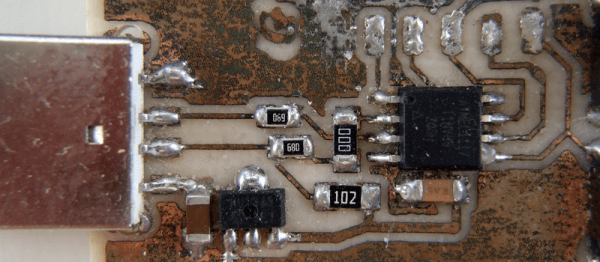
Wait a minute! Resistors are supposed to resist current. What the heck does a zero-ohm resistor do? Well, the short story (tee-hee!) is that it’s like a jumper for single-sided surface-mount boards. In the bad old days, companies used to save money by running single-sided boards, and you could buy wire jumpers to help make the layout that much easier.
Fast forward to the modern era, where there’s not a through-hole component to be seen. What’s the resistance (ideally) of a wire? Zero ohms. And thus the zero-ohm resistor was born. We have a whole spool of them in our closet in 1206, the largest SMD size that we use, in order to be able to sneak two or three tracks underneath, even on a home-etched board. They’re great.
Anyway, what set us off rhapsodizing about the lowest value resistor was this article on the peculiarities of the zero ohm resistor. Of course, nothing has zero resistance, and the article walks you through some of their real-world properties. Enjoy!
[Geeksmithing] wanted to respond to a challenge to build a USB hub using cement. Being a fan of Mario Brothers, a fitting homage is to build a retro-gaming console from cement to look just like your favorite Mario-crushing foe. With a Raspberry Pi Zero and a USB hub embedded in it, [Geeksmithing] brought the Mario universe character that’s a large cement block — the Thwomp — to life.
[Geeksmithing] went through five iterations before he arrived at one that worked properly. Initially, he tried using a 3D printed mold; the cement stuck to the plastic ruining the cement on the face. He then switched to using a mold in liquid rubber (after printing out a positive model of the Thwomp to use when creating the mold). But the foam board frame for the mold didn’t hold, so [Geeksmithing] added some wood to stabilize things. Unfortunately, the rubber stuck to both the foam board and the 3D model making it extremely difficult to get the model out.
Like [Han] in carbonite, that’s a Raspberry Pi Zero being encased in cementNext up was regular silicone mold material. He didn’t have enough silicone rubber to cover the model, so he added some wood as filler to raise the level of the liquid. He also flipped the model over so that he’d at least get the face detail. He found some other silicone and used it to fill in the rest of the mold. Despite the different silicone, this mold worked. The duct tape he used to waterproof the Raspberry Pi, however, didn’t. He tried again, this time he used hot glue – a lot of hot glue! – to waterproof the Pi. This cast was better, and he was able to fire up the Pi, but after a couple of games his controller stopped working. He cracked open the cement to look at the Pi and realized that a small hole in the hot glue caused a leak that shorted out the USB port on the Pi. One last time, he thought, this time he used liquid electrical tape to waterproof the Pi.
The final casting worked and after painting, [Geeksmithing] had a finished cement Thwomp console that would play retro games. He missed the deadline for the USB Hub Challenge, but it’s still a great looking console, and his video has a lot of detail about what went wrong (and right) during his builds. There’s a great playlist on YouTube of the other entries in the challenge, check them out along with [Geeksmithing]’s video below!





![Like [Han] in carbonite, that's a Rapsberry Pi Zero being encased in cement](https://hackaday.com/wp-content/uploads/2016/12/raspberry-pi-thwomp.png?w=400)









