A Tamagotchi For WiFi Cracking

OK, let’s start this one by saying that it’s useful to know how to break security measures in order to understand how to better defend yourself, and that you shouldn’t break into any network you don’t have access to. That being said, if you want to learn about security and the weaknesses within the WPA standard, there’s no better way to do it than with a tool that mimics the behavior of a Tamagotchi.

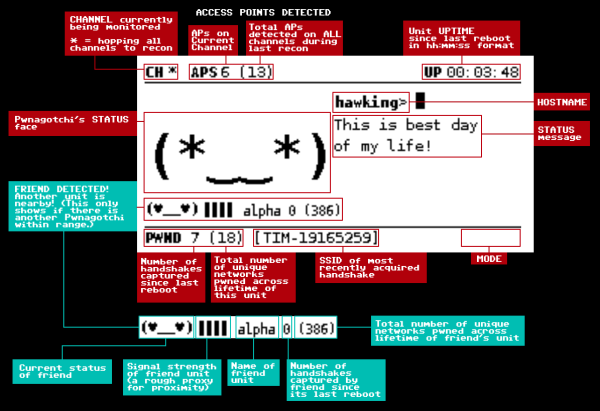
Called the pwnagotchi, this package of artificial intelligence looks for information in local WiFi packets that can be used to crack WPA encryption. It’s able to modify itself in order to maximize the amount of useful information it’s able to obtain from whatever environment you happen to place it in. As an interesting design choice, the pwnagotchi behaves like an old Tamagotchi pet would, acting happy when it gets the inputs it needs.

This project is beyond a novelty though and goes deep in the weeds of network security. If you’re at all interested in the ways in which your own networks might be at risk, this might be a tool you can use to learn a little more about the ways of encryption, general security, and AI to boot. Of course, if you’re new to the network security world, make sure the networks you’re using are secured at least a little bit first.

Thanks to [Itay] for the tip!

Hackaday Links Column Banner

Hackaday Links: October 13, 2019

Trouble in the Golden State this week, as parts of California were subjected to planned blackouts. Intended to prevent a repeat of last year’s deadly wildfires, which were tied in part to defective electrical distribution equipment, the blackouts could plunge millions in the counties surrounding Sacramento into the dark for days. Schools have canceled classes, the few stores that are open are taking cash only, and hospitals are running on generators. It seems a drastic move for PG&E, the utility that promptly went into bankruptcy after being blamed for last year’s fires, but it has the support of the governor, so the plan is likely to continue as long as the winds do. One group is not likely to complain, though;  California amateur radio operators must be enjoying a greatly decreased noise floor in the blackout areas, thanks to the loss of millions of switch-mode power supplies and their RF noise.

Good news, bad news for Fusion 360 users. Autodesk, the company behind the popular and remarkably capable CAD/CAM/CAE package, has announced changes to its licensing scheme, which went into effect this week. Users no longer have to pay for the “Ultimate” license tier to get goodies like 5-axis machining and generative design tools, as all capabilities are now included in the single paid version of Fusion 360. That’s good because plenty of users were unwilling to bump their $310 annual “Standard” license fee up to $1535 to get those features, but it’s bad because now the annual rate goes to $495. In a nice nod to the current userbase, those currently on the Standard license, as well as early adopters, will get to keep the $310 annual rate as long as they renew, and The $495 pricing tier went into effect in November of 2018, while anyone still on the $310 annual price was grandfathered in (and will remain to be). At that time there was still a $1535 tier called Ultimate, whose price will now be going away but the features remain in the $495 tier which is now the only pricing option for Fusion 360. Ultimate users will see a $1040 price drop. As for the current base of freeloaders like yours truly, fear not: Fusion 360 is still free for personal, non-commercial use. No generative design or tech support for us, though. (Editor’s Note: This paragraph was updated on 10/14/2019 to clarify the tier changes after Autodesk reached out to Hackaday via email.)

You might have had a bad day at the bench, but was it as bad as Román’s? He tipped us off to his nightmare of running into defective Wemos D1 boards – a lot of them. The 50 boards were to satisfy an order of data loggers for a customer, but all the boards seemed caught in an endless reboot loop when plugged into a USB port for programming. He changed PCs, changed cables, but nothing worked to stop the cycle except for one thing: touching the metal case of the module. His write up goes through all the dead-ends he went down to fix the problem, which ended up being a capacitor between the antenna and ground. Was it supposed to be there? Who knows, because once that cap was removed, the boards worked fine. Hats off to Román for troubleshooting this and sharing the results with us.

Ever since giving up their “Don’t be evil” schtick, Google seems to have really embraced the alternative. Now they’re in trouble for targeting the homeless in their quest for facial recognition data. The “volunteer research studies” consisted of playing what Google contractors were trained to describe as a “mini-game” on a modified smartphone, which captured video of the player’s face. Participants were compensated with $5 Starbucks gift cards but were not told that video was being captured, and if asked, contractors were allegedly trained to lie about that. Contractors were also allegedly trained to seek out people with dark skin, ostensibly to improve facial recognition algorithms that notoriously have a hard time with darker complexions. To be fair, the homeless were not exclusively targeted; college students were also given gift cards in exchange for their facial data.

For most of us, 3D-printing is a hobby, or at least in service of other hobbies. Few of us make a living at it, but professionals who do are often a great source of tips and tricks. One such pro is industrial designer Eric Strebel, who recently posted a video of his 3D-printing pro-tips. A lot of it is concerned with post-processing prints, like using a cake decorator’s spatula to pry prints off the bed, or the use of card scrapers and dental chisels to clean up prints. But the money tip from this video is the rolling cart he made for his Ultimaker. With the printer on top and storage below, it’s a great way to free up some bench space.

And finally, have you ever wondered how we hackers will rebuild society once the apocalypse hits and mutant zombie biker gangs roam the Earth? If so, then you need to check out Collapse OS, the operating system for an uncertain future. Designed to be as self-contained as possible, Collapse OS is intended to run on “field expedient” computers, cobbled together from whatever e-waste can be scrounged, as long as it includes a Z80 microprocessor. The OS has been tested on an RC2014 and a Sega Master System so far, but keep an eye out for TRS-80s, Kaypros, and the odd TI-84 graphing calculator as you pick through the remains of civilization.


Finding Pre-Trained AI In A Modelzoo Using Python

Training a machine learning model is not a task for mere mortals, as it takes a lot of time or computing power to do so. Fortunately there are pre-trained models out there that one can use, and [Max Bridgland] decided it would be a good idea to write a python module to find and view such models using the command line.

For the uninitiated, Modelzoo is a place where you can find open source deep learning code and pre-trained models. [Max] taps into the (undocumented) API and allows a user to find and view models directly. When you run a utility, it goes online and retrieves the categories and then details of the available models. From then on, the user can select a model and the application will simply open the corresponding GitHub repository. Sounds simple but it has a lot of value since the code is designed to be extendable so that users working on such projects may automate the downloading part as well.

We have seen projects with machine learning used to detect humans, and with AI trending community tools such as this one help beginners get started even faster.

An Apartment-Hunting AI

Finding a good apartment is a lot of work and includes searching websites for available places and then cross-referencing with a list of characteristics. This can take hours, days or even months but in a world where cars drive themselves, it is possible to use machine learning in your hunt.

[veesot] lives in a city between Europe and Asia and was looking for a new home, and his goal was to create a model that can use historical data to not only suggest if an advertised price was right, but also recommend waiting by predicting the decrease in the the future. The data-set includes parameters such as “area”, “district”, “number of balconies” etc and tried to determine an optimal property to view.

There is a lot that [veesot] describes in his post which includes cleaning the data in terms of removing flats that are tool small or tool large. This is essentially creating a training data-set for the machine learning system that will allow the system to generate usable output. [veesot] also added parameters such districts which relate to the geographical location, age of the building and even the materials used in the construction.

There is also an interesting bit about analyzing the data variables and determining cross-correlation which ultimately leads to the obvious conclusions that the central/older districts have older apartments and newer ones are larger. It makes for a few cool graphs but the code can certainly come in handy when dealing with similar data-sets. The last part of the writing discusses applying Linear Regression and then testing its accuracy. Interpreting the model produces interesting results about the trained model and the values of the coefficients.

Continue reading “An Apartment-Hunting AI”

BeagleBone Deep Learning Video Demo

BeagleBoard often gets eclipsed by Raspberry Pi. Where the Pi focuses on ease-of-use, the BeagleBone generally has more power for hardcore applications. With machine learning AI all the rage now, BeagleBoard now has the BeagleBone AI, a board with specific features aimed at machine learning. A recent video (see below) shows a demo of using TIDL (Texas Instruments Deep Learning Library). The video includes an example of streaming video to a browser and using predefined learning models to identify things picked up by a web camera.

The CPU onboard is the TI Sitara AM5729. That’s a dual Arm Cortex A15 running at 1.5 GHz. There are also two C66x floating-point DSP processors and two dual ARM Cortex M4 coprocessors. Still need more? You get four embedded vision engines, two dual-core real-time units, a 2D graphics accelerator, a 3D graphics accelerator, and a subsystem for encoding and decoding video and cryptography.

Continue reading “BeagleBone Deep Learning Video Demo”

AI Makes Hyperbolic Brain Hats A Reality

It isn’t often that the world of Hackaday intersects with the world of crafting, which is perhaps a shame because many of the skills and techniques of the two have significant overlap. Crochet for instance has rarely featured here, but that is about to change with [Janelle Shane]’s HAT3000 neural network trained to produce crochet hat patterns.

Taking the GPT-2 neural network trained on Internet text  and further training it with a stack of crochet hat patterns, she was able to generate AI-designed hats which her friends on the Ravelry yarn forum set to crochet into real hats. It’s a follow-up to a previous knitting-based project, and instead of producing the hats you might expect it goes into flights of fancy. Some are visibly hat-like while others turn into avant-garde creations that defy any attempt to match them to real heads. A whole genre of hyperbolic progressions of crochet rows produce hats with organic folds that begin to resemble brains, and tax both the stamina of the person doing the crochet and their supply of yarn.

Perhaps most amusingly the neural network retains the ability to produce text, but when it does so it now inevitably steers the subject back to crochet hats. A Harry Potter sentence spawns a passage of something she aptly describes as “terrible crochet-themed erotica“, and such is the influence of the crochet patterns that this purple prose can even include enough crochet instructions to make them crochetable. It would be fascinating to see whether a similar model trained with G-code from Thingiverse would produce printable designs, what would an AI make with Benchy for example?

We’ve been entertained by [Janelle]’s AI work before, both naming tomato varieties, and creating pie recipes.

Thanks [Laura] for the tip.

Machine Learning With Microcontrollers Hack Chat

Join us on Wednesday, September 11 at noon Pacific for the Machine Learning with Microcontrollers Hack Chat with Limor “Ladyada” Fried and Phillip Torrone from Adafruit!

We’ve gotten to the point where a $35 Raspberry Pi can be a reasonable alternative to a traditional desktop or laptop, and microcontrollers in the Arduino ecosystem are getting powerful enough to handle some remarkably demanding computational jobs. But there’s still one area where microcontrollers seem to be lagging a bit: machine learning. Sure, there are purpose-built edge-computing SBCs, but wouldn’t it be great to be able to run AI models on versatile and ubiquitous MCUs that you can pick up for a couple of bucks?

We’re moving in that direction, and our friends at Adafruit Industries want to stop by the Hack Chat and tell us all about what they’re working on. In addition to Ladyada and PT, we’ll be joined by Meghna NatrajDaniel Situnayake, and Pete Warden, all from the Google TensorFlow team. If you’ve got any interest in edge computing on small form-factor computers, you won’t want to miss this chat. Join us, ask your questions about TensorFlow Lite and TensorFlow Lite for Microcontrollers, and see what’s possible in machine learning way out on the edge.

join-hack-chatOur Hack Chats are live community events in the Hackaday.io Hack Chat group messaging. This week we’ll be sitting down on Wednesday, September 11 at 12:00 PM Pacific time. If time zones have got you down, we have a handy time zone converter.

Click that speech bubble to the right, and you’ll be taken directly to the Hack Chat group on Hackaday.io. You don’t have to wait until Wednesday; join whenever you want and you can see what the community is talking about.