In my work for Hackaday over the years I have been privileged to interact with some of the most creative people I have ever met, I have travelled far more than I ever did when I toiled unseen in an office in Oxford, and I have been lucky enough to hang out in our community’s spaces, camps, and dives across Europe.
Among the huge diversity of skills and ideas though, it’s striking how many of us share similar experiences and histories that have caused us to find our people in rooms full of tools and 3D printers. One of these things I found surprising because I thought I was the only one; I never fit in with the other kids at school, I found much of the teaching incomprehensible and had to figure things out for myself. As an exercise recently I did a straw poll among some of my friends, and found that a significant majority had a similar experience. Clearly something must have gone badly wrong in the way we were being taught that so many of us could have been let down by our schooling, and maybe to understand the needs of our community it’s time to understand why.
Just a few weeks before Atlantis embarked on the final flight of the Space Shuttle program in 2011, a small Mexican company by the name of Squad quietly released Kerbal Space Program (KSP) onto an unsuspecting world. Until that point the company had only developed websites and multi-media installations. Kerbal wasn’t even an official company initiative, it started as a side project by one of their employees, Felipe Falanghe. The sandbox game allowed players to cobble together rockets from an inventory of modular components and attempt to put them into orbit around the planet Kerbin. It was immediately addictive.
There was no story to follow, or enemies to battle. The closest thing to a score counter was the altimeter that showed how far your craft was above the planet’s surface, and the only way to “win” was to put its little green occupant, the titular Kerbal, back on the ground in one piece. The game’s challenge came not from puzzles or scripted events, but from the game’s accurate (if slightly simplified) application of orbital mechanics and Newtonian dynamics. Building a rocket and getting it into orbit in KSP isn’t difficult because the developers baked some arbitrary limitations into their virtual world; the game is hard for the same reasons putting a rocket into orbit around the Earth is hard.
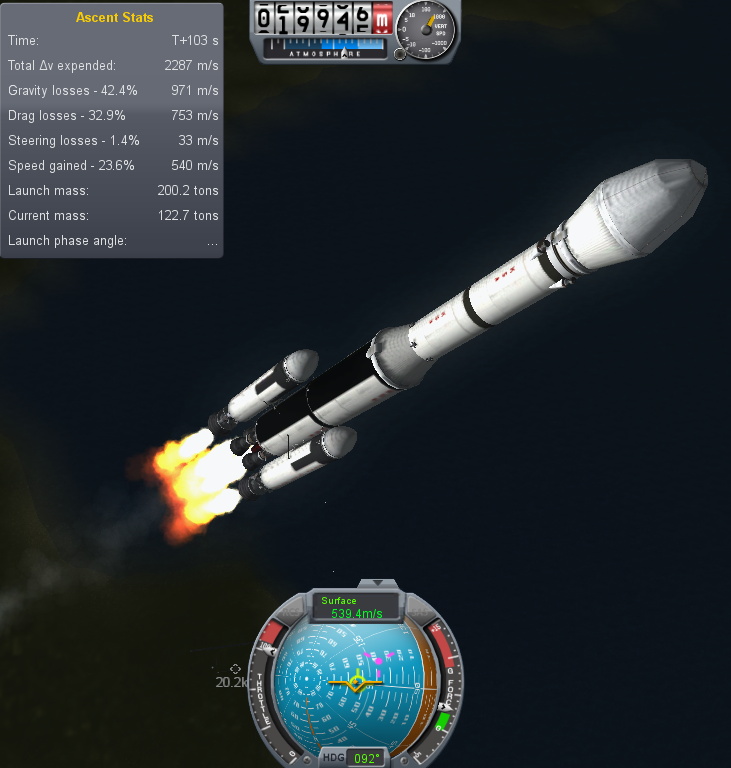
One of my early rockets, circa 2013.
Over the years official updates added new components for players to build with and planets to explore, and an incredible array of community developed add-ons and modifications expanded the scope of the game even further. KSP would go on to be played by millions, and seeing a valuable opportunity to connect with future engineers, both NASA and the ESA helped develop expansions for the game that allowed players to recreate their real-world vehicles and missions.
But now after a decade of continuous development, with ports to multiple operating systems and game consoles, Squad is bringing this chapter of the KSP adventure to a close. To celebrate the game’s 10th anniversary on June 24th, they released “On Final Approach”, the game’s last official update. Attention will now be focused on the game’s ambitious sequel, which will expand the basic formula with the addition of interstellar travel and planetary colonies, currently slated for release in 2022.
Of course, this isn’t the end. Millions of “classic” KSP players will still be slinging their Kerbals into Hohmann transfer orbits for years to come, and the talented community of mod developers will undoubtedly help keep the game fresh with unofficial updates. But the end of official support is a major turning point, and it seems a perfect time to reminisce on the impact this revolutionary game has had on the engineering and space communities.
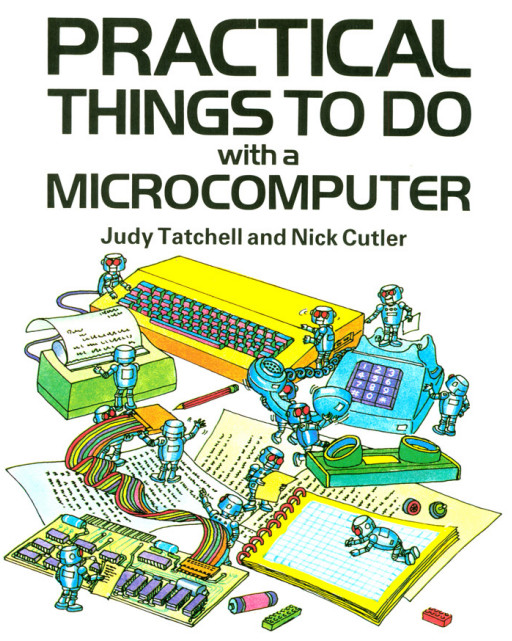
My son is growing up with computers. He’s in first grade, and had to list all of the things that he knows how to do with them. The list included things like mousing around, drawing ghosts with the paint program, and — sign of the times — muting and unmuting the microphone when he’s in teleconferences. Oh yeah, and typing emojis. He loves emojis.
When I was just about his age, I was also getting into computers. But home computers back then were in their early years as well. And if I look back, I’ve been getting more sophisticated about computers at just about the same pace that they’ve been getting more sophisticated themselves. I was grade school during the prime of the BASIC computers — the age of the Apple II and the C64. I was in high school for the dawn of the first Macs and the Amiga. By college, the Pentiums’ insane computational abilities just started to match my needs for them to solve numerical differential equations. And in grad school, the rise of the overclockable multi-cores and GPUs powered me right on through a simulation-heavy dissertation.
We were both so much younger then.
When I was a kid, they were playthings, and as a grownup, they’re powerful tools. Because of this, computers have never been intimidating. I grew up with computers.
But back to my son. I don’t know if it’s desirable, or even possible, to pretend that computers aren’t immensely complex for the sake of a first grader — he’d see right through the lie anyway. But when is the right age to teach kids about voice recognition and artificial neural networks? It’s a given that we’ll have to teach him some kind of “social media competence” but that’s not really about computers any more than learning how to use Word was about computers back in my day. Consuming versus creating, tweeting versus hacking. Y’know?
Of course every generation has its own path. Hackers older than me were already in high-school or college when it became possible to build your own computer, and they did. Younger hackers grew up with the Internet, which obviously has its advantages. Those older than me made the computers, and those younger have always lived in a world where the computer is mature and taken for granted. But folks about my age, we grew up with computers.
This article is part of the Hackaday.com newsletter, delivered every seven days for each of the last 200+ weeks. It also includes our favorite articles from the last seven days that you can see on the web version of the newsletter.
Want this type of article to hit your inbox every Friday morning? You should sign up!
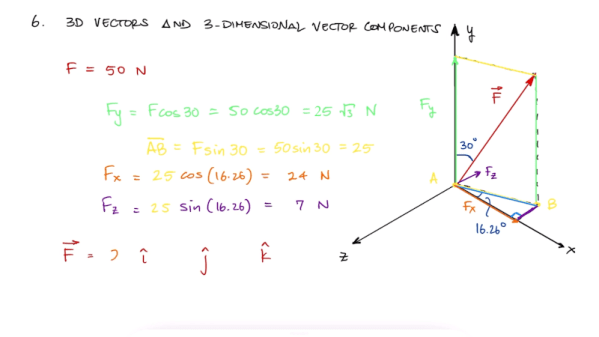
We have to admire a YouTube channel with the name [Less Boring Lectures]. After all, he isn’t promising they won’t be boring, just less boring. Actually though, we found quite a few of the videos pretty interesting and not boring at all. The channel features videos about mechanical engineering and related subjects like statics and math. While your typical electronics project doesn’t always need that kind of knowledge, some of them do and the mental exercise is good for you regardless. A case in point: spend seven minutes and learn about 2D and 3D vectors in two short videos (see below). Or spend 11 minutes and do the whole vector video in one gulp.
These reminded us of Kahn Academy videos, although the topics are pretty hardcore. For example, if you want to know about axial loading, shear strain, or free body diagrams, this is a good place to look.
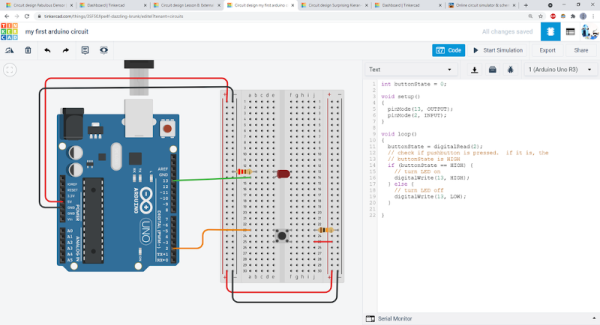
With so many students attending class virtually these days, how can you give kids — or adults — some hands on experience with electronics projects? [Ben Finio] says you can by moving your lab to the virtual world using — of all things — Tinkercad. [Ben] should know something about a classroom since he is a lecturer at Cornell.
Of course, you could do this trick with any online simulator, but Tinkercad is nice because it is easy to use, looks real, and doesn’t cost the students a dime. [Ben] mentions there are some scenarios where it is especially useful like large classes or online classes. There are probably some cases where it doesn’t make sense, like teaching RF design, for example. Even then, maybe you just need a different tool.
A ukulele is a great instrument to pick to learn to play music. It’s easy to hold, has a smaller number of strings than a guitar, is fretted unlike a violin, isn’t particularly expensive, and everything sounds happier when played on one. It’s not without its limited downsides, though. Like any stringed instrument some amount of muscle memory is needed to play it fluidly which can take time to develop, but for new musicians there’s a handy new 3D printed part that can make even this aspect of learning the ukulele easier too.
Called the Easy Fret, the tool clamps on to the neck of the ukulele and hosts a series of 3D printed “keys” that allow for complex chord shapes to be played with a single finger. In this configuration the chords C, F, G, and A minor can be played (although C probably shouldn’t be considered “complex” on a ukulele). It also makes extensive use of compliant mechanisms. For example, the beams that hit the chords use geometry to imitate a four-bar linkage. This improves the quality of the sound because the strings are pressed head-on rather than at an angle.
While this project is great for a beginner learning to play this instrument and figure out the theory behind it, its creator [Ryan Hammons] also hopes that it can be used by those with motor disabilities to be able to learn to play an instrument as well. And, if you have the 3D printer required to build this but don’t have an actual ukulele, with some strings and tuning pegs you can 3D print a working ukulele as well.
This article was meant to be finished up before Christmas, so it’ll be a little late whenever you’re reading it to go and prepare this for the holiday. Regardless, if, like me, should you ever be on the lookout for something to give a toddler nephew or relative, it could be worth it to look into your neglected old parts shelves. In my case, what caught my eye was a 9-year-old AMD laptop catching dust that could be better repurposed in the tiny hands of a kid eager to play video games.
The main issues here are finding a decent selection of appropriate games and streamling the whole experience so that it’s easy to use for a not-yet-hacker, all the while keeping the system secure and child-friendly. And doing it all on a budget.
This is a tall order, and requirements will be as individual as children are, of course, but I hope that my experience and considerations will help guide you if you’re in a similar boat.