Push It To The Limit: SSD1306 At 150 FPS

A good deal of the projects we cover here at Hackaday are not, in the strictest sense, practical endeavors. If we required that everything which graced our digital pages had a clear end result, the site would be in a rather sad state of affairs. Sometimes it’s enough just to do something for the challenge of it. But more often than not, you’ll learn something in the process which you can use down the line.

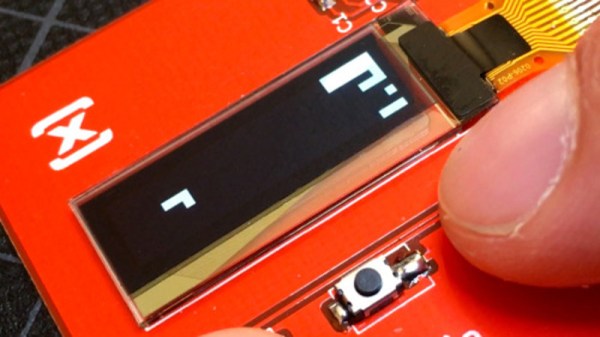
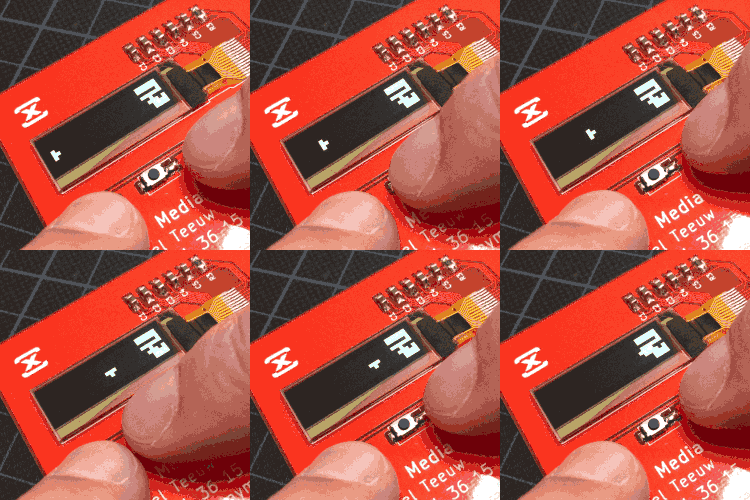
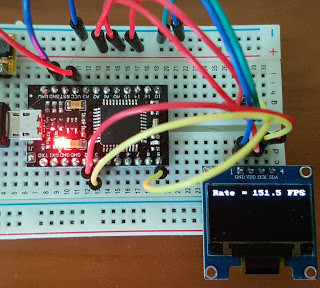
That’s precisely what pushed [Larry Bank] to see how well he could optimize the frame rate on the popularĀ SSD1306 OLED display. After several iterations of his code, he was able to achieve a blistering 151.5 FPS, with apparently still some room for improvement if he’s feeling up to the challenge. But considering his first attempt was only running at 5.5 FPS, we’d say he’s already more than earned his hacker cred on this one.

A few different tricks were used to achieve such incredible performance gains. To start with, while the official I2C specification says you’re supposed to wait for an acknowledgment back from the device when communicating with it, [Larry] realized the SSD1306 didn’t actually care. He could continuously blast commands at the display without bothering to wait for an acknowledgment. He admits there are problems with this method, but you can’t argue with the results.

To really wring all the performance out of the system he could, [Larry] donned his Assembly Cap and examined how the Arduino IDE compiler was interpreting his code. He identified a few areas where changing his C code would force the compiler to generate faster output. He notes that this wouldn’t normally be required when working with more advanced compilers, but that the Arduino toolchain needs its hand held occasionally.

This isn’t the first time we’ve seen somebody try and push more pixels through the very same OLED display, and it’s interesting to see the two very different approaches to the same goal.

Smartwatch Fights Anxiety With Action

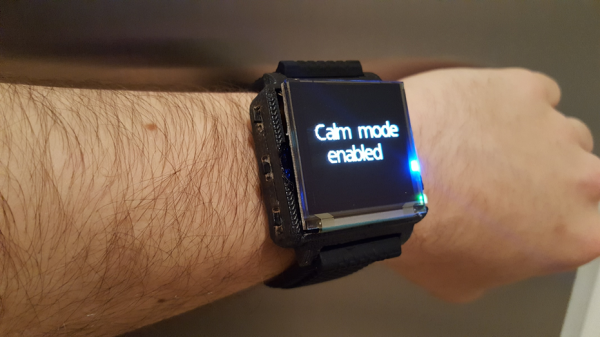
In our fast-paced modern world, it’s no wonder that so many suffer from anxiety and panic attacks. There are several time-worn techniques for dealing with the symptoms of these attacks. But as anyone who’s ever suffered such an attack can tell you, it can be difficult to sense one coming on until it’s too late. By then, rational thinking has been supplanted by intrusive thoughts. For this year’s Hackaday Prize, [Austin Marandos] is doing his part by using technology to help us check ourselves before we wreck ourselves with worry.

Similar smartwatches exist to detect oncoming attacks, but they don’t do anything to combat them. Minder is like having a friend strapped to your wrist that’s never absorbed in their own problems. It wants to help no matter what it takes, which is why it features multiple techniques for getting back to a state of calm.

Minder’s brain is the bite-size Qduino Mini, which is great for a crowded wearable because of its built-in charging circuit. It uses heart rate and temperature sensors to determine the onset of a panic attack, and a vibration motor to alert the user. The motor also plays a part in the relaxation techniques to keep the user focused and in control. Use the upcoming break to relax and check out the video.

If your anxiety stems from feelings of inadequacy, it might be Imposter Syndrome.

Continue reading “Smartwatch Fights Anxiety With Action”

Iron Man Mask With A HUD!

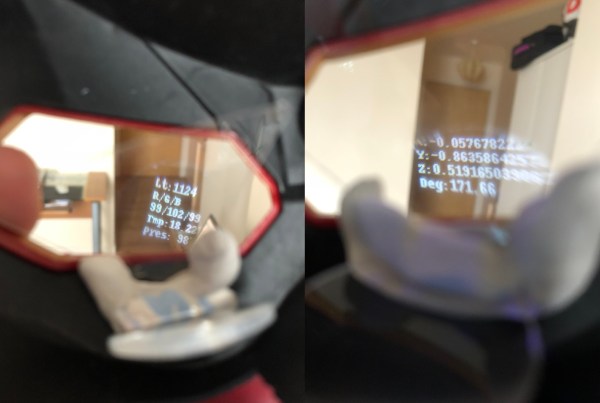
At some point, a child will inevitably dream of being a superhero. Not all children get the chance to see that dream made manifest, but a few take that destiny into their own hands. Redditor [Lord_of_Bone] — seizing at that goal — has built himself an Iron Man mask with an integrated HUD!

Relying on a conceptually similar project he’d previously built, much of the code was rehashed for this ‘Mark II’ version. Pieces of a smartphone holo pyramid act as projection surfaces — using a lens to focus the image to be viewed at such close distances — and a pair of OLED screens displaying the information. It’s a happy bonus that the lack of backlight results in only the text showing in the user’s field of view.

Instead of speaking with J.A.R.V.I.S., [Lord_of_Bone] is using a Raspberry Pi Zero W as the mask’s brain. Working past some I2C troubles between the OLED screens and an Enviro pHat required a whipped-up veroboard and a bit of hardware hacking. Cramming everything into the mask was no easy task — using Blutack and Sugru to bind them in the limited space — but the pHat had to be surface-mounted in the open anyways for atmospheric and light data.

Continue reading “Iron Man Mask With A HUD!”

Lasers, Mirrors, And Sensors Combine In An Optical Bench Game

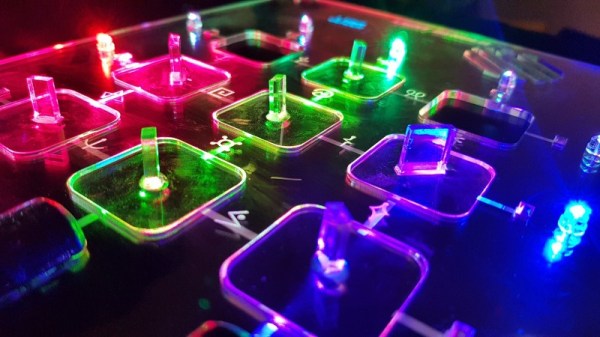
Who would have thought you could make a game out of an optical bench?Ā [Chris Mitchell] did, and while we were skeptical at first, his laserĀ Light Bender gameĀ has some potential. Just watch your eyes.

The premise is simple: direct the beam of a colored laser to the correct target before time runs out. [Chris] used laser-cut acrylic for his playfield, which has nine square cutouts arranged in a grid. Red, green, and blue laser pointers line the bottom of the grid, with photosensors and RGB LEDs lining the grid on the other three sides. Play starts with a random LED lighting up in one of the three colors, acting as a target. The corresponding color laser comes on, and the player has to insert mirrors or pass-through blocks in the grid to create aĀ path to the target. The faster you hit the CdSĀ cell, the higher your score. It’s simple, but it looks really engaging. We can imagine all sorts of upgrades, like lighting up two different targets at once, or adding a beamsplitter block to hit two targets with the same color. Filters and polarizers could add to the optical fun too.

We like builds that are just for fun, especially when they’re well-crafted andĀ have a slight air of danger. The balloon-busting killbots project we featured recently comes to mind.

Continue reading “Lasers, Mirrors, And Sensors Combine In An Optical Bench Game”

Tiny Function Generator On The ATtiny85, Complete With OLED

It’s easy to have a soft spot for “mini” yet perfectly functional versions of electronic workbench tools, like [David Johnson-Davies]’s Tiny Function GeneratorĀ which uses an ATtiny85 to generate different waveforms at up to 5 kHz. It’s complete with a small OLED display to show the waveform and frequency selected. One of the reasons projects like this are great is not only because they tend to show off some software, but because they are great examples of the kind of fantastic possibilities that are open to anyone who wants to develop an idea. For example, it wasn’t all that long ago that OLEDs were exotic beasts. Today, they’re available off the shelf with simple interfaces and sample code.

The Tiny Function Generator uses a method called DDS (Direct Digital Synthesis) on an ATtiny85 microcontroller, which [David] wrote up in an earlier post of his about waveform generation on an ATtiny85. With a few extra components like a rotary encoder and OLED display, the Tiny Function Generator fits on a small breadboard. He goes into detail regarding the waveform generation as well as making big text on the small OLED and reading the rotary encoder reliably. His schematic and source code are both available from his site.

Small but functional microcontroller-based electronic equipment are nifty projects, and other examples include the xprotolab and the AVR-based Transistor Tester (which as a project has evolved into a general purpose part identifier.)

Weaving With Light: An OLED Fibre Fabric Display

If you think of wearable electronic projects, in many cases what may come to mind are the use of addressable LEDs, perhaps on strips or on sewable PCBs like the Neopixel and similar products. They make an attractive twinkling fashion show, but there remains a feeling that in many cases once you have seen one project, you have seen them all.

So if you are tiring of static sewable LED projects and would like to look forward to something altogether more exciting, take a look at some bleeding-edge research from a team at KAIST, the Korean Advanced Institute of Science & Technology. They have created OLED fibres and woven them into fabric in a way that appears such that they can be lit at individual points to create addressable pixels. In this way there is potential for fabrics that incorporate entire LED displays within their construction rather than in which they serve as a substrate.

The especially interesting feature of the OLED fibres from the KAIST team is that their process does not require any high temperatures, meaning that a whole range of everyday textile fibres can be used as substrates for OLEDs. The results are durable and do not lose OLED performance under tension, meaning that there is the possibility of their becoming practical fabrics for use in garments.

While this technology is a little way away from a piece of clothing you might buy from a store, the fact that it does not rely on special processes during weaving means that when the fibres become commercially available we are likely to see their speedy adoption. Meanwhile you can buy conductive fabric, but you might have to take a multimeter to the store to find it.

Via EENewsLED, and thank you [Carl] for the tip.

Tricked-out Barbecue Will Make You Do A Spit Take

[Strn] and his friends love to barbecue no matter what it’s like outside. But something always seems to interrupt the fun: either it’s time to get up and turn the meat, or the music stops because somebody’s phone ran out of juice, or darkness falls and there aren’t enough flashlights or charged-up phones. He had the idea to build the Swiss Army knife of barbecues, a portable powerhouse that solves all of these problems and more (translated).

Most importantly, the E-Mangal rotates the skewers for even cooking. It does this with a 3D-printed worm gear system driven by the heater flap actuator from a car. After 25 minutes of slow rotation, a voice announces that it’s time to eat. [Strn] and friends will never hurt for music options between the pre-loaded tracks, Bluetooth audio, FM antenna, USB, and SD options running through a 3W amp. Two USB lights illuminate nighttime barbecuing, and the 10 Ah battery can do it all and keep everyone’s phone charged. For safety’s sake, [Strn] included a half-liter water tank to extinguish the coals via jet stream. Everything is run by a PIC18F, and it can be controlled at the box or through a simple web interface.

We love the look of this barbecue controller almost as much as the functionality. The sturdy stance of those short, angled legs give it a mid-century appliance feel, and seeing all the guts on display is always a plus. Grab a turkey leg and take the tour after the break.

The E-Mangal has a thermocouple in the coal box to measure the temperature, but there’s no direct control. If you’re more interested in temperature options than entertainment, here’s a project that micromanages everything on the grill.

Continue reading “Tricked-out Barbecue Will Make You Do A Spit Take”