FabGL Has Everything You Need To Write Games For The ESP32

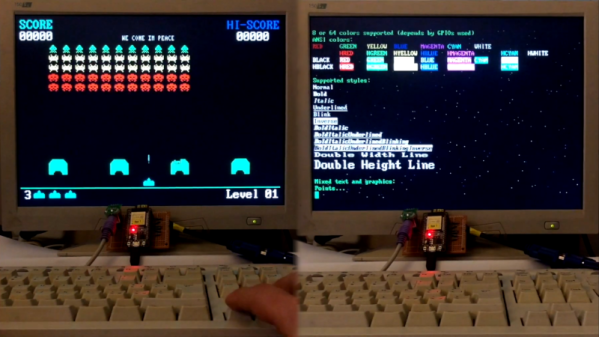
Typically, when one considers writing a video game, the platform is among the first decisions to be made. The PC can be an easy one to start with, and mobile development is fairly accessible too. Of course, you could always develop for a microcontroller platform instead. [Fabrizio Di Vittorio] has built the perfect set of tools to do just that with the ESP32, by the name of FabGL.

The library contains a laundry list of features that are perfect for developing games. There’s VGA output with up to 64 colors, PS/2 mouse and keyboard inputs, as well as a capable graphics library and game engine. It can even act as an ANSI/VT terminal if necessary.

[Fabrizio] has put the hardware through its paces, with a variety of benchmarks displaying impressive performance with simple balls, polygons and sprites. You could easily produce a 2D game in an early 90s style without running into any hardware limitations — though given the ESP32 clocks in at up to 240MHz, that’s somewhat to be expected.

It’s an impressive project (video after the break), and we’d love to see more games developed on the platform. Once you have a VGA connector wired in you should try out some ESP32 VGA hacks. And for those ESP8266 die hards there’s a game engine for that chip too!

Continue reading “FabGL Has Everything You Need To Write Games For The ESP32”

ESP32 Video Tricks Hack Chat With Bitluni

Join us Wednesday at noon Pacific time for the ESP32 Video Tricks Hack Chat!

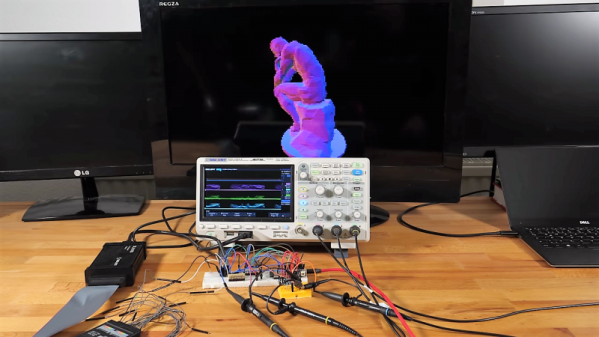
The projects that bitluni works on have made quite a few appearances on these pages over the last couple of years. Aside from what may or may not have been a street legal electric scooter, most of them have centered around making ESP32s do interesting tricks in the analog world. He’s leveraged the DACs on the chip to create an AM radio transmitter, turned an oscilloscope into a video monitor, and output composite video. That last one was handy for turning a Sony Watchman into a retro game console. He’s also found ways for the ESP32 to output VGA signals. Looks like there’s no end to what he can make the versatile microcontroller do.

Although the conversation could (and probably will) go anywhere, we’ll start with video tricks for the ESP32 and see where it goes from there. Possible topics include:

  • Tricks for pushing the ESP32 DACs to their limits;
  • When to use an external DAC;
  • Optimizing ESP32 code by running on separate cores; and
  • What about HDMI on the ESP32?

You are, of course, encouraged to add your own questions to the discussion. You can do that by leaving a comment on the ESP32 Video Tricks Hack Chat and we’ll put that in the queue for the Hack Chat discussion.

join-hack-chatOur Hack Chats are live community events on the Hackaday.io Hack Chat group messaging. This week we’ll be sitting down on Wednesday, March 27, at noon, Pacific time. If time zones have got you down, we have a handy time zone converter.

Click that speech bubble to the right, and you’ll be taken directly to the Hack Chat group on Hackaday.io. You don’t have to wait until Wednesday; join whenever you want and you can see what the community is talking about.

Two Joysticks Talk To FPGA Arcade Game Over A VGA Cable

We really love when hacks of previous hacks show up in the tip line. It shows how the hardware hacking community can be a feedback loop, where one hack begets the next, and so on until great things are everywhere. This hacked joystick port for an FPGA Pac Man game is a perfect example of that creative churn.

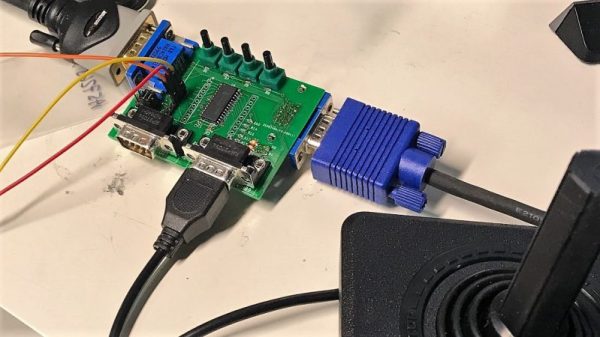
The story starts with Pano Man, a version of the venerable arcade game ported to a Pano Logic FPGA thin client by [Skip]. We covered that story when it first came out, and it caught the attention of [Tom Verbeure], particularly the bit in the GitHub readme file which suggested there might be a better way to handle the joystick connections. So [Tom] took up the challenge of using the Extended Display Identification Data (EDID) circuit in the VGA connector to support an Atari 2600 joystick. The EDID system is an I²C bus, so the job needed the right port expander. [Tom] chose the MCP23017, a 16-bit device that would have enough GPIO for dual joysticks and a few extra buttons. Having never designed a PCB before, [Tom] fell down that rabbit hole for a bit, but quickly came up with a working design, and then a better one, and then the final version. The video below shows it in action with Pano Man.

We think the creative loop between [Skip] and [Tom] was great here, and we can’t wait to see who escalates next. And it’s pretty amazing how much IO can be stuffed over two wires if you have the right tools. Check out this VGA sniffing effort to learn more about EDID and I²C.

Continue reading “Two Joysticks Talk To FPGA Arcade Game Over A VGA Cable”

Little FPV Bot Keeps It Simple With An ESP32

When it comes to robots, it seems the trend is to make them as complicated as possible – look at anything from Boston Dynamics if you’ve any doubt of that. But there’s plenty to be said for simple robots too, such as this adorable ESP32-driven live-streaming bot.

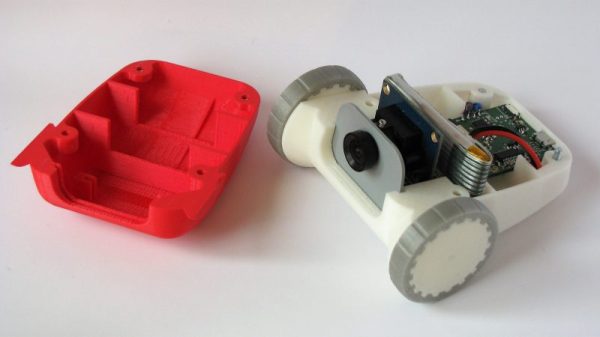
Now it’s true that [Max.K]’s creation is more remote controlled car than robot, and comparing it to one of the nightmare-fuelling creations of Boston Dynamics is perhaps unfair. But [Max.K]’s new project is itself a simplification and reimagining of his earlier, larger “ZeroBot“. As the name implies, ZeroBot was controlled by a Raspberry Pi Zero, an obvious choice for a mobile platform designed to stream FPV video. The ESP32 bot eschews the Pi platform in favor of, well, an ESP32. To save as much space as possible, [Max.K] did a custom PCB for the microcontroller and its supporting components. The 3D-printed case is nicely designed to hold the board along with two motors, a small VGA camera, and a battery pack. At 160×120 resolution, the video isn’t amazing, but the fact that it can be streamed from the ESP32 at a decent enough framerate to drive the bot using a simple web interface is impressive.

This was a fun project and a very clean, smooth build. We like the lines of this little bot, and wouldn’t mind building one as a quick weekend project ourselves.

Continue reading “Little FPV Bot Keeps It Simple With An ESP32”

Back To Video Basics With An ESP32 VGA Display

In a world where standards come and go with alarming speed, there’s something comforting about VGA. It’s the least common denominator of video standards, and seeing that chunky DB15 connector on the back of a computer means that no matter what, you’ll be able to get something from it, if you can just find a VGA cable in your junk bin.

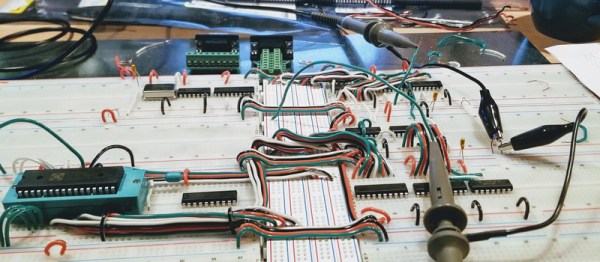
But that’s the PC world; what about microcontrollers? Can you coax VGA video from them? Yes, you can, with an ESP32, a handful of resistors, and a little bit of clever programming. At least that’s what [bitluni] has managed to do in his continuing quest to push the ESP32 to output all the signals. For this project, [bitluni] needed to generate three separate signals – red, green, and blue – but with only two DACs on board, he had to try something else. He built external DACs the old way using R/2R voltage divider networks and addressed them with the I2S bus in LCD mode. He needed to make some compromises to fit the three color signals and the horizontal and vertical sync pulses into the 24 available bits, and there were a few false starts, but the video below shows that he was able to produce a 320×240 signal, and eventually goosed that up to a non-native 460×480.

It’s a pretty impressive hack, and we learned a lot about both the ESP32 and the VGA standard by watching the video. He’s previously used the ESP32 to build an AM radio station and to output composite PAL video, and even turned his oscilloscope into a vector display with it. They’re all great learning projects too.

Continue reading “Back To Video Basics With An ESP32 VGA Display”

Do Other Things Besides Output Video

Small microcontrollers and tiny systems-on-chips are getting more and more popular these days as the price comes down and the ease of programming goes up. A Raspberry Pi is relatively inexpensive and can do pretty much everything you need, but not every chip out there can do something most of us take for granted like output video. For a lot of platforms, it’s next to impossible to do while saving any processor or memory for other tasks besides the video output itself.

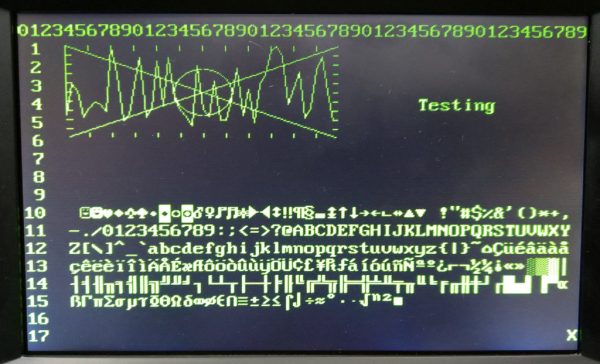
[Dave] aka [Mubes] has been working on the Blue Pill platform which is a STM32F103C8 board. While they don’t natively output video, it’s a feature that provides a handy tool to have for debugging in order to see what’s going on in your code. However, if the video code takes up all of the processor power and memory there’s not much point. [Dave]’s video output program, on the other hand, takes up only 1200 bytes of RAM and 24% of the processor for a 50×18 text display over VGA, leaving a lot of room left for whatever else you need the tiny board to do.

Video output on a device this small and lightweight is an impressive feat, especially while saving room for other tasks. This brings it firmly out of the realm of novelty and into the space of useful tools to keep around. If you want to try the same thing on an ATtiny, though, you might have to come up with some more impressive tricks.

Continue reading “Do Other Things Besides Output Video”

Pac-Man Fever Comes To The Pano Logic FPGA

If you’ve been reading Hackaday for a while now, you might recall the tale of Pano Logic that we first covered all the way back in 2013. They were a company that put out some very interesting FPGA-based thin clients, but as occasionally happens in situations like this, the market wasn’t ready and the company went belly up. These thin clients, now without official support, invariably got dumped onto the second-hand market. Shame for Pano Logic and their staff, but good news for hackers like [Skip Hansen].

After seeing a few posts about the Pano Logic devices and general FPGA hacking, he decided to grab a few on eBay and dive in. Using open source tools and the wealth of information that’s available [Skip] was able to get a Pac-Man simulator up and running over his holiday break, and he tells us his life may never be the same again. FPGA hacking is a fascinating subject with a lot of activity right now, and since you can get these Pano Logic boxes on eBay for less than $10 USD in some cases, now is as good a time as ever to get your feet wet.

Like many open source projects, [Skip] says his code is built upon the existing work of a number of other programmers, which let him get up and running much faster than if he had to start from scratch. He describes his code as the “glue” that mashes these projects together, but we think he’s being somewhat modest there. It took more than copying and pasting some code into an IDE to get Blinky, Pinky, Inky and Clyde doing their thing on the Pano Logic.

The biggest challenge was the lack of I/O. The Pano Logic thin clients have USB ports, but it seems nobody has quite figured out how to get them working yet. To talk to the outside world, you’ve got to get a little more creative. Eventually [Skip] was able to track down four lines he could effectively use as GPIO: two which are used to drive the LEDs on the device, and two which are used for the VGA port’s Display Data Channel (DDC) pins. Soldering jumpers from the LEDs to the unused pins in the device’s VGA connector meant he was even able to get these four GPIO lines accessible from the outside of the Pano Logic without having to cut any holes in the case.

Anyone with a Pano Logic client that has a VGA port, an Atari 2600 joystick, and who doesn’t mind soldering a couple of wires can now play Pac-Man with the bitstream [Skip] has provided. But where do we go from here? How long until we see DOOM running on it? Perhaps one of you fine readers should pick one up and see what you can do to advance the state of Pano Logic hacking. Just be sure to let us know about it.

We’ve previously covered one of the projects used to get this Pac-Man simulator off the ground, a very cool ray tracing demo for the Pano Logic developed by [Tom Verbeure]. In fact, [Skip] says that project was what got him interested in FPGA hacking in the first place. If you’re thinking of following his lead, you might also want to check out our FPGA Boot Camp.