Retro Recreations Hack Chat With Tube Time

Join us on Wednesday, March 17 at noon Pacific for the Retro Recreations Hack Chat with Tube Time!

join-hack-chatNostalgia seems to be an inevitable consequence of progress. Advance any field far enough into the future, and eventually someone will look back with misty eyes and fond memories of the good old days and start the process of turning what would qualify as junk under normal conditions into highly desirable collectibles.

In some ways, those who have been bitten by the computer nostalgia bug are lucky, since the sheer number of artifacts produced during their period of interest is likely to be pretty high, making getting gear to lovingly restore relatively easy. But even products produced in their millions can eventually get difficult to find, especially once they get snapped up by eager collectors, leaving the rest to make do or do without.

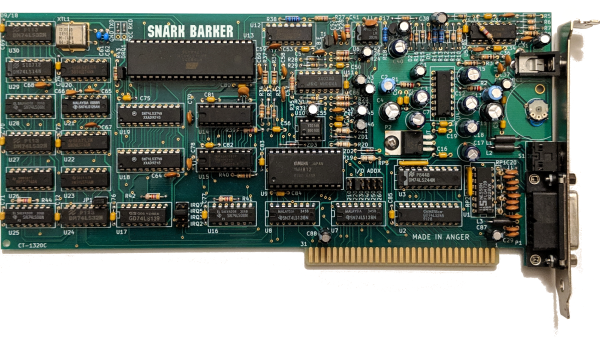
Of course, if you’re as resourceful as Tube Time is, there’s another alternative: build your own retro recreations. He has embarked on some pretty intense builds to recapture a little of what early computer enthusiasts went through trying to build useful machines. He has built replicas of early PC sound cards, like an ISA-bus AdLib card, its MCA equivalent, and the “Snark Barker”— or is it the “Snood Bloober”? — which bears an uncanny resemblance to the classic Sound Blaster card from the 1980s.

Tube Time will join us for the Hack Chat this week to answer questions about all his retro recreations, including his newest work on a retro video card. Be sure to bring your questions on retro rebuilds, reverse engineering, and general computer nostalgia to the chat.

Our Hack Chats are live community events in the Hackaday.io Hack Chat group messaging. This week we’ll be sitting down on Wednesday, March 17 at 12:00 PM Pacific time. If time zones have you tied up, we have a handy time zone converter.

Click that speech bubble to the right, and you’ll be taken directly to the Hack Chat group on Hackaday.io. You don’t have to wait until Wednesday; join whenever you want and you can see what the community is talking about.
Continue reading “Retro Recreations Hack Chat With Tube Time”

Free To Good Home: FPGA Supercharged Audio/Video Synthesizer

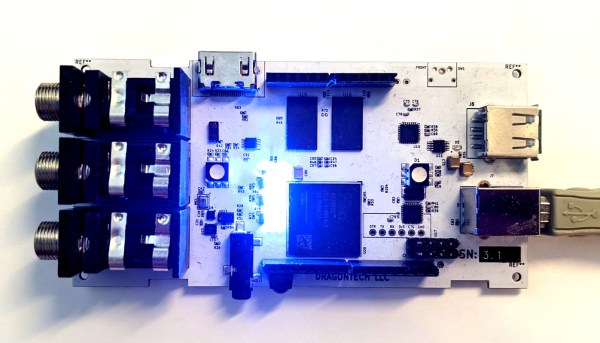
Audio and video synthesizers have been around for decades, and are pretty much only limited by one’s willingness to spend money on them.  That is, unless you can develop your own FPGA-supercharged synthesizer to really get a leg up on the consumer-grade components. Of course, as [Julian] found out in this four-year project, you tend to pay for it anyway in time spent working on your projects.

[Julian] has actually decided to stop working on the project and open-source it to anyone who wants to continue on. He has already finished the PCB layout on a gargantuan 8-layer print, done all of the routing and parts selection, and really only needed to finish testing it to complete the project. It’s powered by the Xilinx Zynq and is packed with features too: HDMI, DDR3 ram, USB, a handful of sensors, and an Arduino Uno-style header to make interfacing and programming a breeze.

While we’re sympathetic with setting aside a project that we’ve worked so hard on, with most of the work done on this one it should be pretty easy to pick up and adapt for anyone interested in carrying the torch. If you were hoping to wet your whistle with something with fewer PCB layers, though, we’ve seen some interesting (but slightly simpler) video synthesizers made out of other unique hardware as well.


The World Is Your Green Screen

This year has been the year of home video conferencing. If you are really on the ball, you’ve managed to put some kind of green screen up so you can hide your mess and look as though you are in your posh upper east side office space. However, most of the consumer video conferencing now has some way to try to guess what your background is and replace it even without a green screen. The results, though, often leave something to be desired. A recent University of Washington paper outlines a new background matting procedure using machine learning and, as you can see in the video below, the results are quite good. There’s code on GitHub and even a Linux-based WebCam filter.

The algorithm does require a shot of the background without you in it, which we imagine needs to be relatively static. From watching the video, it appears the acid test for this kind of software is spiky hair. There are several comparisons of definitely not bald people flipping their hair around using this method and other background replacers such as the one in Zoom.

Continue reading “The World Is Your Green Screen”

PET 2001 Emulator On $2 Of Hardware

Since the late 60s, Moore’s law has predicted with precision that the number of semiconductors that will fit on a chip about doubles every two years. While this means more and more powerful computers, every year, it also means that old computers can be built on smaller and cheaper hardware. This project from [Bjoern] shows just how small, too, as he squeezes a PET 2001 onto the STM32 Blue Pill.

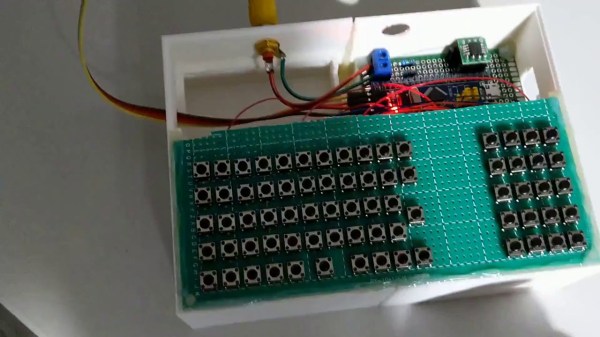
While the PET 2001 was an interesting computer built by Commodore this project wasn’t meant to be a faithful recreation, but rather to test the video output of the Blue Pill, with the PET emulation a secondary goal. It outputs a composite video signal which takes up a good bit of processing power, but the PET emulation still works, although it is slightly slow and isn’t optimized perfectly. [Bjoern] also wired up a working keyboard matrix as well although missed a few wire placements and made up for it in the software.

With his own home-brew software running on the $2 board, he has something interesting to display over his composite video output. While we can’t say we’d emulate an entire PC just to get experience with composite video, we’re happy to see someone did. If you’d like to see a more faithful recreation of this quirky piece of computing history, we’ve got that covered as well.

Continue reading “PET 2001 Emulator On $2 Of Hardware”

Audio Fingerprinting Skips A Show’s Intro, Reliably

Lacking a DVD drive, [jg] was watching a TV series in the form of a bunch of .avi video files. Of course, when every episode contains a full intro, it is only a matter of time before that gets too annoying to sit through.

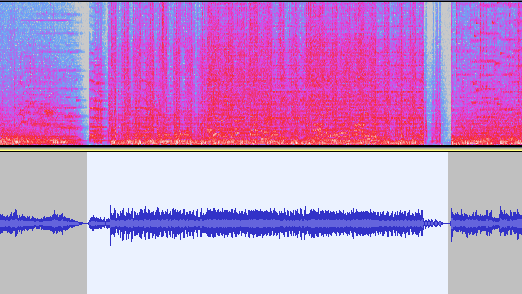
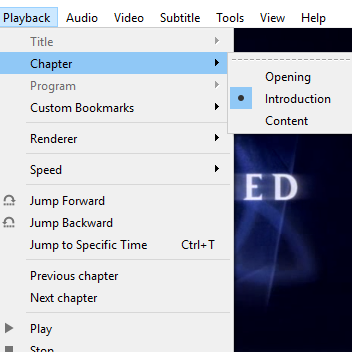
Chapter breaks reliably inserted around the intro, even when it doesn’t always occur in the same place.

The usual method of skipping the intro on a plain video file is a simple one:

  1. Manually drag the playback forward past the intro.
  2. Oops that’s too far, bring it back.
  3. Ugh reversed it too much, nudge it forward.
  4. Okay, that’s good.

[jg] was certain there was a better way, and the solution was using audio fingerprinting to insert chapter breaks. The plain video files now have a chapter breaks around the intro, allowing for easy skipping straight to content. The reason behind selecting this method is simple: the show intro is always 52 seconds long, but it isn’t always in the same place. The intro plays somewhere within the first two to five minutes of an episode, so just skipping to a specific timestamp won’t do the trick.

The first job is to extract the audio of an intro sequence, so that it can be used for fingerprinting. Exporting the first 15 minutes of audio with ffmpeg easily creates a wav file that can be trimmed down with an audio editor of choice. That clip gets fed into the open-source SoundFingerprinting library as a signature, then each video has its audio track exported and the signature gets identified within it. SoundFingerprinting therefore detects where (down to the second) the intro exists within each video file.

Marking out chapter breaks using that information is conceptually simple, but ends up being a bit roundabout because it seems .avi files don’t have a simple way to encode chapters. However, .mkv files are another matter. To get around this, [jg] first converts each .avi to .mkv using ffmpeg then splices in the chapter breaks with mkvmerge. One important element is that the reformatting between .avi and .mkv is done without completely re-encoding the video itself, so it’s a quick process. The result is a bunch of .mkv files with chapter breaks around the intro, wherever it may be!

The script is available here for anyone to play with, and the project page is a good learning reference because [jg] kindly provides all the command-line options used for each tool. Interested in using audio fingerprinting in your own projects? Remember to also check out Olaf, the Overly Lightweight Acoustic Fingerprinting method that can be implemented in embedded systems and web browsers.

Tracking Drone Flight Path Via Video, Using Cameras We Can Get

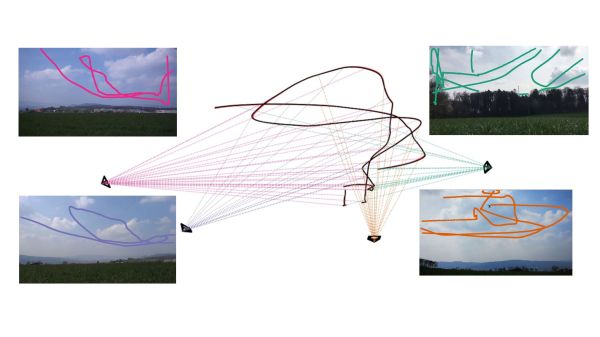
Calculating three-dimensional position from two-dimensional projections are literal textbook examples in geometry, but those examples are the “assume a spherical cow” type of simplifications. Applicable only in an ideal world where the projections are made with mathematically perfect cameras at precisely known locations with infinite resolution. Making things work in the real world is a lot harder. But not only have [Jingtong Li, Jesse Murray et al.] worked through the math of tracking a drone’s 3D flight from 2D video, they’ve released their MultiViewUnsynch software on GitHub so we can all play with it.

Instead of laboratory grade optical instruments, the cameras used in these experiments are available at our local consumer electronics store. A table in their paper Reconstruction of 3D Flight Trajectories from Ad-Hoc Camera Networks (arXiv:2003.04784) listed several Huawei cell phone cameras, a few Sony digital cameras, and a GoPro 3. Video cameras don’t need to be placed in any particular arrangement, because positions are calculated from their video footage. Correlating overlapping footage from dissimilar cameras is a challenge all in itself, since these cameras record at varying framerates ranging from 25 to 59.94 frames per second. Furthermore, these cameras all have rolling shutters, which adds an extra variable as scanlines in a frame are taken at slightly different times. This is not an easy problem.

There is a lot of interest in tracking drone flights, especially those flying where they are not welcome. And not everyone have the budget for high-end equipment or the permission to emit electromagnetic signals. MultiViewUnsynch is not quite there yet, as it tracks a single target and video files were processed afterwards. The eventual goal is to evolve this capability to track multiple targets on live video, and hopefully help reduce frustrating public embarrassments.

[IROS 2020 Presentation video (duration 14:45) requires free registration, available until at least Nov. 25th 2020.]

Super-Simple VGA Adapter Sports Low-Res Output With Only Four TTL Chips

Here at Hackaday we cast a wary eye at tips that come in with superlative claims. Generally, if we post something that claims to be the fastest or the smallest of all time, we immediately get slapped down in the comments by someone who has done it faster or smaller. So we present the simplest TTL video card ever knowing the same thing will happen, but eager to see how anyone might scale things down.

To be fair, [George Foot] does qualify his claim to the simplest usable VGA adapter, and he does note that it descends from [Ben Eater]’s “world’s worst video card”, which he uses for his 6502 breadboard computer. But where [Ben]’s VGA adapter uses about 20 TTL chips and an EEPROM, [George] has managed to decrease the BOM to just four TTL chips along with the memory and a crystal oscillator. This required a fair number of compromises, of course; the color depth is fairly low, as is the resolution. Each pixel appears as a thin horizontal bar rather than a small square, leading the images to be smeared out across the screen. They’re still surprisingly viewable, though, which probably says more about the quality of the pattern-recognition wetware between our ears than anything about the quality of the adapter. [George] gives a tour of the circuit in the brief video below.

It looks like [George] has posted a few improvements to the project since we first spotted it, so we’re looking forward to seeing how much the parts count went up. We’re also keen to see if anyone can outdo the simplicity of this effort — be sure to let us know if you give it a shot.

Continue reading “Super-Simple VGA Adapter Sports Low-Res Output With Only Four TTL Chips”