Removing Supervisor Passwords And Learning Python

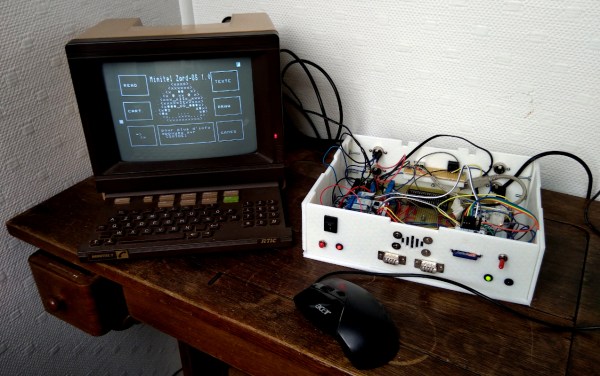
When learning a new programming language, it’s best to have a goal in mind and work towards it. [Timo] thought it was about time to learn python, and he also had a project in mind: removing the BIOS supervisor password from his old Thinkpad. From there it was just a few keystrokes (and some soldering) and he was able to change the BIOS password of this black box from the outside.

The build utilizes a BeagleBone to communicate with the laptop’s EEPROM via the I2C bus. An oscilloscope also monitors the bus to look for a specific window every four-seconds when the computer is not accessing the bus. During that short period, the EEPROM can be read and written to. Once the window opens, the BeagleBone executes the Python script, which attempts to read the EEPROM and can also perform actions such as removing or changing the BIOS supervisor password.

Of course, tinkering with the EEPROM on a laptop has a high risk of bricking the device, and not all laptops use the same security measures or even memory addresses for things like this, so documentation and precision are key. Also, with Thinkpads of this vintage it’s possible to replace the firmware on these chips entirely with a FOSS version called libreboot, and even though the process is difficult, it’s definitely recommended.

Continue reading “Removing Supervisor Passwords And Learning Python”

Lightweight OS For Any Platform

Linux has come a long way from its roots, where users had to compile the kernel and all of the other source code from scratch, often without any internet connection at all to help with documentation. It was the wild west of Linux, and while we can all rely on an easy-to-install Ubuntu distribution if we need it, there are still distributions out there that require some discovery of those old roots. Meet SkiffOS, a lightweight Linux distribution which compiles on almost any hardware but also opens up a whole world of opportunity in containerization.

The operating system is intended to be able to compile itself on any Linux-compatible board (with some input) and yet still be lightweight. It can run on Raspberry Pis, Nvidia Jetsons, and x86 machines to name a few, and focuses on hosting containerized applications independent of the hardware it is installed on. One of the goals of this OS is to separate the hardware support from the applications, while being able to support real-time tasks such as applications in robotics. It also makes upgrading the base OS easy without disrupting the programs running in the containers, and of course has all of the other benefits of containerization as well.

It does seem like containerization is the way of the future, and while it has obviously been put to great use in web hosting and other network applications, it’s interesting to see it expand into a real-time arena. Presumably an approach like this would have many other applications as well since it isn’t hardware-specific, and we’re excited to see the future developments as people adopt this type of operating system for their specific needs.

Thanks to [Christian] for the tip!

The Long Journey Ahead For Linux On Apple Silicon

An old joke from the Linux community about its prevalence in computing quips that Linux will run on anything, including some animals. While the joke is a little dated, it is true that Linux can run on just about any computing platform with a certain amount of elbow grease. The current exception is the new Apple M1 silicon, although one group called Asahi Linux is currently working to get Linux running on this novel hardware as well.

While the Apple M1 is specifically built to run macOS, there’s no technical reason why Linux couldn’t run on it once all of the kinks are ironed out. This progress report from last month outlines some of the current areas of focus, especially around booting non-Mac kernels. The new Apple silicon runs on an ARM processor and because of this it functions more like an embedded device than a PC with standardized BIOS or UEFI. This means a lot of workarounds to the proprietary boot process have to be created to get a Linux kernel to boot. Luckily there are already versions of Linux that run on ARM so a lot of work has already been done, but there’s still much ahead.

While it’s probably best to buy an x86 machine for the time being if you need a Linux on your own personal machine, it seems like only a matter of time until all of the barriers to Linux are overcome on the M1 silicon. If Linux is able to take advantage of some of the efficiency and performance benefits of these chips, it could be a game-changer in the Linux world and at least give us all another option for hardware. Of course, we will still be needing software that can run on ARM, too.

Thanks to [Mark] for the tip!

Guitar Effects With No (Unwanted) Delay

MIDI has been a great tool for musicians and artists since its invention in the 1980s. It allows a standard way to interface musical instruments to computers for easy recording, editing, and production of music. It does have a few weaknesses though, namely that without some specialized equipment the latency of the signals through the various connected devices can easily get too high to be useful in live performances. It’s not an impossible problem to surmount with the right equipment, as illustrated by [Philip Karlsson Gisslow].

The low-latency MIDI interface that he created is built around a Raspberry Pi Pico. It runs a custom library created by [Philip] called MiGiC which specifically built as a MIDI to Guitar interface. The entire setup consists of a preamp to boost the guitar’s signal up to 3.3V where it is then fed to the Pi. This is where the MIDI sampling is done. From there it sends the information to a PC which is able to play the sound back quickly with no noticeable delay.

[Philip] also had to do a lot of extra work to port the software to the Pi which lacks a lot of the features of its original intended hardware on a Mac or Windows machine, and the results are impressive, especially at the end of the video where he uses the interface to play a drum machine via his guitar. And, while MIDI is certainly a powerful application for a guitarist, we have also seen the Pi put to other uses in this musical realm as well.

Continue reading “Guitar Effects With No (Unwanted) Delay”

Custom Dummy Load With Data Logging

While it might seem counterintuitive on the surface, there are a number of cases where dumping a large amount of energy into a resistor simply to turn it into heat is necessary to the operation of a circuit. Most of these cases involve testing electronic equipment such as power supplies or radio transmitters and while a simple resistor bank can be used in some situations, this active dummy load is comprised of different internals has some extra features to boot.

The load bank built by [Debraj] is actually an electronic load, which opens it up for a wider set of use cases than a simple passive dummy load like a resistor bank. It’s specifically designed for DC and also includes voltage measurement, current control, and temperature measurement and speed control of the fans on the heat sinks. It also includes a Bluetooth module that allows it to communicate to a computer using python via a custom protocol and GUI.

While this one does use a case and some other parts from another product and was specifically built to use them, the PCB schematics and code are all available to build your own or expand on this design. It’s intended for DC applications, but there are other dummy loads available for things such radio antenna design, and it turns out that you can learn a lot from them too.

Continue reading “Custom Dummy Load With Data Logging”

Your Plants Can Take Care Of Themselves Now

One of [Sasa]’s life goals is to be able to sit back in his home and watch as robots perform all of his work for him. In order to work towards this goal, he has decided to start with some home automation which will take care of all of his house plants for him. This project is built from the ground up, too, and is the first part of a series of videos which will outline the construction of a complete, open-source plant care machine.

The first video starts with the sensors for the plants. [Sasa] decided to go with a completely custom module based on the STM32 microcontroller since commercial offerings had poor communications designs and other flaws. The small board is designed to be placed in the soil, and has sensors for soil moisture as well as other sensors for amount of light available and the ambient temperature. The improvements over the commercial modules include communication over I2C, allowing a large number of modules to communicate over a minimum of wires and be arranged in any way needed.

For this build everything is open-source and available on [Sasa]’s GitHub page, including PCB layouts and code for the microcontrollers. We’re looking forward to the rest of the videos where he plans to lay out the central unit for handling all of these sensors, and a custom dashboard for controlling them as well. Perhaps there will also be an option for adding a way to physically listen to the plants communicate their needs as well.

Continue reading “Your Plants Can Take Care Of Themselves Now”

Motorcycle Needs Custom Latching Switches For Turn Signals

While modern cars have been getting all kinds of fancy features like touch screens, Bluetooth, crumple zones, and steering wheel controls, plenty of motorcycles have remained firmly in the past. Some might have extra options like a fuel gauge or even ABS if you’re willing to spend extra, but a good percentage of them have the bare minimum equipment required by law. That equipment is outdated and ripe for some improvements too, like this ergonomic custom turn signal switch built with custom latching switches.

Since motorcycle turn signals don’t self-cancel like car signals the rider has to cancel it themselves, usually by pushing an inconveniently tiny button. This assembly consists of four separate switches, two of which control the left and right turn signals. Since both can’t be on at the same time, they include circuitry that can detect their position and a small motor that can physically de-latch them if the other one is pressed. The entire assembly is 3D printed, including the latching mechanism, and they are tied together with a small microcontroller for the controls.

The truly impressive part of this build is the miniaturization, since all four buttons have to be reached with the thumb without removing the hand from the handlebar. The tiny circuitry and mechanical cam for latching are impressive and worth watching the video for. And, if you need more ergonomic improvements for your motorcycle there are also some options for cruise control as well, another feature often lacking in motorcycles.

Continue reading “Motorcycle Needs Custom Latching Switches For Turn Signals”