Do You Know Where Your Children Are? Check The Weasley Clock

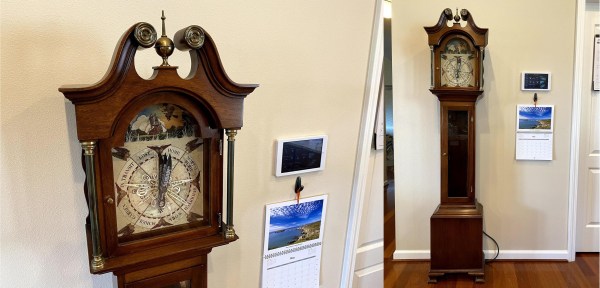
What’s the coolest thing you could build for a Harry Potter fan, aside from a working magic wand or Quidditch broomstick? We would have to say a Weasley clock that shows the whereabouts of everyone in the family is pretty high on the list, especially if that fan is a wife and mother.

Here’s how it works: they’ve set up geofences to define the boundaries of home, each person’s school or workplace, and so on. The family’s locations are tracked through their phones’ GPS using Home Assistant, which is hosted on a Raspberry Pi. Whenever someone’s location changes, the Pi alerts the clock over MQTT, and it moves the 3D-printed hands with servos.

The clock has some interesting granularity to it as well. As someone gets closer to home, their pointer’s distance reflects that in its proximity to the Home slice. And Home itself is divided into the main house and the shop and reflected by the pointer’s position.

We particularly like the attention to detail here, like the art poster used for the clock’s face that includes all the Weasley’s whereabouts in the background. It’s built into a thrift store grandmother clock, which is smaller than a grandfather clock but no less majestic. In the future there are plans to implement the clock’s chimes to announce that someone is back home.

No matter what you’re into, the whereabouts clock idea can probably fit that universe. For instance, here’s one that uses LEGO mini-fig heads to locate roommates.

Breakaway Keyboard PCB Makes Customization A Snap

Once upon a time, keyboards were something that you took with you from computer to computer, because most of them were built quite nicely. After a few dark decades of membrane keyboards being the norm, the rise of the mechanical keyboard community has shined a light on what is possible with open source designs. Anyone can join in, because quality clackers now exist on every level, whether you want to design the perfect split ortho with OLEDs, rotary encoders, and rear view mirrors, or just want to fork over some money and get to punching switches.

Break me off a piece of that candy bar keeb.

Building your own keyboard doesn’t have to be daunting. It can be as easy or as involved as you want. There’s still a fair amount of soldering simply because it’s a keyboard. But there are plenty of options if you don’t want to do a whole lot beyond soldering switches (or hot swap sockets!) and putting a case together.

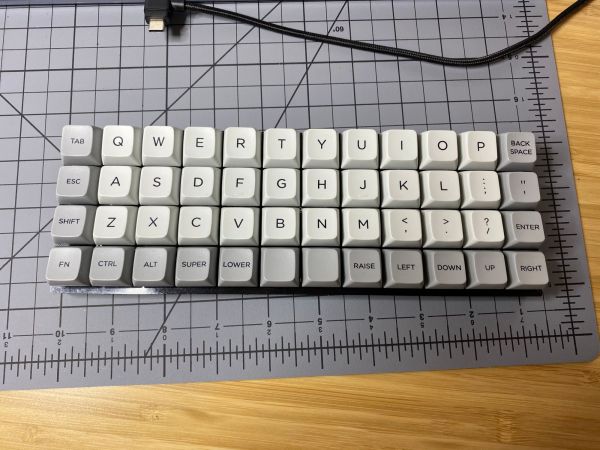
Take for instance the JNAO (Just Need An Ortho) build that [Jared] just finished. It starts with a PCB and on-board controller, and the idea is to customize it from there. You’re left to 3D print, laser cut, or otherwise carve your own case and a plate to stabilize the key switches, and then get down to business deciding on switches and keycaps.

The interesting thing about the JNAO is the breakaway row of keys on the bottom. The standard grid is 12×5, but if you don’t need the dedicated number row along the top like [Jared], you’re not stuck with it. And you’re not stuck with the default layout, either. Flashing to a standard Planck layout didn’t go as easily as [Jared] might have liked, but we think he was wise to get the firmware squared away before ever turning on the soldering iron.

Don’t know what to do with such a small keyboard? They’re pretty much perfect for cyberdeck builds.

Panic Button Is An Audio-Visual Parachute Out Of Zoom Calls

Everyone has been learning how to stream this year whether they want to or not. This has given rise to the embarrassment paradox, which states that the more urgently you need to kill your camera and microphone feeds in a videoconference call, the more difficult and time-consuming it will be. Zoom in particular will toggle the mic and camera with keyboard shortcuts, but when your toddler waddles into the room swinging a used diaper around in the air, keyboard shortcuts will seem woefully under-powered.

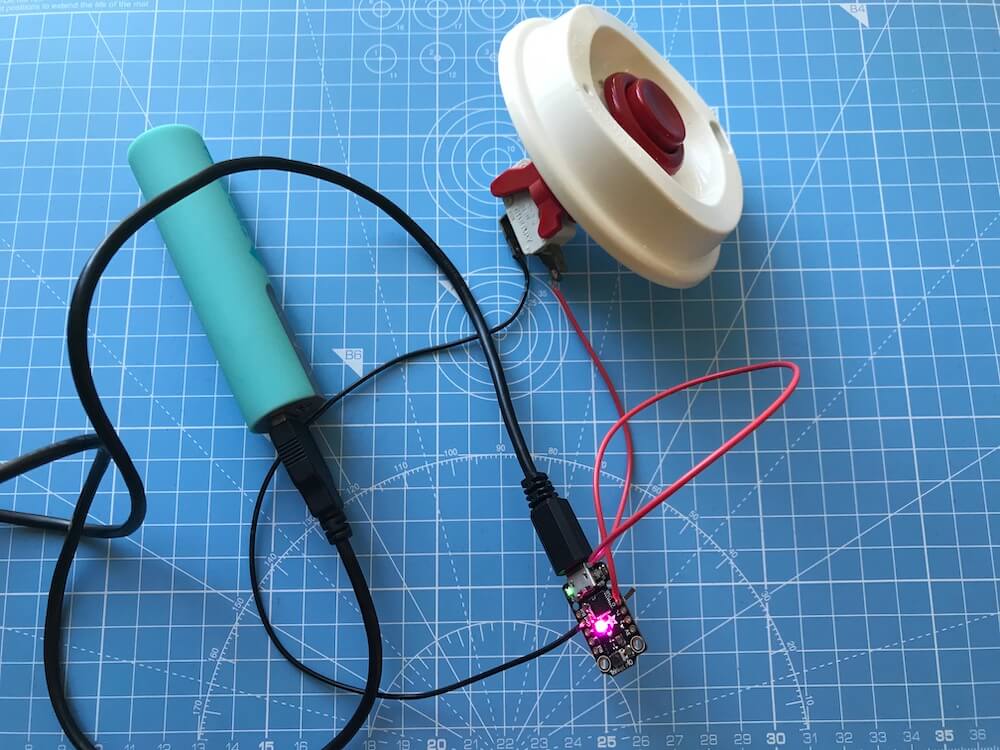
What you need is a single sturdy button that sends both of these toggle commands as quickly as possible. [Simon Prickett]’s panic switch does exactly that. It’s a delightfully tactile arcade button connected to a Trinket M0, which can emulate a keyboard quite easily as an Arduino or CircuitPython device.

This little keyboard doesn’t send these macros directly, because that would be way too risky. What if you were reading Hackaday instead of staring into the tiled faces of your coworkers? Then it wouldn’t work, because Zoom is out of focus.

Instead, it sends an obscure four-key macro to the computer that triggers an AppleScript. [Simon]’s AppleScript checks to see if Zoom is running. If not, it has the system announce the fact. If it is running, then the script sends cmd+shift+a and cmd+shift+v to Zoom directly to toggle the audio and video. Check out the demo after the break.

As you might expect, we’ve seen a couple of videoconference survival hacks over the past few months. Need to show something or work with your hands, but only have one camera? All you need is a mirror, a clothespin, and a length of wire for a simple split-screen setup.

Continue reading “Panic Button Is An Audio-Visual Parachute Out Of Zoom Calls”

Porsche’s Printed Pistons Are Powerful And Precise

The 700-horsepower Porsche 911 GT2 RS is already pretty darn fast — over three times faster than the average regular-person car on the road today. For the sports car enthusiast, there’s likely no ceiling on the need for speed and performance. And so, Porsche was able to wrangle another thirty horsepower out of their limited-run supercar by printing a set of ultra-lightweight pistons.

Pistons being lasered into existence. Image via The Drive

These pistons are printed from high-purity aluminium alloy powder that was developed by German auto parts manufacturer Mahle. Porsche is having these produced by Mahle in partnership with industrial machine maker Trumpf using the laser metal fusion (LMF) process. It’s a lot like selective laser sintering (SLS), but with metal powder instead of plastic.

The machine dusts the print bed with a layer of powder, and then a laser melts the powder according to the CAD file, hardening it into shape. This process repeats one layer at a time, and supports are zapped together wherever necessary. When the print job is finished, the pistons are machined into their shiny final form and thoroughly tested, just like their cast metal cousins have been for decades. Continue reading “Porsche’s Printed Pistons Are Powerful And Precise”

RadioGlobe Takes The World Of Internet Radio For A Spin

There’s no denying that the reach and variety of internet radio is super cool. The problem is that none of the available interfaces really give the enormity of the thing the justice it deserves. We long for a more physical and satisfying interface for tuning in stations from around the globe, and [Jude] has made just the thing.

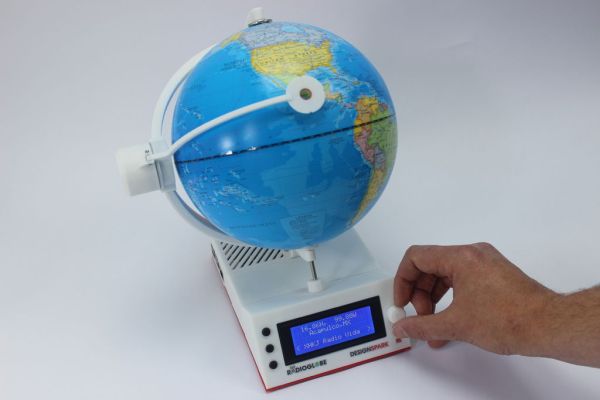
RadioGlobe lets the user tune in over 2000 stations from around the world by spinning a real globe. It works by using two absolute rotary encoders that each have a whopping 1024 positions available. One encoder is stuck into the South Pole, and it reads the lines of longitude as the user spins the globe.

The other encoder is on the left side of the globe, and reads whatever latitude is focused in the reticle. Both encoder are connected to a Raspberry Pi 4, though if you want to replicate this open-source project using the incredibly detailed instructions, he says a Raspberry Pi 3 B+ will work, too.

In the base there’s an LCD that shows the coordinates, the city, and the station ID. Other stations in the area are tune-able with the jog wheel on the base. There’s also an RGB LED that blinks red while the station is being tuned in, and turns green when it’s done. We totally dig the clean and minimalist look of this build — especially the surprise transparent bottom panel that lets you see all the guts.

There are three videos after theĀ  break – a short demo that gives you the gist of how it works, a longer demonstration, and a nice explanation of absolute rotary encoders. Those are just the tip of the iceberg, because [Jude] kept a daily vlog of the build.

Maybe you just long for a web radio that dials in vintage appeal. This antique internet radio has a lot of features, but you wouldn’t know it from the outside.

Continue reading “RadioGlobe Takes The World Of Internet Radio For A Spin”

Tiny Circuit Sculpture Keeps The Night Watch

If you’re planning to get into circuit sculpture one of these days, it would probably be best to start with something small and simple, instead of trying to make a crazy light-up spaceship or something with a lot of curves on the first go. A small form factor doesn’t necessarily mean it can’t also be useful. Why not start by making a small automatic night light?

The circuit itself is quite simple, especially because it uses an Arduino. You could accomplish the same thing with a 555, but that’s going to complicate the circuit sculpture part of things a bit. As long as the ambient light level coming in from the light-dependent resistor is low enough, then the two LEDs will be lit.

We love the frosted acrylic panels that [akshar1101] connected together with what looks like right angle header pins. If you wanted to expose the electronics, localize the light diffusion with a little acrylic cover that slips over the LEDs. Check it out in the demo after the break.

There’s more than one way to build a glowing cuboid night light. The Rubik’s way, for instance.

Continue reading “Tiny Circuit Sculpture Keeps The Night Watch”

Hex Matrix Clock Is Spellbinding

Just when we think we’ve seen all possible combinations of 3D printing, microcontrollers, and pretty blinkenlights coming together to form DIY clocks, [Mukesh_Sankhla] goes and builds this geometric beauty. It’s kaleidoscopic, it’s mosaic, and it sorta resembles stained glass, but is way cheaper and easier.

The crucial part of the print does two jobs — it combines a plate full of holes for a string of addressable RGB LEDs with the light-dividing walls that turn the LEDs into triangular pixels. [Mukesh] designed digits for a clock that each use ten triangles. You’d need an ESP8266 to run the clock code, or if you’d rather sit and admire the rainbow light show unabated by the passing of time, just use an Arduino Uno or something similar.

Most of the aesthetic magic here is in the printed pieces and the FastLED library. It has a bunch of really cool animations baked in that look great with this design. Check out the demo video after the break. The audio is really quiet until the very end of the video, so be warned. In our opinion, the audio isn’t necessary to follow along with the build.

The humble clock takes many lovely forms around here, including pop art.

Continue reading “Hex Matrix Clock Is Spellbinding”