3D Printing With Multiple Soluble Filaments

Complex 3D-printed designs often require the use of an automatically generated support structure around them for stability. While this enables some truly incredible results, it adds considerable time and cost to the printing process. Plus there’s the painstaking process of removing all the support material without damaging the object itself. If you’ve got a suitably high-end 3D printer, one solution to this problem is doing the supports in a water soluble filament; just toss the print into a bath and wait for the support to dissolve away.

But what if you’re trying to print something that’s complex and also needs to be soluble? That’s precisely what [Jacob Blitzer] has been experimenting with recently. The trick is finding two filaments that can be printed at the same time but are dissolved with two different solutions. His experimentation has proved it’s possible to do with consumer-level hardware, but it isn’t easy and it’s definitely not cheap.

You might be wondering what the possible application for this technique is. For [Jacob], he wanted to be able to print hollow molds in complex geometric shapes that would ultimately be filled with concrete. The molds required extensive internal supports that would have been all but impossible to remove if they weren’t printed in a soluble filament. But he also wanted to be able to dissolve the mold once the concrete inside had cured. So he needed one easy to dissolve filament for the supports, and a harder to dissolve one for the actual mold.

For the mold itself, [Jacob] went with High Impact Polystyrene (HIPS) which can be dissolved with an industrial degreaser called Limonene. It’s expensive, and rather nasty to work with, but it does an excellent job of eating away the HIPS so that’s one problem solved. Finding a water-soluble filament for the supports that could be printed at similar temperatures to the HIPS took months of research, but eventually he found one called HyroFill that fit the bill. Unfortunately, it costs an eye-watering $175 USD per kilogram.

So you have the filaments, but what can actually print them at the same time? Multi-material 3D printing is a tricky topic, and there’s a few different approaches that have been developed over the years. In the end, [Jacob] opted to go with the FORMBOT T-Rex that uses the old-school method of having two individual hotends and extruders. It’s the simplest method conceptually, but calibrating such a machine is notoriously difficult. Running two exotic and temperamental filaments at the same time certainly doesn’t help matters.

After all the time, money, and effort put into the project (he also had to write the software that would create the 3D models in the first place) [Jacob] says he’s not exactly thrilled with the results. He’s produced some undeniably stunning pieces, but the failure rate is very high. Still, it’s fascinating research that appears to be the first of its kind, so we’re glad that he’s shared it for the benefit of the community and look forward to seeing where it goes from here.


A Chrome Extension For Configuring RGB LEDs

Like pretty much all of us, [Andy Schwarz] loves RGB LEDs. Specifically he likes to put them on RC vehicles, such as navigation lights on airplanes or flashers and headlights on cars. He found himself often rewriting very similar Arduino code for each one of these installations, and eventually decided he could save himself (and all the other hackers in the world) some time by creating a customizable Arduino firmware specifically for driving RGB LEDs.

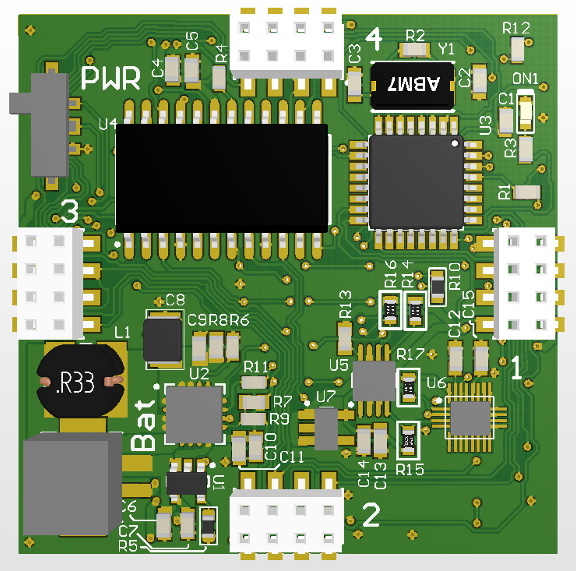
The software side of this project, which he’s calling BitsyLED, actually comes in two parts. The first is the firmware itself, which is designed to control common RGB LEDs such as the WS2812 or members of the NeoPixel family. It can run on an Arduino Pro Mini with no problems, but [Andy] has also designed his own open hardware control board based on the ATtiny84 that you can build yourself. Currently you need a USBASP to program it, but he’s working on a second version which will add USB support.

With your controller of choice running the BitsyLED firmware, you need something to configure it. For that, [Andy] has developed a Chrome extension which offers a very slick user interface for setting up colors and patterns. The tool even allows you to create a visual representation of your LEDs so you can get an idea of what it’s going to look like when all the hardware is powered up.

RGB LEDs such as the WS2812 are some of the most common components we see in projects today, mainly because they’re so easy to physically interface with a microcontroller. But even though it only takes a couple of wires to control a large number of LEDs, you still need to write the code for it all. BitsyLED takes a lot of the hassle out of that last part, and we’re very interested to see what the hacker community makes of it.

Continue reading “A Chrome Extension For Configuring RGB LEDs”

Putting Some Smarts Into An Electric Car Charger

Many electric cars feature a timer capability that allows the owner to set which hours they want the vehicle to start pulling a charge. This lets the thrifty EV owner take advantage of the fact that the cost of electricity generally goes down late at night when the demand is lower. The Renault Zoe that [Ryan Walmsley] owns has this feature, but not only does it cost him extra to have it enabled, it’s kind of a hassle to use. So being an enterprising hacker, he decided to implement his own timer in the charger itself.

Now controlling high voltages with a lowly microcontroller might sound dangerous, but it’s actually not nearly as tricky as you might think. The charger and the vehicle actually communicate with low-voltage signals to determine things like the charge rate, so it turns out you don’t need to cut into the AC side of things at all. You just need to intercept the control signals between the two devices and modify them accordingly.

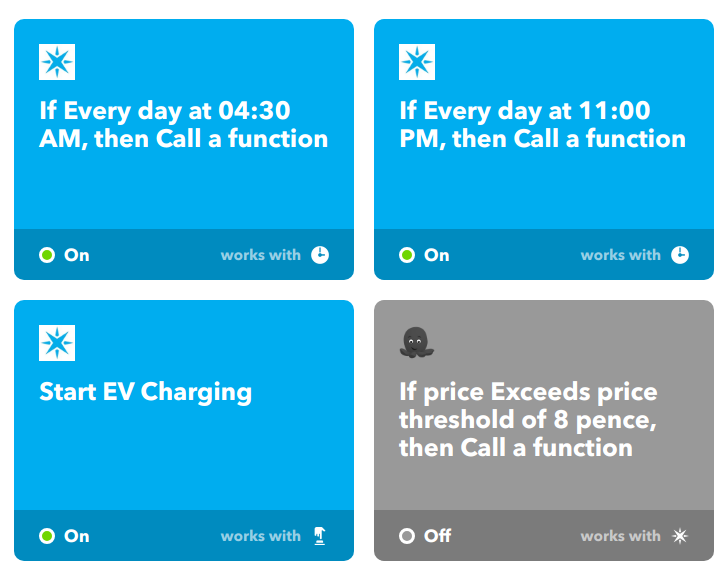
Or do you? As [Ryan] eventually realized, he didn’t need to bother learning how the control signals actually worked since he wasn’t trying to do anything tricky like set the charge rate. He just wanted to be able to stop and start the charging according to what time it was. So all he had to do was put the control signal from his car through a relay controlled by a Particle Photon, allowing him to selectively block communication.

The charger also had an optional key lock, which essentially turns the controller off when the contacts are shorted. [Ryan] put a relay on that as well so he could be absolutely sure the charger cuts the juice at the appropriate time. Then it was just a matter of getting the schedule configured with IFTTT. He mentions the system could even be tweaked to automatically control the charger based on the instantaneous cost of electricity provided by the utility company, rather than assuming overnight is always the most economical.

We’ve seen a fair amount of electric car hacking, but with only a few exceptions, the projects always steer clear of modifying the actual chargers themselves. In general hackers feel a lot safer playing around in the world of DC, but as [Ryan] has shown, safely hacking your EV charger is possible if you do your homework.

Driving A 16×2 LCD With Voltage Modulation

The basic 16×2 LCD is an extremely popular component that we’ve seen used in more projects than we could possibly count. Part of that is because modern microcontrollers make it so easy to work with; if you’ve got an I2C variant of the display, it only takes four wires to drive it. That puts printing a line of text on one of these LCDs a step or two above blinking an LED on a digital pin on the hierarchy of beginner’s electronics projects.

What’s that? Even four wires is too many? In that case, you might be interested in this hack from [Vinod] which shows how you can drive the classic 16×2 with data and power on the same pair of wires. You’ll still need a microcontroller “backpack” for the LCD to interpret the modulated voltage, but if you’ve got an application for a simple remote display, this is definitely worth checking out.

The basic idea is to “blink” the 5 V line so quick that a capacitor on the LCD side can float the electronics over the dips in voltage. As long as one of the pins of the microcontroller is connected to the 5 V line before the capacitor, it will be able to pick up when the line goes low. With a high enough data rate and a large enough capacitor as a buffer, you’re well on the way to encoding your data to be displayed.

For the transmitting side, [Vinod] is using a Python script on his computer that’s sending out the text for the LCD over a standard USB to UART converter. That’s fed into a small circuit put together on a scrap of perfboard that triggers a MOSFET off of the UART TX line.

We actually covered the theory behind this technique years ago, but it’s always interesting to see somebody put together a real-world example. There might not be too many practical uses for this trick in the era of dirt-cheap microcontrollers bristling with I/O, but it might make a fun gag at your hackerspace.

Continue reading “Driving A 16×2 LCD With Voltage Modulation”

Resistance Is Futile, You Want This LED Cube

We’re suckers for a good desk toy here at Hackaday, so this 2019 Hackaday Prize entry from [Jack Flynn] certainly caught our eye. The idea is that by using professionally manufactured dual layer PCBs and only surface mount components, you can create a cube that has an LED matrix on each face and all of the electronics hidden within. We’re not entirely sure if there’s any practical application for such a device, but we know we’d certainly like to have one blinking madly away on our shelf regardless.

Before having any of the PCBs manufactured, [Jack] is putting a considerable amount of thought into the design so he doesn’t end up painting himself info a corner (which is of course eight times as bad when you’re building a cube). By importing the PCB files into OnShape, he’s able to “assemble” a virtual representation of the final product to better understand how everything will fit together. He wants to limit the amount of times the cube will need to be pulled apart, so everything from how it will sit in its 3D printed cradle to the placement of breakaway tabs that ensure the internal power switch is accessible are being carefully planned out.

The current design puts the “brains” on the bottom board, with every other panel holding a daisy-chained MAX7219 to drive its own individual 64 LED matrix. Initially the dimensions of the ATmega328p powered cube will be 42 x 42 x 42 mm, with a total of 384 LEDs. Ultimately, [Jack] hopes the modular nature of the design could allow the size of the cube to be increased, or perhaps even take on a different shape entirely.

Generally the LED cubes we see are of the more wiry variety, so it’s particularly interesting when they take on solid forms like this one. Given the nearly universal popularity of blinking LED gadgets, we think this particular project is well positioned to make the leap from one-off hack to a commercial product.

Continue reading “Resistance Is Futile, You Want This LED Cube”

RFID Payment Ring Made From Dissolved Credit Card

RFID payment systems are one of those things that the community seems to be divided on. Some only see the technology as a potential security liability, and will go a far as to disable the RFID chip in their card so that it can’t be read by a would-be attacker. Others think the ease and convenience of paying for goods by tapping their card or smartphone on the register more than makes up for the relatively remote risk of RFID sniffers. Given the time and effort [David Sikes] put into creating this contactless payment ring, we think it’s pretty clear which camp he’s in.

Alright, so the whole ring making part sounds easy enough, but how does one get an RFID chip that’s linked to their account? Easy. Just call the bank and ask them for one. Of course, they won’t just send you out a little RFID chip and antenna to mount in your hacked up project. (If only things were so simple!) But they will send you a new card if you tell them your old one is getting worn out and needs a replacement. All you have to do when it gets there is liberate the electronics without damaging them.

[David] found that an hour or so in an acetone bath was enough to dissolve the plastic and expose the epoxy-encased RFID chip, assuming you scrape the outer layers of the card off first. He notes that you can speed this part of the process up considerably if you know the exact placement and size of the RFID chip; that way you can cut out just the area you’re interested in rather than having to liquefy the whole card.

Once you have your chip, you just need to mount it into a ring. [David] has designed a 3D printable frame (if you’ve got a high-resolution SLA machine, that is) which accepts the chip and a new antenna made from a coil of 38 AWG magnet wire. With the components settled into the printed frame, its off to a silicone mold and the liberal application of epoxy resin to encapsulate the whole thing in a durable shell.

If a ring is not personal enough for you, then the next step is getting the RFID chip implanted directly into your hand. There are even folks at hacker cons who will do that sort of thing for you, if you’re squeamish.

Continue reading “RFID Payment Ring Made From Dissolved Credit Card”

Retrotechtacular: Balloons Go To War

To the average person, the application of balloon technology pretty much begins and ends with birthday parties. The Hackaday reader might be able to expand on that a bit, as we’ve covered several projects that have lofted various bits of equipment into the stratosphere courtesy of a high-altitude balloons. But even that is a relatively minor distinction. They might be bigger than their multicolored brethren, but it’s still easy for a modern observer to write them off as trivial.

But during the 1940’s, they were important pieces of wartime technology. While powered aircraft such as fighters and bombers were obviously more vital to the larger war effort, balloons still had numerous defensive and reconnaissance applications. They were useful enough that the United States Navy produced a training film entitled History of Balloons which takes viewers through the early days of manned ballooning. Examples of how the core technology developed and matured over time is intermixed with footage of balloons being used in both the First and Second World Wars, and parallels are drawn to show how those early pioneers influenced contemporary designs.

Even when the film was produced in 1944, balloons were an old technology. The timeline in the video starts all the way back in 1783 with the first piloted hot air balloon created by the Montgolfier brothers in Paris, and then quickly covers iterative advancements to ballooning made into the 1800’s. As was common in training films from this era, the various “reenactments” are cartoons complete with comic narration in the style of W.C. Fields which were designed to be entertaining and memorable to the target audience of young men.

While the style might seem a little strange to modern audiences, there’s plenty of fascinating information packed within the film’s half-hour run time. The rapid advancements to ballooning between 1800 and the First World War are detailed, including the various instruments developed for determining important information such as altitude and rate of climb. The film also explains how some of the core aspects of manned ballooning, like the gradual release of ballast or the fact that a deflated balloon doubles as a rudimentary parachute in an emergency, were discovered quite by accident.

When the film works its way to the contemporary era, we are shown the process of filling Naval balloons with hydrogen and preparing them for flight. The film also talks at length about the so-called “barrage balloons” which were used in both World Wars. Including a rather dastardly advancement which added mines to the balloon’s tethers to destroy aircraft unlucky enough to get in their way.

This period in human history saw incredible technological advancements, and films such as these which were created during and immediately after the Second World War provide an invaluable look at cutting edge technology from a bygone era. One wonders what the alternative might be for future generations looking back on the technology of today.

Continue reading “Retrotechtacular: Balloons Go To War”