Counter-Strike Gets The RGB LED Treatment

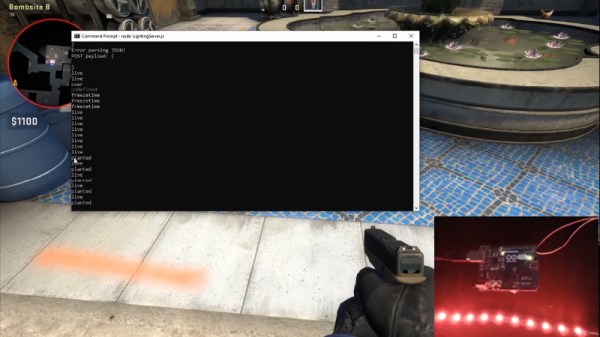
Inspired by the over-the-top stage lighting and pyrotechnics used during e-sport events, [Hans Peter] set out to develop a scaled-down version (minus the flames) for his personal Counter-Strike: Global Offensive sessions. It might seem like pulling something like this off would involve hacking the game engine, but as it turns out, Valve was kind enough to implement a game state API that made it relatively easy.

According to the documentation, the CS:GO client can be configured to send out state information to a HTTP server at regular intervals. It even provided example code for implementing a simple state server in Node.js, which [Hans] adapted for this project by adding some conditional statements that analyze the status of the current game.

These functions fire off serial commands to the attached Arduino, which in turn controls the WS2812B LEDs. The Arduino code takes the information provided by the HTTP server and breaks that down into various lighting routines for different conditions such as wins and losses. But things really kick into gear when a bomb is active.

[Hans] wanted to synchronize the flashing LEDs with the beeping sound the bomb makes in the game, but the API doesn’t provide granular enough data. So he recorded the audio of the bomb arming sequence, used Audacity to precisely time the beeps, and implemented the sequence in his Arduino code. In the video after the break you can see that the synchronization isn’t perfect, but it’s certainly close enough to get the point across in the heat of battle.

With the special place that Counter-Strike occupies in the hearts of hackers and gamers alike, it’s little surprise people are still finding unique ways to experience the game.

Continue reading “Counter-Strike Gets The RGB LED Treatment”
Sherbet Custom Game Pad Is Smooth And Sweet

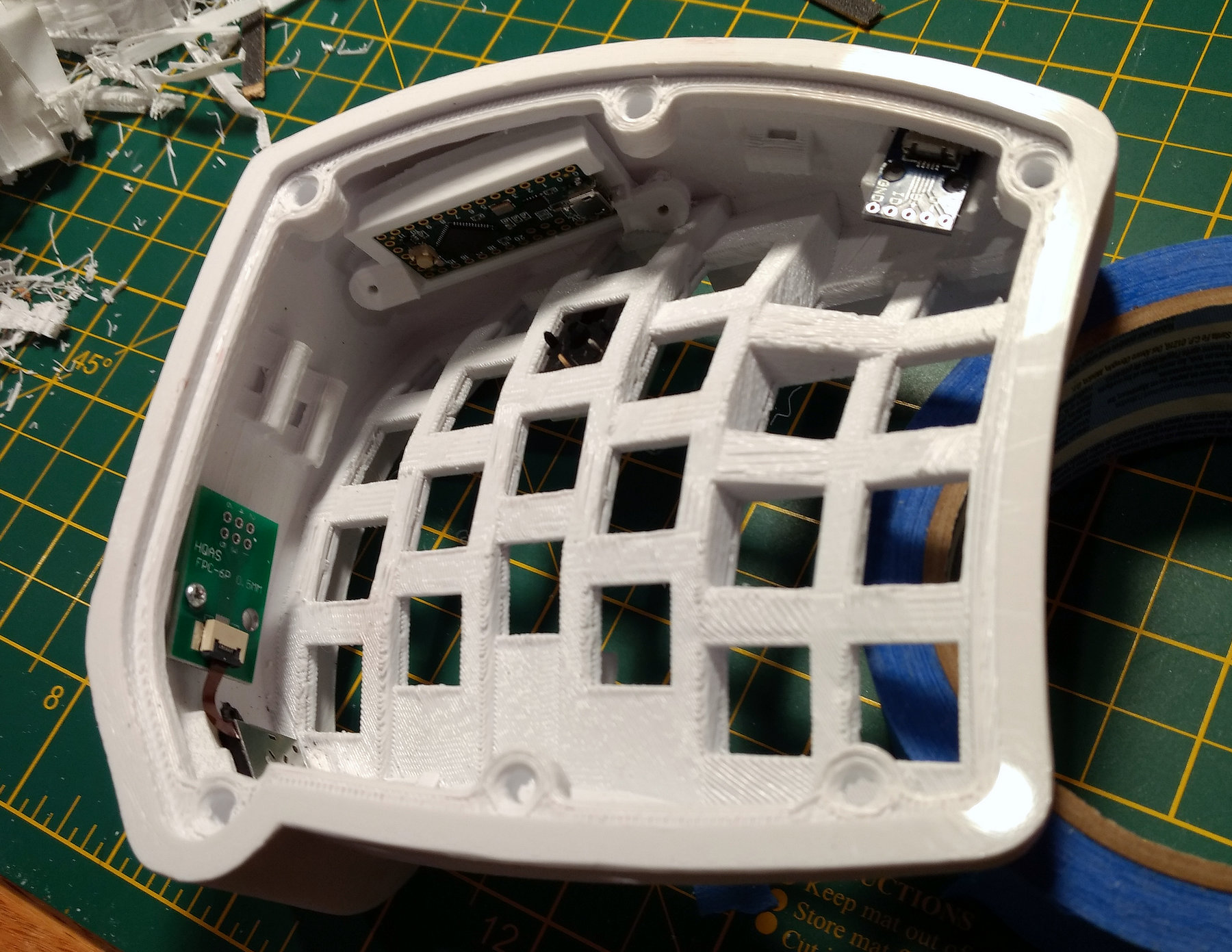
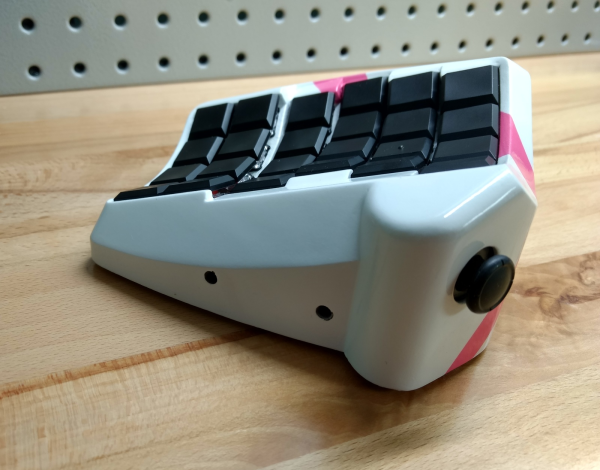
When [Billiam]’s beloved Logitech G13 game pad went to that great spectate room in the sky, he decided to pay homage by designing a custom, more ergonomic replacement from the desk up. Grab a spoon and dig into the story of [Billiam]’s journey toward Sherbet, because it’s a sweet ride.

Here’s the scoop: like a lot of DIY game pads and keyboards, Sherbet is based on the Teensy. We often see the micro USB coming straight off the Teensy, especially in clear acrylic builds, but [Billiam] added a USB breakout board so there’s no direct stress on the Teensy itself.

One of [Billiam]’s design challenges comes from the game pad placement — he has a tall desk and uses a keyboard tray, so it has to fit the space and leave enough room for his hand. Fortunately, there are low-profile mechanical switches out there, although the keycap options are strongly limited. We love that [Billiam] embedded a tiny ceramic bearing into one of them to use as a homing bump, because that’s a great idea.

If you want to take a crack at this project, [Billiam] has all the goodies laid out. [Billiam] wanted to use QMK firmware, but they didn’t have joystick support yet, so he’s got an Arduino sketch running in the meantime.

We love a good custom game pad around here, especially if they can reprogram themselves.

Why Settle For The Standard Catan Board?

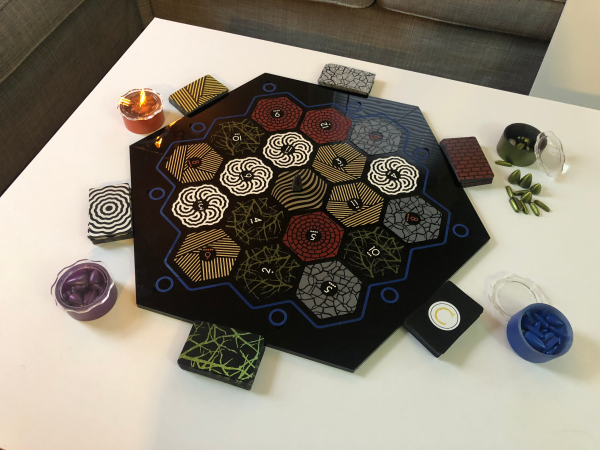
Let’s face it, game night can get downright rowdy. Whether your game nights involve wine and cats, beer and dogs, or vodka and bear cubs, things happen. Maybe the robber gets batted irretrievably far under the couch, or someone gesticulates wildly and spills wine all over your sheep. [EEEEEEEEEDEN]’s gatherings were getting way out of hand, and it was time to design a custom Catan board.

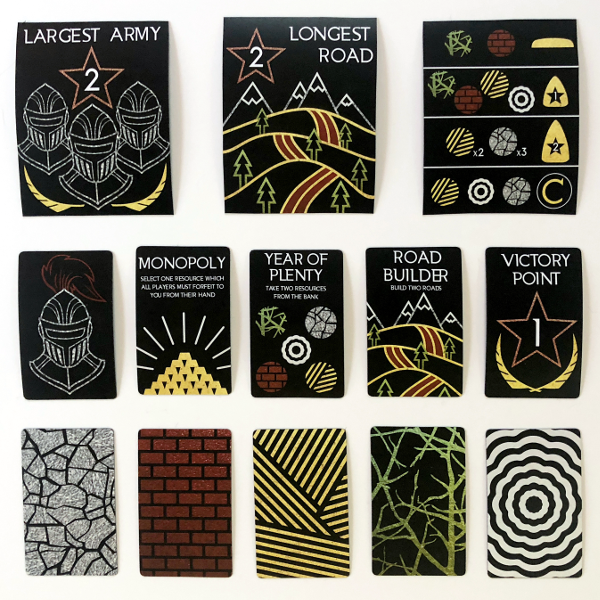
But she didn’t stop with the board tiles — this is Catan redesigned from the ground up, including the pieces, the resource cards, and a custom storage box. [EEEEEEEEEDEN] even planned for player expansion by designing a leaf to drop in the middle. There are a few hundred magnets built into the frame, so there shouldn’t be any more lost pieces. And as far as liquor-proofing all the cardboard goes, [EEEEEEEEEDEN] designed new board tiles and cards, laser cut them from acrylic, and painstakingly painted them all with Plasti-Dip spray.

We think it’s gorgeous, but understand that maybe this minimalist style isn’t for everyone. If you want to go custom, it’s hard to argue against the beauty of 3D Catan.

Thanks to [Johannes] for the tip! via /r/DIY

3D Printing For Wire Paths Yields An Arduboy Minus The PCB

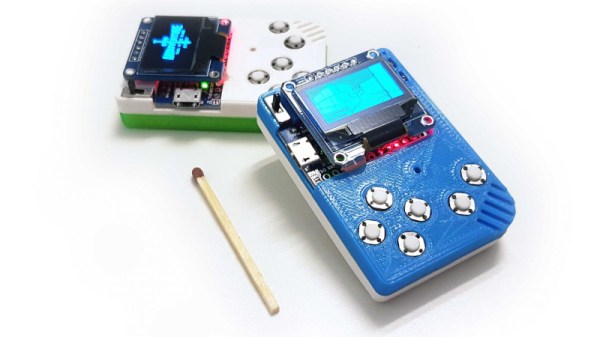
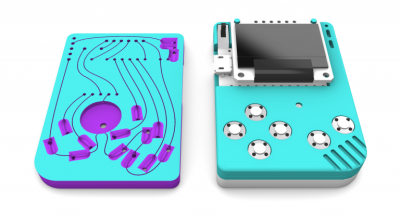
What is part way between a printed circuit board and a rats-nest of point-to-point wiring? We’re not sure, but this is it. [Johan von Konow] has come up with an inspired solution, 3D printing an Arduboy case with channels ready-made for all the wires. The effect with his 3DPCBoy is of a PCB without the PCB, and allows the console to be made very quickly and cheaply.

The Arduboy — which we originally looked at back in 2014 — is a handheld gaming console in a somewhat Gameboy-like form factor. Normally a credit-card sized PCB hosts all the components, including a microcontroller, display, and buttons. Each has a predictable footprint and placement so they can simply be wired together with hookup wire, if you don’t mind a messy result.

Here the print itself has all the holes ready-created for the components, and the path of the wires has a resemblance to the sweeping traces of older hand-laid PCBs. The result is very effective way to take common components — and Arduino pro micro board for the uC, an OLED breakout board, and some buttons — and combine them into a robust package. This technique of using 3D prints as a combination of enclosure and substrate for components and wiring has an application far beyond handheld gaming. We look forward to seeing more like it.

[Via the Arduboy community forum, thanks Kevin Bates for the tip.]

Up Your Game With DIY Headset Motion Tracking

While there’s been a lot of advancements in VR gaming over the last couple of years, plenty of folks are still happy enough to just stare at their monitor. But that’s not to say some of those fancy head-tracking tricks wouldn’t be a welcome addition to their repertoire. For players who are literally looking to get their head in the game, [Adrian Schwizgebel] has created qeMotion.

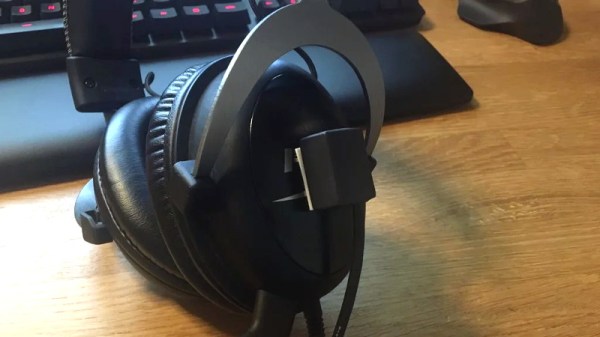
The idea here is simple enough: attach a motion sensor to a standard gaming headset (here a MPU-6050 IMU), and use the data from it to virtually “press” keys through USB HID emulation. Many first person shooter games offer the ability to lean left or right by pressing Q or E respectively, so all [Adrian] had to do was map the appropriate accelerometer readings to those keys for it to work seamlessly with popular titles such as Tom Clancy’s Rainbow Six Siege and Insurgency.

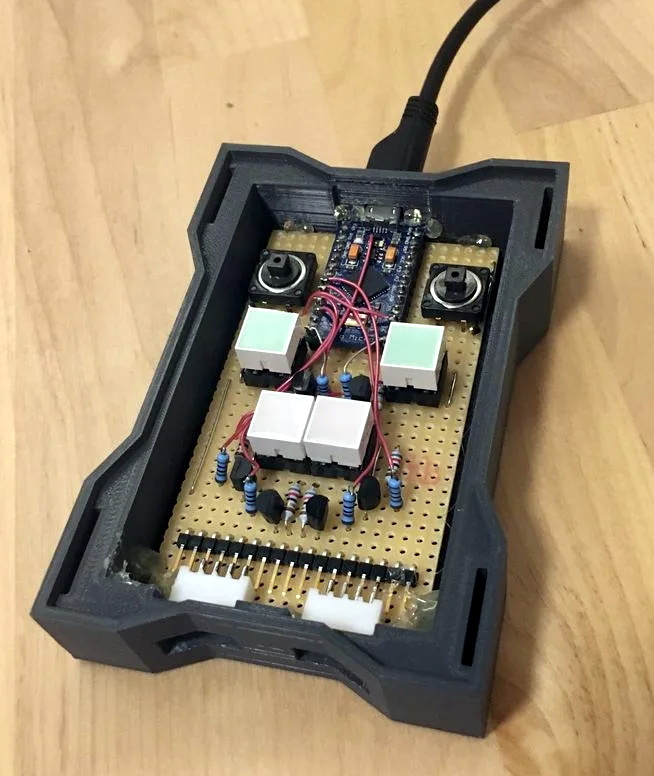
The concept might be basic, but the execution is anything but. Rather than just duct taping an Arduino to his headset, [Adrian] designed a very slick 3D printed enclosure for the electronics that sits on his desk. While they haven’t all been implemented yet, the devices features indicator lights and buttons to switch through various modes. The sensor on the headset has similarly been encased in a very professional looking 3D printed box, complete with a nice braided cable to link it to the desk unit.

It’s been awhile since we’ve seen a head tracking project, and most of those utilized something like the Wii Remote. Adding sensors to a person’s head normally wouldn’t be an ideal situation, but if you’re going to be wearing the headset anyway to listen to the game and chat, it’s not really a problem. If your hair is too nice for the qeMotion, you could always try doing something similar with computer vision.

Continue reading “Up Your Game With DIY Headset Motion Tracking”

An Arcade Cabinet With Displays To Spare

We’ve all got a pretty good mental image of what an arcade cabinet looks like, so you probably don’t need to be reminded that traditionally they are single-screen affairs. But that idea dates back to when they were built around big and bulky CRT displays. Now that we have modern LCD, LED, and OLED panels, who says you have to follow the old rules?

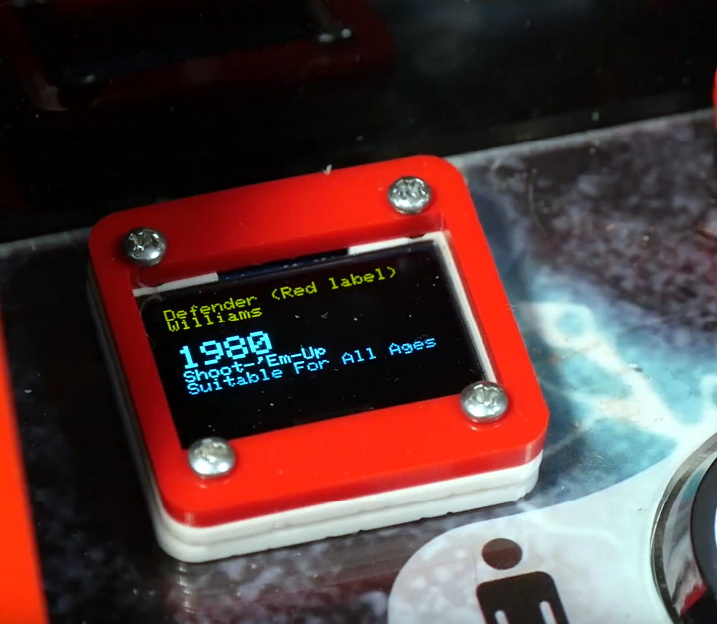
That’s precisely the sort of out of the box thinking that lead [Al Linke] to build this unique multi-display arcade cabinet. The game itself is still played on a single screen, but several smaller sub-displays are dotted all around the cabinet to indicate various bits of ancillary information. Are they necessary? Hardly. But we can’t deny it’s a clever idea, and we wouldn’t be surprised if we start seeing something similar in other DIY cabinets.

The build started with a commercially available cabinet from Arcade1Up, which at this point are popular enough that some of the Big Box retailers have them in stock. All of the electronics except for the display were stripped out, and replaced with a Dell OptiPlex 9020 computer and high-quality joysticks and buttons. [Al] then installed his various displays all over the cabinet, including a gorgeous LED marquee that we’ve featured previously.

So what do all these little screens do? [Al] explains them in the video after the break, but the general idea is that they provide contextual information about the game you currently have loaded up. A two-color OLED display shows the name of the game and what it’s rated, while a seven segment LED display shows the year the game was released. The displays are located both by the controls and where you’d expect the coin slot to be, so whether you’re actively playing or across the room, you can see all the information.

We’re always amazed to see how builders find ways to make their own personal arcade cabinets stand out. While it’s an idea that at this point we’ve seen quite a lot of, no two projects have ever been quite the same.

Continue reading “An Arcade Cabinet With Displays To Spare”

The Multiyear Hunt For A Gameboy Game’s Bug

[Enddrift] had a real problem trying to run a classic game, Hello Kitty Collection: Miracle Fashion Maker, into a GBA (Gameboy Advance) emulator. During startup, the game would hit an endless loop waiting for a read from a non-existent memory location and thus wouldn’t start under the emulator. The problem is, the game works on real hardware even though that memory doesn’t exist there, either.

To further complicate things, a similar bug exists when loading a saved game under Sonic Pinball Party. Then a hack for Pokemon Emerald surfaced that helped break the case. The story is pretty interesting.

Continue reading “The Multiyear Hunt For A Gameboy Game’s Bug”