Autopsy Of A Freshly Cooked 10Gbit SFP+ Network Adapter

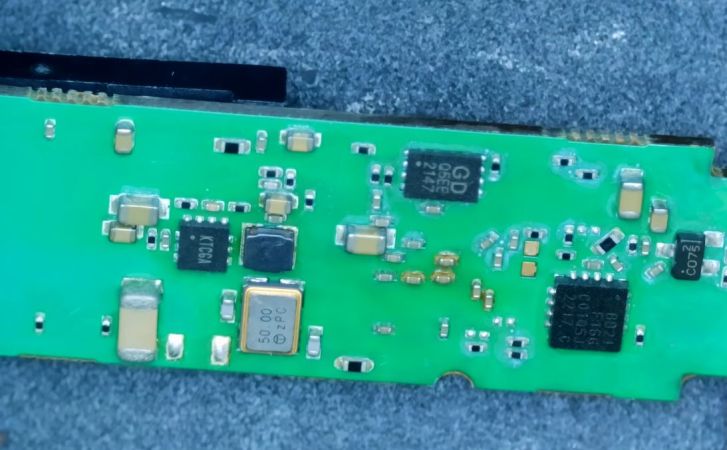
With the advent of affordable 2.5 Gbit, 5 Gbit, and 10 Gbit consumer networking gear, more and more people are taking advantage of these higher networking speeds, with [This Does Not Compute] having used 10 Gbit SFP+ modules over regular Cat-5e copper to connect to a NAS in the next room. Only problem was that after a while these SFP+ modules began to start dropping frames. On taking a closer look at these modules, he found that they were running pretty hot: 40°C while idle. A teardown of one of these modules showed severe discoloration due to heat.
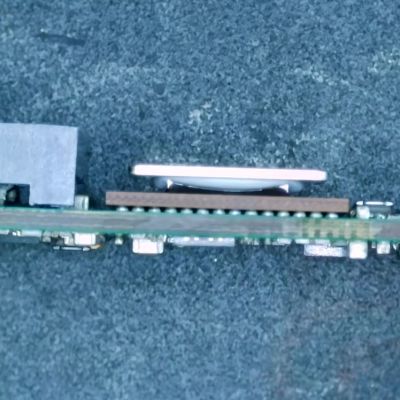
Side view of the SFP+ module's PCB. (Credit: This Does Not Compute, YouTube)
Side view of the SFP+ module’s PCB. (Credit: This Does Not Compute, YouTube)

Inside these 10Gbit modules is the Marvell-branded Alaska X 88X3310/40P PHY, which despite the ‘low-power’ claims have a metal heatsink glued onto the actual IC and thermally coupled to the module’s metal enclosure. The other side of the PCB was quite discolored, further indicating how hot these modules run in operation. Some digging revealed that this can go up to around 2.5 watts.

Perhaps the most fascinating part of this teardown is the discovery of an 8051-based MCU that’s responsible for telling the switch the module is put into that it is a 30-meter multi-mode fiber module, presumably for compatibility purposes. It’s definitely an interesting feature of these FS-branded SFP+ modules.

These old modules were replaced with Wiitek-branded modules that are supposed to use only up to around 1.5 watts in operation courtesy of a newer chipset, in the hope that these wouldn’t fry themselves. At idle these do however still run at 30 °C. As noted in the comments, it might be a good idea to have active airflow over high-speed networking gear like this, as they generally can get pretty hot and sometimes crispy.

The final solution for the video’s networking problem was to just run single-mode fiber to the room and use appropriate SFP+ modules for that, also because these run noticeably cooler. If you still have room in your cable ducts, that would seem to be the optimal solution.

Continue reading “Autopsy Of A Freshly Cooked 10Gbit SFP+ Network Adapter”

4:3 screenshot? Either period-appropriate hardware or a VM.

Meshcore And Haiku: A Match Apparently Made In Italy

No, we’re not talking about cultural appropriation of Japan’s most famous form of short poem–this is the other Haiku, the open-source descendant of BeOS, which now has a fully-native meshcore chat client called Sestriere, thanks to the efforts of one [Atomozero]. Of course you’ll need a LoRa radio to act as a modem, but anything that speaks USB serial– which is any of the ESP32-based offerings on the market–should work.

This is interesting in that we don’t see many desktop applications leveraging LoRa networks– meshtastic or meshcore– so for one to appear for the relatively-obscure BeOS derivative is just neat. It’s also a nice peice of work: the chat window is full featured, organizing your contacts, and communicating not just with text but emojis and reaction GIFs. GIFs seem a bit extravagant for LoRa bandwith, but apparently it works. There are also Codec2-based voice messages, another thing that we didn’t expect to see over LoRa, since most ‘chat’ projects restrict themselves to text messaging.

The chat window. One nice thing about Haiku APIs is that look-and-feel isn’t in question.

The software will also map all the nodes with which you are in contact, both diagrammatically and geographically, overlaid on OpenStreetMap tiles. The network map conveniently colour-codes your contacts by the link quality, but what’s even more interesting is the WireShark-inspired packet sniffer built into the software to let you keep a really close eye on traffic on the mesh network.

Neither Haiku or MeshCore are to everyone’s tastes, but as an OS it is a worthy daily driver, even if you have to jump through some hoops to install it if you have a UEFI-only system.

If you need more range, try a Yagi.

An Ethernet WiFi Router On A Pi Pico 2W

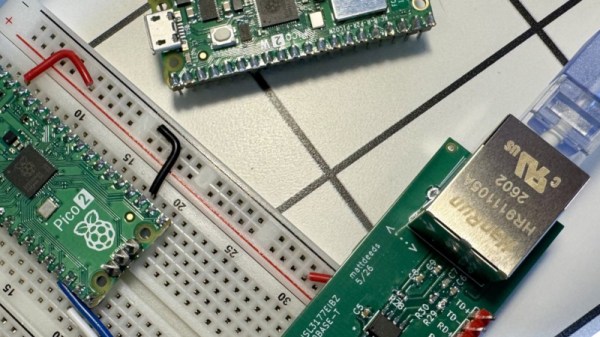
We are all in search of the fastest in a wireless router, to give ourselves the best connectivity to the world. But what about the slowest? Gigabit Ethernet may not be for everyone, as Matt Deeds demonstrates with bit-banged 10baseT Ethernet on a Raspberry Pi Pico 2W.

The project is written in Rust, and is in part a port of an earlier project. It makes use of Ethernet magnetics, but the rest of the works is all done in software. He says it’s full-speed on transmit and reduced speed on receive, but we’re guessing if you’re using 10baseT in 2026 then speed isn’t your number one concern anyway. It provides a WiFi router as well as a wired connection, making it possibly the cheapest Ethernet to wireless solution possible.

We like projects that extract the last ounce of power from a part to make it do something its designers never intended. In this case we’ve seen a few other bit-banged Ethernet projects before, even another on the Pi Pico.

Revisiting Making Your Own Internet Router In 2026

After my recent misadventures setting up an OpenWrt installation on a scruffy e-waste-level x86 PC, quite a few people chimed in with feedback, criticism and friendly hostility regarding things like a presumed ‘x86 bias’. There were also some system-related things that simply didn’t seem to want to work, such as booting from an SD card with a USB adapter, which cut short a lot of the actual OpenWrt testing that I had intended. This made it mostly an enlightening look at what issues you can run into when ‘quickly’ throwing an OpenWrt router together with some junk parts these days.

In this second article I’ll try to address as many of these points as possible, as well as attempt to show off an actual working OpenWrt installation in action. In addition, since just using random junk x86 PC parts was the way to go back in the late 90s/early 2000s doesn’t mean that this is still the way in 2026, so I’ll be taking a look at alternatives that exist today. This includes everything from mini PCs, to ancient business PCs being sold for peanuts, as well as more dedicated (ARM-based) hardware solutions.

Continue reading “Revisiting Making Your Own Internet Router In 2026”

How The Banana Pi BPI-R4 Pro Violates The First Rule Of OpenWRT Club

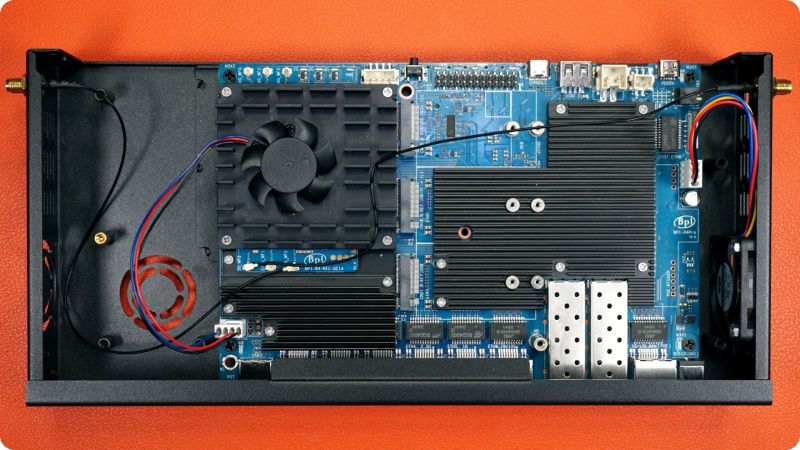
As fun as ARM and RISC-V single-board computers (SBCs) are, all too often getting the most out of the hardware requires the use of an unofficial firmware image. So too with the Banana Pi BPI-R4 Pro router SBC that has been out for a while, as OpenWRT support for it still very much unofficial. This is where [Interfacing Linux] goes on a bit of a rant while assembling one of these puppies into a sleek metal enclosure.

The first rule of OpenWRT Club is of course that you never run an unofficial image on any hardware that’s part of any network you care about. This is somewhat upsetting, as the testing shown in the video below reveals that performance is great when running it.

Currently OpenWRT support is painfully working its way through development, per the OpenWRT PR thread, so there’s hope that official support will appear at some point. As with all of such SBCs the question is always whether official support appears before the hardware has been rendered firmly obsolete. Until then the community Debian 13 image might actually be safer.

Continue reading “How The Banana Pi BPI-R4 Pro Violates The First Rule Of OpenWRT Club”

Between-Device Sharing Still Sucks

Once upon a time, computing was simple. You had files on a floppy disk. If you wanted to take them to a different computer, you ejected the disk from one machine and put it in another. It wasn’t fast, but it was easy and intuitive. Besides, you probably only had one computer of your own, anyway.

Life has since gotten a lot more complex. You’ve got a desktop, a laptop, a work laptop, your personal and business phones, and a smart watch to boot. You live amongst a swirling maelstrom of terabytes of data. Despite all the technical advances that got you here, it’s still a pain to get a file from one device to another, even when they’re sitting on the same desk. Why?!

Continue reading “Between-Device Sharing Still Sucks”

The 8-bit Web Server

Even [maurycyz] doesn’t think it is a good idea, but it is possible to use an AVR 8-bit CPU to serve web pages. Of course, it is a vastly simplified web server, but it does serve pages — OK, technically just one page — to the public Internet.

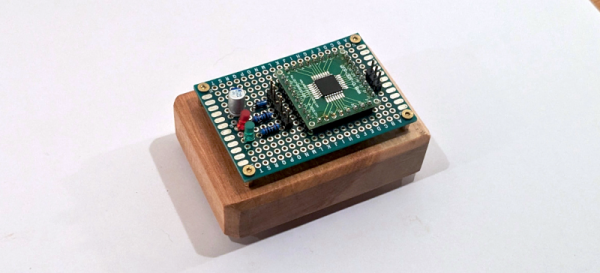
Working backward, it is fairly easy to get the microcontroller to note an HTTP request and then simply spit out a prerecorded HTTP response to provide the page. The hard part is connecting the little processor to the network. The server is dead simple, just a CPU and a scant number of components like filter caps and LEDs. The trick is to use SLIP, an ancient protocol used to connect dial-up modem terminals to the network.

Linux supports SLIP, so the MCU connects to a Linux computer via SLIP. Then the Linux computer uses WireGuard to network with the remote web server that serves [maurycyz’s] site. The SLIP implementation assumes that IP packets aren’t fragmented, which is normally true these days. TCP was a bit more complicated since you have to track the connection state and possibly re-transmit lost packets. Still, nothing the AVR with 8 K of RAM and 64 K of flash can’t handle.

Practical? No. Cool? Sort of. Funny that a disposable vape has more CPU power. Of course, something like an ESP32 is an obvious choice.