This Week In Security:Malicious Previews, VNC Vulnerabilities, Powerwall, And The 5th Amendment

Malware embedded in office documents has been a popular attack for years. Many of those attacks have been fixed, and essentially all the current attacks are unworkable when a document is opened in protected view. There are ways around this, like putting a notice at the top of a document, requesting that the user turn off protected view. [Curtis Brazzell] has been researching phishing, and how attacks can work around mitigations like protected view. He noticed that one of his booby-trapped documents phoned home before it was opened. How exactly? The preview pane.

The Windows Explorer interface has a built-in preview pane, and it helpfully supports Microsoft Office formats. The problem is that the preview isn’t generated using protected view, at least when previewing Word documents. Generating the preview is enough to trigger loading of remote content, and could feasibly be used to trigger other vulnerabilities. [Curtis] notified Microsoft about the issue, and the response was slightly disappointing. His discovery is officially considered a bug, but not a vulnerability.

VNC Vulnerabilities

Researchers at Kaspersky took a hard look at several VNC implementations, and uncovered a total of 37 CVEs so far. It seems that several VNC projects share a rather old code-base, and it contains a plethora of potential bugs. VNC should be treated similarly to RDP — don’t expose it to the internet, and don’t connect to unknown servers. The protocol wasn’t written with security in mind, and none of the implementations have been sufficiently security hardened.

Examples of flaws include: Checking that a message doesn’t overflow the buffer after having copied it into said buffer. Another code snippet reads a variable length message into a fixed length buffer without any length checks. That particular function was originally written at AT&T labs back in the late 90s, and has been copied into multiple projects since then.

There is a potential downside to open source that is highlighted here. Open source allows poorly written code to spread. This isn’t a knock against open source, but rather a warning to the reader. Just because code or a project uses an OSS license doesn’t mean it’s secure or high quality code. There are more vulnerabilities still in the process of being fixed, so watch out for the rest of this story. Continue reading “This Week In Security:Malicious Previews, VNC Vulnerabilities, Powerwall, And The 5th Amendment”


DSP Spreadsheet: Talking To Yourself Using IQ

We’ve done quite a bit with Google Sheets and signal processing: we’ve generated signals, created filters, and computed quadrature signals. We can pull all that together into an educational model for two SDRs talking to each other, but it’s going to require two parts: modulation and demodulation. Guess what? We can do that with a spreadsheet.

The first step is to generate a reference clock for the carrier. You’ll need a cosine wave (I) and sine wave (Q). Of course, you also need the time base. That’s columns A-C in the spreadsheet and works like other signal generation we’ve seen.

Continue reading “DSP Spreadsheet: Talking To Yourself Using IQ”

Retrotechtacular: The Art Of The Foundry

Mention the term “heavy industry” and the first thing to come to mind might well be the metal foundry. With immense machines and cauldrons of molten metal being shuttled about by crane and rail, the image of the foundry is like a scene from Dante’s Inferno, with fumes filling a vast impersonal factory, and sparks flying through the air. It looks like a dangerous place, as much to the soul as to the body, as workers file in each day to suffer mindlessly at the hearths and ladles, consumed in dirty, exhausting work even as it consumes them.

Things are not always as they appear, of course. While there’s no doubting the risks associated with working in a foundry such as the sprawling Renfrew works of Babcock and Wilcox Ltd. in the middle of the previous century, as the video below shows the work there was anything but mindless, and the products churned out by the millions from this factory and places like it throughout the world were critical to today’s technology.

Continue reading “Retrotechtacular: The Art Of The Foundry”

Fail Of The Week: Z-Tape Is No Substitute For Solder

Here at Hackaday, we see all kinds of mechanical construction methods. Some are impressively solid and permanent, while others are obviously temporary in nature. The latter group is dominated by adhesives – sticky stuff like cyanoacrylate glue, Kapton tape, and the ever-popular hot glue. They’ve all got their uses in assembling enclosures or fixing components together mechanically, but surely they have no place in making solid electrical connections, right?

Maybe, maybe not. As [Tom Verbeure] relates, so-called Z-tape just might be an adhesive that can stand in for solder under certain circumstances. Trouble is, he couldn’t find the right conditions to make the tape work. Z-tape, more properly called “Electrically Conductive Adhesive Transfer Tape 9703”,  derives its nickname from the fact that it’s electrically conductive, but only in the Z-axis. [Tom] learned about Z-tape in [Joe FitzPatrick]’s malicious hardware prototyping workshop at the 2019 Hackaday Superconference, and decided to put it to the test.

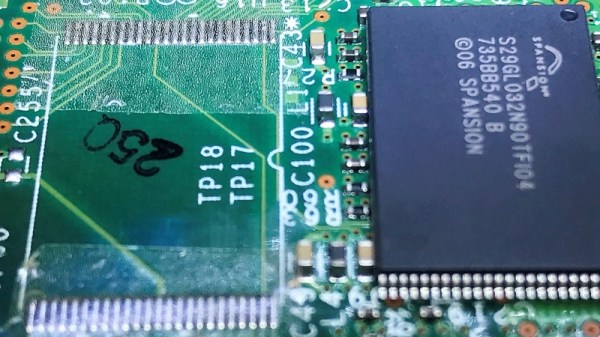
A card from a Cisco router served as a testbed thanks to an unpopulated chip footprint. The 0.5-mm pin spacing on the TSOP-48 chip was within spec for the Z-tape, but the area of each pin was 30 times smaller than the recommended minimum bonding area. While the chip was held down mechanically by the Z-tape, only five of the 48 pins were electrically connected to the pads. Emboldened by the partial success, [Tom] tried a 28-pin SOIC chip next. The larger pins and pads were still six times smaller than the minimum, and while more of the pins ended up connected by the tape, he was unable to make all 28 connections.

Reading the datasheet for the adhesive revealed that constant pressure from a clamp or clip might be necessary for reliable connections, which suggests that gluing down SMD chips is probably not the best application for the stuff. Still, we appreciate the effort, and the fine photomicrographs [Tom] made showing the particles within the Z-tape that make it work – at least in some applications.

The Strain Of Flu Shot Logistics

Did you get a flu shot this year? How about last year? In a world of next-day delivery and instant downloads, making the yearly pilgrimage to the doctor or the minute clinic feels like an outdated concept. Even if you get your shots free at the office, it’s still a pain to have to get vaccinated every year.

Unfortunately, there’s really no other way to deal with the annual threat of influenza. There’s no single vaccine for the flu because there are multiple strains that are always mutating. Unlike other viruses with one-and-done vaccinations, influenza is a moving target. Developing, producing, and distributing millions of vaccines every year is a massive operation that never stops, or even slows down a little bit. It’s basically Santa Claus territory — if Santa Claus delivered us all from mass epidemics.

The numbers are staggering. For the 2018-19 season, as in last year, there were 169.1 million doses distributed in the United States, up from 155.3 million doses the year before. How do they do it? We’re gonna roll up our sleeves and take a stab at it.

Continue reading “The Strain Of Flu Shot Logistics”

Mike Harrison Knows Everything About LEDs

Driving an LED and making it flash is probably the first project that most people will have attempted when learning about microprocessor control of hardware. The Arduino and similar boards have an LED fitted, and turning it on and off is a simple introduction to code. So it’s fair to say that many of us will think we have a pretty good handle on driving an LED; connect it to a I/O pin via a resistor and that’s it. If this describes you, then Mike Harrison’s talk at the recent Hackaday Superconference (embedded below) will be an education.

Mike has appeared on these pages multiple times as he pushes LEDs and PCB techniques to their limits, even designing our 2017 Superconference badge, and his many years of work in the upper echelons of professional LED installations have given him an unrivaled expertise. He has built gigantic art projects for airports, museums, and cities. A talk billed as covering everything he’s learned about LEDs them promises to be a special one.

If there’s a surprise in the talk, it’s that he’s talking very little about LEDs themselves. Instead we’re treated to a fundamental primer in how to drive a lot of LEDs, how to do so efficiently, with good brightness and colour resolution, and without falling into design traps. It’s obvious that some of his advice such at that of relying on DIP switches rather than software for configuration of multi-part installations has been learned the hard way.

Multiple LEDs at once from your driver chip, using a higher voltage.

We are taken through a bit of the background to perceived intensity and gamma correction for the human eyesight. This segues neatly into the question of resolution, for brightness transitions to appear smooth it is necessary to have at least 12 bits, and to deliver that he reaches into his store of microcontroller and driver tips for how to generate PWM at the right bitrate. His favoured driver chip is the Texas TLC5971, so we’re treated to a primer on its operation. A useful tip is to use multiple smaller LEDs rather than a single big one in the quest for brightness, and he shows us how he drives series chains of LEDs from a higher voltage using just the TI chip.

Given the content of the talk this shouldn’t come as a shock, but at the end he reminds us that he doesn’t use all-in-one addressable LEDs such as the WS2932 or APA102. These are  the staple of so many projects, but as he points out they are designed for toy type applications and lack the required reliability for a multi-thousand LED install.

Conference talks come in many forms and are always fascinating to hear, but it’s rare to see one that covers such a wide topic from a position of experience. He should write it into a book, we’d buy it!

Continue reading “Mike Harrison Knows Everything About LEDs”

Tales From The Sysadmin: Dumped Into The Grub Command Line

Today I have a tale of mystery, of horror, and of hope. The allure of a newer kernel and packages was too much to resist, so I found myself upgrading to Fedora 30. All the packages had downloaded, all that was left was to let DNF reboot the machine and install all the new packages. I started the process and meandered off to find a cup of coffee: black, and darker than the stain this line of work leaves on the soul. After enough time had elapsed, I returned, expecting the warming light of a newly upgraded desktop. Instead, all that greeted me was the harsh darkness of a grub command line. Something was amiss, and it was bad.

(An aside to the reader, I had this experience on two different machines, stemming from two different root problems. One was a wayward setting, and the other an unusual permissions problem.)

How does the fledgling Linux sysadmin recover from such a problem? The grub command line is an inscrutable mystery to the uninitiated, but once you understand the basics, it’s not terribly difficult to boot your system and try to restore the normal boot process. This depends on what has broken, of course. If the disk containing your root partition has crashed, then sorry, this article won’t help.

In order to get a system booting, what exactly needs to happen? How does booting Linux work, even? Two components need to be loaded into memory: the kernel, and the initramfs. Once these two elements are loaded into memory, grub performs a jump into the kernel code, which takes over and finishes the machine’s boot. There is one more important detail that we care about — the kernel needs to know where to find the root partition. This is typically part of the kernel parameters, specified on the kernel boot line.

When working with an unfamiliar shell, the help command is a good starting point. grub runs in a very limited environment, and running the help command scrolls most of the text off the screen. There is an environment variable that helps out here, enabling output paging:set pager=1.
Continue reading “Tales From The Sysadmin: Dumped Into The Grub Command Line”