You Can Learn A Lot From A Blinkenrocket

At this year’s Chaos Communication Congress, we caught up with [muzy] and [overflo], who were there with a badge and soldering project they designed to teach young folks how to solder and program. Blinkenrocket is a basically a 64-LED matrix display and just enough support hardware to store and display animations, and judging by the number of blinking rockets we saw around the necks of attendees, it was a success.

Their talk at 34C3 mostly concerns the production details, design refinements, and the pitfalls of producing thousands of a thing. If you’re thinking of building a hardware kit or badge on this scale, you should really check it out and crib some of their production optimization tricks.

For instance, instead of labelling the parts “C2” or “R: 220 Ohms”, they used a simple color-coding scheme. This not only makes it easier for kids to assemble, but it also means that they didn’t have to stick 1,000 part labels on every component. Coupled with [overflo]’s Zerhacker, SMD parts in strips were cut to the right length and color-coded in one step, done by machine.

The coolest feature of the Blinkenrocket itself is the audio programming interface. It’s like in the bad old days of software stored on cassette tapes, but it’s a phenomenal interface for getting a simple animation out of a web app and straight into a piece of minimal hardware — just plug it into a laptop or cell phone’s audio out and press “play” in the browser. The original design tried to encode the data in the pulse-length of square waves, but this turned out to be very hardware dependent. The final design used frequency-shift keying. What’s old is new again.

Everything you could want to know about the design, its code, and even the website itself are up on the project’s GitHub page, so go check it out. If you’d like to arrange a Blinkenrocket workshop yourself, shoot [muzy] or [overflo] an e-mail. Full disclosure: [overflo] gave us a kit, the “hard-mode” SMD one with 0805 1206 parts, and it was fun to assemble and program.

I’ll Have A Beer With A Compliment Chaser

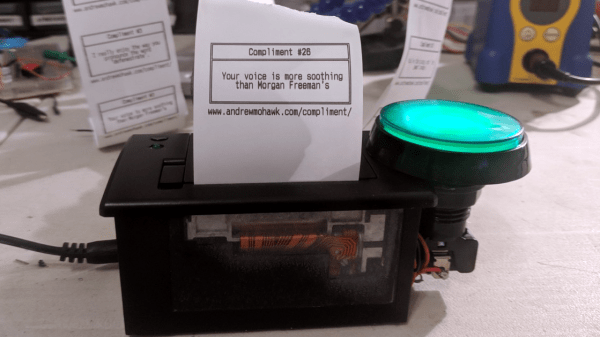
[Andrew MacPherson] found out that compliments, even insincere ones, make the recipients feel better. So, he put together a thermal printer and a hilariously large button with an Arduino and created a machine that prints compliments. And where best to put a machine that prints out compliments? The local bar, where else?

An Arduino Nano clone runs the show connected to a thermal printer. The Nano clone didn’t like the 9 volt power supply, so a buck converter was used to reduce the voltage down to 5 volts for the Nano, while the printer gets the full power. During initial trials, the printer was very slow to print and it took [Andrew] a while to adjust the parameters – after tweaking the speed as well as the heating time, he was able to get the printer working without burning the paper or taking forever to print.

Once the machine was working, it was time to add a button. A large, light-up button was connected and glued to the side of the printer. More glue was used (after some “modifications” to the printer chassis) to secure a barrel connector for the power adapter.

[Andrew] decided that since he’s down at his favorite bar quite a lot, he’d set it up there. The customers could push the button and receive a compliment while drowning their sorrows. He got a friend of his who’s a copywriter to come up with some nicely written compliments to print out. The printer was such a hit that the bartender sent [Andrew] a message on Facebook saying so. If you have a thermal printer lying around, you can use this tutorial to connect it to the internet, or, if you don’t have one, you can build your own.

Continue reading “I’ll Have A Beer With A Compliment Chaser”

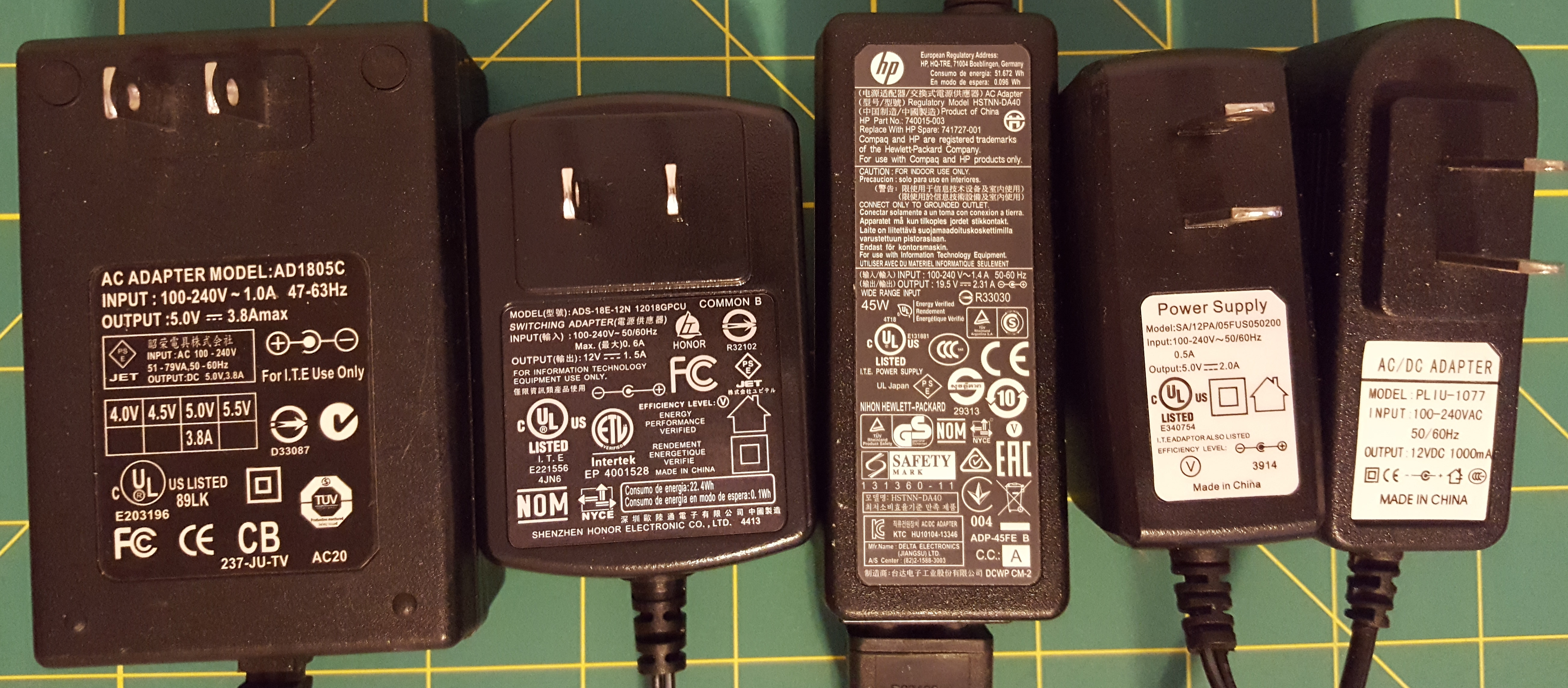
What Are Those Hieroglyphics On Your Laptop Charger?

Look on the back of your laptop charger and you’ll find a mess of symbols and numbers. We’d bet you’ve looked at them before and gleaned little or no understanding from what they’re telling you.

These symbols are as complicated as the label on the tag of your shirt that have never taught you anything about doing laundry. They’re the marks of standardization and bureaucracy, and dozens of countries basking in the glow of money made from issuing certificates.

The switching power supply is the foundation of many household electronics — obviously not just laptops — and thus they’re a necessity worldwide. If you can make a power supply that’s certified in most countries, your market is enormous and you only have to make a single device, possibly with an interchangeable AC cord for different plug types. And of course, symbols that have meaning in just about any jurisdiction.

In short, these symbols tell you everything important about your power supply. Here’s what they mean.

Continue reading “What Are Those Hieroglyphics On Your Laptop Charger?”

Arcade Style Computer Hotkeys

Prolific maker [Sean Hodgins] has taken the wraps off of his latest one-day build, and as usual, it takes the kind of spare parts most people reading Hackaday will have in their parts bins and turns it into something fun and useful. This time around, he takes a bunch of spare arcade-style buttons he had from a previous project and combines them with an Adafruit Trinket (SAMD21 flavor) to make a USB input device for his computer.

[Sean] uses 1/4 inch acrylic to make the case, though he does mention that it could just as easily be 3D printed. But using the acrylic is easy and gives a nice glossy look to the final hardware. With a saw and a drill press you can make some very professional cases out of acrylic, which goes to show that you don’t necessarily need to have a high end 3D printer to create great looking enclosures.

As explained in the video, the Adafruit Trinket is not strictly necessary for this build, it’s just what [Sean] had lying around. Any microcontroller that can present itself to the operating system as a USB Human Interface Device (HID) will work fine for a project like this.

Software wise, a modified Arduino demo program is used to equate the states of the digital pins to pre-defined key combinations to be sent to the computer. In this simple example the key combinations are hard-coded into the Trinket’s source code, but a future enhancement could be adding a method of setting up new key combinations with a configuration tool.

We’ve covered our fair share of non-traditional USB input devices, all operating on largely the same principle. As it turns out, hackers have quite a pension for making oddball input devices.

Continue reading “Arcade Style Computer Hotkeys”

Play A Few Games Of Smash Brothers On The Go With A Portable Wii

How would you approach a build that required you to hack apart a perfectly good console motherboard? With aplomb and a strong finish. [jefflongo] from [BitBuilt.net] — a forum dedicated to making consoles portable — has finished just such a task, unveiling his version of a portable Wii to the world.

While this bears the general appearance of a portable GameCube, it’s what inside that counts. A heavily modified   Wii motherboard — to reduce size — forms this portable’s backbone, and it includes two infrared LEDs on its faceplate for Wii Remotes.  A single player can use the built-in controller, but [jefflongo] has included four GameCube controller ports for maximum multiplayer mayhem. Although he’ll likely plan on taking advantage of the built-in AV Out port to play on a TV and charge port for those extended gaming sessions, four 3400mAh batteries — with an estimated four hour battery life — should keep him satisfied on the go until he can recharge.

While the electronics display an impressive amount of work, but the final piece is a sight to behold. Check out the demo video after the break!

Continue reading “Play A Few Games Of Smash Brothers On The Go With A Portable Wii”

Asgard: The Open Source Air Data Computer

We get a lot of awesome projects sent our way via the tip line. Well, mainly it seems like we get spam, but the emails that aren’t trying to sell us something are invariably awesome. Even so, it’s not often we get a tip that contains the magic phrase “determine Mach number” in its list of features. So to say we were interested in the Asgard Air Data Computer (ADC) is something of an understatement.

Now we’ll admit right up front: we aren’t 100% sure who the target audience for the Asgard is, but it certainly looks impressive. Team member [Erik] wrote into tip line with information about this very impressive project, which is able to perform a number of measurements on incoming air, such as true speed, viscosity, and temperature. The team says it has applications ranging from HVAC to measuring the performance of bicycles. We don’t know who’s going so fast on their bike that they need to measure air speed, but of course the hacker community never ceases to amaze us.

Even if you don’t have a jet fighter that could benefit from a high performance ADC such as Asgard, you have to be impressed by the incredible work the team has done not only designing and building it, but documenting it. From the impeccably designed 3D printed case to the stacked PCB internals, every aspect of Asgard screams professional hardware.

Data collected from Asgard can be stored on the internal micro SD if the device is to be used in stand-alone mode, or you can connect to it over USB or Bluetooth thanks to the HC-05 module. The team has even put together some scripts to merge the Asgard’s generated air data with GPS position information.

We’re all for putting high quality sensors in the hand’s of the community and seeing what they can come up with. The spirit and build quality of this project reminds us of the impressive work [Radu Motisan] has been doing with his distributed air quality sensors.

Continue reading “Asgard: The Open Source Air Data Computer”

This Tiny Motor Is Built Into A PCB

Mounting a motor on a PCB is nothing new, right? But how about making the PCB itself part of the motor? That’s what [Carl Bugeja] has done with his brushless DC motor in a PCB project, and we think it’s pretty cool.

Details on [Carl]’s Hackaday.io page are a bit sparse at this point, but we’ve been in contact with him and he filled us in a little. The PCB contains the stator of the BLDC and acts as a mechanical support for the rotor’s bearing. There are six spiral coils etched into the PCB, each with about 40 turns. The coils are distributed around the axis; connected in a wye configuration, they drive a 3D-printed rotor that has four magnets pressed into it. You can see a brief test in the video below; it seems to suffer from a little axial wobble due to the single bearing, but that could be handled with a hat board supporting an upper bearing.

We see a lot of potential in this design. [Carl] mentions that the lack of cores in the coil limit it to low-torque applications, but it seems feasible to bore out the center of the coils and press-fit a ferrite slug. Adding SMD Hall sensors to the board for feedback would be feasible, too — in fact, an entire ESC and motor on one PCB could be possible as well. [Carl] has promised to keep the project page updated, and we’re looking forward to more on this one.

For a more traditional approach to printed motors, check out this giant 3D-printed BLDC.

Continue reading “This Tiny Motor Is Built Into A PCB”