Medium Machine Mediates Microcontroller Messages

Connecting computers to human brains is currently limited to the scope of science fiction and a few cutting-edge laboratories. Tapping into some nerves farther from our central wetware is possible and [Peter Buczkowski] shows us his stylish machine for implanting a pattern into our brains without actively having to memorize anything.

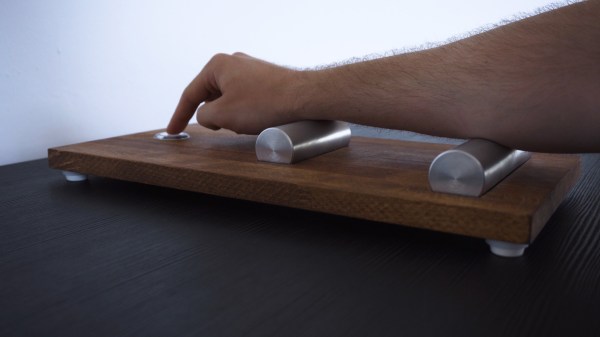
His Medium Machine leverages a TENS unit to activate forearm muscles in a pattern programmed into an Arduino. Users place their forearm across two aluminum electrodes mounted on a tasteful wooden platform and extend a single finger over a button. Electrical impulses trigger the muscles which press the button. That’s all. After repeating the pattern a few times, the users should be able to recite it back on command even if they aren’t aware of what it means. If this sounds like some [Johnny Mnemonic] memory cache, you are absolutely correct. This project draws inspiration from the [William Gibson] novel which became a [Keanu Reeves] movie.

Users can be programmed with a Morse code message or the secret knock to open an attic library or play a little tune. How about learning a piano song?

Continue reading “Medium Machine Mediates Microcontroller Messages”

Big Mouth Billy Bass Channels Miley Cyrus

Here’s a Big Mouth Billy Bass with extra lip thanks to Alexa. If you’re not already familiar, Big Mouth Billy Bass is the shockingly popular singing animatronic fish designed to look like a trophy fish mounted to hang on your wall. In its stock condition, Billy uses a motion sensor to break into song whenever someone walks by. It’s limited to a few songs, unless you like to hack things — in which case it’s a bunch of usable parts wrapped in a humorous fish! Hackaday’s own [Bob Baddeley] combined the fish with an Amazon Echo Dot, connecting the two with an ATtiny84, and having Billy speak for Alexa.

[Bob] had a few problems to solve, including making Billy’s mouth move when there was audio playing, detecting when the Echo was on, moving the motors and playing the audio. After a bit of research and a lot of tweaking, a Fast Fourier Transform algorithm designed for the ATtiny was used was used to get the mouth moving. The mouth didn’t move a lot because of the design of the fish, and [Bob] modified it a bit, but there was only so much he could do.

It’s all well and good for the fish to lie there and sing, but [Bob] wanted Billy to move when Alexa was listening, and in order the detect this, the best bet was to watch for the Dot’s light to turn on. He tried a couple of things but decided that the simplest method was probably the best and ended up just taping a photo-resistor over the LED. Now Billy turns to look at you when you ask Alexa a question.

With a few modifications to the Dot’s enclosure, everything now fits inside the original mounting plaque and, after some holes were drilled so the Dot could hear, working. Billy has gone from just a few songs to an enormous entire library of songs to sing!

We’ve seen Alexa combined with Big Mouth Billy Bass before, but just demos and never an excellent guide like [Bob’s].  The nice thing about this guide is that once you’ve hacked the hardware, it’s a breeze to add new functionality using Alexa skills.

Continue reading “Big Mouth Billy Bass Channels Miley Cyrus”

Zephyr Adds Features, Platforms, And Windows

Zephyr is an open source real-time operating system (RTOS) that appeared on the scene a few years ago with support for a few boards. The new 1.11 release adds a lot of features, a lot of new boards, and also has a Windows development environment. But don’t worry, the environment is portable so it still runs on Linux and Mac, as well.

The OS has support for many ARM and x86 boards. It also supports ESP32, NIOS II, and can also target Linux which is useful for debugging or studying execution using desktop tools.

Continue reading “Zephyr Adds Features, Platforms, And Windows”

Emulating OBD-II On The ESP32

It used to be that you could pop the hood and with nothing more than flat head screwdriver, some baling wire, and tongue held at the optimal angle, you could fix anything that ailed your car. But today, for better or for worse, the average automobile is a rolling computer that runs on gasoline and hope (if it even still has a gasoline engine, that is). DIY repairs and maintenance on a modern car is still possible of course, but the home mechanic’s toolbox has needed to evolve with the times. If you want to do anything more advanced than changing a tire, you’ll really want to have the gear to interface with the vehicle’s computer via the OBD-II port.

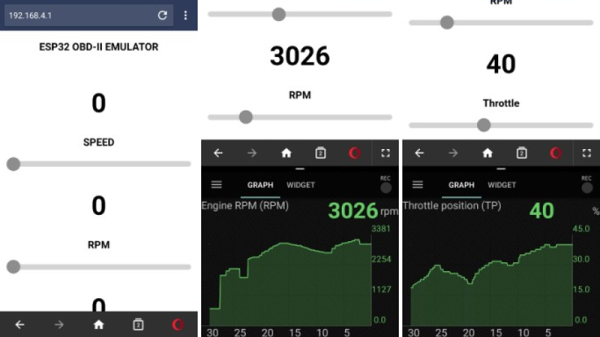
But for some, even that isn’t enough. [limiter121] recently wrote in to tell us of an interesting project which doesn’t read the OBD-II port in a vehicle, but actually emulates one. Like so many others this hack was born out of necessity, as a way to test an OBD-II project without having to sit out in the driveway all day. It allows you to create fictitious speed and engine RPM values for the OBD-II device or software under test to read, complete with a slick web interface to control the “car”.

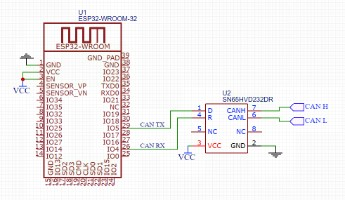
So what makes it tick? Surprisingly little, actually. At the most basic level, an ESP32-WROOM-32 is connected up to a SN65HVD230 CAN transceiver chip. You’ll also need a 3.3V power supply, as well as a USB to serial adapter to do the initial programming on the ESP32. From there it’s just a matter of compiling and flashing the code [limiter121] has made available in the GitHub repo.

If you’re wondering if such products don’t already exist on the commercial market, they do. But like so many other niche projects, the price is a bit hard to swallow for the home hacker. Compared to the nearly $300 USD list price of commercial offerings such as the Freematics OBD-II Emulator, building one of these ESP32 based emulators should only cost you around $20.

Unless you’re developing an OBD-II reader, you probably don’t have much use for an OBD-II emulator. But this project could still be useful for anyone who wants to learn more about OBD from the comfort of their couch.

New App Note Day: Internet Of Pillows

The Internet of Things is a cancer that consumes all reasonable expectations of technology, opens vast security holes we’ve never had to deal with before, and complicates life in the pursuit of quarterly gains from whatever technology startup is hot right now. We are getting some interesting tech out of it, though. The latest in the current round of ‘I can’t believe someone would build that’ is the Internet of Pillows. No, it’s not a product, it’s just an application note, but it does allow us to laugh at the Internet of Things while simultaneously learning about some really cool chips.

The idea behind this ‘smart’ pillow is to serve as a snoring sensor. When the smart pillow detects the user is snoring, a small vibration motor turns on to wake up the user. There’s no connectivity in this smart pillow, so the design is relatively straightforward. You need a microphone or some sort of audio sensor, you should probably have a force-sensitive resistor so you know the pillow is actually being used, and you need a vibration motor. Throw in a battery for good measure. Aside from that, you’re also going to need a microcontroller, and that’s where things get interesting.

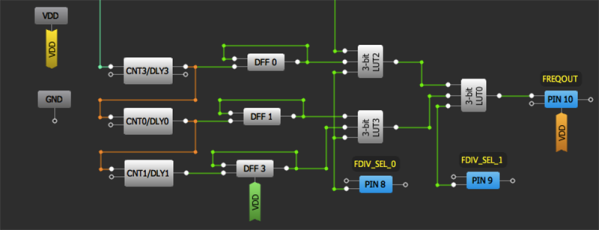
This application note was written as a demonstration of what Dialog’s GreenPAC devices can do. We’ve seen these things before, and the idea behind these devices is something like a ‘modern-day PAL’ or ‘a really, really limited FPGA’. It’s a bit more than that, though, because the GreenPAC devices are mixed-signal, there are some counters and latches in there, and all the programming is done through a graphical IDE. If you need a small, low-power chip that only does one thing, the GreenPAC is right up your alley.

So, how does this device detect snoring? The code pulls data from the sound sensor every 30 ms, with a 5 ms time window. If this sound repeats again within six seconds, it’s assumed the user is snoring. The logic then turns on the vibration motor, greatly annoying whoever is sleeping. All of this is done through a graphical IDE, which I’m sure will draw the ire of some, but there really aren’t that many pins or that many LUTs on GreenPAC devices, so it’s never going to get too out of hand.

The GreenPAC is a very interesting family of parts that we don’t see too much of around here. That’s a shame, because for low-power applications that don’t need a lot of horsepower, the GreenPAC seems like it would be very useful. Slightly more useful than an Internet of Things pillow, at least.

Reviving An Electron Microscope With Arduino

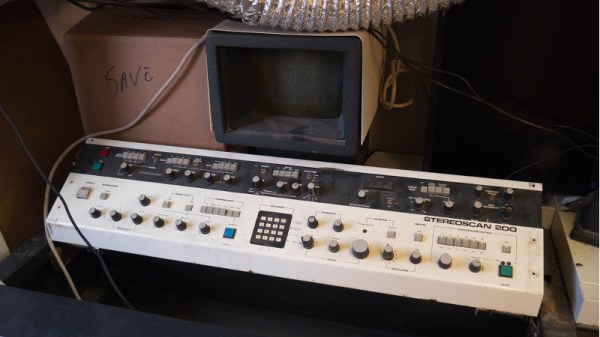
We don’t know about you, but when our friends ask us if we want to help them fix something, they’re usually talking about their computer, phone, or car. So far it’s never been about helping them rebuild an old electron microscope. But that’s exactly the request [Benjamin Blundell] got when a friend from a local hackerspace asked if he could take a look at a vintage Cambridge Stereoscan 200 they had found abandoned in a shed. Clearly we’re hanging out with the wrong group of people.

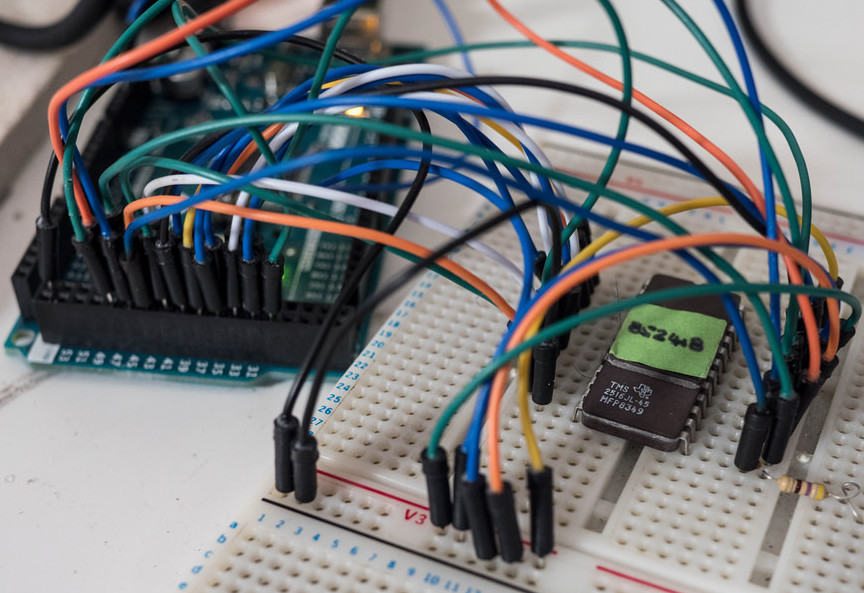
As you might imagine, the microscope was in desperate need of some love after spending time in considerably less than ideal conditions. While some of the hackerspace members started tackling the hardware side of the machine, [Benjamin] was tasked with finding a way to recover the contents of the scope’s ROM. While he’s still working on verification, the dumps he’s made so far of the various ROMs living inside the Stereoscan 200 have been promising and he believes he’s on the right track.

The microscope uses a mix of Texas Instruments 25L32 and 2516 chips, which [Benjamin] had to carefully pry out after making sure to document everything so he knew what went where. A few of the chips weren’t keen on being pulled from their home of 30-odd years, so there were a few broken pins, but on the whole the operation was a success.

Each chip was placed in a breadboard and wired up to an Arduino Mega, as it has enough digital pins to connect without needing a shift register. With the wiring fairly straightforward, [Benjamin] just needed to write up some code to read the contents of the chip, which he has graciously provided anyone else who might be working on a similar project. At this point he hasn’t found anything identifiable in his ROM dumps to prove that they’ve been made successfully, all he really knows right now is that he has something. At least it’s a start.

More and more of these older electron microscopes are getting a second lease on life thanks to dedicated hackers in their home labs. Makes you wonder if there’s ever going to be a piece of hardware the hacker community won’t bend to their will.

Kniwwelino Is An ESP8266 Micro:Bit

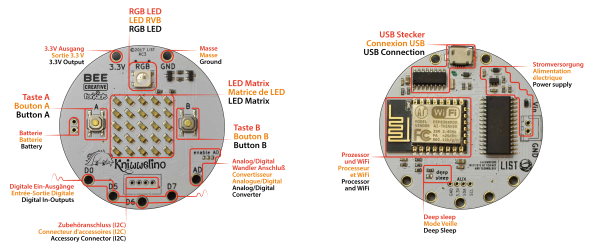
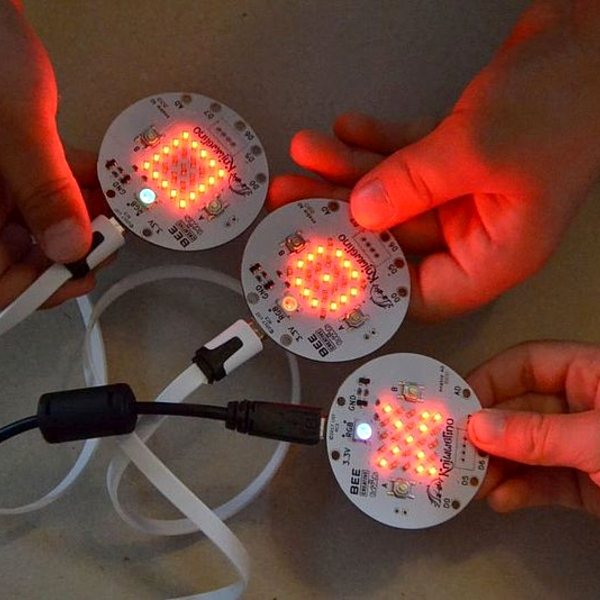
Kniwwelino is the latest in a line of micro:bit-inspired projects that we’ve seen, but this one comes with a twist: it uses an ESP8266 and WiFi at the core instead of the nR51 ARM/BTLE chip. That means that students can connect via laptop, cellphone, or anything else that can get onto a network.

That’s not the only tradeoff, though. In order to get the price down, the Kniwwelino drops the accelerometer/magnetometer of the micro:bit for a programmable RGB LED. With fewer pins to break out, the Kniwwelino is able to ditch the love-it-or-hate-it card-edge connector of the micro:bit as well. In fact, with all these changes, it’s hard to call this a micro:bit clone at all — it’s more like a super-blinky ESP8266 development kit.

So what have they got left in common? The iconic 5×5 LED matrix in the center, and a Blockly visual programming dialect dedicated to the device. Based on the ESP8266, the Kniwwelino naturally also has an Arduino dialect that students can “graduate” to when they’re tired of moving around colored blobs, and of course you could flash the chip with anything else that runs on an ESP8266.

We don’t have one in our hands, but we like the idea. An RGB LED is a lot of fun on Day One, and the fact that the Kniwwelino fits so neatly into existing bodies of code makes the transition from novice to intermediate programmer a lot easier. These things are personal preference, but WiFi beats Bluetooth LE in our book, for sheer ubiquity and interoperability. Finally, the Kniwwelino comes in at about half the manufacturing cost of a micro:bit, which makes it viable in schools without large manufacturer subsidies. They’re estimating $5 per unit. (Retail is higher.) On the other hand, the Kniwwelino is going to use more juice than its ARM-based competitor, and doesn’t have an accelerometer.

Kniwwelino is apparently derived from a luxembourgish word “kniwweln” that apparently means to craft something. The German Calliope Mini is named after Zeus’ daughter, the programmer’s muse. We’re stoked to see so many cute dev boards getting into the hands of students, no matter what you call them.