Portable Apple II On An AVR

The Apple II was one of the first home computers. Designed by Steve “Woz” Wozniak, it used the MOS technologies 6502 processor, an 8-bit processor running at about 1 MHz. [Maxstaunch] wrote his bachelor thesis about emulating the 6502 in software on an AVR1284 and came up with a handheld prototype Apple II with screen and keyboard.

pic_15
Prototype on veroboard

Originally, [maxstrauch] wanted to build an NES, which uses the same 6502 processor, but he calculated the NES’s Picture Processing Unit would be too complicated for the AVR, so he started on emulating the Apple II instead. It’s not quite there – it can only reference 12K of memory instead of the 64K on the original, so hi-res graphic mode, and therefore, many games, won’t work, but lo-res mode works as well as BASIC (both Integer BASIC and Applesoft BASIC.)

[Maxstrauch] details the 6502 in his thesis and, in a separate document, he gives an overview of the project. A third document has the schematic he used to build his emulator. His thesis goes into great detail about the 6502 and how he maps it to the AVR microcontroller. The build itself is pretty impressive, too. Done on veroboard, the build has a display, keyboard and a small speaker as well as a micro SD card for reading and storing data. For more 6502 projects, check out the Dis-Integrated 6502 and also, this guide to building a homebrew 6502.

Continue reading “Portable Apple II On An AVR”

How Has Amazon Managed To Make Hackers Love Alexa?

Our hackspace has acquired an Amazon Dot, courtesy of a member. It mostly seems to be used as a source of background music, but it has also spawned a seemingly never-ending new entertainment in which the hackspace denizens ceaselessly bait their new electronic companion with ever more complex and esoteric requests. From endless rephrasing and careful enunciation of obscure early reggae artists to try to settle a musical argument to hilarious mis-hearing on the part of our silicon friend, the fun never stops. “Alexa, **** off!” it seems results in “I’m sorry, I can’t find a device of that name on this network”.

amazon-dot-always-listeningThat is just the experience of one hackspace, but it evidently does not end there. Every other day it seems that new projects using Alexa pass through the Hackaday timeline, so it looks as though Amazon’s online personal assistant has been something of a hit within our community.

Fair enough, you might say, we’re always early adopters of any new technology. But it’s a development over which I wonder; am I alone in finding it surprising? It’s worth taking a moment to look at the subject.

Continue reading “How Has Amazon Managed To Make Hackers Love Alexa?”

Raspberry Pi Zero smart projector

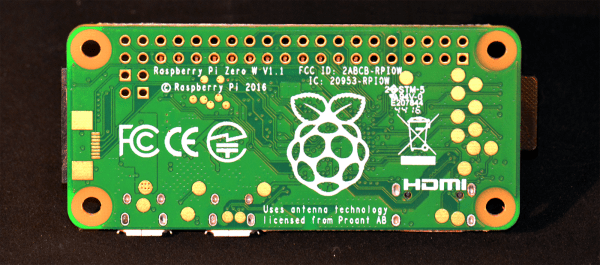
Smart Projector With Built-in Raspberry Pi Zero

You’ve heard of smartphones but have you heard of smart projectors? They’ve actually been around for a few years and are sort of like a TV set top box and projector combined, leaving no need for a TV. Features can include things like streaming Netflix, browsing in Chrome, and Skyping. However, they can cost from a few hundred to over a thousand dollars.

[Novaspirit]  instead made his own cheap smart projector. He first got a $70 portable projector (800×480 native resolution, decent for that price) and opened it up. He soldered an old USB hub that he already had to a Raspberry Pi Zero so that he could plug in a WiFi dongle and a dongle for a Bluetooth keyboard. That all went into the projector.

Examining the projector’s circuit board he found locations to which he could wire the Raspberry Pi Zero for power even when the projector was off. He lastly made the Raspberry Pi dual-bootable into either OSMC or RetroPie. OSMC is a Linux install that boots directly into a media player and RetroPie is a similar install that turns your Raspberry Pi into a gaming machine. You can see a timelapse of the making of it and a demonstration in the video after the break.

Continue reading “Smart Projector With Built-in Raspberry Pi Zero”

Cheap Chainsaw Teardown Reveals Buried Treasures

People seem to have a love-hate relationship with Harbor Freight, and it mostly seems that they love to hate the purveyor of discount tools. This is not without cause — any number of HF tools have fallen apart in our hands. But there are some gems to be found amid the dregs and dross of your local branch of the 700-store US chain, as long as you match the tool to your needs and manage your expectations.

Now, we’d normally shy away from any electric chainsaw, especially a cordless saw, and doubly so a Harbor Freight special. But as [Professor Charles] demonstrates with his detailed and humorous teardown, the Lynxx 40-volt cordless 14″ chainsaw might be worth picking up just for harvesting parts. First there’s the battery pack, which is chock full of 18650 lithium cells. [Professor Charles] leads us on a detailed tour of the design compromises of the battery and charger and is none too impressed with either, but he clearly understands what it means to build to a price point. While [Charles] found the stock motor controller somewhat anemic, the real buried treasure in the tool is a huge brushless motor, powerful enough to “throw an 8-inch Vise Grip at you” during a (not so) locked rotor test.

The whole teardown is enlightening as to the engineering decisions that go into mass-market tools, so even if you can’t think of something to do with this motor, the article is worth a read. At $169 for the Lynxx (before the 20% coupon in your Sunday paper every week) it’s a little pricey to buy just to harvest parts, but it wouldn’t be the first HF tool to suffer that fate. We’ll bet these things will start showing up broken on the secondary market for a song, and if the [Professor]’s assessments are right, it likely won’t be the motors that fail.

Harrowing Story Of Installing Libreboot On ThinkPad

As an Apple user, I’ve become somewhat disillusioned over the past few years. Maybe it’s the spirit of Steve Jobs slowly vanishing from the company, or that Apple seems to care more about keeping up with expensive trends lately rather than setting them, or the nagging notion Apple doesn’t have my best interests as a user in mind.

Whatever it is, I was passively on the hunt for a new laptop with the pipe dream that one day I could junk my Apple for something even better. One that could run a *nix operating system of some sort, be made with quality hardware, and not concern me over privacy issues. I didn’t think that those qualities existed in a laptop at all, and that my 2012 MacBook Pro was the “lesser of evils” that I might as well keep using. But then, we published a ThinkPad think piece that had two words in it that led me on a weeks-long journey to the brand-new, eight-year-old laptop I’m currently working from. Those two words: “install libreboot”.

Continue reading “Harrowing Story Of Installing Libreboot On ThinkPad”

Set Your Clocks To Decimal Time

Many stop lights at street intersections display a countdown of the remaining seconds before the light changes. If you’re like me, you count this time in your head and then check how in sync you are. But did you know that if the French had their way back in the 1890s when they tried to introduce decimal time, you’d be counting to a different beat? Did you know the Chinese have used decimal time for millennia? And did you know that you may have unknowingly used it already if you’ve programmed in Linux? Read on to see what decimal time is along with the answers to these questions.

Continue reading “Set Your Clocks To Decimal Time”

Make Your Own Arduino Header Pins

There are two kinds of people in the world (and, no, this isn’t a binary joke). People who love the Arduino, and people who hate it. If you’ve ever tried to use a standard prototype board to mount on an Arduino, you’ll know what kind of person you are. When you notice the pins aren’t on 0.1 inch centers, you might think, “What the heck were those idiots thinking!” Or, you might say, “How clever! This way the connectors are keyed to prevent mistakes.” From your choice of statement, we can deduce your feelings on the subject.

[Rssalnero] clearly said something different. We weren’t there, but we suspect it was: “Gee. I should 3D print a jig to bend headers to fit.” Actually, he apparently tried to do it by hand (we’ve tried it, too). The results are not usually very good.

He created two simple 3D printed jigs that let you bend an 8-pin header. The first jig bends the correct offset and the second helps you straighten out the ends again. You can see the result in the picture above.

Continue reading “Make Your Own Arduino Header Pins”