In the original Animal Crossing from 2001, players are able to interact with a huge cast of quirky characters, all with different interests and personalities. But after you’ve played the game for awhile, the scripted interactions can become a bit monotonous. Seeing an opportunity to improve the experience, [josh] decided to put a Large Language Model (LLM) in charge of these interactions. Now when the player chats with other characters in the game, the dialogue is a lot more engaging, relevant, and sometimes just plain funny.
How does one go about hooking a modern LLM into a 24-year-old game built for an entirely offline console? [josh]’s clever approach required a lot of poking about, and did a good job of leveraging some of the game’s built-in features for a seamless result.
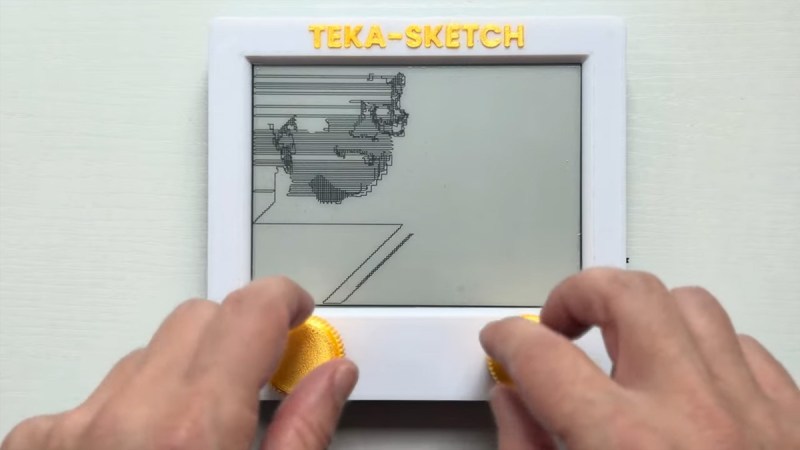
The Etch A Sketch was never supposed to meet a Raspberry Pi, a camera, or a mathematical algorithm, but here we are. [Tekavou]’s Teka-Cam and TekaSketch are a two-part hack that transforms real photos into quite stunning, line-drawn Etch A Sketch art. Where turning the knobs only results in wobbly doodles, this machine plots out every curve and contour better than your fingertips ever could.
Essentially, this is a software hack mixed with hardware: an RPi Zero W 2, a camera module, Inkplate 6, and rotary encoders. Snap a picture, and the image is conveyed to a Mac Mini M4 Pro, where Python takes over. It’s stripped to black and white, and the software creates a skeleton of all black areas. It identifies corner bridges, and unleashes a modified Chinese Postman Algorithm to stitch everything into one continuous SVG path. That file then drives the encoders, producing a drawing that looks like a human with infinite patience and zero caffeine jitters. Originally, the RPi did all the work, but it was getting too slow so the Mac was brought in.
It’s graph theory turned to art, playful and serious at the same time, and it delivers quite unique pieces. [Tekavou] is planning on improving with video support. A bit of love for his efforts might accellerate his endeavours. Let us know in the comments below!
I think most of us who make or build things have a thing we are known for making. Where it’s football robots, radios, guitars, cameras, or inflatable textile sculptures, we all have the thing we do. For me that’s over the years been various things but has recently been camera hacking, however there’s another thing I do that’s not so obvious. For the last twenty years, I’ve been interested in computational language analysis. There’s so much that a large body of text can reveal without a single piece of AI being involved, and in pursuing that I’ve created for myself a succession of corpus analysis engines. This month I’ve finally been allowed to try one of them with a corpus of Hackaday articles, and while it’s been a significant amount of work getting everything shipshape, I can now analyse our world over the last couple of decades.
The Burning Question You All Want Answered
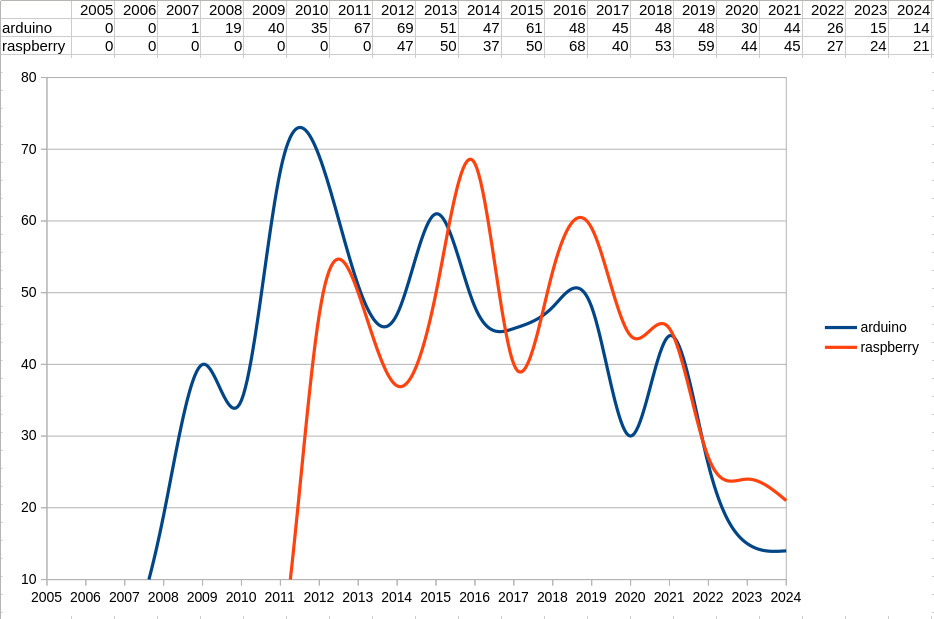
Battle of the Boards, over the decades.
A corpus engine is not clever in its own right, instead it will simply give you straightforward statistics in return for the queries you give it. But the thing that keeps me coming back for more is that those answers can sometimes surprise you. In short, it’s a machine for telling you things you didn’t know. To start off, it’s time to settle a Hackaday trope of many years’ standing. Do we write too much about Arduino projects? Into the engine goes “arduino”, and for comparison also “raspberry”, for the Raspberry Pi.
What comes out is a potted history of experimenter’s development boards, with the graph showing the launch date and subsequent popularity of each. We’re guessing that the Hackaday Arduino trope has its origins in 2011 when the Italian board peaked, while we see a succession of peaks following the launch of the Pi in 2012. I think we are seeing renewals of interest after the launch of the Pi 3 and Pi 4, respectively. Perhaps the most interesting part of the graph comes on the right as we see both boards tail off after 2020, and if I had to hazard a guess as to why I would cite the rise of the many cheap dev boards from China.
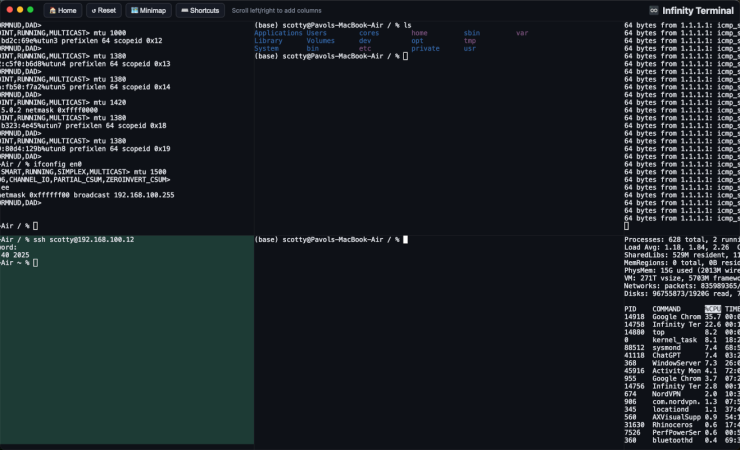
The creator of infinite vertical scrolling in social media, [Aza Raskin], infamously regrets his creation that has helped to waste a tremendous amount of human attention and time on the Internet. But that’s vertical scrolling. [bujna94] has created infinityTerminal, a program with infinite scrolling, but in the horizontal direction instead. This tool has had the opposite effect to go along with its opposite orientation: increased productivity and improved workflow.
The impetus for infinityTerminal is [bujna94]’s need for many simultaneous SSH sessions, and the fact that no other terminal program can support an indefinite number of visible terminal windows. This application starts with four terminal windows in a 2×2 grid, and allows the user to open more terminals, two at a time, to form a 2xN grid. As many terminals as needed will open in pairs in the horizontal direction with smooth, trackpad-compatible scrolling and automatic color-coded backgrounds for servers accessed by SSH.
For anyone with a similar dislike of tabs like [bujna94], this might be worth trying out. It’s built with Electron, xterm.js, and node-pty.
There are a few more details about the project on a Reddit post. [Bujna94] also made it completely open source and freely available with the files on a GitHub page, and welcomes anyone to try out his creation that wants to. For more terminal magic, we’d also recommend checking out Notcurses, a terminal application capable enough to output SNES-level detail natively.
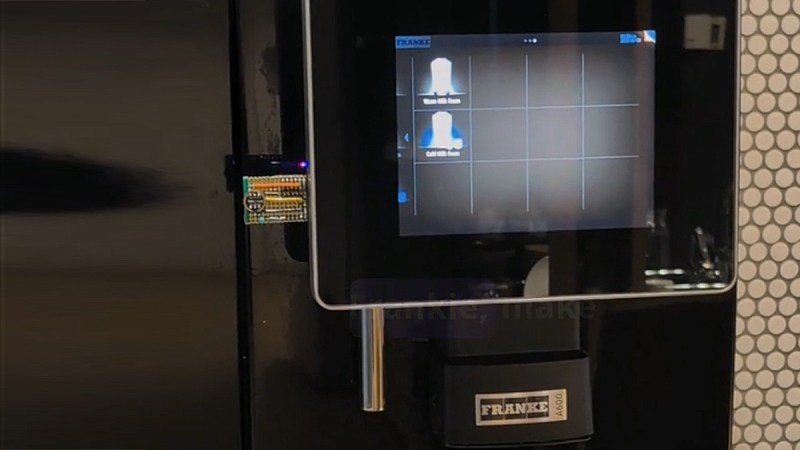
If you were to troll your colleagues, you can label your office coffee maker any day with a sticker that says ‘voice activated’. Now [edholmes2232] made it actually come true. With Speech2Touch, he grafts voice control onto a Franke A600 coffee machine using an STM32WB55 USB dongle and some clever firmware hacking.
The office coffee machine has been a suspect for hacking for years and years. Nearly 35 years ago, at Cambridge University, a webcam served a live view of the office coffee pot. It made sure nobody made the trip to the coffee pot for nothing. The funny, but in fact useless HTTP status 418 was brought to life to state that the addressed server using the protocol was in fact a teapot, in answer to its refusal to brew coffee. Enter this hack – that could help you to coffee by shouting from your desk – if only your arms were long enough to hold your coffee cup in place.
Back to the details. The machine itself doesn’t support USB keyboards, but does accept a USB mouse, most likely as a last resort in case the touchscreen becomes irresponsive. That loophole is enough: by emulating touchscreen HID packets instead of mouse movement, the hack avoids clunky cursors and delivers a slick ‘sci-fi’ experience. The STM32 listens through an INMP441 MEMS mic, hands speech recognition to Picovoice, and then translates voice commands straight into touch inputs. Next, simply speaking to it taps the buttons for you.
It’s a neat example of sidestepping SDK lock-in. No reverse-engineering of the machine’s firmware, no shady soldering inside. Instead, it’s USB-level mischief, modular enough that the same trick could power voice control on other touchscreen-only appliances.
If we’re talking about oxidized iron… probably nobody. If we’re talking about Rust the programming language, well, that might be a different story. Google agrees, and is working on bringing the language into Android. That’s not enough for [Paul Sanja], who has the first Redox OS smartphone.
It’s alive!
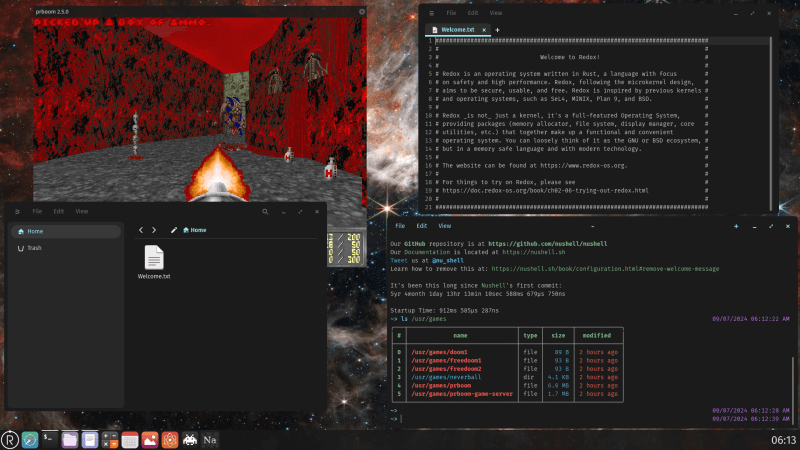
Redox OS is a Unix-like operating system written entirely in Rust, and somehow we haven’t covered it until now. Unlike Asterinas, a project to recreate the Linux kernel in Rust, Redox has few pretensions of being anything but its own thing, and that’s great! On desktop, Redox has a working windowing system and many utilities, including a basic browser in the form of NetSurf.
It’s claims to be source-compatible with Linux and BSD programs, and partially POSIX compliant. A certain someone around here might want to try it as a daily driver. The header image is a desktop screenshot, because there’s more to see there and it fits our aspect ratio.
On smartphones, it… boots. Some smartphones, anyway. It’s actually a big first step. That booting is possible is actually thanks to the great work put in by the Postmarket OS team to get Uboot working on select android devices. That uboot loader doesn’t need to load the Linux-based Postmarket OS. It can be used for anything compatible. Like, say, Redox OS, as [Paul] shows us.
Of course, Redox OS has no drivers for the touchscreen or anything else, so at the moment that rusty smartphone can only boot to a login screen. But thanks to Rust, you can rest assured that login screen hasn’t got any memory leaks! Jokes aside, this is a great start and we’re hoping to see more.
Redox is a promising project on mobile or desktop, and its development seems a much better use of time and effort than fighting over Rust in the Linux kernel.
Over this series test-driving operating systems, we’ve tried to bring you the unusual, the esoteric, or the less mainstream among the world of the desktop OS. It would become very boring very quickly of we simply loaded up a succession of Linux distros, so we’ve avoided simply testing the latest Debian, or Fedora.
That’s not to say that there’s no space for a Linux distro on these pages if it is merited though, as for example we marked its 30th anniversary with a look at Slackware. If a distro has something interesting to offer it’s definitely worth a look, which brings us to today’s subject.
KDE Linux is an eponymous distro produced by the makers of the KDE Plasma desktop environment and associated applications, and it serves as a technical demo of what KDE can be, a reference KDE-based distribution, and an entirely new desktop Linux distribution all in one. As such, it always has the latest in all things KDE, but aside from that perhaps what makes it even more interesting is that as an entirely new distribution it has a much more modern structure than many of the ones we’re used to that have their roots in decades past. Where in a traditional distro the system is built from the ground up on install, KDE Linux is an immutable base distribution, in which successive versions are supplied as prebuilt images on which the user space is overlaid. This makes it very much worth a look. Continue reading “Jenny’s Daily Drivers: KDE Linux”→





 Over this series test-driving operating systems, we’ve tried to bring you the unusual, the esoteric, or the less mainstream among the world of the desktop OS. It would become very boring very quickly of we simply loaded up a succession of Linux distros, so we’ve avoided simply testing the latest Debian, or Fedora.








