Manhole Covers Hide Antennas

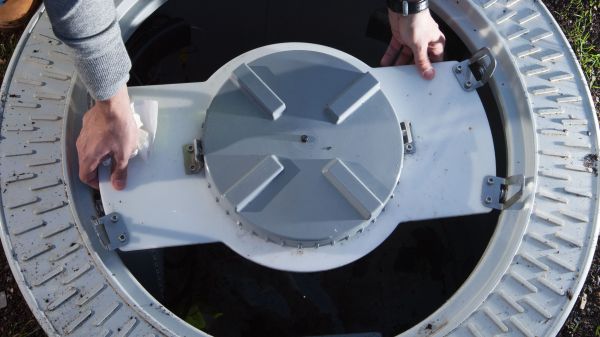
5G is gearing up to be the most extensive implementation of mesh networking ever, and that could mean antennas will not need to broadcast for miles, just far enough to reach some devices. That unsightly cell infrastructure stuck on water towers and church steeples could soon be hidden under low-profile hunks of metal we are already used to seeing; manhole covers. This makes sense because 5G’s millimeter radio waves are more or less line-of-sight, and cell users probably wouldn’t want to lose connectivity every time they walk behind a building.

At the moment, Vodafone in the UK is testing similar 4G antennas and reaching 195 megabits/sec download speeds. Each antenna covers a 200-meter radius and uses a fiber network because, courtesy of existing underground infrastructure. There is some signal loss from transmitting and receiving beneath a slab of metal, but that will be taken into account when designing the network. The inevitable shift to 5G will then be a relatively straightforward matter of lifting the old antennas out and laying the new hardware inside, requiring only a worker and a van instead of a construction crew.

We want to help you find all the hidden cell phone antennas and pick your own cell module.

Via IEEE Spectrum.

Underclocking The ESP8266 Leads To WiFi Weirdness

Sometimes the best hacks come from the most basic of questions. In this case, [CNLohr] was wondering what would happen if he started to reduce the clock speed of the ESP8266’s Baseband PLL (BBPLL) while still trying to communicate with it. You know, as one does. The results ended up being fairly surprising, and while it’s not immediately clear if there’s a practical application for this particular trick, it’s certainly worth some additional research.

Code for stepping through clock speeds

The idea here is that the BBPLL is the reference clock for the entire system, including all of the peripherals. So underclocking it doesn’t just slow down code execution as you might expect, but it also slows down the chip’s interactions with the outside world. [CNLohr] demonstrates this concept in the video below, showing how the baud rate used to view the serial output from the ESP8266 needs to be adjusted to match the chip’s frequency or else you’ll only get garbage on the line.

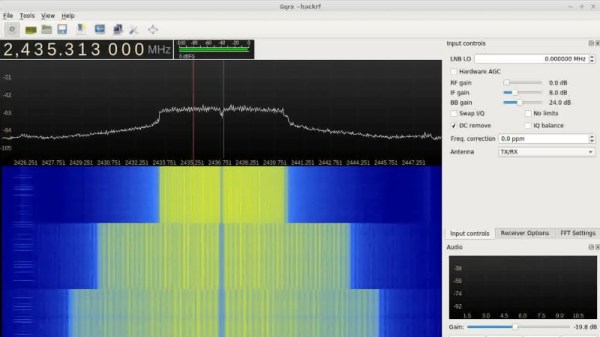
But what happens to the WiFi? As [CNLohr] discovered, while the center frequency itself doesn’t change, the channel width gets narrower as the clock rate is lowered. When viewed on the waterfall display of a software defined radio (SDR), the transmission can be seen “compressing” in a step pattern as the clock rate is reduced. As one might expect, the 802.11 packets become indecipherable to a normal WiFi device running in monitor mode. The signal is still at the correct frequency, but the devices can no longer understand each other.

Now it was time for another of those basic questions. What would happen if you did the same thing to a second ESP8266? Much to his surprise, [CNLohr] discovered that the two devices could still communicate successfully as long as their BBPLL clock speed was the same. From an outsider’s perspective it looked like gibberish, but to the two ESPs which had been slowed by the same amount, everything worked as expected even though the 802.11 standards say it shouldn’t.

So what can you do with this? The most obvious application is a “stealth” WiFi connection between ESP8266s which wouldn’t show up to normal devices, a communications channel invisible to all but the most astute eavesdropper. [CNLohr] has made all the source code to pull this trick off public on GitHub, and it should be interesting to see what kind of applications (if any) hackers find for this standards-breaking behavior.

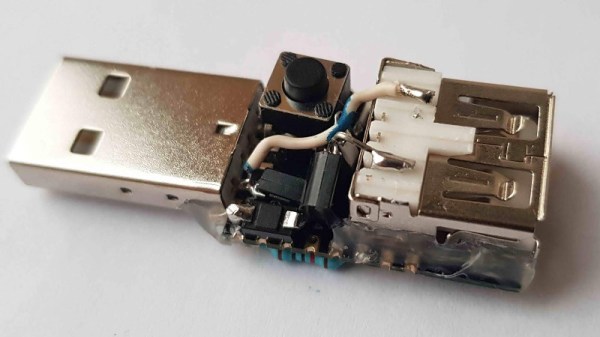
If your thing is devices being forced into operations they were never intended to by particularly twisted hackers, check out our recent coverage of the USB serial adapter turned SDR by [Ted Yapo].

Continue reading “Underclocking The ESP8266 Leads To WiFi Weirdness”

Finding The Goldilocks Cell Module

If adding a cell modem is dealing with a drama queen of a hardware component, then choosing from among the many types of modules available turns the designer into an electronics Goldilocks. There are endless options for packaging and features all designed to make your life easier (or not!) so you-the-designer needs to have a clear understanding of the forces at work to come to a reasonable decision. How else will Widget D’lux® finally ship? You are still working on Widget D’lux®, aren’t you?

OK, quick recap from last time. Cell modems can be used to add that great feature known as The Internet to your product, which is a necessary part of the Internet of Things, and thus Good. So you’re adding a cell modem! But “adding a cell modem” can mean almost anything. Are you aiming to be Qualcomm and sue Apple build modems from scratch? Probably not. What about sticking a Particle Electron inside to bolt something together quickly? Or talk to Telit and put a bare modem on a board? Unless you’re expecting to need extremely high volume and have a healthy appetite for certification glee, I bet you’ve chosen to get a modem with as many existing certifications as possible, which takes us to where we are today. Go read the previous post if you want a much more elaborate discussion of your modem-packaging options and some of the trade offs involved. Continue reading “Finding The Goldilocks Cell Module”

Superheterodyne Radios Explained

The general public thinks there is one thing called a radio. Sure, they know there are radios that pick up different channels, but other than that, one radio is pretty much like the other. But if you are involved in electronics, you probably know there are lots of ways a radio can work internally. A crystal set is very different from an FM stereo, and that’s different still from a communications receiver. We’d say there are several common architectures for receivers and one of the most common is the superheterodyne. But what does that mean exactly? [Technology Connection] has a casual explanation video that discusses how a superhet works and why it is important. You can see the video, below.

Engineering has always been about building on abstractions. This is especially true now when you can get an IC or module that does most of what you want it to do. But even without those, you would hardly start an electronics project by mining copper wire, refining it, and drawing your own wire. You probably don’t make many of your own resistors and capacitors, neither do you start your design at the fundamental electronic equations. But there’s one abstraction we often forget about: architecture. If you are designing a receiver, you probably don’t try to solve the problem of radio reception; instead you pick an architecture that is proven and design to that.

Continue reading “Superheterodyne Radios Explained”

35C3: Finding Bugs In Bluetooth

[Jiska Classen] and [Dennis Mantz] created a tool called Internal Blue that aims to be a Swiss-army knife for playing around with Bluetooth at a lower level. The ground for their tool is based in three functions that are common to all Broadcom Bluetooth chipsets: one that lets you read arbitrary memory, on that lets you run it, and one that lets you write it. Well, that was easy. The rest of their work was analyzing this code, and learning how to replace the firmware with their own version. That took them a few months of hard reversing work.

In the end, Internal Blue lets them execute commands at one layer deeper — the LMP layer — easily allowing monitoring and injection. In a series of live (and successful!) demos they probe around on a Nexus 6P from a modified Nexus 5 on their desk. This is where they started digging around in the Bluetooth stack of other devices with Broadcom chipsets, and that’s where they started finding bugs.

As is often the case, [Jiska] was just poking around and found an external code handler that didn’t do bounds checking. And that meant that she could run other functions in the firmware simply by passing the address handler offset. Since they’re essentially calling functions at any location in memory, finding which functions to call with which arguments is a process of trial and error, but the ramifications of this include at least a Bluetooth module crash and reset, but can also pull such tricks as putting the Bluetooth module into “Device Under Test” mode, which should only be accessible from the device itself. All of this is before pairing with the device — just walking by is sufficient to invoke functions through the buggy handler.

All the details of this exploit aren’t yet available, because Broadcom hasn’t fixed the firmware for probably millions of devices in the wild. And one of the reasons that they haven’t fixed it is that patching the bug will disclose where the flaw lies in all of the unpatched phones, and not all vendors can be counted on to push out updates at the same time. While they focused on the Nexus 5 cellphone, which is fairly old now, it’s applicable to any device with a similar Broadcom Bluetooth chipset.

Aside from the zero-day bug here, the big story is their Bluetooth analysis framework which will surely help other researchers learn more about Bluetooth, finding more glitches and hopefully helping make Bluetooth more openly scrutinized and more secure. Now anyone with a Raspberry Pi 3/3+ or a Nexus 5, is able to turn it into a low-level Bluetooth investigation tool.

You might know [Jiska] from her previous FitBit hack. If not, be sure to check it out.

Continue reading “35C3: Finding Bugs In Bluetooth”

RFID Doing More Than ID

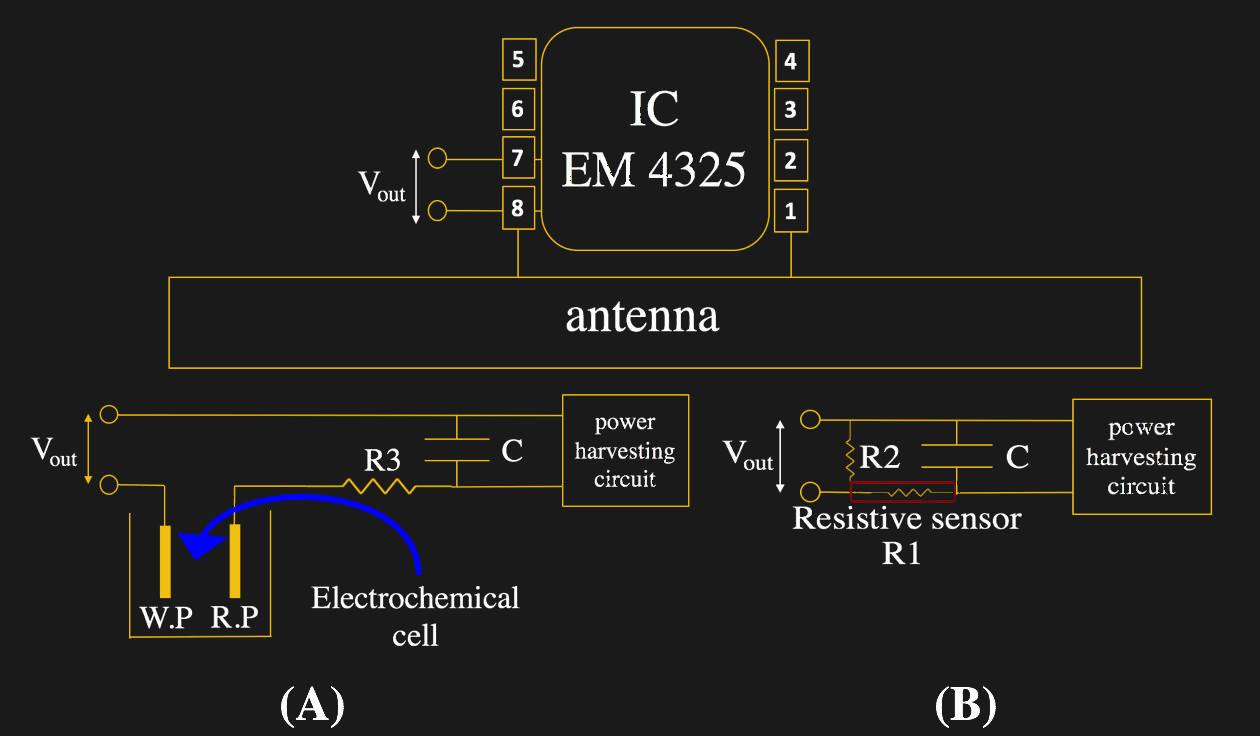
RFID is a workhorse in industrial, commercial, and consumer markets. Passive tags, like work badges and key fobs, need a base station but not the tags. Sensors are a big market and putting sensors in places that are hard to reach, hostile, or mobile is a costly proposition. That price could drop, and the sensors could be more approachable with help from MIT’s Auto-ID Lab who are experimenting with sensor feedback to RFID devices.

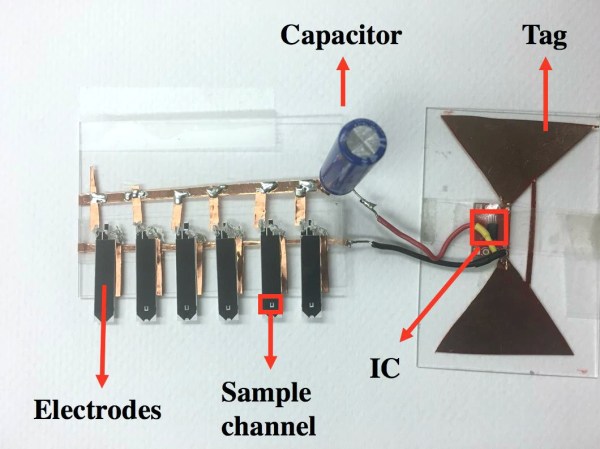
Let’s pretend you want to measure the temperature inside a vat of pressurized acid. You’d rather not drill a hole in it to insert a thermometer, but a temperature sensor sealed in Pyrex that wirelessly transmits the data and never runs out of power is a permanent and cheap solution. The researchers have their sights set on glucose sensing and that news come shortly after Alphabet gave up their RFID quest to measure glucose through contact lenses. Shown the top of this article is a prototype for a Battery Assisted Passive (BAP) RFID sensor that uses commodity glucose testing strips, sending data when the electrochemical reaction occurs. It uses six of these cells in parallel to achieve a high enough peak current to trigger the transmission. But the paper (10.1109/RFID.2018.8376201 behind paywall) mentions a few strategies to improve upon this. However, it does prove the concept that the current spike from the test strips determines the time the tag is active and that can be correlated to the blood glucose detected.

How many of our own projects would instantly upgrade with the addition of a few sensors that were previously unobtainable on a hacker budget? Would beer be brewed more effectively with more monitoring? How many wearables would be feasible with battery-free attachments? The sky is the figurative limit.

Thank you, [QES] for the tip [via TechXplore]

Pushbutton → Push Notification

How many mundane devices upgrade to IoT because they let you monitor a single data point or a variable? That little nudge over the communication precipice allows you to charge 500% more. Now, if you are as handy as a Hackaday reader, you can throw a lazy afternoon at the problem and get the same effect from a “dumb” appliance. If IoT is as simple as getting a notification when your laundry is dry, or your water is boiling, all you really need is a WiFi device and a push notification, right? Does it need to be more complicated than that? [Gianni] believes it is that simple (machine translation) and has built up an easy-to-implement version on Raspberry Pi, Arduino, and ESP8266.

[Gianni] leverages the aptly named Pushover (a paid app with a 1-week trial period) to convert your bits, bytes, words, or strings to a push notification. This idea is born of the desire for a home security system which doesn’t require constant monitoring but instead alerts you to problems. The minimum requirement you need is for your phone to chime with a notification saying, “Your front window sensor has been tripped.” Now it is time to launch your IP camera app or call someone nearby.

It’s not revolutionary, it may be the “Hello World” of IoT, but that is all some people need. The general idea is the same no matter the framework you want to use. For instance, if you Google Suite account, you can set up a chatroom just for your alert notifications; Google’s quickstart takes about 3 minutes to test it out in Python. The same setup is also available for Slack, and [Tom Nardi] did a guide for doing this with Discord. These tackle the receiving side, but the sending side is really flexible too — that MQTT broker you built could easily be the source of the alerts.

Build a handful of these in a weekend and keep them nearby to step up your next project to IoT status with a couple of solder joints. Maybe it will be a motion sensor for your own security system.