An Open Source Sip-and-Puff Mouse For Affordable Accessibility

At the core of any assistive technology is finding a way to do something with whatever abilities the user has available. This can be especially difficult in the case of quadriplegia sufferers, the loss of control of upper and lower limbs caused by spinal cord damage in the cervical region. Quadriplegics can gain some control of their world with a “Sip-and-puff” device, which give the user control via blowing or sucking on a mouthpiece.

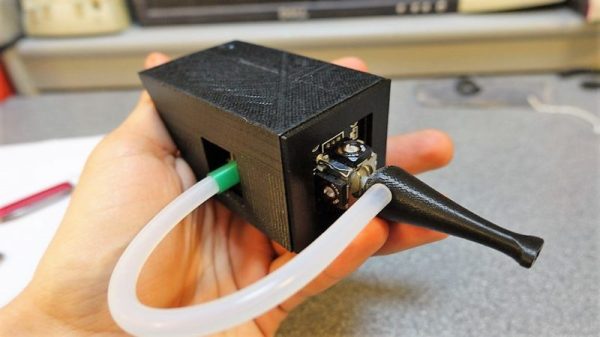
A sip-and-puff can make a world of difference to a quadriplegic, but they’re not exactly cheap. So to help out a friend, [Jfieldcap] designed and built an open source sip-and-puff mouse on the cheap. As is best for such devices, the design is simple and robust. The hollow 3D-printed mouthpiece acts as handle for a joystick module , and a length of tubing connects the mouthpiece to a pressure sensor. An Arduino lets the user move his head to position the cursor; hard sips and puffs are interpreted as left and right clicks, while soft mouth pressure is used for scrolling. In conjunction with some of the accessibility tools in modern OSes and personal assistant software like Siri or Cortana, the sip-and-puff opens up the online world, and for all of $50 in material.

We’re impressed by the effort and the results, but we worry that the standard PLA used for the mouthpiece won’t stand up to the cleaning it’ll need. Of course, printing extra mouthpieces is easy, but since it’s going to be in contact with the mouth, perhaps a review of food-safe 3D-printing is in order.
Flying The Friendly Skies With A Hall Effect Joystick

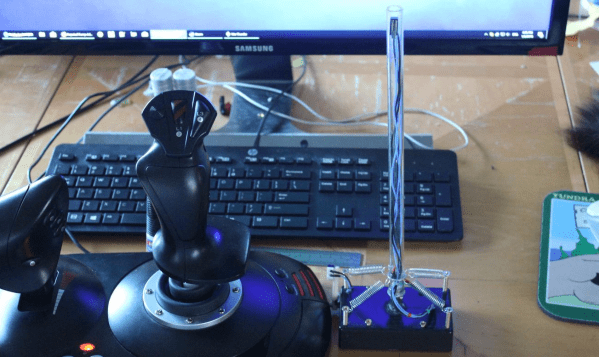
There are plenty of PC joysticks out there, but that didn’t stop [dizekat] from building his own. Most joysticks measure position mechanically using potentiometers or encoders. Only a few high-end models use Hall effect sensors. That’s the route [dizekat] took.

Hall effect sensors are non-contact devices which measure magnetic fields. They can be used to measure the position and orientation of a magnet. That’s exactly how [dizekat] is using a trio of sensors in his design. The core of the joystick is a universal joint from an old R/C car. The center section of the joint (called a spider) has two one millimeter thick disc magnets glued to it. The Hall sensors themselves are mounted in the universal itself. [Dizekat] used a small piece of a chopstick to hold the sensors in position while he found the zero point and glued them in. A third Hall effect sensor is used to measure a throttle stick positioned on the side of the box.

An Arduino micro reads the sensors and converts the analog signal to USB.  The Arduino Joystick Library by [Matthew Heironimus] formats the data into something a PC can understand.

While this is definitely a rough work in progress, we’re excited by how much [dizekat] has accomplished with simple hand tools and glue. You don’t need a 3D printer, laser cutter, and a CNC to pull off an awesome hack!

If you think Hall effect sensors are just for joysticks, you’d be wrong – they work as cameras for imaging magnetic fields too!

Turn A Car Into A Game Controller

The CAN bus has become a staple of automotive engineering since it was introduced in the late ’80s, but in parallel with the spread of electronic devices almost every single piece of equipment inside a car has been put on the CAN bus. While there are opinions on whether or not this is a good thing, the reality is that enough data is gathered on this bus to turn an unmodified modern car into a video game controller with just a little bit of code.

The core of [Scott]’s project is a laptop and a Python program that scrapes information about the car from the car’s CAN bus, including positions of the pedals and the steering wheel. This information can be accessed by plugging an adapter into the OBD-II port (a standard for all cars made after 1995). From there, the laptop parses the CAN data into keyboard and mouse commands for your video game of choice.

This is an interesting investigation into the nitty-gritty of the CAN bus, but also a less dangerous demonstration of all of the data available from the car than some other cases we’ve seen. At least [Scott]’s Mazda (presumably) lacks any wireless attack vectors!

Continue reading “Turn A Car Into A Game Controller” →

Retractable Console Allows Wheelchair User To Get Up Close And Personal

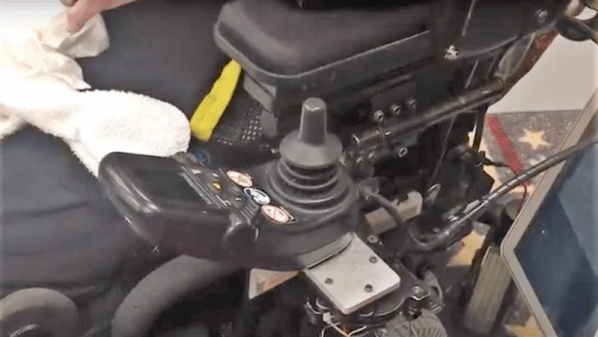
[Rhonda] has multiple sclerosis (MS), a disease that limits her ability to walk and use her arms. She and the other residents of The Boston Home, an extended care facility for people with MS and other neuromuscular diseases, rely on their wheelchairs for mobility. [Rhonda]’s chair comes with a control console that swings out of the way to allow her to come up close to tables and counters, but she has problems applying enough force to manually position it.

Sadly, [Rhonda]’s insurance doesn’t cover a commercial solution to her problem. But The Boston Home has a fully equipped shop to extend and enhance residents’ wheelchairs, and they got together with students from MIT’s Principles and Practices of Assistive Technology (PPAT) course to hack a solution that’s not only useful for [Rhonda] but should be generally applicable to other chairs. The students analyzed the problem, measured the forces needed and the clearances required, and built a prototype pantograph mount for the control console. They’ve made the device simple to replicate and kept the BOM as inexpensive as possible since patients are often out-of-pocket for enhancements like these. The video below shows a little about the problem and the solution.

Wheelchair hacks are pretty common, like the 2015 Hackaday Prize-winning Eyedrivomatic. We’ve also covered totally open-source wheelchairs, both manual and electric.

Continue reading “Retractable Console Allows Wheelchair User To Get Up Close And Personal” →

Robot Arm From Recyclables

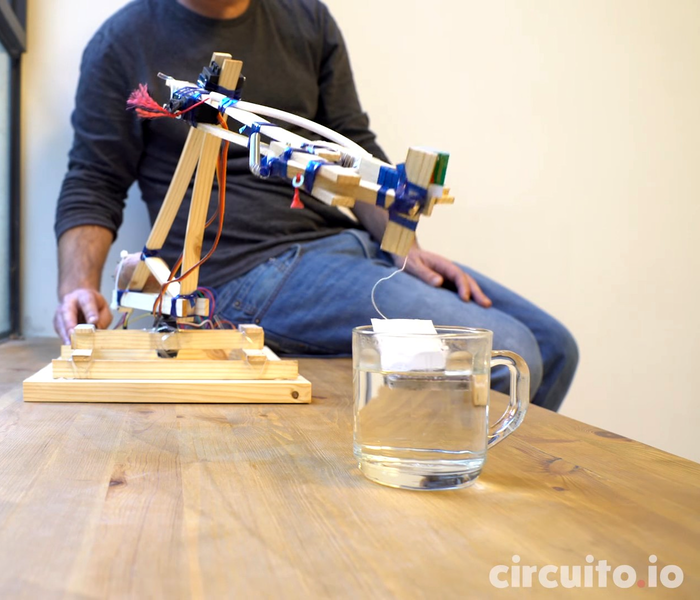
A robot assistant would make the lives of many much easier. Luckily, it’s possible to make one of your own with few fancy materials. The [circuito.io] team demonstrates this by building a robot arm out of recyclables!

With the exception of the electronics — an Arduino, a trio of servo motors, and a joystick — the arm is made almost completely out of salvaged recyclables: scrap wood, a plastic bottle, bits of plastic string and a spring. Oh, and — demonstrating yet another use for those multi-talented tubers — a potato acts as a counterweight.

Instead of using screws or glue, these hackers used string made from a plastic bottle as a form of heat shrink wrap to bind the parts of the arm together. The gripper has only one pivoting claw for greater strength, and the spring snaps it open once released. Behold: your tea-bag dunking assistant.

Continue reading “Robot Arm From Recyclables” →

Hackaday Prize Entry: A CNC Mill Without The C

It’s a staple of home CNC construction, the 3D mill built on the bench from available parts. Be the on a tubular, plywood, or extruded aluminum frame, we’ve seen an astonishing array of mills of varying levels of capability.

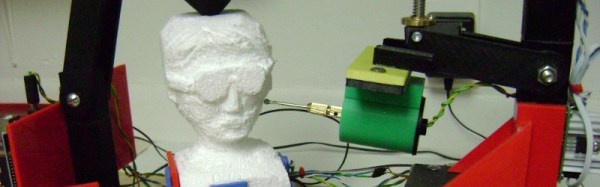
The norm for such a mill is to have a computer controlling it. Give it a CAD file, perform the software magic, press button, receive finished object (Or so the theory goes). It’s a surprise then to see a mill in which the input doesn’t come from a CAD file, instead all control is done by hand through the medium of a joystick. [Mark Miller]’s 3D printed freeform carving machine is a joystick-controlled mill with a rotary tool on an arm facing a rotatable bed, and it can perform impressive feats of carving in expanded foam.

You might ask why on earth you should make a machine such as this one when you could simply pick up a rotary tool in your hand and start carving. And you’d be right, from that perspective there’s an air of glorious uselessness to the machine. But to take that view misses the point entirely, it’s a clever build and rather a neat idea. We notice he’s not put up the files yet for other people to have a go, if someone else fancies making CNC software work with it then we’re sure that would be possible.

There is a video showing the basic movements the mill is capable of, which we’ve put below the break. Best to say, though, it’s one on which to enable YouTube’s double speed option.

Continue reading “Hackaday Prize Entry: A CNC Mill Without The C” →

4-way or 8-way joystick mod

4-way Or 8-way Joystick Restrictor Mod

Having a restricted 4-way or 8-way digital joystick for an arcade game is fine if the joystick is built into a game cabinet that plays only one game — 4-way for Pacman and 8-way for Super Cobra. But [Tinker_On_Steroids] wanted a joystick that could be restricted as either 4-way or 8-way for a cabinet that could play a multitude of games, and it had to switch from one type of restriction to the other automatically based on the selected game.

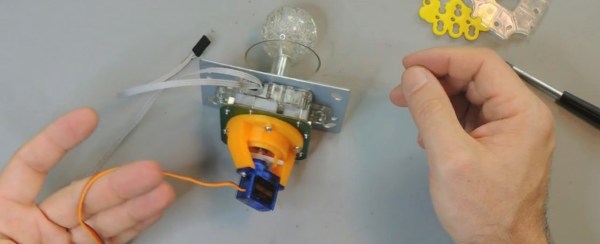
His digital joystick already came with a plate that can be mounted for either 4-way or 8-way restriction, but it has to be manually screwed in place for one or the other. He removed it and designed two 3D-printable parts, one that is to be mounted firmly to the bottom of the joystick and the other that rotates within the first one. Rotated in one orientation gives 4-way restriction and in the other orientation gives 8-way. That left only attaching a servo to do the rotation. The first video below shows mounting this all to the joystick and demoing the servo using a Teensy. The STL files for the parts are on his Thingiverse project page.

He also shows a simple circuit board he made that has two buttons and two LEDs on it for connecting to the Teensy and controlling the servo. And as an added option he shows how to talk to the Teensy from his desktop computer through USB and control the servo that way. In the second video below he details all that and also does a walk-through of the code he wrote for the Teensy. On the Thingiverse page he provides only the hex file but it’s likely you’d write your own software for interfacing with a game anyway.

Continue reading “4-way Or 8-way Joystick Restrictor Mod” →