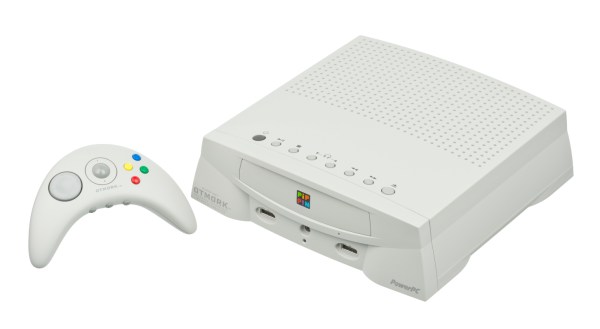
90s Apple Computer Finally Runs Unsigned Code

Back in the 90s, the console wars were in full swing. Nintendo vs Sega was an epic showdown at first, but when Nintendo seemed sure to clench the victory Sony came out of nowhere with the PlayStation. While these were the most popular consoles at the time, there were a few others around that are largely forgotten by history even if they were revolutionary in some ways. An example is the Pippin, a console made by Apple, which until now has been unable to run any software not signed by Apple.

The Pippin was Apple’s only foray into gaming consoles, but it did much more than that and included a primitive social networking system as well as the ability to run Apple’s Macintosh operating system. The idea was to be a full media center of sorts, and the software that it would run would be loaded from the CD-ROM at each boot. [Blitter] has finally cracked this computer, allowing it to run custom software, by creating an authentication file which is placed on the CD to tell the Pippin that it is “approved” by Apple.

The build log goes into incredible detail on the way these machines operated, and if you have a Pippin still sitting around it might be time to grab it out of the box and start customizing it in the way you probably always wanted to. For those interested in other obscure Apple products, take a look at this build which brings modern WiFi to the Apple Newton, their early PDA.

Continue reading “90s Apple Computer Finally Runs Unsigned Code” →
Open-Source Farming Robot Now Includes Simulations

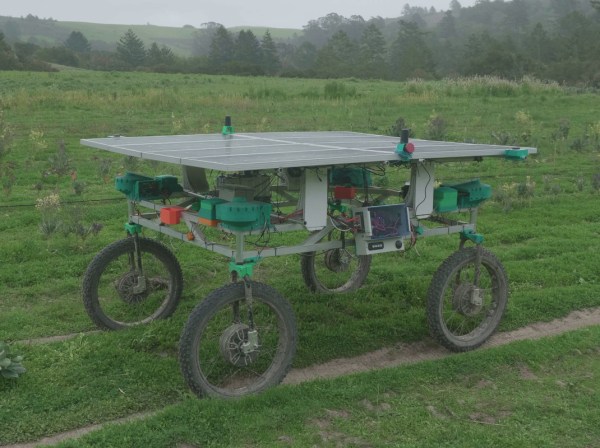
Farming is a challenge under even the best of circumstances. Almost all conventional farmers use some combination of tillers, combines, seeders and plows to help get the difficult job done, but for those like [Taylor] who do not farm large industrial monocultures, more specialized tools are needed. While we’ve featured the Acorn open source farming robot before, it’s back now with new and improved features and a simulation mode to help rapidly improve the platform’s software.

The first of the two new physical features includes a fail-safe braking system. Since the robot uses electric geared hub motors for propulsion, the braking system consists of two normally closed relays which short the motor leads in emergency situations. This makes the motors see an extremely high load and stops them from turning. The robot also has been given advanced navigation facilities so that it can follow custom complex routes. And finally, [Taylor] created a simulation mode so that the robot’s entire software stack can be run in Docker and tested inside a simulation without using the actual robot.

For farmers who are looking to buck unsustainable modern agricultural practices while maintaining profitable farms, a platform like Acorn could be invaluable. With the ability to survey, seed, harvest, and even weed, it could perform every task of larger agricultural machinery. Of course, if you want to learn more about it, you can check out our earlier feature on this futuristic farming machine.

Code Wrong: Expand Your Mind

The really nice thing about doing something the “wrong” way is that there’s just so much variety! If you’re doing something the right way, the fastest way, or the optimal way, well, there’s just one way. But if you’re going to do it wrong, you’ve got a lot more design room.

Case in point: esoteric programming languages. The variety is stunning. There are languages intended to be unreadable, or to sound like Shakespearean sonnets, or cooking recipes, or hair-rock ballads. Some of the earliest esoteric languages were just jokes: compilations of all of the hassles of “real” programming languages of the time, but yet made to function. Some represent instructions as a grid of colored pixels. Some represent the code in a fashion that’s tantamount to encryption, and the only way to program them is by brute forcing the code space. Others, including the notorious Brainf*ck are actually not half as bad as their rap — it’s a very direct implementation of a Turing machine.

So you have a set of languages that are designed to be maximally unlike each other, or traditional programming languages, and yet still be able to do the work of instructing a computer to do what you want. And if you squint your eyes just right, and look at as many of them all together as you can, what emerges out of this blobby intersection of oddball languages is the essence of computing. Each language tries to be as wrong as possible, so what they have in common can only be the unavoidable core of coding.

While it might be interesting to compare an contrast Java and C++, or Python, nearly every serious programming language has so much in common that it’s just not as instructive. They are all doing it mostly right, and that means that they’re mostly about the human factors. Yawn. To really figure out what’s fundamental to computing, you have to get it wrong.

Python Ditches The GILs And Comes Ashore

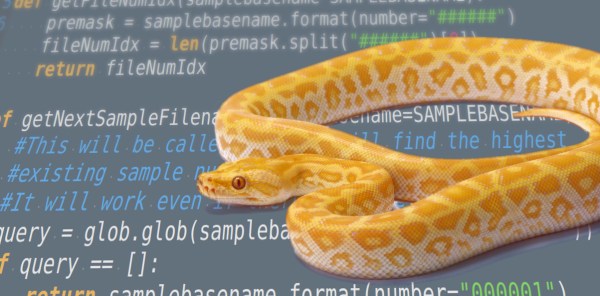
The Python world has been fractured a few times before. The infamous transition from version 2 to version 3 still affects people today, and there could be a new schism in the future. [Sam Gross] proposed a solution to drop the Global Interrupt Interpreter Lock (GIL), which would have enormous implications for many projects that leverage the CPython internals, such as Pandas and NumPy.

The fact that Python is interpreted is a double edge sword. It means there can be different runtimes, such as Pyston, Cinder, MicroPython, PyPy, and others, that might support the whole language, a specific version, or a subset. But if you’re using Python, you’re probably running CPython. And it has something known as global interpreter lock that affects threaded code. In a nutshell, only one thread can run in the interpreter at a time. There are some ways around it, such as moving performance-critical sections to C or having multiple interpreters. However, most existing solutions come with considerable downsides. Continue reading “Python Ditches The GILs And Comes Ashore” →

Classic 80s Text-To-Speech On Classic 80s Hardware

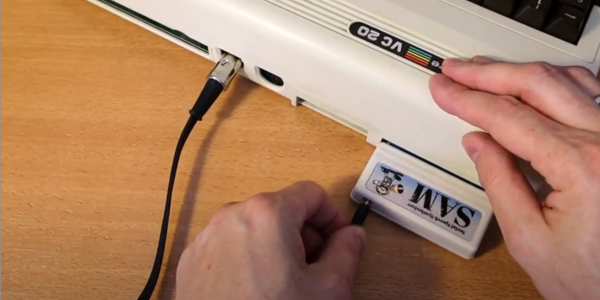
Those of us who were around in the late 70s and into the 80s might remember the Speak & Spell, a children’s toy with a remarkable text-to-speech synthesizer. While it sounds dated by today’s standards, it was revolutionary for the time and was riding a wave of text-to-speech functionality that was starting to arrive to various computers of the era. While a lot of them used dedicated hardware to perform the speech synthesis, some computers were powerful enough to do this in software, but others were not quite able. The VIC-20 was one of the latter, but thanks to an ESP8266 it has been retroactively given this function.

This project comes to us from [Jan Derogee], a connoisseur of this retrocomputer, and builds on the work by [Earle F. Philhower] who ported the retro speech synthesis software known as SAM from assembly to C which made it possible to run on the ESP8266. Audio playback is handled on the I2S port, but some work needed to be done to get this to work smoothly since this port also handles the communication with the VIC-20. Once this was sorted out, a patch was made to be able to hear the computer’s audio as well as the speech synthesizer’s. Finally, a serial command interface was designed by [Jan] which allows for control of the module.

While not many of us have VIC-20s sitting at home, it’s still an interesting project that shows the broad scope of a small and inexpensive chip like the ESP8266 which would have had a hefty price tag back in the 1980s. If you have other 80s hardware laying around waiting to be put to work, though, take a look at this project which brings new vocabulary words to that old classic Speak & Spell.

Continue reading “Classic 80s Text-To-Speech On Classic 80s Hardware” →

Capacitive Touch Controller For FPGAs

Most projects that interface with the real world need some sort of input device. Obviously this article is being written from a standardized “human interface device” but when the computers become smaller the problem can get more complicated. We can’t hook up a USB keyboard to every microcontroller since we often only need a few buttons, but even buttons can be a little bit too cumbersome for some applications. For something even simpler, we would like to turn your attention to capacitive touch controllers.

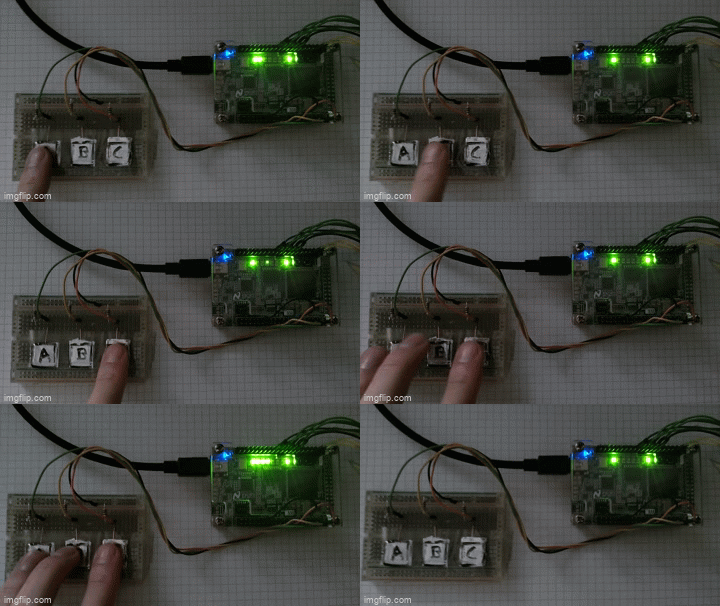
Granted, these devices are really only simpler from a hardware perspective. Rather than a switch that can be prone to failure either when its moving parts break or its contacts become corroded, a capacitive touch button only needs a certain conductive area on something like a PCB, along with a few passive components, to work. The real difficulty is in the software, so this project aims to make it simpler to bring these sort of devices to any FPGA that needs some sort of interface like this. It can operate in stand-alone mode or in a custom user interface, and was written to be platform-independent in VHDL without the need for any dependencies or macros.

The project’s page goes into a great amount of detail on how capacitive touch sensors like these work in general, and describes the operation of this specific code as well. Everything is open source, so it’s ready to be put to work right away. If you need capacitive touch capabilities on something like a microcontroller, though, take a look at this tiny Atmel-powered musical instrument instead.

In Search Of The First Comment

Are you writing your code for humans or computers? I wasn’t there, but my guess is that at the dawn of computing, people thought that they were writing for the machines. After all, they were writing in machine language, and whatever bits they flipped into the electronic brain stayed in the electronic brain, unless punched out on paper tape. And the commands made the machine do things, not other people. Code was written strictly for computers.

Modern programming practice, on the other hand, is aimed firmly at people. Variable and function names are chosen to be long and to describe what they contain or do. “Readability” of code is a prized attribute. Indeed, sometimes the fact that it does the right thing at all almost seems to be an afterthought. (I kid!)

Somewhere along this path, there was an important evolutionary step, like the first fish using its flippers to walk on land. Comments were integrated into programming languages, formalizing the notes that coders of old surely wrote by hand in the margins of the paper first-drafts before keying it in. So I went looking for the missing link: the first computer language, and ideally the first program, with comments. I came up empty handed.

Or rather full handed. Every computer language that I could find had comments from the beginning. FORTRAN had comments, marked by a “C” as the first character in a line. APL had comments, marked by the bizarro rune ⍝. Even the custom language written for the Apollo 11 guidance computers had comments — the now-commonplace “#”. I couldn’t find an early programming language without comments.

My guess is that the first language with a comment must have been an assembly language, because I don’t know of any machines with a native comment instruction. (How cool and frivolous would that be?)

Assemblers simply translate mnemonic names to their machine instruction counterparts, but this gives them the important freedom to ignore anything starting with, traditionally, a semicolon. Even though you’re just transferring the contents of register X to the memory location pointed to in register Y, you can write that you’re “storing the height above ground (meters)” in the comments.

The crucial evolutionary step, though, is saving the comments along with the code. Simply ignoring everything that comes after the semicolon and throwing it away doesn’t count. Does anyone know? What was the first code to include comments as part of the code itself, and not simply as marginalia?