
How To Time Drone Races Without Transponders

Drone racing is nifty as heck, and a need all races share is a way to track lap times. One way to do it is to use transponders attached to each racer, and use a receiver unit of some kind to clock them as they pass by. People have rolled their own transponder designs with some success, but the next step is ditching add-on transponders entirely, and that’s exactly what the Delta 5 Race Timer project does.

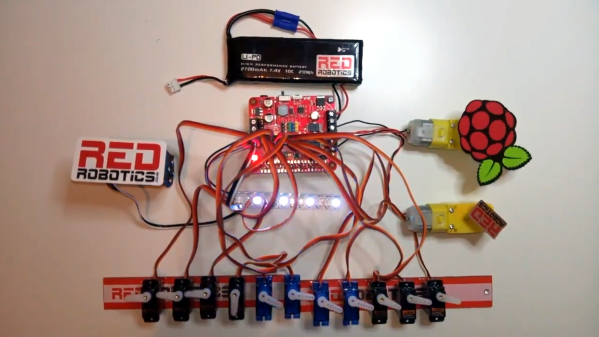
A sample Delta 5 Race Timer build (Source: ET Heli)

The open-sourced design has a clever approach. In drone racing, each aircraft is remotely piloted over a wireless video link. Since every drone in a race already requires a video transmitter and its own channel on which to broadcast, the idea is to use the video signal as the transponder. As a result, no external hardware needs to be added to the aircraft. The tradeoff is that using the video signal in this way is trickier than a purpose-made transponder, but the hardware to do it is economical, accessible, and the design is well documented on GitHub.

The hardware consists of RX508 RX5808 video receiver PCBs modified slightly to enable them to communicate over SPI. Each RX508 RX5808 is attached to its own Arduino, which takes care of low-level communications. The Arduinos are themselves connected to a Raspberry Pi over I2C, allowing the Pi high-level control over the receivers while it serves up a web-enabled user interface. As a bonus, the Pi can do much more than simply act as a fancy stopwatch. The races themselves can be entirely organized and run through the web interface. The system is useful enough that other projects using its framework have popped up, such as the RotorHazard project by [PropWashed] which uses the same hardware design.

While rolling one’s own transponders is a good solution for getting your race on, using the video transmission signal to avoid transponders entirely is super clever. The fact that it can be done with inexpensive, off the shelf hardware is just icing on the cake.

Supportless Overhangs: Just Reorient Gravity By 90 Degrees

The 3D print by [critsrandom] in the image above may not look like much at first glance, until one realizes that the 90 degree overhang has no supports whatsoever. Never mind the messy bottom surface, and never mind that the part shown might avoid the problem entirely with some simple supports or a different print orientation; the fact that it printed at all is incredible.

[critsrandom] shared the method in a post on Reddit, and it consists simply of laying the 3D printer on its side. When the print head reaches the overhang, the fact that it is printing sideways is what allows that spot to make the leap from “impossible” to merely “messy”. Necessary? Probably not, but a neat trick nevertheless.

Tilted 3D printers is something that we’ve seen in the past, but for different reasons. When combined with a belt-driven build platform, a tilted printer has a theoretically infinite build volume (in one axis, anyway.)

DIY Vacuum Table Enhances PCB Milling

CNC milling a copper-clad board is an effective way to create a PCB by cutting away copper to form traces instead of etching it away chemically, and [loska] has improved that process further with his DIY PCB vacuum table. The small unit will accommodate a 100 x 80 mm board size, which was not chosen by accident. That’s the maximum board size that the free version of Eagle CAD will process.

When it comes to milling PCBs, double-sided tape or toe clamps are easy solutions to holding down a board, but [loska]’s unit has purpose behind its added features. The rigid aluminum base and vacuum help ensure the board is pulled completely flat and held secure without any need for external fasteners or adhesives. It’s even liquid-proof, should cutting fluid be used during the process. Also, the four raised pegs provide a way to reliably make double-sided PCBs. By using a blank with holes to match the pegs, the board’s position can be precisely controlled, ensuring that the back side of the board is cut to match the front. Holes if required are drilled in a separate process by using a thin wasteboard.

Milling copper-clad boards is becoming more accessible every year; if you’re intrigued by the idea our own [Adil Malik] provided an excellent walkthrough of the workflow and requirements for milling instead of etching.

Screen Shake In VR, Minus The Throwing Up

In first-person games, an effective way to heighten immersion is to give the player a sense of impact and force by figuratively shaking the camera. That’s a tried and true practice for FPS games played on a monitor, but to [Zulubo]’s knowledge, no one has implemented traditional screen shake in a VR title because it would be a sure way to trigger motion sickness. Unsatisfied with that limitation, some clever experimentation led [Zulubo] to a method of doing screen shake in VR that doesn’t cause any of the usual problems.

Screen shake doesn’t translate well to VR because the traditional method is to shake the player’s entire view. This works fine when viewed on a monitor, but in VR the brain interprets the visual cue as evidence that one’s head and eyeballs are physically shaking while the vestibular system is reporting nothing of the sort. This kind of sensory mismatch leads to motion sickness in most people.

The key to getting the essence of a screen shake without any of the motion sickness baggage turned out to be a mix of two things. First, the shake is restricted to peripheral vision only. Second, it is restricted to an “in and out” motion, with no tilting or twisting. The result is a conveyance of concussion and impact that doesn’t rely on shaking the player’s view, at least not in a way that leads to motion sickness. It’s the product of some clever experimentation to solve a problem, and freely downloadable for use by anyone who may be interested.

Speaking of fooling one’s senses in VR environments, here is a fascinating method of simulating zero gravity: waterproof the VR headset and go underwater.

[via Reddit]

To Make Reproduction Train Whistles, The Old Ways Are Best

Late last year, artist [Steve Messam]’s project “Whistle” involved 16 steam engine whistles around Newcastle that would fire at different parts of the day over three months. The goal of the project was bring back the distinctive sound of the train whistles which used to be fixture of daily life, and to do so as authentically as possible. [Steve] has shared details on the construction and testing of the whistles, which as it turns out was a far more complex task than one might expect. The installation made use of modern technology like Raspberry Pi and cellular data networks, but when it came to manufacturing the whistles themselves the tried and true ways were best: casting in brass before machining on a lathe to finish.

The original whistles are a peek into a different era. The bell type whistle has three major components: a large bell at the top, a cup at the base, and a central column through which steam is piped. These whistles were usually made by apprentices, as they required a range of engineering and manufacturing skills to produce correctly, but were not themselves a critical mechanical component.

In the original whistle shown here, pressurized steam comes out from within the bottom cup and exits through the thin gap (barely visible in the image, it’s very narrow) between the cup and the flat shelf-like section of the central column. That ring-shaped column of air is split by the lip of the bell above it, and the sound is created. When it comes to getting the right performance, everything matters. The pressure of the air, the size of the gap, the sharpness of the bell’s lip, the spacing between the bell and the cup, and the shape of the bell itself all play a role. As a result, while the basic design and operation of the whistles were well-understood, there was a lot of work to be done to reproduce whistles that not only operated reliably in all types of weather using compressed air instead of steam, but did so while still producing an authentic re-creation of the original sound. As [Steve] points out, “with any project that’s not been done before, you really can’t do too much testing.”

Embedded below is one such test. It’s slow-motion footage of what happens when the whistle fires after filling with rainwater. You may want to turn your speakers down for this one: locomotive whistles really were not known for their lack of volume.

Continue reading “To Make Reproduction Train Whistles, The Old Ways Are Best”

Project Shows How To Use Machine Learning To Detect Pedestrians

Most people are familiar with the idea that machine learning can be used to detect things like objects or people, but for anyone who’s not clear on how that process actually works should check out [Kurokesu]’s example project for detecting pedestrians. It goes into detail on exactly what software is used, how it is configured, and how to train with a dataset.

The application uses a USB camera and the back end work is done with Darknet, which is an open source framework for neural networks. Running on that framework is the YOLO (You Only Look Once) real-time object detection system. To get useful results, the system must be trained on large amounts of sample data. [Kurokesu] explains that while pre-trained networks can be used, it is still necessary to fine-tune the system by adding a dataset which more closely models the intended application. Training is itself a bit of a balancing act. A system that has been overly trained on a model dataset (or trained on too small of a dataset) will suffer from overfitting, a condition in which the system ends up being too picky and unable to usefully generalize. In terms of pedestrian detection, this results in false negatives — pedestrians that don’t get flagged because the system has too strict of an idea about what a pedestrian should look like.

[Kurokesu]’s walkthrough on pedestrian detection is great, but for those interested in taking a step further back and rolling their own projects, this fork of Darknet contains YOLO for Linux and Windows and includes practical notes and guides on installing, using, and training from a more general perspective. Interested in learning more about machine learning basics? Don’t forget Google has a free online crash course to get you up to speed.

Years Don’t Dim The Shine Of These Curious Gadgets

[Maarten Tromp] recently took the time to document some of the unusual and creative electronic projects he received as gifts over the years. These gadgets were created in the early 2000’s and still work flawlessly today. Two of our favorites are shown here: Hardware Tetris Unit (shown in the image above) and Heap of Electronic Parts.

The “Heap of Electronic Parts” makes sounds when in sunlight.

Heap of Electronic Parts was a kind of hardware puzzle and certainly lives up to its name. It’s a bunch of parts soldered in a mystifying way to the backs of four old EPROMs — the chips with the little window through which UV is used to erase the contents. Assured that the unit really did have a function, [Maarten] eventually figured out that when placed in sunlight, the device ticks, buzzes, and squeals. [Jeroen] had figured out that the EPROMs could act like tiny solar cells when placed in sunlight, and together the four generate just enough power to drive an oscillator connected to a piezo speaker. It still chirps happily away, even today.

Hardware Tetris plays in a terminal window.

Hardware Tetris Unit was a black box intended to be plugged into a serial port. With a terminal opened using the correct serial port settings, a fully-functional Tetris game using ASCII-art graphics could be played. It was even self-powered from the serial port pins.

Inside Hardware Tetris is an AVR microcontroller with some level shifters, and the source code and schematics are available for download. 14 years later, computers no longer have hardware serial ports but [Maarten] says a USB-to-serial converter worked just fine and the device still functions perfectly.

There are a couple more devices documented on [Maarten]’s gifts page, including a Zork-inspired mini text adventure and a hardware board that does some trippy demos on an old Nokia color LCD.  [Maarten]’s friend [Jeroen Domburg] (aka Sprite_tm) had a hand in creating most of the gadgets, and he’s someone whose brilliant work we have had the good fortune to feature many times in the past.