Old LED Light Bulbs Give Up Filaments For Spider Web Clock

We love it when something common gets put to a new and unusual use, especially when it’s one of those, “Why didn’t I think of that?” situations. This digital clock with a suspended display is just such a thing.

The common items in this case were “filaments” from LED light bulbs, those meant to mimic the look of clear-glass incandescent light bulbs. [Andypugh] had been looking at them with interest for a while, and realized they were perfect as the segments for a large digital clock. The frame of the clock was formed from bent brass U-channel and mounted to an oak base via turned stanchions. The seven-segment displays were laid out in the frame and the common anodes of the LED filaments were connected together, with the cathode for each connected to a very fine wire. Each wire was directed through a random hole in the frame and channeled down into the base, to be hooked to one of the four DS8880 VFD driver chips. The anode wires form a lacy filigree behind the segments, which catch the light and make then look a little like a spider’s web. It looks great, but nicht für der gefingerpoken – the frame is at 80 VDC to drive the LED segments. The clock is synced to the UK atomic clock with a 60-kHz radio link; see the long, painful sync process in the video below.

We like the open frame look, which we’ve seen before with an equally dangerous sculptural nixie clock. And this gives us some ideas for what to do with those filament LEDs other than turning them back into a light bulb. And if [Andy] sounds familiar, it could be because he’s appeared here before. First of all resurrecting the parts bin for an entire classic motorcycle marque, and then as the designer of SMIDSY, a robot competitor in the first incarnation of the UK Robot Wars series.

Continue reading “Old LED Light Bulbs Give Up Filaments For Spider Web Clock”
Amiga Repairs Put One Tough Little Machine Back In Service

Returning a piece of retro hardware to factory condition is generally a labor of love for the restorationist. A repair, on the other hand, is more about getting a piece of equipment back into service. But the line between repair and restoration is sometimes a fine one, with the goals of one bleeding over into the other, like in this effort to save an otherwise like-new Amiga 2000 with a leaky backup battery.

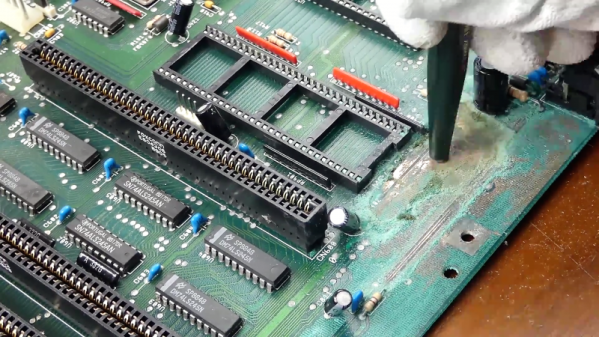
Having previously effected emergency repairs to staunch the flow of electrolyte from the old batteries and prevent further damage, [Retromat] entered the restoration phase of the project. The creeping ooze claimed several caps and the CPU socket as it spread across the PCB, but the main damage was to the solder resist film itself. In the video below you can clearly see flaky, bubbly areas in the mask where the schmoo did its damage.

Using a fiberglass eraser, some isopropyl alcohol, and far more patience than we have, [Retromat] was able to remove the damaged resist to reveal the true extent of the damage below. Thankfully, most of the traces were still intact; only a pair of lines under the CPU socket peeled off as he was removing it. After replacing them with fine pieces of wire, replacing the corroded caps and socket, and adding a coin-cell battery holder to replace the old battery, the exposed traces were coated with a varnish to protect them and the machine was almost as good as new.

Amigas were great machines in their day and launched more than one business. They’ve proved their staying power too, some even in mission-critical roles.

Continue reading “Amiga Repairs Put One Tough Little Machine Back In Service”

Save Some Steps With This Arduino Rapid Design Board

We’re all familiar with the wide variety of Arduino development boards available these days, and we see project after project wired up on a Nano or an Uno. Not that there’s anything wrong with that, of course, but there comes a point where some hobbyists want to move beyond plugging wires into header sockets and build the microcontroller right into their project. That’s when one generally learns that development boards do a lot more than break the microcontroller lines out to headers, and that rolling your own design means including all that supporting circuitry.

To make that transition easier, [Sean Hodgins] has come up with a simple Arduino-compatible module that can be soldered right to a PCB. Dubbed the “HCC Mod” for the plated half-circle castellations that allows for easy soldering, the module is based on the Atmel SAMD21 microcontroller. With 16 GPIO lines, six ADCs, an onboard 3.3 V regulator, and a reset button, the module has everything needed to get started — just design a PCB with the right pad layout, solder it on, and surround it with your circuitry. Programming is done in the familiar Arduino IDE so you can get up and running quickly. [Sean] has a Kickstarter going for the modules, but he’s also releasing it as open source so you’re free to solder up your own like he does in the video below.

It’s certainly not the first dev module that can be directly soldered to a PCB, but we like the design and can see how it would simplify designs. [Sean] as shown us a lot of builds before, like this army of neural net robots, so he’ll no doubt put these modules to good use.

Continue reading “Save Some Steps With This Arduino Rapid Design Board”

The Hot And Cold Of Balanced Audio

A few summers of my misspent youth found me working at an outdoor concert venue on the local crew. The local crew helps the show’s technicians — don’t call them roadies; they hate that — put up the show. You unpack the trucks, put up the lights, fly the sound system, help run the show, and put it all back in the trucks at the end. It was grueling work, but a lot of fun, and I got to meet people with names like “Mister Dog Vomit.”

One of the things I most remember about the load-in process was running the snakes. The snakes are fat bundles of cables, one for audio and one for lighting, that run from the stage to the consoles out in the house. The bigger the snakes, the bigger the show. It always impressed me that the audio snake, something like 50 yards long, was able to carry all those low-level signals without picking up interference from the AC thrumming through the lighting snake running right alongside it, while my stereo at home would pick up hum from the three-foot long RCA cable between the turntable and the preamp.

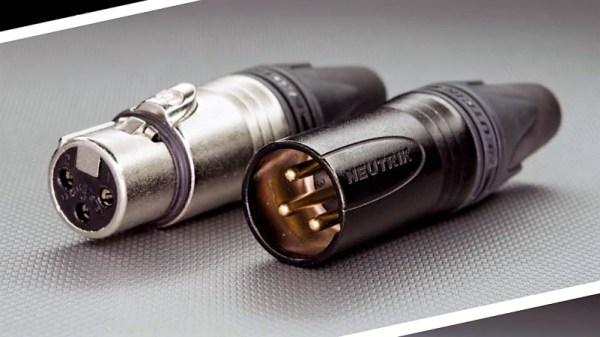
I asked one of the audio techs about that during one show, and he held up the end of the snake where all the cables break out into separate connectors. The chunky silver plugs clinked together as he gave his two-word answer before going back to patching in the console: “Balanced audio.”

Continue reading “The Hot And Cold Of Balanced Audio”

Dual-Port Memory And Raspberry Pi Team Up For Retro Console Multicart

There’s something powerful about reliving the experience of using a game console from our personal good old days, especially the tactile memories stored up from hundreds of hours handling a chintzy joystick or the sound and feel of inserting a game cartridge. Emulators have their place, but they fall far short of period-correct hardware in the nostalgia department.

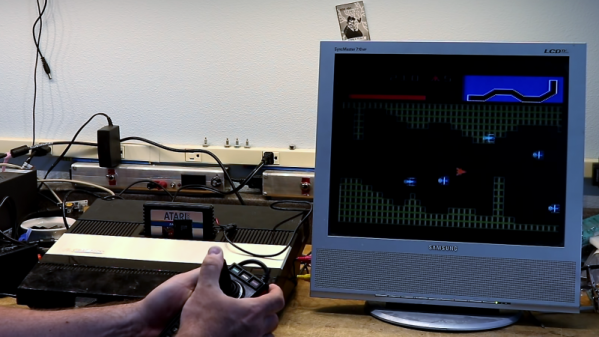
That’s not to say that the retro gear can’t use a little help in terms of usability, which is why [Scott M. Baker] built this Raspberry Pi multi-cartridge for his Atari 5200. The idea is to maintain the experience of the cartridge interface without having to keep stacks of cartridges around for all the games he wants to play. [Scott] leveraged the approach he used when he built a virtual floppy drive for a homebrew PC/XT: dual-port memory. The IDT7007 is a 32k chip that lives between the Atari 5200 and a Raspberry Pi Zero and can be addressed by both systems; the Pi to write ROM images to the memory, and the console to read them. He had to deal with some fussy details like chip select logic and dealing with the cartridge interlock signals, not to mention the difference in voltage between the memory chip’s logic levels and that of the Pi. Retro game-play occupies the first part of the video below; skip to 6:45 for build details.

The one quibble we have is trying to jam everything into an old cartridge. It’s critical to replicating the tactile experience, and while we don’t think we’d have gone so far as to injection mold a custom cartridge to house everything without any protrusions, we might have 3D-printed a custom cartridge instead. In the end it doesn’t detract much from the finished project, though, and we appreciate the mix of old and new tech.

Continue reading “Dual-Port Memory And Raspberry Pi Team Up For Retro Console Multicart”

Hackaday Belgrade: Luka Mustafa On Exploiting IoT Niches

Ecology is a strange discipline. At its most basic, it’s the study of how living things interact with their environment. It doesn’t so much seek to explain how life works, but rather how lives work together. A guiding principle of ecology is that life finds a way to exploit niches, subregions within the larger world with a particular mix of resources and challenges. It’s actually all quite fascinating.

But what does ecology have to do with Luka Mustafa’s talk at the 2018 Hackaday Belgrade Conference? Everything, as it turns out, and not just because Luka and his colleagues put IoT tools on animals and in their environments to measure and monitor them. It’s also that Luka has found a fascinating niche of his own to exploit, one on the edge of technology and ecology. As CEO of Institute IRNAS, a non-profit technology development group in Slovenia, Luka has leveraged his MEng degree, background in ham radio, and interest in LoRaWAN and other wide-area radio networks to explore ecological niches in ways that would have been unthinkable even 10 years ago, let alone in the days when animal tracking was limited by bulky radio collars.

Continue reading “Hackaday Belgrade: Luka Mustafa On Exploiting IoT Niches”

This Cetus Printer Is Rigged For Silent Running

The entry-level 3D-printer market is a rich one, with offerings from many vendors that are surprisingly good. But nothing is perfect, and to hit the $200 price point some compromises are inevitable. That doesn’t mean you have to live with those engineering choices, of course, which makes these cheap printers a great jumping off point for aftermarket mods.

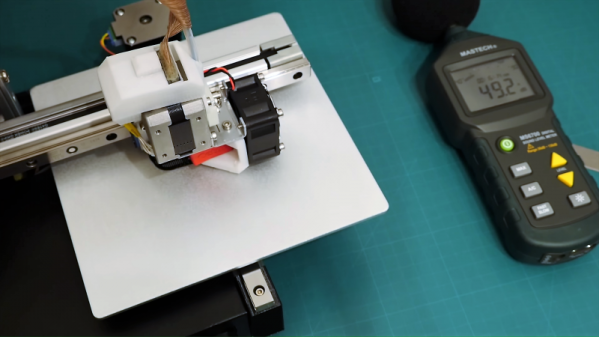
[Linas K] took this route and in the process made his Cetus 3D-printer essentially silent. The first part of the video below reviews the shortcomings of the stock machine and the mechanical changes [Linas] made, including new brackets for the Z-axis slide, relocating the WiFi antenna to someplace sensible, and adding limit switches for each slide. Inside the case, the electronics get a complete reworking, with a custom PCB to house Trinamic stepper drivers for ultraquiet operation. The new board also supports the limit switches as well as thermostatic control of the extruder fan and pads for a platform heater. As a bonus, the new PCB is much smaller than the original, leaving room to tuck the power supply into the case, which is a nice touch. It wasn’t cheap, and it meant basically gutting the printer, but the results are impressively quiet.

We’re tempted to try these silencing mods on our own Cetus, if [Linas] ever publishes the BOM and PCB designs (hint, hint). And Cetus hacking is becoming quite a thing around here. From a trio of Cetus pro-tips to turning a Cetus into a PCB machine, the little printer has a lot to offer.

Continue reading “This Cetus Printer Is Rigged For Silent Running”