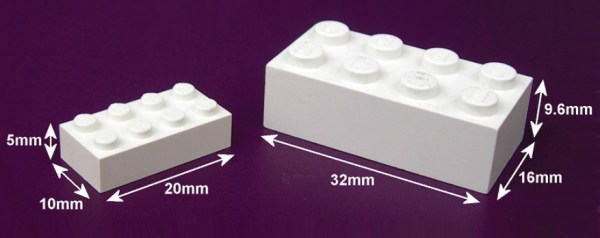
An image of a Modulex brick (left) next to a LEGO brick right. Both are 4x2 studs, but the Modulex brick is much smaller at 20x10x5 mm vs the LEGO's 32x16x9.6 mm.

Modulex Is LEGO’s Long Lost Cousin

We love LEGO here at Hackaday, but did you know that LEGO spun off a parallel product line made for architectural models called Modulex?

[Peter Dibble] takes us on a deep dive through the history of Modulex, starting with Godtfred Kirk Christiansen needing a better way to model actual buildings after trying to design a house in LEGO. The LEGO brick’s 5:5:6 ratio proved challenging for modeling full-sized projects, so Modulex was conceived around a 1:1:1 ratio 5 mm cube. This change means Modulex is not compatible with LEGO System bricks.

As architectural styles morphed through the mid-20th Century, designs based around blocky shapes became passe, and Modulex pivoted to targeting factory and city planning customers. Products later branched out to include wall charts and Plancopy photocopy-able planners along with reconfigurable signage. Modulex (now ASI) still goes on as one of the biggest signage companies in the world, but discontinued the bricks in 2004. An attempt was made to revive Modulex bricks in 2015, but LEGO Group bought the company that had the rights to the bricks and has no intention of producing Modulex.

For more LEGO hacks, checkout this machine learning LEGO sorter or these giant LEGO-like pieces.

Continue reading “Modulex Is LEGO’s Long Lost Cousin”

A white longtail cargo bike sits on grass with fenced-in planters behind it. The bike has a basket made of black metal tubes on the front and a passenger compartment behind the rider seat for children made of similar black metal tubes. A white canopy is above the passenger compartment and a solar panel sits atop the canopy.

Solar Powered E-bike Replaces Car Trips

E-bikes can replace car trips for some people, and adding a solar panel can make the fun last longer. [Luke] did some heavy modifications to his RadWagon to make it better, stronger, and faster than it was before.

The first step was replacing the stock 750 W controller with a 1500 W model to give the motor twice the power. [Luke] plans to replace the motor if it gets fried pushing too much juice, but is planning on just being careful for now. To stop this super-powered ride, he swapped the stock mechanical discs out for a hydraulic set which should be more reliable, especially when loading down this cargo bike.

On top of these performance enhancements, he also added a 50 W solar panel and maximum power point tracking (MPPT) charge controller to give the bike a potential 50% charge every day. Along with the OEM kid carrier and roof, this bike can haul kids and groceries while laughing at any hills that might come its way.

Checkout this other solar e-bike or this one making a trip around the world for more fun in the sun.

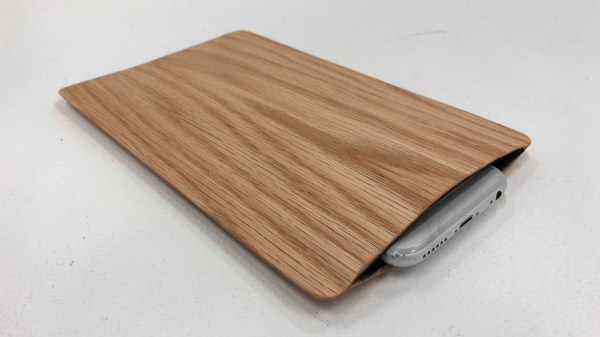
A grey smartphone sits inside a sleeve made of light brown wood veneer and a black felt interior.

Wooden Smartphone Sleeve Keeps You On Task

Smartphones are amazing tools, but sometimes they can be an equally amazing time suck. In an effort to minimize how much precious time goes down the drain, [Lance Pan and Zeynep Kirmiziyesil] decided to make a functional and beautiful smartphone sleeve to keep you on task.

Most modern smartphones have some form of Do Not Disturb mode available, but having the phone visible can still be an invitation for distraction. By tucking the phone into an accessible but less visible sleeve, one can reduce the visual trigger to be on the phone while keeping it handy in the even of an emergency.

Once in the sleeve, the NFC tag sandwiched between the felt and wood veneer triggers an automation to put the phone into Do Not Disturb mode. This hack looks like something that you could easily pull off in an afternoon and looks great which is always a winning combination in our book.

To see some more focus-oriented hacks, checkout the Pomodachi or this Offline E-Paper Typewriter.

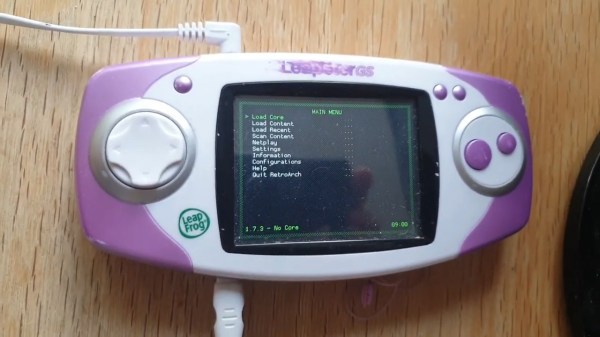
A pink and white Leapster GS handheld console sits on a wooden table. It has a white D-pad and two large pink action buttons. A power cord extends from the bottom and a headphone cable comes out the top.

RetroArch On A LeapFrog Leapster GS

Retro games are a blast, and even more so when you can bring the fun on the go. [mac2612] has developed a custom retroarch-based firmware for the Leapster GS and LeapPad2. (via Bringus Studios on YouTube)

We covered Linux on the Leapster before, but Retroleap seems better documented (and still up on the internet). Installation is done over the command line with sshflash, also by [mac2612], after booting the Leapster or LeapPad2 into “Surgeon Mode.” Since the stock bootloader remains intact, you can always return the LeapFrog to its default state if anything gets wiggy by reflashing the device via the LeapFrog Connect App.

The default system includes emulators for NES, SNES, GBA, Genesis, Atari 800, and MAME. Performance varies, but some PS1 games have even run successfully on the device.

If you’d like to see some other LeapFrog hacks, checkout this LeapFrog TV Running DOOM or Composite Video Out on the DIDJ.

Continue reading “RetroArch On A LeapFrog Leapster GS”

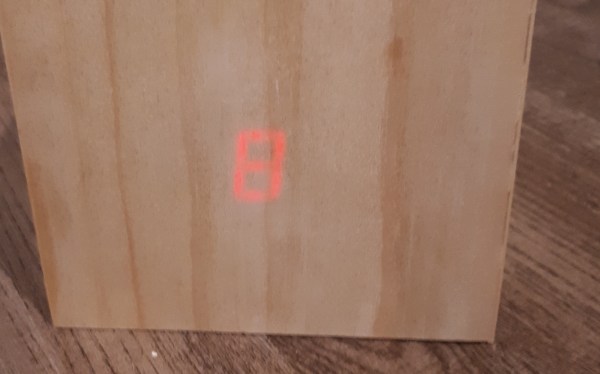
A wooden box sits on a darker wooden table. The box has a red, glowing number 8 on it.

Ambient Display Tells You If Borealis Is Coming To Town

For those times when you’d rather not get sucked down another internet rabbit hole when you really just wanted the weather, an ambient display can be great. [AlexanderK106] built a simple ambient display to know the probability the Northern Lights would visit his town.

Starting with a NodeMCU featuring the ESP8266, [AlexanderK106] walks us through a beginner-friendly tutorial on how to do everything from configure the Arduino IDE, the basics of using a breadboard. finding a data source and parsing it, and finally sticking everything into an enclosure.

The 7-segment display is taped and set into the back of the 1/4″ pine with enough brightness to shine through the additional layer of veneer on top. The display is set to show one digit and then the next before a three second repeat. A second display would probably make this easier to use day-to-day, but we appreciate him keeping it simple for this tutorial.

Looking for more ambient displays? Checkout the Tempescope or this clock that lets you feel the temperature outside!

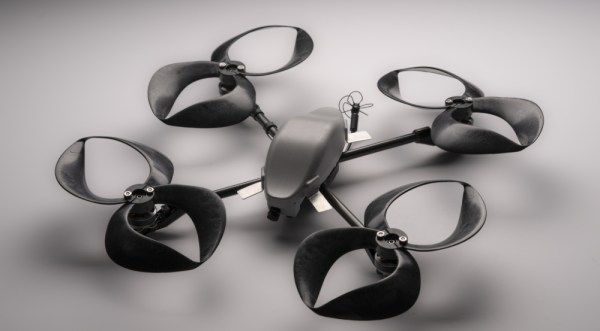
A black quadcopter sits on a grey surface. In place of traditional propellers are four figure eight propellers with sharp tips where the top and bottom of the eight would be.

Toroidal Propellers Make Drones Less Annoying

Despite being integral to aviation for more than a century, propellers have changed remarkably little since the Wright Brothers. A team at MIT’s Lincoln Lab has developed a new propeller shape that significantly reduces the noise associated with drones. [PDF via NewAtlas]

Inspired by some of the experiments with “ring wings” in the early 20th Century, researchers iterated on various toroidal propeller geometries until arriving at one that significantly reduces the sound produced by the rotors, particularly in the range of human hearing. The team suspects the reduction in noise is due to vortices being distributed over the whole propeller instead of just the tips.

Experiments show the drones can get twice as close before becoming a nuisance for human ears which should be great news for anyone hoping to launch Skynet commercial drone deliveries. Since the rotors are easily fabricated via 3D printing they should be easy to adapt to a number of different drones.

If you want to explore some more interesting drones, checkout this one that can fly and swim or this one that only uses a single propeller.

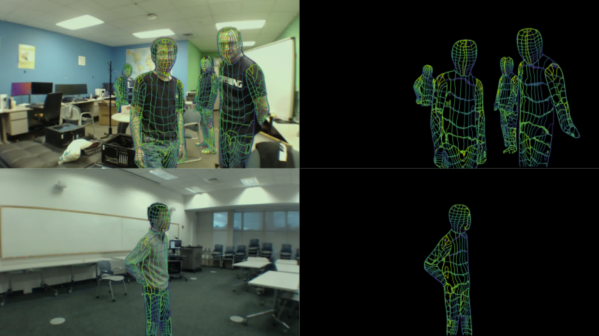
Four images in one. Top left is an image of four individuals in a room with whiteboards and desks in the background along with various clutter on the floor. Over the people is a wireframe overlay of their poses. The image on the top right is just the wireframe people on a black background. Bottom left image is of a single individual standing in a room with the pose wireframe overlay. Bottom right image is the single pose wireframe on a black background.

Tracking Humans With WiFi

In case you thought that cameras, LiDAR, infrared sensors, and the like weren’t enough for Big Brother to track you, researchers from Carnegie Mellon University have found a way to track human movements via WiFi. [PDF via VPNoverview]

The process uses the signals from WiFi routers for an inexpensive way to determine human poses that isn’t hampered by lack of illumination or object occlusion. The system produces UV coordinates of human bodies by analyzing signal strength and phase data to generate a 2D feature map and then feeding that through a modified DensePose-RCNN architecture which corresponds to 3D human poses. The system does have trouble with unusual poses that are not in the training set or if there are more than three subjects in the detection area.

While there are probably applications in Kinect-esque VR Halo games, this will probably go straight into the toolbox of three letter agencies and advertising-fueled tech companies. The authors claim this to use “privacy-preserving algorithms for human sensing,” but only time will tell if they’re correct.

If you’re interested in other creepy surveillance tools, checkout the Heat-Sensing Crotch Monitor or this Dystopian Peep Show.