Knock Your 3D Printer Down To 2D

Hackers love 3D printers. In fact, they might love them a little too much. We hope know we aren’t be the only ones who couldn’t turn down a good deal on an overseas printer (or two). But when you’re not pumping out plastic boats and other PLA dust collectors, what are you supposed to do with them?
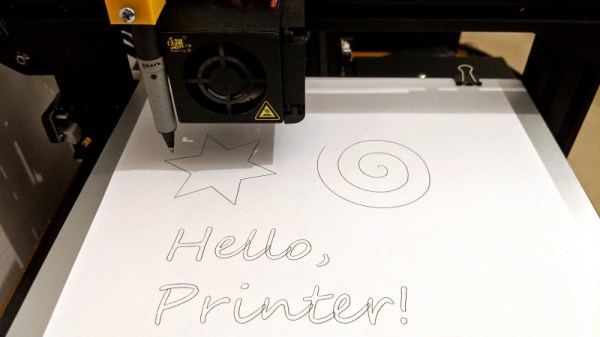
Well if you’re like [Uri Shaked] you could hand them a pen and tell them to get writing. The holidays are coming up quick, and somebody’s gotta sign all these cards. In his detailed write-up, he shows how he was able to add a pen to his Creality CR-10 printer to turn it into a lean mean letter-writing machine without making any permanent changes to the printer.

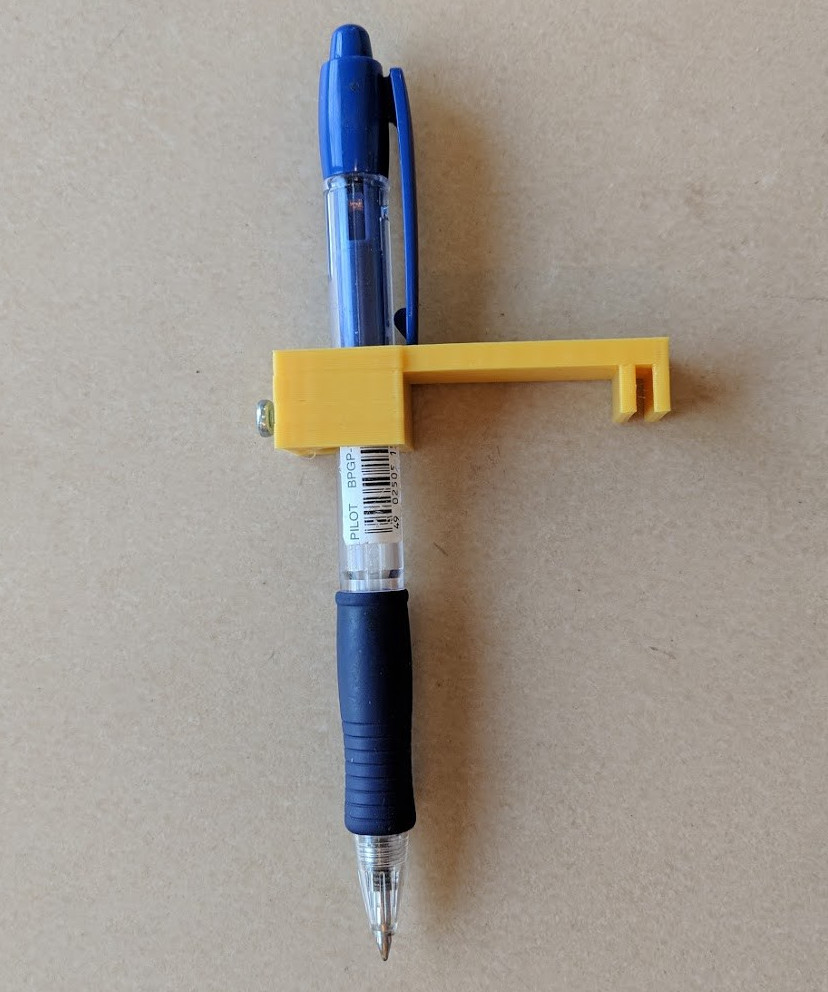
The physical aspect of this hack is about as simple as they come: just come up with some way to hold the pen a bit below the printer’s hotend. The positioning here is a bit critical, as you don’t want to crash the nozzle into the bed while writing out a missive. [Uri] got fancy and designed a little bracket that clamps onto the CR-10 and even has a M3 screw to hold the pen in place, but you could get away with zip ties if you just want to experiment a bit.

[Uri] goes into much greater detail on the software side of things, which is good, as it does take a bit of Inkscape trickery to get the printer to perform the specific dance moves required. He goes through step by step (with screen shots) explaining how to set up Orientation Points and configure the tool parameters for optimal performance. Even if you aren’t looking to put a 3D printer to work autographing your 8x10s before the next hackerspace meet, this is an excellent guide on producing GCode with Inkscape which can be helpful for tasks such as making PCBs.

The general process here is very similar to adding a laser module to your 3D printer, but with considerably lower risk of your eyeballs doing their best Death Star impression.


Continue reading “Knock Your 3D Printer Down To 2D”

World’s Smallest Wii Is Also World’s Worst

As far as game consoles go, the Nintendo Wii was relatively small. Probably owing at least somewhat to the fact that it wasn’t a whole lot more than a slightly improved GameCube in a new case, but that’s another story entirely. So it’s not much of a surprise that people have modded Nintendo’s infamous money printing machine into handheld versions. But this…this is just something else.

We’re going to go out on a limb and say that this absolutely preposterous build by [Shank] which puts a fully functional Nintendo Wii into an Altoids tin wins the title of “World’s Smallest Wii”. We’re also going to put money on the fact that this record doesn’t get beaten because…well, come on. There’s a reason he’s named his diminutive creation the “Kill Mii”.

You’re probably wondering how this is possible. That’s an excellent question. As it turns out, hackers have discovered that you can cut off the majority of the Wii’s motherboard and still have a functioning system, albeit missing non-essential functions like the GameCube controller ports and SD card slot. From there, you just need to install a new firmware on the now heavily trimmed down Wii that tells it to ignore the fact it has no disc drive and load games as ISOs from an attached USB flash drive. That’s the high level summary anyway, the reality is that this a mod of crushing difficulty and should only be attempted by true masochists.

As for this particular build, [Shank] went all in and even relocated the Wii’s NAND chip to make everything fit inside the tin. There’s also custom PCBs which interface the Wii’s motherboard with the Nintendo 3DS sliders he’s using for control sticks. Underneath everything there’s a battery that can run the whole device for a grand total of about 10 minutes, but given the general shape of the “Kill Mii” and the fact that most of the buttons are tactile switches, that’s probably about as long as you’d want to play the thing anyway.

Yes, this is the worst Wii ever made. But that was also the point. In the words of the creator himself “This portable is not logical, comfortable, or practical. But it must be done… for the memes.” Truly an inspiration to us all.

Incidentally, this isn’t the first “trimmed” Wii portable we’ve seen; though that one was considerably more forgiving internally, and just a bit more practical.

Continue reading “World’s Smallest Wii Is Also World’s Worst”

Will Drones And Planes Be Treated As Equals By FAA?

Soon, perhaps even by the time you read this, the rules for flying remote-controlled aircraft in the United States will be very different. The Federal Aviation Authority (FAA) is pushing hard to repeal Section 336, which states that small remote-controlled aircraft as used for hobby and educational purposes aren’t under FAA jurisdiction. Despite assurances that the FAA will work towards implementing waivers for hobbyists, critics worry that in the worst case the repeal of Section 336 might mean that remote control pilots and their craft may be held to the same standards as their human-carrying counterparts.

Section 336 has already been used to shoot down the FAA’s ill-conceived attempt to get RC pilots to register themselves and their craft, so it’s little surprise they’re eager to get rid of it. But they aren’t alone. The Commercial Drone Alliance, a non-profit association dedicated to supporting enterprise use of Unmanned Aerial Systems (UAS), expressed their support for repealing Section 336 in a June press release:

Basic ‘rules of the road’ are needed to manage all this new air traffic. That is why the Commercial Drone Alliance is today calling on Congress to repeal Section 336 of the FAA Modernization and Reform Act of 2012, and include new language in the 2018 FAA Reauthorization Act to enable the FAA to regulate UAS and the National Airspace in a common sense way.

With both the industry and the FAA both pushing lawmakers to revamp the rules governing small remote-controlled aircraft, things aren’t looking good for the hobbyists who operate them. It seems likely those among us with a penchant for airborne hacking will be forced to fall in line. But what happens then?

Continue reading “Will Drones And Planes Be Treated As Equals By FAA?”

Perfecting The Solar Powered Web Server

Running a server completely off solar power seems like it would be a relatively easy thing to do: throw up a couple of panels, tack on a charge controller and a beefy battery, and away you go. But the reality is somewhat different. Most of us hackers are operating on a relatively limited budget and probably don’t have access to the kind of property you need to put out big panels; both pretty crippling limitations. Doing solar on a small-scale is hard, and unless you really plan ahead your setup will probably be knocked out on its first cloudy day.

So when [Kris de Decker] wanted to create a solar-powered version of his site “Low-tech Magazine”, he went all in. Every element of the site and the hardware it runs on was investigated for potential power savings, and luckily for us, the entire process was written up in meticulous detail (non-solar version here). The server still does go down from time to time if the weather is particularly poor, but in general it maintains about 90% uptime in Barcelona, Spain.

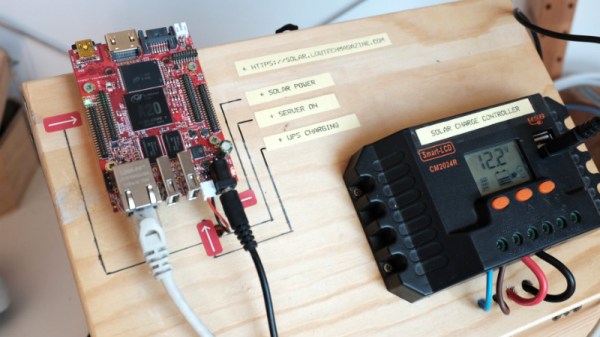
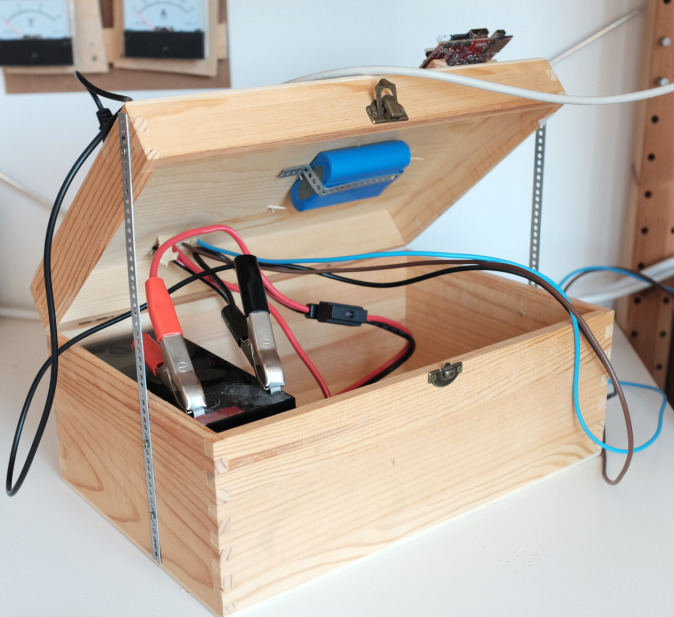
The solar side of the equation is fairly simple. There’s a 50 watt photovoltaic panel charging a 12V 7Ah lead-acid battery though a 20A charge controller. With an average of 4 to 6 hours of sunlight a day, the panel generates 300 Wh of electricity in the best case scenario; which needs to be split between charging the battery and running the server itself.

As for the server, [Kris] chose the Olimex Olinuxino A20 Lime 2 in part because of it being open source hardware, but also because it’s very energy-efficient and includes a AXP209 power management chip. Depending on processor load, the Olimex board draws between 1 and 2.5 watts of power, which combined with charging losses and such means the system can run through two days of cloudy weather before giving up the ghost. A second battery might be added in the future to help improve the run time during low-light conditions, but for now its been working pretty well.

Perhaps the most interesting part of the whole project are the lengths to which the website itself was optimized to keep resource utilization as low as possible. Images are compressed using dithering to greatly reduce their file sizes, and the site eschews modern design in favor of a much less processor intensive static layout. There’s even a battery capacity display integrated into the page through some clever use of CSS. Even if you aren’t looking to set up your own sun worshiping website, there are tips here for building efficient web pages that could absolutely be put to use in other projects.

If you’re interested in solar projects, we’ve got you covered. From an open source charge controller to building DIY photovoltaic panels, there’s plenty of prior art you should find very…illuminating. Please clap.

ESP8266 Clock Puts Time In A Jar

Ironically, with the wide availability of modular electronic components today, the hardest part of constructing your latest gadget might just end up being able to find a decent looking enclosure for it. Project boxes will only get you so far, and let’s be honest, they aren’t exactly the most attractive things in the world. But if you’re willing to think outside the box (get it?) there are some unconventional options out there that might fit the bill.

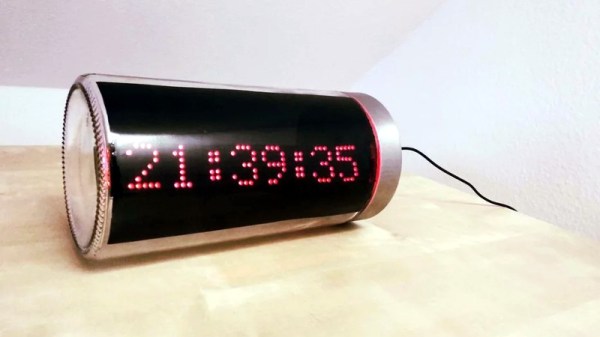
Take for example this ESP8266 clock by [ZaNgAbY] that’s housed in a glass pasta jar. With the addition of some window tint film for the LED display to shine through, the final result could nearly pass as modern art. Even if you don’t need an extra clock around the house, this same general principle could be used to create a slick-looking ticker for all sorts of information, from the weather to server uptime with just some adjustments to the code.

Inside the jar there’s six 8×8 MAX7219 LED matrix modules tacked together to create one long strip, with a NodeMCU board stuck to the back with double-sided tape. There’s also a DS3231 RTC module so the clock can keep halfway decent time, but depending on how aggressively you are willing to pull down the current time from NTP, that may or may not be required. A simple barrel jack is popped through the metal lid of the jar for power, and represents the only physical connection the internals have to the outside world.

For the next iteration [ZaNgAbY] is thinking of adding a temperature and humidity sensor, and a light sensor that can dim the LED display depending on the ambient light. While the environmental sensors will have to go on the outside of the lid if there’s any hope of pulling useful readings from them, the clear glass will allow him to keep the light sensor internal to the clock.

Believe it or not, this isn’t the first time we’ve seen somebody give their electronics the pickle treatment. We’ve previously played host to a server that “preserves” files in a Mason jar, as well as a gorgeous display of an iPod under glass.

Continue reading “ESP8266 Clock Puts Time In A Jar”

Amplifier Controlled Motorized Display

It’s easy to get jaded by gadgets like the Chromecast or Sonos, which let the user control AV equipment remotely from a mobile device or computer. You can pick something to play from your phone and send it off to your speakers via the magic of Wi-Fi. But it’s still nice to have a display to look at for music visualizations and that sort of thing, at least occasionally.

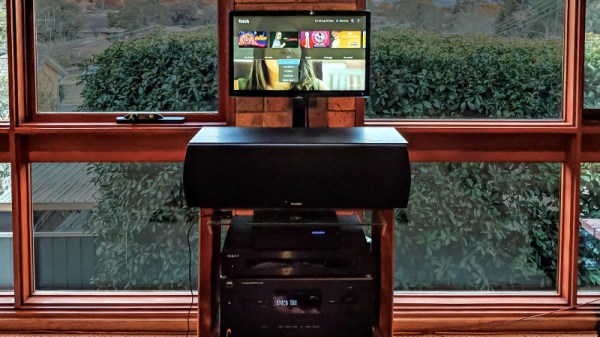
To address this only occasional desire to have a display on your media setup, you could follow in the footsteps of [Steven Elliott] and create a DIY motorized display which only pops up when needed. Inspired by seeing videos of TVs rising out of cabinets and other such trickery, he decided to create his own version using an old computer monitor he had lying around.

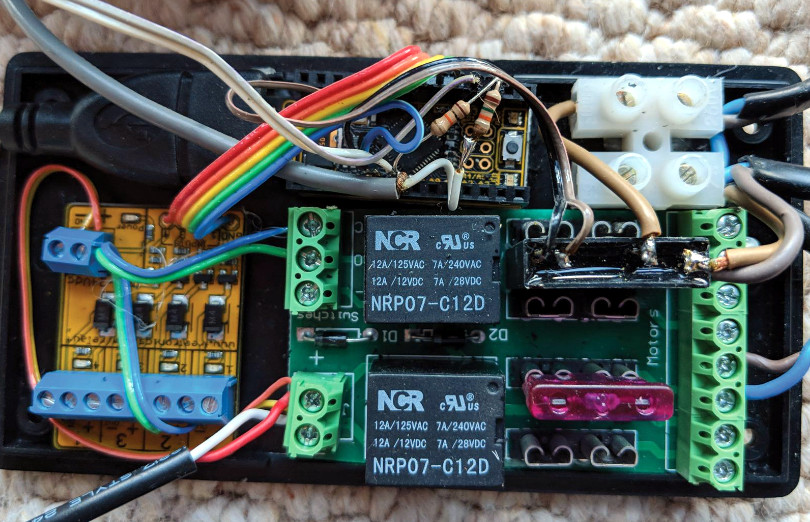
The monitor is lifted with a beefy linear actuator, which has been placed inside of a square metal fence post to keep from rotating. It already had a power supply and control board with relays for extending and retracting, so [Steven] just needed to find a convenient way of firing them off.

The answer came from a somewhat unconventional source: his amplifier. [Steven] explains that many amplifiers feature a “Trigger Output”, which uses a standard stereo 3.5mm connector and sends a 12V pulse to connected device. This is generally used to turn on downstream devices when the amplifier switches to the respective input. It’s too short and not nearly powerful enough to close the actuators relays, but it’s easy enough to detect.

[Steven] uses a LeoStick microcontroller to wait for the pulse from the amplifier, and then use that to raise or lower the display depending on the selected input. There’s also a SPST momentary switch which can be used to trigger the actuator manually. Beyond the fact the linear actuator is a bit loud, he says the setup works very well and prevents him from having to start up his projector if he just wants to take a quick glance at what’s playing or program his DVR.

We don’t see many motorized display lifts like this anymore, not since wall mounted LCDs became popular anyway. But it’s still a cool effect, and today made quite a bit easier thanks to the fact that TVs and monitors no longer weigh as much as a small car.

[Thanks to Baldpower for the tip.]

Tiny Plotter Is Made Of Strings And Cardboard

If you’ve been hanging around Hackaday for any length of time, you’ve undoubtedly seen the work of [Niklas Roy]. A prolific maker of…everything, we’ve covered his projects for over a decade now. He’s one of an elite group of hackers who can say they’ve been around since Hackaday was still using black & white pictures. Yet sometimes projects fall through the cracks.

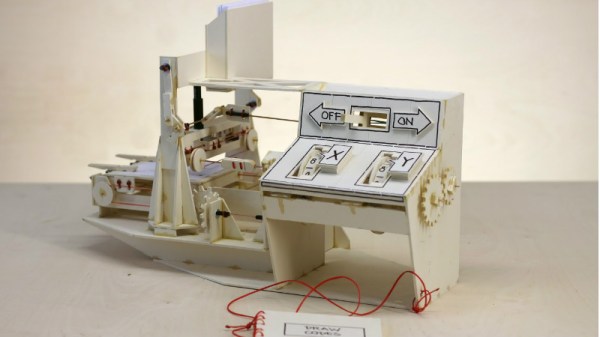
Thanks to a tip sent in from one of our beloved readers, we’re just now seeing this incredible cardboard plotter [Niklas] made for a workshop he ran at the University of Art and Design Offenbach several years ago. The fully manual machine is controlled with two rotary dials and a switch, and it even comes with a book that allows you to “program” it by dialing in specific sequences of numbers.

Not that it detracts from the project, but its worth mentioning that the “cardboard” [Niklas] used is what is known as Finnboard, a thin construction material made of wood pulp that looks similar to balsa sheets. The material is easy to work with and much stronger than what we’d traditionally think of as cardboard. Beyond the Finnboard, the plotter uses welding rods as axles and slide rails, with glue, tape, and string holding it all together.

The dials on the control panel correspond to the X and Y axes: turning the X axis dial moves the bed forward and backward, and the Y dial moves the pen left and right. The switch above the dial lowers and raises the pen so it comes into contact with the paper below. With coordination between these three inputs, the operator can either draw “freehand” or follow the sequences listed in the “Code Book” to recreate stored drawings and messages.

Believe it or not, this isn’t the first time we’ve seen somebody made a plotter out of cardboard. Though previous entries into this specific niche did use servos to move around.

Continue reading “Tiny Plotter Is Made Of Strings And Cardboard”