Comparing Altium And Cadence PCB Layout Tools

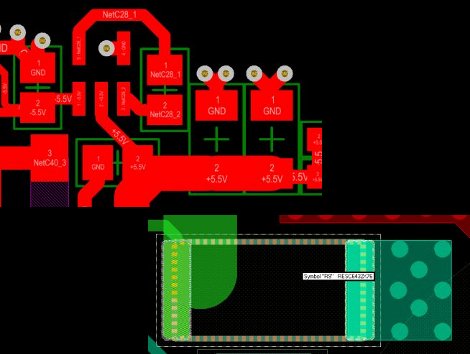
We see a lot of projects using Eagle for the schematics and PCB layout. There are a few that use Kicad, but we hear very little about other alternatives. Recently, [Limpkin] has been working with Altium and Cadence and wrote about how they compare when it comes to PCB layout. Neither are free packages so it’s good to know what you’re getting into before taking the plunge.

[Limpkin] begins his overview by mentioning that the schematic editors are comparable; the differences start to show themselves in the PCB layout tools. Here you can see that Altium always labels the pads so you know what net each of them belongs to. Cadence (whose PCB layout tool is called Allegro) will display the net if you hover over the pad with your mouse. Both have 3D rendering, with Altium’s looking a bit more pleasant but what real use is it anyway? Okay, we will admit we love a good photorealistic board rendering, but we digress. The most interesting differences show themselves once traces are all on the board and need to be rejiggered. Cadence will actually move traces on other layers automatically to avoid collision with a via that is late to the party, and Altium shows some strange behavior when dragging traces. [Limpkin] doesn’t register a final judgement, but the comparison alone is worth the read.
Flip-dot Display Is An Advertising Experience We Can Get Behind

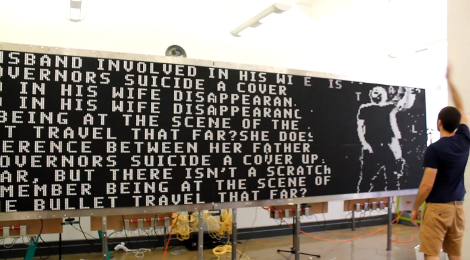
This huge and mesmerizing interactive display is just a big piece of advertising. It is a flip-dot display. Each pixel is a mechanical disk, white on one side and black on the other. The team over at BreakfastNY hacked the display modules and wrote their own software so that it can be refreshed with lighting quickness. To the left you can see the high contrast text, but on the right it’s showing the camera-based interactivity. A few seconds later this gentleman sweeps his arm to the side and all the pixels scatter as if blown away by a forceful wind. You might as well just skip down to the video after the break right now.

The display is an advertisement for a new show on the TNT network called Perception. We’ve got to say, if you’re going to advertise this is the way to do it. Make something cool, then share the details. We get to enjoy the clickity-clack of all those dots flipping into place and they got us to at least recognize the network and say the name of the show. Everyone wins.

Continue reading “Flip-dot Display Is An Advertising Experience We Can Get Behind”

USB Dongle For Unmodified NES Controllers

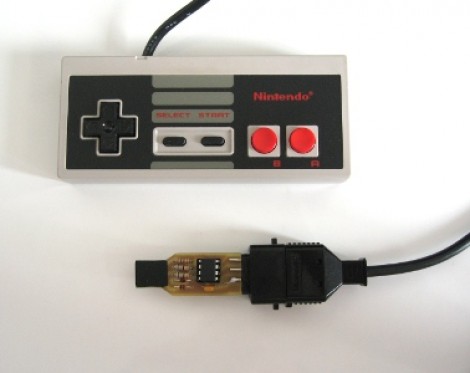
This USB dongle will let you use your unmodified NES controllers on a computer. That’s because it includes the same socket you’d find on the classic console.

The image above shows the prototype. Instead of etching the copper clad board, each trace was milled by hand (presumably with a rotary tool). To the left the black square is made of several layers of electrical tape that builds the substrate up enough to fit snugly in a USB port.

An ATtiny45 running the V-USB stack has no problem reading the controller data and formatting it for use as a USB device. This is actually the second iteration of the project. The first attempt used an ATtiny44 and a free-formed circuit housed inside the controller. It worked quite well, but required alterations to the circuit board, and you needed to replace the stock connector with a USB plug. This dongle allows the controller to go unaltered so it can be used with an NES console again in the future.

Automatic Trough Filler Makes Sure The Animals Have Water

It has been a hot hot summer for many parts of the US. The heat has been dangerous at times and making sure the livestock has the water they need is incredibly important. [Maddox] recently upgraded the automation on their water troughs which will help with the process. Sure, they still have to check on the animals, but this will ensure there’s plenty to drink in between those visits, and that a malfunction doesn’t waste precious water.

There has always been some level of automation here, but it relied on float valves which were frequently malfunctioning. This project seeks to get rid of the float value and use solenoid valves like those used in irrigation. These solenoids can run from a 9V battery and offer quite a bit more reliability than the mechanical vales. There is still a float sensor which measures the water level, filling up the trough when needed.

An MSP430 Launchpad was used for the prototype, from which a PCB was designed. Since this needs to be weather-proof a water tight enclosure was sourced. The company that makes the enclosure also provides DXF templates which [Maddox] used to establish the size and outline of the PCB.

The Live Streaming 72 Hour Build-off Begins Tonight!

Tonight at 6pm pst, the people at RedBull will be announcing the theme for the 72 hour build-off. We’ve cleaned our space, set up the cameras, and tried to get a good night’s sleep.  We’re all ready to kick some ass and would love it if you would join in to watch and even chat with us during the build. You should be able to watch all of the teams at the red bull contest web site. Though you can also just tune in to us at the link below, or on the sidebar.

During some of our team meetings we decided that watching a live stream of us hunched over some device for 72 hours would be extremely boring. To help remedy this, we have been contacting people all week to arrange proper amusement. We have graffiti artists, dancers, and some other miscellaneous things(possibly fire breathers?) in the works to help break the monotony. You’ll see a board labelled “EVENTS” in the bottom left of our stream. This should help keep you notified when the next bit of amusement shall arrive.

If you want to just watch the teams individually, there’s a list of each of our channels after the break.

Continue reading “The Live Streaming 72 Hour Build-off Begins Tonight!”

Use Your TV Remote As An HID Mouse

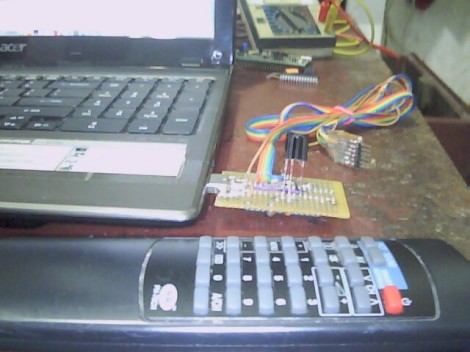
[Vinod’s] latest project lets him use a TV remote control as a mouse. It may not sound like much, but he did it with a minimum of hardware and packed in the maximum when it comes to features.

He’s using an ATmega8 to read the remote control signals and provide USB connectivity. With the V-USB stack he enumerates the device as an HID mouse. One note of warning, he used the PID/VID pair from the USBasp programmer project. If you use that programmer you’ll need to uninstall the drivers to get this to work (we think this is only necessary on a Windows box).

The cursor can be moved in eight directions using the number pad on the remote. The numeral five falls in the center of the directional buttons so [Vinod] mapped that to the left click, with the zero key serving as right click. He even included the scroll wheel by using the volume buttons. The firmware supports cursor acceleration. If you hold one direction the cursor will move slowly at first,then pick up speed. Fine adjustments can be made by single clicking the button. Check out his demonstration embedded after the break.

Continue reading “Use Your TV Remote As An HID Mouse”

Father/son Team Goes Big With Backyard Observatory

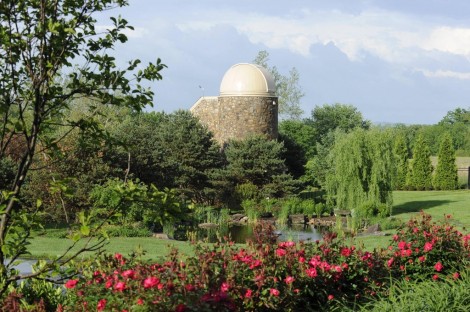
Oh that? It’s just the backyard observatory we built last summer. You know, for fun. This is a conversation we image [Kakon24] and his dad are having quite often these days. They’re astronomy interests just got a big equipment upgrade when they built a huge observatory on their homestead. Now we don’t proclaim to know a lot about observatory quality, but this is head and shoulders above what most people manage to acquire.

It isn’t a simple build either. It’s a full-fledged building of its own, starting with a poured foundation, then stick framing which was covered in stone work. The images tell the story of the build, but for information on the hardware you’ll want to read through the comments over on the Reddit Astronomy thread. Sounds like the scope itself cost over 100 grand so having a proper building to protect it is a must.