Curiosity Killed The Twit, Twitter Clickjacking

dontclick

Twitter was flooded this morning with users posting “Don’t Click: http://tinyurl.com/amgzs6”. TinyURL has since terminated the URL. The original page doesn’t seem to be live either. It displayed a button that said “Don’t Click”. If the user happened to be logged into Twitter, it would automatically update their status. The instigator partially describes the method on his blog (translated). The page would load the user’s Twitter page in an invisible iframe. The status would be pasted in and the “Don’t Click” button is placed on top of the update button. You can find the code snippets here and the original author credits this post for the inspiration. Twitter has since added a JavaScript fragment to each page to break out of iframes.

if (window.top !== window.self) { window.top.location.href = window.self.location.href; }

Impress: Tactile Interface

impress

Touch screen interfaces are generally hard and flat. Impress tries to break from that tradition by making the display flexible. Allowing you to feel more like you are interacting with the display. In the image above, the circles seem to physically fall into the dent made by your fingers. Another application shows some rudimentary 3d modeling being done by physically pushing on the vertexes. This prototype is very interesting, we’d love to see much higher resolution on the input side of things. It states that it does pressure sensitivity, but we weren’t able to distinguish it in the video. Maybe you can, catch the video after the break. Maybe laying one of these on some foam would be another alternative.

Continue reading “Impress: Tactile Interface” →

Solar Charging Your DS

solar_ds

[dark sponge] decided to make his DS lite, solar powered. Or, at least charged via solar panels.  He was able to find solar cells that were 60×60 mm, which means he could fit 4 of them on the outside of the DS. This gives him a total of 6V at 80 mA output. These panels charge the battery between uses. The DS has to be open and laying on its face for all 4 panels to be exposed, but this way of mounting them didn’t alter the pocket-ability of the unit. He says he’s been using it for a while and hasn’t had to plug it in yet, but we have concerns about wiring the panels directly to the battery. As [cyrozap] points out in the comments on the instructable, this is a Lithium Ion battery, shouldn’t there be some charging circuitry involved?

Electric Matchstick

[youtube=http://www.youtube.com/watch?v=q-HY8a9cCvI]

Here is a cool little toy, an LED matchstick. We don’t really know what purpose it serves, but [dhananjaygadre] did a pretty good job of reproducing the effect. The light is controlled by a microprocessor to emulate the flickering of a flame. It holds a charge for a short while, staying lit for an amount of time comparable to a match. To turn it on, you even “strike” it on a match box filled with magnets.

Cell Phone Shoe

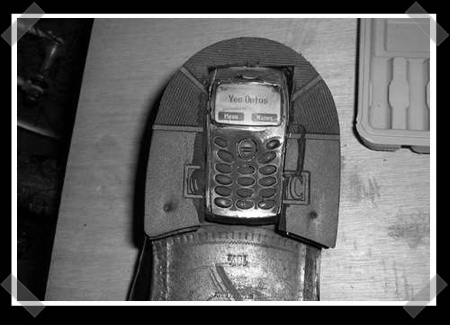
Sometimes you absolutely need to keep your phone a secret. You know, like when you’re on spy missions. The goons at the door will always frisk you, but they never check under your shoe, right? [mikeyberman] shows us how to make our own Maxwell Smart style shoe phone. All you need is to dig a giant hole in your shoe sole and cram a cell phone in there. Will it get ruined by water? Probably. Will you look like a goon trying to talk on it? Definitely. Can you make it through airport security? Try it and let us know.

BackTrack 4 Beta Released

backtrack

The Remote Exploit Development Team has just announced BackTrack 4 Beta. BackTrack is a Linux based LiveCD intended for security testing and we’ve been watching the project since the very early days. They say this new beta is both stable and usable. They’ve moved towards behaving like an actual distribution: it’s based on Debian core, they use Ubuntu software, and they’re running their own BackTrack repositories for future updates. There are a lot of new features, but the one we’re most interested in is the built in Pico card support. You can use the FPGAs to generate rainbow tables and do lookups for things like WPA, GSM, and Bluetooth cracking. BackTrack ISO and VMWare images are available here.

WiFi And Bluetooth Tethering On Android

tmobileg1

Many G1/ADP1 owners have been using the app Tetherbot to get internet access on their laptop via USB to the phone’s data connection. The app relied on the Android Debug Bridge to forward ports. It worked, but people wanted a solution better than a SOCKS proxy. The community figured out a way to create a properly NAT’d connection using iptables and then [moussam] rolled them up into easy to use applications. There’s one for setting up a PAN device on Bluetooth and another for adhoc WiFi networking. It requires you to have root on your phone, but hopefully you’ve achieved that and are already running the latest community firmware.

[photo: tnkgrl]