We like to think that all these new voice-controlled gadgets like our cell phones, Google Home, Amazon Echo, and all that is the pinnacle of new technology. Enabled by the latest deep learning algorithms, voice-controlled hardware was the stuff of science fiction back in the 1961s, right? Not really. Turns out in around 1960, Ideal sold Robot Commando, a kid’s toy robot that featured voice control.
Well, sort of. If you look at the ad in the video below, you’ll see that a kid is causing the robot to move and fire missiles by issuing commands into a microphone. How did some toy company pull this off in 1961?
We tend to think of electricity as part of the modern world. However, Thales of Mietus recorded information about static electricity around 585 BC. This Greek philosopher found that rubbing amber with fur would cause the amber to attract lightweight objects like feathers. Interestingly enough, a few hundred years later, the aeolipile — a crude steam engine sometimes called Hero’s engine — appeared. If the ancients had put the two ideas together, they could have invented the topic of this post: electrostatic generators. As far as we know, they didn’t.
It would be 1663 before Otto von Guericke experimented with a sulfur globe rubbed by hand. This led to Isaac Newton suggesting glass globes and a host of other improvements from other contributors ranging from a woolen pad to a collector electrode. By 1746, William Watson had a machine consisting of multiple glass globes, a sword, and a gun barrel. Continue reading “Hair-Raising Tales Of Electrostatic Generators”→
That the Cold War was a tense and perilous time in history cannot be denied, and is perhaps a bit of an understatement. The world stood on the edge of Armageddon for most of it, occasionally stepping slightly over the line, and thankfully stepping back before any damage was done.
As nerve-wracking as the Cold War was, it had one redeeming quality: it turned us into a spacefaring species. Propelled by national pride and the need to appear to be the biggest kid on the block, the United States and the Soviet Union consistently ratcheted up their programs, trying to be the first to make the next major milestone. The Soviets made most of the firsts, making Sputnik and Gagarin household names all over the world. But in 1962, they laid down a marker for a first of epic proportions, and one that would sadly stand alone for the next 19 years: they put the first woman, Valentina Tereshkova, into space.
Parallelism is your friend when working with FPGAs. In fact, it’s often the biggest benefit of choosing an FPGA. The dragons hiding in programmable logic usually involve timing — chaining together numerous logic gates certainly affects clock timing. Earlier, I looked at how to split up logic to take better advantage of parallelism inside an FPGA. Now I’m going to walk through a practical example by modeling some functions. Using Verilog with some fake delays we can show how it all works. You should follow along with a Verilog simulator, I’m using EDAPlayground which runs in your browser. The code for this entire article is been pre-loaded into the simulator.
If you’re used to C syntax, chances are good you’ll be able to read simple Verilog. If you already use Verilog mostly for synthesis, you may not be familiar with using it to model delays. That’s important here because the delay through gates is what motivates us to break up a lot of gates into a pipeline to start with. You use delays in test benches, but in that context they mostly just cause the simulator to pause a bit before introducing more stimulus. So it makes sense to start with a bit of background on delays.
In 1940, England was in a dangerous predicament. The Nazi war machine had been sweeping across Europe for almost two years, claiming countries in a crescent from Norway to France and cutting off the island from the Continent. The Battle of Britain was raging in the skies above the English Channel and southern coast of the country, while the Blitz ravaged London with a nightly rain of bombs and terror. The entire country was mobilized, prepared for Hitler’s inevitable invasion force to sweep across the Channel and claim another victim.
We’ve seen before that no idea that could possibly help turn the tide was considered too risky or too wild to take a chance on. Indeed, many of the ideas that sprang from the fertile and desperate minds of British inventors went on to influence the course of the war in ways they could never have been predicted. But there was one invention that not only influenced the war but has a solid claim on being its key invention, one without which the outcome of the war almost certainly would have been far worse, and one that would become a critical technology of the post-war era that would lead directly to innovations in communications, material science, and beyond. And the risks taken to develop this idea, the cavity magnetron, and field usable systems based on it are breathtaking in their scope and audacity. Here’s how the magnetron went to war.
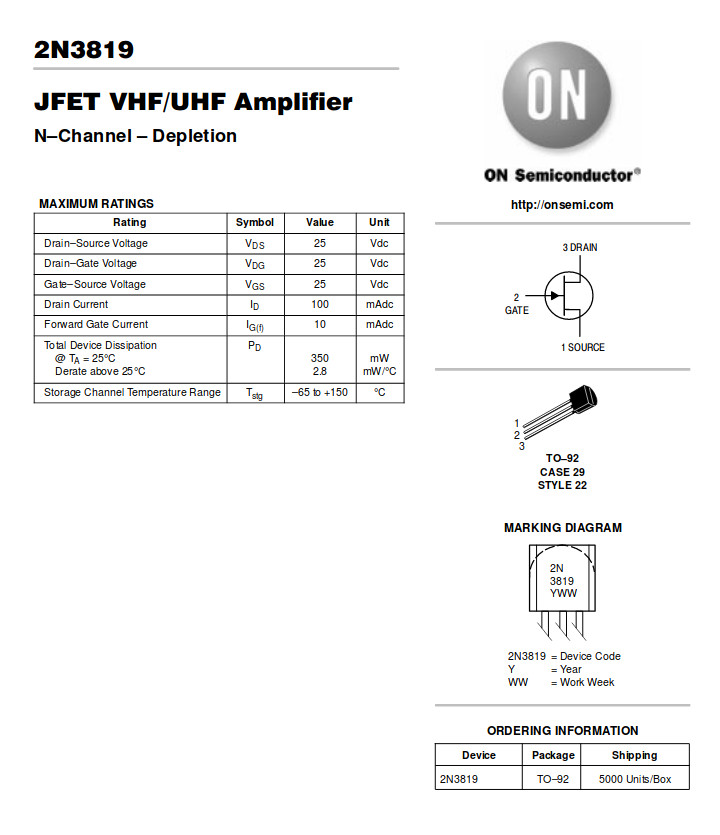
The 2N3819 is the archetypal general-purpose N-channel FET. (ON Semiconductor)
Over the recent weeks here at Hackaday, we’ve been taking a look at the humble transistor. In a series whose impetus came from a friend musing upon his students arriving with highly developed knowledge of microcontrollers but little of basic electronic circuitry, we’ve examined the bipolar transistor in all its configurations. It would however be improper to round off the series without also admitting that bipolar transistors are only part of the story. There is another family of transistors which have analogous circuit configurations to their bipolar cousins but work in a completely different way: the Field Effect Transistors, or FETs.
In a way it’s less pertinent to look at FETs in the way we did bipolar transistors, because while they are very interesting devices that power much of what you will do with electronics, you will encounter them as discrete components surprisingly rarely. Every CMOS device you deal with relies on FETs for its operation and every high-quality op-amp you throw a signal at will do so through a FET input, but these FETs are buried inside the chip and you’d be hard-pressed to know they were there if we hadn’t told you. You’d use a FET if you needed a high-impedance audio preamp or a low-noise RF amplifier, and FETs are a good choice for high-current switching applications, but sadly you will probably never have a pile of general-purpose FETs in the way you will their bipolar equivalents.
That said, the FET is a fascinating device. Join us as we take an in-depth look at their operation, and how and where you might use one.
FET basics
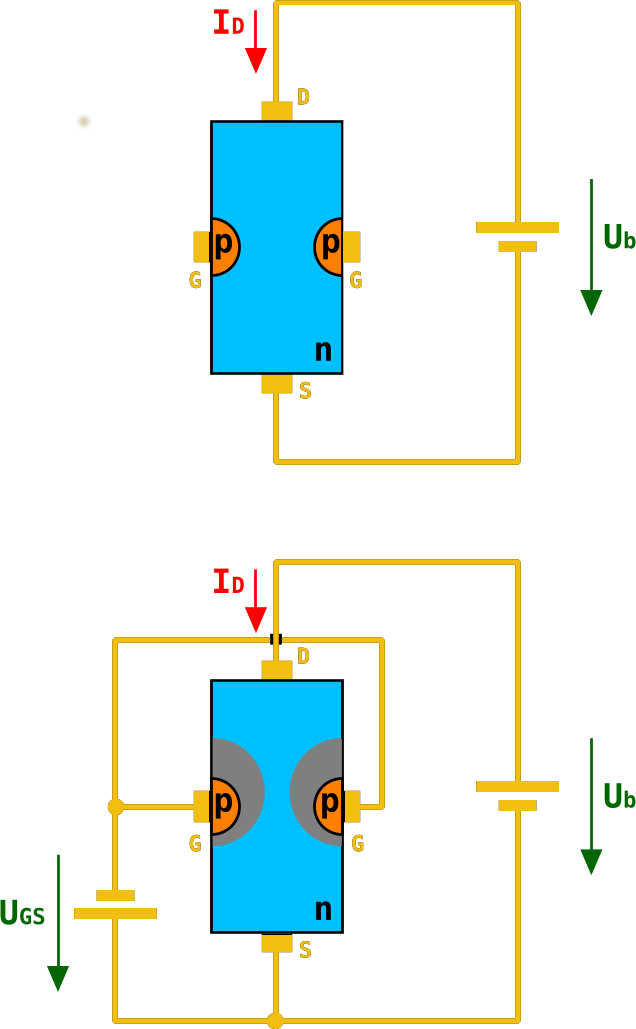
A diagram of an n-channel JFET. As the negative gate voltage on the p-type silicon decreases in the lower diagram, its electric field restricts the area through which electrons can flow in the n-type channel. Chtaube,(CC BY-SA 2.0 DE)
A basic FET has three terminals, a source (the source of electrons), a gate (the control terminal), and a drain (where electrons leave the device). These are analogous to the terminals on a bipolar transistor, in that the source fulfills a similar role to the emitter, the gate to the base, and the drain to the collector. Thus the three basic bipolar transistor circuit configurations have equivalents with a FET; common-emitter becomes common-source, common-base becomes common-gate, and an emitter follower becomes a source follower. It is dangerous to stretch the analogy between bipolar transistors and FETs too far, though, because of their different mode of operation. A closer similarity exists between a FET and a triode tube, if that helps.
The simplest FET for demonstration purposes has a piece of N-type semiconductor with source and drain connections at opposite ends, and a zone of P-type semiconductor deposited in its middle. This is referred to as an N-channel junction FET or JFET, because the channel through which current flows is N-type semiconductor, and because a diode junction exists between gate and channel. There are equivalent P-channel devices, just as there are PNP and NPN bipolar transistors.
Were you to bias an n-channel JFET as you would a bipolar transistor with a positive bias on its gate, the diode between gate and source would conduct, and the transistor would remain a diode with two cathode terminals. If however you give the gate a negative bias compared to the source, the diode becomes reverse-biased, and no current to speak of flows in the gate.
A characteristic of a reverse-biased diode is that it has a depletion zone between anode and cathode, an area in which there are no electrons. This is what causes the diode to no longer conduct, and the size of the depletion zone depends upon the size of the electric field that exists across it. If you’ve ever used a varicap diode, the capacitance between the two sides of this variable-width zone is the property you are exploiting.
In a FET, the depletion zone stretches from the gate region into the channel, and since its size can be adjusted by the gate voltage it can be used to “pinch” the remaining conductive region within the channel. Thus the area through which electrons can flow is controlled by the gate voltage, and thus the current that flows between drain and source is proportional to the gate voltage. We have an amplifier.
A simple FET radio receiver circuit showing FET biasing. The gate is biased at ground potential through the inductor, and the source is held above ground by the current in the 5K resistor. Herbertweidner [Public domain].In the JFET diagram above, the negative gate bias is represented by a battery. Tube enthusiasts may have encountered equipment that derives negative grid bias from a power supply, and you will find tube power units that include a -150 V rail for this purpose. In general though this is inconvenient in a FET circuit even though the voltage is lower, because of the extra cost of a negative regulator.. Instead the gate is held at a lower potential than the source by careful selection of a source resistor such that the current flowing through it brings the source up above ground, and a gate bias circuit that holds the gate close to ground. The base resistor chain from the bipolar circuit is for this reason often replaced with either a single resistor to ground, or a gate circuit with a very low DC resistance to ground such as an inductor.
MOSFETs, where the FET becomes more useful
Internal structure of an N-channel MOSFET. Fred the Oyster [Public domain].The JFET we have described is the simplest of field-effect devices, but it is not the one you will encounter most frequently. MOSFETs, short for Metal Oxide Semiconductor FETs, have a similar source, gate, and drain, but instead of relying on a depletion zone in a reverse-biased diode, they have a thin layer of insulation. The electric field from the gate acts across this insulation and pinches the conductive region in the channel through repulsion of electrons, with the same effect as it has in the JFET. It is beyond the scope of this piece to go into their mechanisms, but you will encounter two types of MOSFET: depletion mode devices that require the same negative bias as the JFET, and enhancement mode MOSFETS that require a positive bias.
Why would you use a FET?
So we’ve described the FET, and noted that while its mode of operation is different to that of a bipolar transistor it does a substantially similar job. Why would we use a FET then, what advantages does it offer us? The answer comes from the gate being insulated either by a depletion region in a JFET or by an insulating layer in a MOSFET. A FET is a voltage amplifier rather than a current amplifier, its input impedance is many orders higher than that of a bipolar transistor, and thus you will find FETs used in many applications that require a high impedance small-signal amplifier. The input of a high-performance op-amp will almost certainly be a FET, for example.
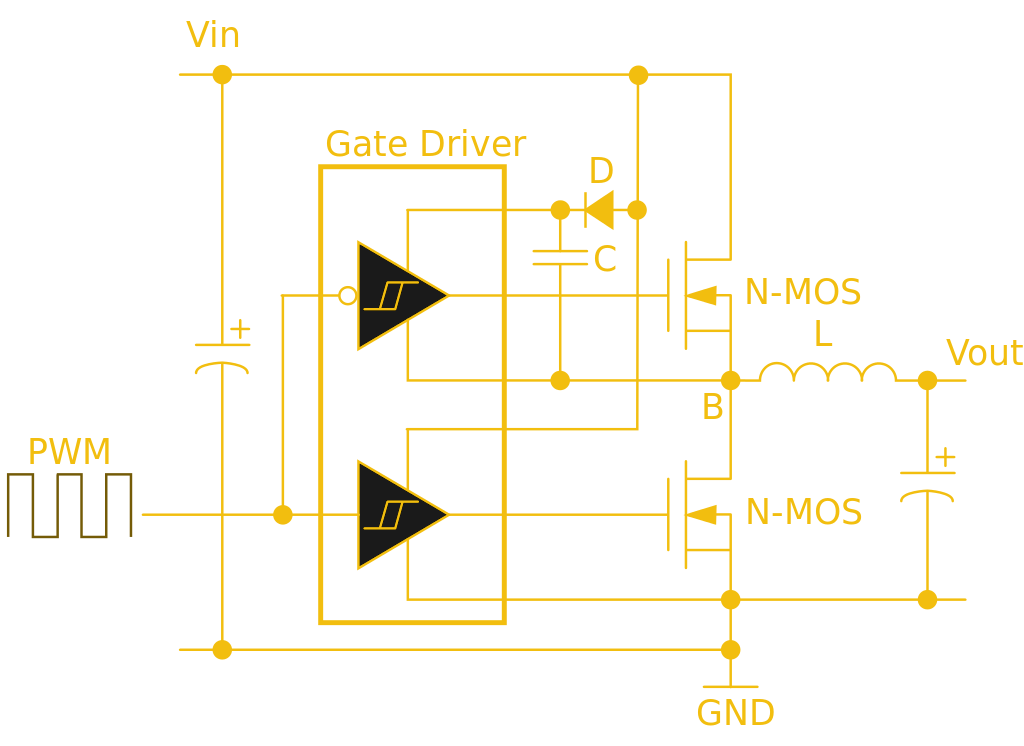
This half-bridge power MOSFET driver circuit uses a specialist gate driver IC with a pair of Schmidt buffers to deliver the initial surge required for a fast-turn-on time. Wdwd (CC BY 3.0).
The high input impedance has another effect less coupled to small signal work. Where a bipolar transistor requires significant base current to turn itself on, the corresponding FET requires almost none. Thus almost all complex integrated circuit logic devices are FET-based rather than bipolar because of the huge power saving that can be made by not needing to supply the base current demands of many thousands of bipolar transistors.
The same effect influences the choice of FETs for power switching, while a bipolar transistor’s base current is proportional to its collector current and thus it will need a significant driver, by contrast a power MOSFET requires virtually no standing gate current after an initial surge. A MOSFET power switch can thus be built requiring much less in the way of drive electronics and much more efficiently than a corresponding bipolar switch, and makes possible some of the tiny driver boards you might be used to for driving motors in your 3D printer, or your multirotor.
Through the course of this series you should have acquired a solid grounding in basic bipolar transistor principles, and now you should be able to add FETs to that knowledge base. We suggested you buy a bag of 2N3904s to experiment with in one of the previous articles, can we now suggest you do the same with a bag of 2N3819s?
Biohacking is the new frontier. In just a few years, millions of people will have implanted RFID chips under the skin between their thumb and index finger. Already, thousands of people in Sweden have chipped themselves to make their daily lives easier. With a tiny electronic implant, Swedish rail passengers can pay their train ticket, and it goes without saying how convenient opening an RFID lock is without having to pull out your wallet.
That said, embedding RFID chips under the skin has been around for decades; my thirteen-year-old cat has had a chip since he was a kitten. Despite being around for a very, very long time, modern-day cyborgs are rare. The fact that only thousands of people are using chips on a train is a newsworthy event. There simply aren’t many people who would find the convenience of opening locks with a wave of a hand worth the effort of getting chipped.
Why hasn’t the most popular example of biohacking caught on? Why aren’t more people getting chipped? Is it because no one wants to be branded with the Mark of the Beast? Are the reasons for a dearth of biohacking more subtle? That’s what we’re here to find out, so we’re asking you: what is the future of implanted electronics?







![A simple FET radio receiver circuit showing FET biasing. The gate is biased at ground potential through the inductor, and the source is held above ground by the current in the 5K resistor. Herbertweidner [Public domain].](https://hackaday.com/wp-content/uploads/2018/06/1kreiser_mit_fet.png)
![Internal structure of an N-channel MOSFET. Fred the Oyster [Public domain].](https://hackaday.com/wp-content/uploads/2018/04/n-channel_mosfet-svg1.png)