When A Skimmer Isn’t A Skimmer

I have a confession to make: ever since the first time I read about them online, I’ve been desperate to find an ATM skimmer in the wild. It’s the same kind of morbid curiosity that keeps us from turning away from a car accident, you don’t want to be witness to anyone getting hurt, but there’s still that desire to see the potential for danger up close. While admittedly my interest is largely selfish (I already know on which shelf I would display it), there would still be tangible benefits to the community should an ATM skimmer cross my path. Obviously I would remove it from the machine and prevent others from falling prey to it, and the inevitable teardown would make interesting content for the good readers of Hackaday. It’s a win for everyone, surely fate should be on my side in this quest.

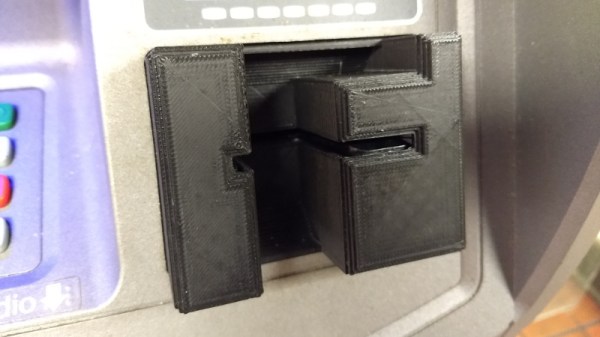
So when my fingers brushed against that unmistakable knobby feel of 3D printed plastic as I went to insert my card at a local ATM, my heart skipped a beat. After all these years, my dream had come true. Nobody should ever be so excited about potentially being a victim of fraud, but there I was, grinning like an idiot in the farmer’s market. Like any hunter I quickly snapped a picture of my quarry for posterity, and then attempted to free it from the host machine.

But things did not go as expected. I spend most of my free time writing blog posts for Hackaday, so it’s safe to say that physical strength is not an attribute I possess in great quantity, but even still it seemed odd I couldn’t get the skimmer detached. I yanked it in every direction, tried to spin it, did everything short of kicking it; but absolutely no movement. In fact, I noticed that when pulling on the skimmer the whole face plate of the ATM bulged out a bit. I realized this thing wasn’t just glued onto the machine, it must have actually been installed inside of it.

I was heartbroken to leave my prize behind, but at the very least I would be able to alert the responsible party. The contact info for the ATM’s owner was written on the machine, so I emailed them the picture as well as all the relevant information in hopes that they could come check the machine out before anyone got ripped off.

Continue reading “When A Skimmer Isn’t A Skimmer”

34C3: Ultimate Apollo Guidance Computer Talk

While it might not be as exciting as the Saturn V rocket itself, the Apollo Guidance Computer (AGC) was one of the most important developments of the entire Apollo program. While comically underwhelming compared to modern hardware, the AGC was nothing short of revolutionary when it was developed in the 1960’s. Before the AGC, the smallest computers were about the size of a refrigerator and consumed hundreds of watts; both big problems if you’re trying to pack them into a relatively tiny space capsule with limited resources. Not only did the AGC get humanity to the Moon and back, but it also redefined the state of the art for microcomputers, paving the way for the desktop systems of the 1970’s.

That said, the design and operation of the AGC is downright bizarre to modern eyes; it comes from a time of limitations we can hardly fathom. With this in mind, [Michael Steil] and [Christian Hessmann] put together “The Ultimate Apollo Guidance Computer Talk” for 34C3.

This hour-long presentation walks viewers through every aspect of not only the AGC itself, but how it interacted with the Saturn V rocket and the overall lunar mission. Even if you aren’t enough of a vintage computing aficionado to appreciate the complexities of core rope memory, the presentation gives a fascinating look at the gritty details of one of humanity’s greatest achievements.

Though very slick and easy to understand graphics, [Michael] and [Christian] break down the alien world of the AGC. Even if a lot of this part of the presentation goes over your head, just listen for the sounds of laughter or applause from the audience: that’s when you’re looking at something really off-the-wall.

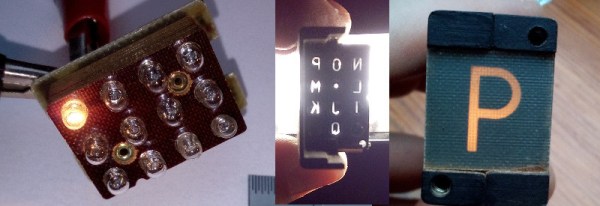
Of particular note during this presentation is the explanation of how the astronauts actually interacted with the AGC. The AGC’s display and keyboard (referred to as DSKY) may seem rather obtuse even to those who used to hack on a VT100, but [Michael] and [Christian] explain how it’s not quite as complex as it seems. Comparing the input and output of the DSKY with what we would see on a more contemporary command line interface, the presentation makes the case that it’s actually a very straightforward way of talking to the computer.

There’s also a complete breakdown of the different phases of the Apollo mission from launch to landing, explaining what the AGC would be doing at any given time. The DSKY is overlaid on actual footage from the Apollo missions, giving a unique perspective as to what the astronauts would see on their computer during iconic moments such as stage separation or lunar touchdown.

If this presentation has you hungry for more Apollo-era computer technology, we’ve covered plenty of projects to keep you occupied. From building a replica DSKY to leisurely paging through the printed version of the AGC’s source code.

Coasty The Coaster Toaster

Whether or not you feel the need to laser cut custom drink coasters, you have to be impressed by the amount of thought that went into Coasty.

They say that justice is blind, and while we can’t promise you anything at your next court date, we can at least say with confidence that we’re not the kind of people who will turn down a good hack just because it’s held together with rubber bands and positive vibes. If it works it works, and it doesn’t matter what it looks like. Having said that, we’re blown away by how incredibly finished this particular project is.

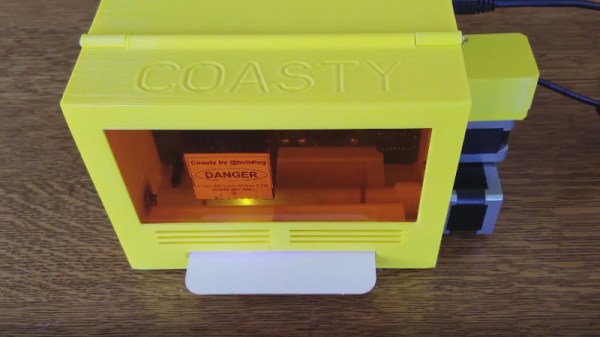
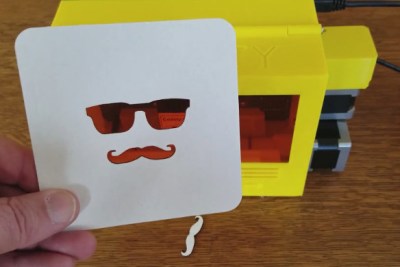
Coasty, designed and built by [Bart Dring] is one of those projects that elevate a hack into something that looks like it could be a commercial product. It takes in a common pulpboard coaster and laser cuts any design you want. It’s just the right size, with just the right components because this is Coasty’s purpose. It has a slot to feed in the coaster, and uses this as one of the axes during the laser cutting process, with the laser’s left to right movement as the other. This method makes for a smaller overall footprint and means you never need to open the protective enclosure for normal operation.

One of the most striking elements of Coasty is how much of the hardware is 3D printed. If it isn’t a motor, smooth rod, or other mechanical component, it’s printed. We’re used to seeing 3D printed parts as brackets or mounts, but rarely do you see an entire chassis printed like this. Not only does it take a serious amount of forethought and design, but the print time itself can be quite prohibitive.

But by designing and printing the majority of Coasty, it really gives it a professional look that would have been harder to achieve if it was a bundle of aluminum extrusions.

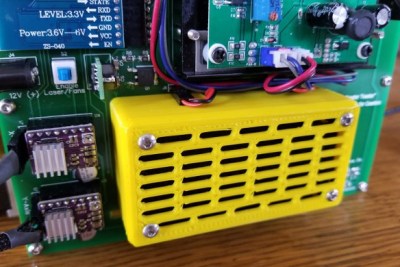
The back of Coasty features an exposed PCB “motherboard” with a dizzying array of plug-in boards. Hardware like the stepper drivers, Bluetooth radio, and laser power supply are separate modules for ease of maintenance and development. There’s a few neat hardware features integrated into the motherboard as well, like the IR sensor for detecting the edge of the coaster.

The printed filter is an especially nice touch. Containing a scrap of commercially available carbon cloth intended for home air filters, Coasty is able to cut down on the smoke that is invariably produced when blasting cardboard with a 3W 450nm laser.

It turns out that custom drink coasters are serious business for some hackers out there. This isn’t the first time somebody has gone all out to make their mark while simultaneously preventing marks.

Continue reading “Coasty The Coaster Toaster”

A Guidebook To The World Of Counterfeit Parts

We’ve all experienced it: that sinking feeling you get when you’ve powered up your latest circuit and nothing happens. Maybe you made a mistake in your design or you shorted something while soldering. It’s even possible that ESD damaged one of your chips. All of these issues and more are possible, maybe even inevitable, when designing your own hardware.

But what if your design is perfect and your soldering skills beyond reproach? What if your shiny new device is DOA but you’ve done everything right? A fascinating report by [Yahya Tawil] makes the case that it’s increasingly possible that you’ve run across a counterfeit component. While it’s still relatively unlikely the hobby hacker is going to get bit by the counterfeit bug, the figures and examples referenced in his report may surprise you.

One of these is an ATmega328, the other is literal garbage.

[Yahya] points to a number of government studies on the rising scourge of counterfeit components, and the numbers are rather surprising. For example, the U.S Department of Commerce conducted a study between 2005 and 2008 where over 50% of respondent manufacturers and distributors had encountered counterfeit components. Another estimate claims that up to 15% of the semiconductors purchased by the Pentagon are counterfeit, presenting a serious risk to national security.

But how exactly does one counterfeit a microcontroller or transistor? Interestingly, in the vast majority of cases, old chips are pulled from recycled circuit boards and new labels are written over the original. Sometimes the forgery is as simple as changing the date code on the component or up-rating its capability (such as labeling it military spec when it isn’t), but in some cases chips with the same package will be labeled as something else entirely. Other tricks are decidedly low-tech: the documentation for the device may list functions and capabilities which it simply does not possess, artificially raising its value.

The report is a worthwhile read, even for those of us who may not be purchasing components in the same quantities as the Pentagon. It may make you think twice before you click “Buy” on that shady site with the prices that seem to good to be true.

Counterfeit components certainly seem to be on the rise from where we’re sitting. We’ve covered a number of other studies on this increasingly common trend, as well as first hand accounts ranging from successful recoveries to frustrating failures.

Interfacing With A Digital Speedometer

After swapping the engine out in his scooter, [James Stanley] made an unfortunate discovery. The speedometer was digitally controlled, and while the original engine had a sensor which would generate pulses for it to interpret, his new engine didn’t. Learning that the original sensor would pull the signal wire to ground each time it detected a tooth of one of the spinning gears, [James] reasoned he needed to find a way to detect the scooter’s speed and create these pulses manually.

To find the scooter’s speed, he installed a magnet on the front wheel and a hall effect sensor on the fork to detect each time it passed by. Since the wheel is of a known circumference, timing the pulses from the sensor allows calculation of the current speed. A GPS receiver could be used if you wanted fewer wires, but the hall effect sensor on the wheel is simple and reliable. With the speed of the scooter now known, he needed to turn that into a signal the speedometer understands.

Speedometer controller potted with resin.

[James] wrote a program for an ATmega that would take the input from the wheel sensor and use it to create a PWM signal. This PWM signal drives a transistor, which alternates the speedometer sensor wire between low and floating. With a bit of experimentation, he was able to come up with an algorithm which equated wheel speed to the gearbox speed the speedometer wanted with accuracy close enough for his purposes.

While the software side of this project is interesting in its own right, the hardware is an excellent case study in producing robust electronic devices suitable for use on vehicles. [James] 3D printed a shallow case for the circuit board, and potted the entire device with black polyurethane resin. He even had the forethought to make sure he had a debugging LED and programming connector before he encapsulated everything (which ended up saving the project).

While the specific scenario encountered by [James] is unlikely to befall others, his project is an excellent example of not only interfacing with exiting electronics but producing rugged and professional looking hardware without breaking the bank. Even if scooters aren’t your thing, there are lessons to be learned from this write-up.

For all you two wheeled hackers out there, we’ve covered similar projects designed for bicycles, as well as some very slick digital speedometer mods for motorcycles.

Watch Video On A Oscilloscope With An ESP32

[bitluni] got a brand new scope, and he couldn’t be happier. No, really — check the video below; he’s really happy. And to celebrate, he turned his scope into a vector display using an ESP32.

Using a scope in X-Y mode is nothing new, of course. The technique is used to display everything from Lissajous patterns from an SDR to bouncing balls from an analog computer. Taken on as more of an exercise to learn how to use his new tool than a practical project, [bitluni]’s project starts by using two DACs on an ESP32 to create simple Lissajous patterns to learn about the scope’s controls. Next he built some code to display 3D point clouds, but learned that the native DAC code wasn’t up to the job. A little hacking improved the speed 27-fold, which was enough for great 3D images and live video from an I²S camera module. The latter was accomplished by grabbing frames from the camera and rendering them pixel by pixel, CRT style. The results are pretty clean, and there’s a lot to be learned about both using scopes as X-Y displays and tweaking the ESP32 for maximum performance.

Need more background on the ESP32? Start by checking out these ESP32 tutorials.


Continue reading “Watch Video On A Oscilloscope With An ESP32”

Aluminum Foil Heatsink Keeps LEDs In Check

In your kitchen is very likely a roll of aluminum foil, like most people you probably use it to line pans or wrap food for baking. If you heard somebody used aluminum foil in the cooling of items, you could be forgiven for thinking they were referring to wrapping leftovers and tossing them in the refrigerator. But rather than preserving Mom’s famous meatloaf, [Michael Dunn] is using that classic kitchen staple to protect his LED strips.

Cheap LED strips are becoming extremely popular and have been popping up in more and more projects, but they have a pretty serious flaw: heat dissipation. Left on their own they can get hot enough to cook themselves, which is sort of a problem when you’re looking to replace as much of your home lighting with them like [Michael] is.

Heat was of particular concern as he was looking to retrofit a delicate shade with his beloved LED strips. Since he wanted a column of LEDs inside the unique shape of the shade, he reasoned that some kind of heat-conductive tubular structure could be used as both a mandrel to wrap the LEDs around and a way to dissipate heat. Like most of us, his first thought was copper pipe. But unfortunately the only copper pipe he had handy was of too small a diameter.

The tube of foil on the other hand was the perfect diameter, and while aluminum isn’t as good a conductor of heat as copper, it’s certainly no slouch either. Early tests weren’t that great when the tube was laying on the bench, but once it stood vertically convection got the air moving and cooled the LEDs down to where [Michael] was comfortable enough to put them inside the shade. Though he does have some lingering doubts about leaving the cardboard tube in such a toasty environment.

Going back through the archives, we’ve seen some absolutely fantastic projects utilizing LED strips in the past, some of which have come up with their own creative ways of beating the heat.