The World’s Smallest Vacuum In An Altoids Tin

There’s been a lot of Altoids tin hacks over the years, but a vacuum cleaner in a tin is something new. In [Toby Bateson]’s first project on Hackaday, he used simple household items to create a functioning vacuum cleaner to use for sucking crumbs out of your keyboard or paper punch holes off your desk.

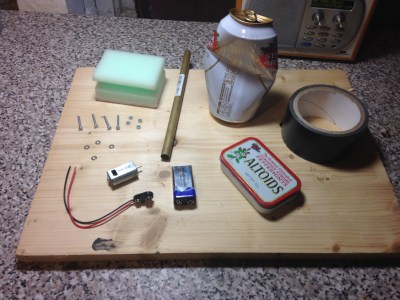
The vacuum features a retractable suction tube, a low-profile switch, and a bagless waste collection system (the waste is stored and discarded out from the tin itself). A brushed motor and impeller provide the airflow. A scrap of a beer can mounted on the shaft is used for an impeller blade, and two bolts with a thin metal sheet between them are made into a switch (the instructions recommend you finish your drink before using the scrap metal). A sponge is used for filtering the dirt from the motor while a hole is cut out of the top of the tin to provide airflow.

[Bateson] is looking to put his name in the world record book for the world’s smallest vacuum tube, as he recently created an even smaller vacuum in a 1cc tube.

“Oh dear, I’ve spilled something on my desk, whatever am I going to do? Luckily, I have my vacuum cleaner in an Altoids tin…”

Continue reading “The World’s Smallest Vacuum In An Altoids Tin”

Robotic Laundry Line Reels You In

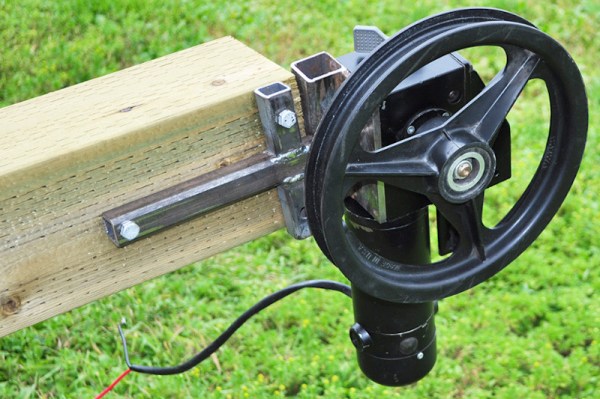
It may not be a laundry-folding robot, but this robotic launders line build by [Radical Brad Graham] is pretty neat. He has a 75-foot hanging laundry line from his house to a woodshed, and decided to roboticize it using some bits that were lying around. The result is a simple build that adds push-button control to pull the line back and forward, making it easier to hang everything out to dry. It’s a simple build, but [Brad] did a great job of documenting what he did and why, from mounting the posts that support the line to wiring up the control buttons.

Continue reading “Robotic Laundry Line Reels You In”

How To Make A Living With Embedded Systems

One of the biggest dreams anyone has is to make a living doing what they love. For all hackers, makers, and DIYers with a passion for embedded systems, it may make sense initially to pursue embedded systems design as a possible career, but without so much information on the types of qualifications or steps needed to actually secure a job offer, it may seem daunting to try and break into the field.

YouTuber [iAyan Pahwa] currently works as an embedded software engineer, having been in the field for two years, with prior experience as a hobbyist working with microcontrollers, motors, and programming in the embedded domain. In this video, embedded below, he provides his take on what you need to know to get yourself that first job.

Continue reading “How To Make A Living With Embedded Systems”

Navigate Around Garmin’s Custom Map Limits

If your only experience with Garmins is from that one rental car a few years back, it may surprise you that some of them, mostly the handheld outdoor units, allow custom maps. This sounds cool until you find out the limitations. Unless you upgrade to premium, it doesn’t allow map files larger than 3MB. What’s worse, it will choke the resolution of maps larger than one megapixel. Well, bust out your virtual hiking boots, because [facklere]’s gonna take you down the trail of DIY digital cartography.

You can use any map you want as long as its not completely fictional (although wandering the maps of middle-earth would be a fun hack on top of this one). Your map can be paper, PDF, or parchment; it just has to be converted to JPEG. The map [facklere] wanted to use was a huge PDF, so as a bonus, he shows how to get from PDF to JPEG in GIMP. Then comes the fiddly part — rooting the map in reality by overlaying it on real roads using Google Earth.

You’ve still got a huge map. Now what? The secret sauce is tiling. [facklere] used KMZfactory, a free map editor for Garmin maps that goes the extra mile to split the tiles for you, keeping them under the 1MP limit. Once that’s done, just upload it to your unit and hit the road.

Got an old Garmin that won’t do custom maps? See if you can get DOOM up and running on it.

Solve Your Precision Woes With A Sliding Angle Grinder

Angle grinders are among the most useful tools for anyone who’s ever had to cut metal. They’re ergonomic, compact, and get the job done. Unfortunately, one of the tradeoffs you usually make when using them is precision.

But thankfully, there’s a DIY solution. YouTuber [workshop from scratch] demonstrated the build process for a sliding angle grinder in a recent video, welding steel beams into a flat frame and attaching fitted beams on top to slide across the rows. Where necessary, spacers are used to ensure that the slider is perfectly fitted to the beam. The contraption holding the angle grinder – a welded piece of steel bolted to the sliding mechanism – has a grip for the user to seamlessly slide the tool across the table.

The operation is like a more versatile and robust chop saw, not to mention the customized angle references you can make to cut virtually anything you like. The build video shows the entire process, from drill pressing and turning holes to welding pieces of the frame together to artfully spray painting the surface a classy black, with familiarity enough to make the project look like a piece of cake.

As the name implies, [workshop from scratch] is all about building your own shop tools, and we’ve previously taken a look at their impressive hydraulic vise and mobile crane builds. These tools, largely hacked together from scraps, prove that setting up your own shop doesn’t necessarily mean you need to break the bank.

Continue reading “Solve Your Precision Woes With A Sliding Angle Grinder”

Fried Desk Lamp Reborn: How To Use ESP8266 To Build Connected Devices

Some hacks are born of genius or necessity, and others from our sheer ham-fisted incompetence. This is not a story about the first kind. But it did give me an excuse to show how easy it is to design WiFi-connected devices that work the way you want them to, rather than the way the manufacturer had in mind.

It started out as a sensible idea – consumer electronics in Vietnam have many different electric plug types for mains AC power: A, C, G, F, and I are fairly present, with A and C being most common. For a quick review of what all those look like, this website sums it up nicely. There are universal power adapters available of course, but they tend to fit my most common type (C) poorly, resulting in intermittent power loss whenever you sneeze. So I figured I should replace all the plugs on my devices to be A-type (common to those of you in North America), as it holds well in all the power bar types I have, mainly leftover server PDUs.

This was very straightforward until I got to my desk lamp. Being a fancy Xiaomi smart lamp, they had opted to hide a transformer in the plug with such small dimensions that I failed to notice it. So instead of receiving a balmy 12 volts DC, it received 220 volts AC. With a bright flash and bang, it illuminated my desk one final time.

Continue reading “Fried Desk Lamp Reborn: How To Use ESP8266 To Build Connected Devices”

The Zen Of Mechanical Keyboard Wiring

Mechanical keyboards are all the rage right now, but the vast majority of them are purchased commercially. Only the most dedicated people are willing to put in the time and effort required to design and assemble their own custom board, and as you might imagine, we’ve featured a number of such projects here on Hackaday in the past.

But what makes this particular mechanical keyboard build from [kentlamh] so special isn’t the final product (though it’s certainly quite nice), but the care he took when hand-wiring all of the switches to the Teensy 2.0 microcontroller that serves as its controller. There’s no PCB inside this custom board, it’s all rainbow colored wires, individual diodes, and the patience to put it all together with tweezers.

[kentlamh] takes the reader through every step of the wiring process, and drops a number of very helpful hints which are sure to be of interest to anyone who might be looking to embark on a similar journey. Such as bending the diode legs en masse on the edge of a table, or twisting them around a toothpick to create a neat loop that will fit over the pin on the back of the switch.

He also uses a soldering iron to melt away the insulation in the middle of the wires instead of suffering through hundreds of individual jumpers. We’ve seen this trick before with custom keyboards, and it’s one of those things we just can’t get enough of.

Some will no doubt argue that the correct way to do this would be to use an automatic wire stripper, and we don’t necessarily disagree. But there’s something undeniably appealing about the speed and convenience of just tapping the wire with the iron at each junction to give yourself a bit of bare copper to work with.

Even if you aren’t enough of a mechanical keyboard aficionado to travel all the way to Japan to attend the official meetup or discuss the finer points of their design at the Hackaday Superconference, there’s an undeniable beauty to this custom board. With a little guidance from [kentlamh], perhaps it will be your own handwired masterpiece that’s next to grace these pages.

[Thanks to Psybird for the tip.]