Morphing Keyboard Gets You Dialed In Just Right

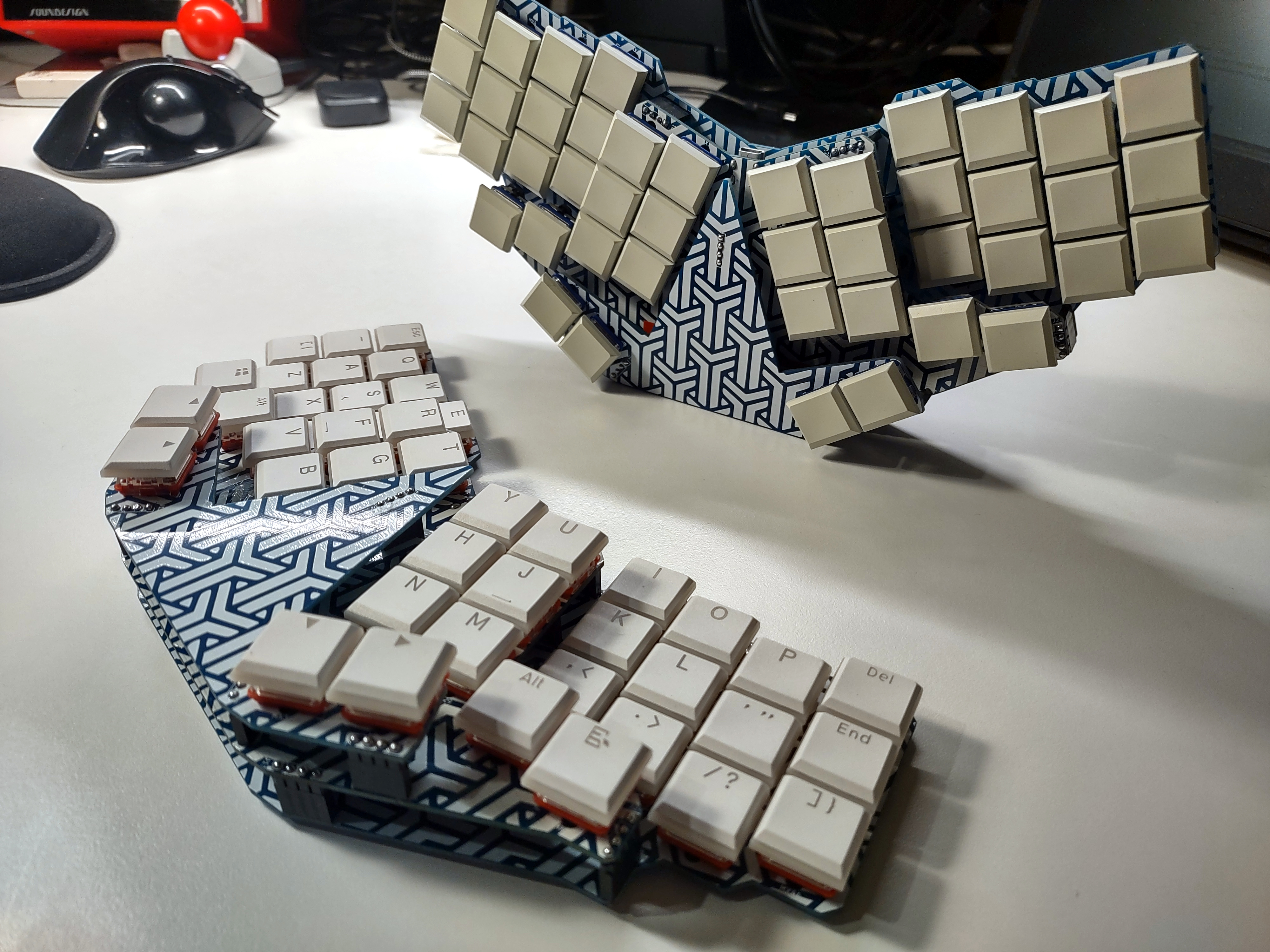
So you’re tired of rectangular, brick wall-staggered keyboards and want to go split and/or ergo. But how? Which style? What do? Here’s what you do: you build one of these here LHM Morph boards and customize the crap out of it, because that’s what it’s for.

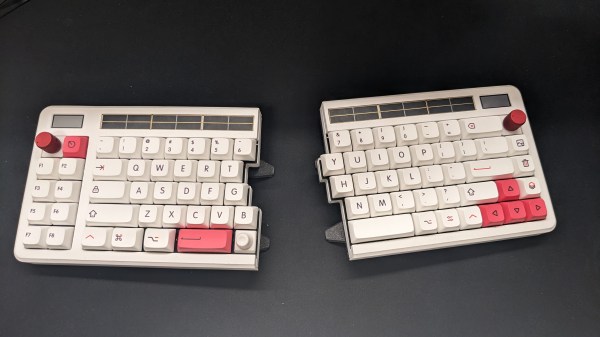
So what is this thing, anyway? Is it a even a keyboard? Well, as long as you can press switches and send key commands to a computer, it certainly smells like a keyboard to us. Now that we’ve gotten that out of the way, what’s going on here is that [LifeHackerMax] has built a highly-customizable version of the LHM, their 26-key split. The LHM Morph can be fine-tuned to nearly any degree imaginable, including the tenting angle. The keys are grouped in modules that can slide back and forth to suit your varying finger lengths. As they are half-round, these modules can also be tilted and rotated until they’re just right.

But the super cool thing about the LHM Morph is the way it goes together — like LEGO. It’s completely modular, and you don’t even have to go split if you’re not ready for that. But all the pieces connect via rods made of copper wire. If you’d like to make one for yourself, the 3D files are up on Thingiverse, and the firmware is on GitHub. Be sure to check out the video after the break.

Does this keyboard remind you of anything? [Peter Lyons]’ Squeezebox, perhaps?

Continue reading “Morphing Keyboard Gets You Dialed In Just Right”

Mouse Whisperer Keeps You Working, Even When You Need A Break

When life hands you lemons, you make lemonade, right? What about when life hands you annoyingly intrusive work-from-home policies that require you to physically stay at your computer even though you really, REALLY need to go to the bathroom, but can’t be trusted to act like a responsible adult who won’t get diverted by TV or the fridge on the way back? In that case, you build something like the Mouse Whisperer — because malicious compliance is the best kind of compliance.

To be fair, [andrey.malyshenko] does list other plausible use cases for what amounts to an automatic mouse wiggler. Like many of us, [andrey] isn’t a fan of logging back in from screen locks, and recognizes that not absolutely every minute of work requires staring at one’s screen. There’s also the need for bio-breaks, of course, and the Mouse Whisperer is designed to accommodate these use cases and more.

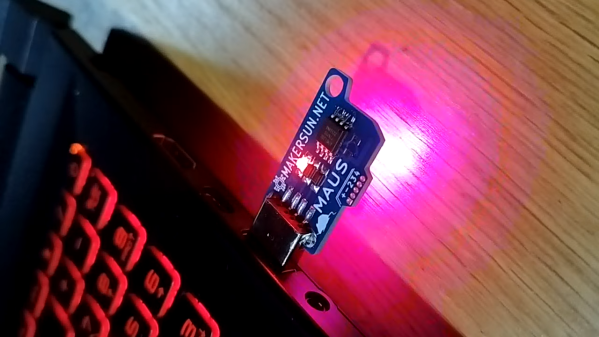
The design is quite compact, occupying barely more space than a wireless mouse dongle. Plugged into a USB port, the ATtiny85 mostly sits idle, waiting to detect the touch of a finger on an exposed pad via a TTP223. The dongle then goes into a routine that traces lazy circles with the mouse pointer, plus flashes an RGB LEB on the board, because blinkenlights are cool. The mouse wiggling continues until you come back from your Very Important Business and touch the pad again.

Now, if anyone is actually monitoring you remotely, the circling mouse pointer is going to look a wee bit sus. Fear not, though — the code uses a *.h file to define the circle, so other patterns should be possible. Either way, the Mouse Whisperer is a nice solution, and it’s considerably more compact and integrated than some of the alternatives we’ve seen.

Foot Pedal Ups Vim Productivity, Brings Ergonomic Benefits

Vim is the greatest or the worst text editor of all time, depending on the tribe you’re in. Either way, members of both camps can appreciate this build from [Chris Price], which uses a foot pedal to ease operations for the user.

The basic concept was to use a pedal to enable switching between normal and insert modes. In Vim’s predecessor, vi, switching modes was easy, with the ESC key located neatly by the Q on the keyboard of the ADM-3A terminal. On modern keyboards, though, it’s a pain, and so a foot pedal is a desirable solution. In the Vim world, it’s referred to as a “Vim clutch.”

The build used a cheap pedal switch sourced from eBay, into which a Raspberry Pi Pico was installed. The Pico was hooked up to the switch contacts, and programmed to act as a USB HID device. When the pedal is pressed down, the Pico sends an “i” keypress to enter Vim’s insert mode. Releasing the pedal has the Pico send a “ESC” keypress to return to normal mode.

Those that use Vim on a regular basis would likely appreciate the productivity improvements of such a device. Plus, there’s some ergonomic benefits to not having to strain one’s hand over to reach the ESC key. Of course, it’s an old-school solution, but there’s still something so compelling and next-level about having a foot pedal hooked up to one’s dev rig.

Two-Thirds Keyboard Is Inspired By The Typesetting Era

We see all kinds of custom keyboard builds around here. Most of them are intended to optimize typing to the user’s desires. This glorious build from [Attoparsec] isn’t one of those, and is instead part of the growing joke keyboard genre. The so-called Two-Thirds Keyboard is inspired by the long-gone typesetting era.

The build is based on the typecases used in the era when type was assembled by hand. Typesetters would grab “majuscule” letters from the upper case of type, and “miniscule” letters from the lower case of type, when setting a page, which would go on to influence how we refer to those letters today. Letters that came up more often, like e and s, would get larger compartments in the type cases, while rarer letters like z and q would get smaller compartments. The Two-Thirds keyboard replicates this by giving the most common letters the biggest keys, while rarer letters and upper-case majuscule letters get smaller keys. The overall layout matches that of the popular Two-Thirds California Case of type that grew popular in the US in the typesetting era.

There were some engineering issues in building the keyboard. While stabilizers are available for wide keys like Enter and Space in regular keyboard designs, stabilizing keys that are wide and high is fussy. The build relies on multiple switches to enable them to move cleanly. Nor were 2×2 and 2×3-sized custom keycaps readily available. In the end, resin printing was key to producing all the necessary components.

Typing on the keyboard is not quick, but lower speeds were probably acceptable in the typesetting era. Regardless, [Attoparsec] used it for a full week to do it justice, going from around 10  wpm to 22 wpm by the end of the test.

It’s a fun build, but by no means the slowest keyboard we’ve ever seen.

Continue reading “Two-Thirds Keyboard Is Inspired By The Typesetting Era”

A huge cardboard computer with an equally huge mouse

Massive Mouse Game Mimics Classic Software Crashes

Computer mice come in all kinds of shapes and sizes, but are typically designed to fit in the palm of your hand. While some users with large hands may find standard mice uncomfortably small, we don’t think anyone will ever make that complaint about the humongous peripheral [Felix Fisgus] made for a game called Office Job at the ENIAROF art festival in Marseille. With a length of about two meters we suspect it might be the largest functional computer mouse in existence.

An optical mouse sensor mounted on a cardboard frameInside the massive mouse is a wooden pallet with four caster wheels that enable smooth movement in all directions. This motion is detected by an ordinary optical mouse sensor: perhaps surprisingly, these can be used at this enormous scale simply by placing a different lens in front.

As for the mouse button, [Felix] and his colleagues found of that the bottom of an empty five-liter can has a nice “pop” to it and installed one in the front section of the device, hooked up to an ESP32 board that communicates with a computer through Bluetooth.

The mouse connects to an equally huge desktop computer, powered by a Raspberry Pi, on which users play a game that involves clicking on error messages from a wide variety of old and new operating systems. Moving the mouse and pressing its button to hit those dialog boxes is a two-person job, and turns the annoyance of software errors into a competitive game.

Optical mouse sensors are versatile devices: apart from their obvious purpose they can also serve as motion sensors for autonomous vehicles, or even as low-resolution cameras.

Continue reading “Massive Mouse Game Mimics Classic Software Crashes”

Exploded version of the Cistercian display

Serial Cistercian Digit Module

There’s no doubt that the 7-segment display is a gold standard for displaying lighted digits. But what about a throwback to an older system of displaying numbers — Cistercian? With thirty-one 0805 LEDs, [Josue Alejandro] made a simple module displaying a single Cistercian digit (any from 0-9999).

The first iteration used castellated edges and required a significant number of GPIO, so on the next rev, he switched to a serial-to-parallel converted from Lumissil (IS31FL3726A). A diffuser and spacer were printed from PLA and made for an incredibly snazzy-looking package.

Of course, it couldn’t stop there, and a third revision was made that uses SK6812 Neopixels, allowing full RGB capability. All the design documents, layout files, and incredibly detailed drawings are available on GitHub. What makes this incredibly handy is having a module you can easily add to a project. Perhaps even as a component in an escape room in a box that would allow you to flash multiple numbers. Or perhaps as a stylish clock. We’d even go so far as to challenge someone to create a calculator by combining several of these modules with this keypad.

A toy gamepad controlling Super Mario World emulated on a MacBook

Turning A Toy Gamepad Into A Real One, With Bluetooth

It’s important to instill healthy habits in your children when they’re still young. Preferences for sports, snacks and dinosaurs are typically formed in early childhood, as is loyalty to a specific gaming platform. [RetrogradeScene] apparently wished to steer his young daughter towards the Nintendo camp, but wasn’t looking forward to having her grubby hands touch his prized controllers. So he built her her own kid-friendly controller out of a Fisher-Price toy.

The toy in question is an imitation game controller that just makes funny sounds when you press the buttons. Converting it into a real, working game controller was a matter of soldering some wires onto the existing PCB and hooking them up to a microcontroller board, in this case a DFRobot FireBeetle. After loading the ESP32-BLE-Gamepad library and assigning the correct pin-button combinations in software [RetrogradeScene] ended up with a big, brightly-coloured gamepad that actually functioned as one.

Unfortunately, the FireBeetle took up space where the original AAA batteries were sitting, so the hacked gamepad needed a new power source. Classic batteries are heavy and inconvenient anyway, so [RetrogradeScene] installed a modern lithium battery plus a USB-C port for charging. Of course, no Bluetooth gadget is complete without an accompanying smartphone app either: [RetrogradeScene] wrote one for his iPhone that enables him to quickly change the button layout between the Nintendo and Xbox styles.

This might be a rare example of someone making a gamepad from, well, a gamepad. We’ve seen a few more unusual things being converted into game controllers, ranging from a handful of LEGO bricks to entire cars.

Continue reading “Turning A Toy Gamepad Into A Real One, With Bluetooth”