At this point, you’ve almost certainly heard the tale of Eric Lundgren, the electronics recycler who is now looking at spending 15 months in prison because he was duplicating freely available Windows restore discs. Of no use to anyone who doesn’t already have a licensed copy of Windows, these restore discs have little to no monetary value. In fact, as an individual, you couldn’t buy one at retail if you wanted to. The duplication of these discs would therefore seem to be a victimless crime.
Eric Lundgren
Especially when you hear what Eric wanted to do with these discs. To help extend the functional lifespan of older computers, he intended on providing these discs at low cost to those looking to refurbish Windows computers. After each machine had its operating system reinstalled, the disc would go along with the computer in hopes the new owner would be able to utilize it themselves down the road.
It all sounds innocent enough, even honorable. But a quick glance at Microsoft’s licensing arrangement is all you need to know the whole scheme runs afoul of how the Redmond giant wants their operating system installed and maintained. It may be a hard pill to swallow, but when Eric Lundgren decided to use Microsoft’s product he agreed to play by their rules. Unfortunately for him, he lost.
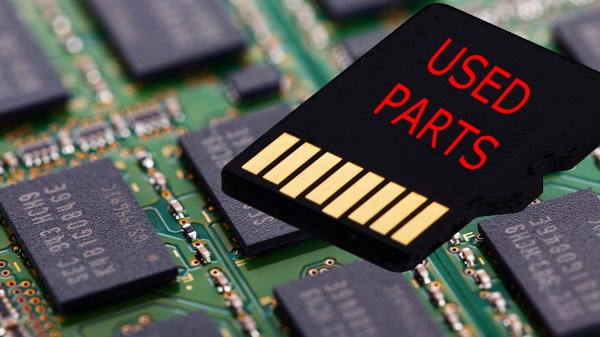
We all love new tech. Some of us love getting the bleeding edge, barely-on-the-market devices and some enjoy getting tech thirty years after the fact to revel in nostalgia. The similarity is that we assume we know what we’re buying and only the latter category expects used parts. But, what if the prior category is getting used parts in a new case? The University of Alabama in Huntsville has a tool for protecting us from unscrupulous manufacturers installing old flash memory.
Flash memory usually lasts longer than the devices where it is installed, so there is a market for used chips which are still “good enough” to pass for new. Of course, this is highly unethical. You would not expect to find a used transmission in your brand new car so why should your brand new tablet contain someone’s discarded memory?
The principles of flash memory are well explained by comparing them to an ordinary transistor, of which we are happy to educate you. Wear-and-tear on flash memory starts right away and the erase time gets longer and longer. By measuring how long it takes to erase, it is possible to accurately determine the age of chip in question.
One of humankind’s dreams has always been to fly like a bird. For a hacker, an achievable step along the path to that dream is to make an ornithopter — a machine which flies by flapping its wings. An RC controlled one would be wonderful, controlled flight is what everyone wants. Building a flying machine from scratch is a big enough challenge, and a better jumping-off point is to make a rubber band driven one first.
I experimented with designs which are available on the internet, to learn as much as possible, but I started from scratch in terms of material selection and dimensions. You learn a lot about flight through trial and error, and I’m happy to report that in the end I achieved a great little flyer built with a hobby knife and my own two hands. Since then I’ve been looking back on what made that project work, and it’s turned into a great article for Hackaday. Let’s dig in!
First Google gradually improved its WaveNet text-to-speech neural network to the point where it sounds almost perfectly human. Then they introduced Smart Reply which suggests possible replies to your emails. So it’s no surprise that they’ve announced an enhancement for Google Assistant called Duplex which can have phone conversations for you.
What is surprising is how well it works, as you can hear below. The first is Duplex calling to book an appointment at a hair salon, and the second is it making reservation’s with a restaurant.
Note that this reverses the roles when talking to a computer on the phone. The computer is the customer who calls the business, and the human is on the business side. The goal of the computer is to book a hair appointment or reserve a table at a restaurant. The computer has to know how to carry out a conversation with the human without the human knowing that they’re talking to a computer. It’s for communicating with all those businesses which don’t have online booking systems but instead use human operators on the phone.
Not knowing that they’re talking to a computer, the human will therefore speak as it would with another human, with all the pauses, “hmm”s and “ah”s, speed, leaving words out, and even changing the context in mid-sentence. There’s also the problem of multiple meanings for a phrase. The “four” in “Ok for four” can mean 4 pm or four people.
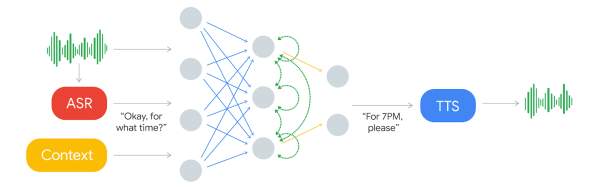
The component which decides what to say is a recurrent neural network (RNN) trained on many anonymized phone calls. The input is: the audio, the output from Google’s automatic speech recognition (ASR) software, and context such as the conversation’s history and the parameters of the conversation (e.g. book places at a restaurant, for how many, when), and more.
Producing the speech is done using Google’s text-to-speech technologies, Wavenet and Tacotron. “Hmm”s and “ah”s are inserted for a more natural sound. Timing is also taken into account. “Hello?” gets an immediate response. But they introduce latency when responding to more complex questions since replying too soon would sound unnatural.
There are limitations though. If it decides it can’t complete a task then it hands the conversation over to a human operator. Also, Duplex can’t handle a general conversation. Instead, multiple instances are trained on different domains. So this isn’t the singularity which we’ve talked about before. But if you’re tired of talking to computers at businesses, maybe this will provide a little payback by having the computer talk to the business instead.
On a more serious note, would you want to know if the person you were speaking to was in fact a computer? Perhaps Google should preface each conversation with “Hi! This is Google Assistant calling.” And even knowing that, would you want to have a human conversation with a computer, knowing that it’s “um”s were artificial? This may save time for the person whom the call is on behalf of, but the person being called may wish the computer would be a little more computer-like and speak more efficiently. Let us know your thoughts in the comments below. Or just check out the following Google I/O ’18 keynote presentation video where all this was announced.
Let’s get this out of the way first – this project isn’t meant to be a replacement for your regular smartphone. Although, at the very least, you can use it as one if you’d like to. But [Shree Kumar]’s Hackaday Prize 2018 entry, the Kite : Open Hardware Android Smartphone aims to be an Open platform for hackers and everyone else, enabling them to dig into the innards of a smartphone and use it as a base platform to build a variety of hardware.
When talking about modular smartphones, Google’s Project Ara and the Phonebloks project immediately spring to mind. Kite is similar in concept. It lets you interface hacker friendly modules and break out boards – for example, sensors or displays – to create your own customized solutions. And since the OS isn’t tied to any particular brand flavor, you can customize and tweak Android to suit specific requirements as well. There are no carrier locks or services to worry about and the bootloader is unlocked.
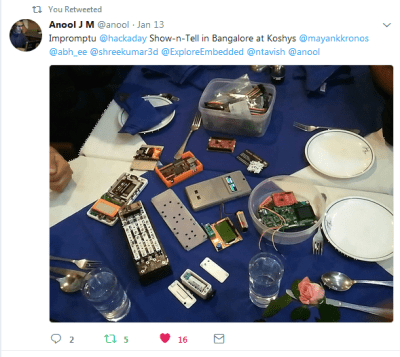
Hackaday Show-n-Tell in Bangalore
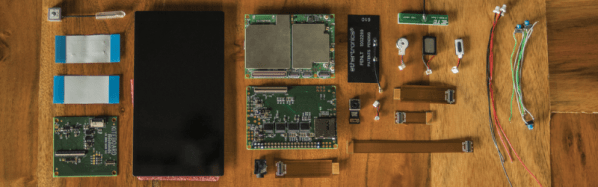
At the core of the project is the KiteBoard – populated with all the elements that are usually stuffed inside a smartphone package – Memory, LTE/3G/2G radios, micro SIM socket, GPS, WiFi, BT, FM, battery charging, accelerometer, compass, gyroscope and a micro SD slot. The first version of KiteBoard was based around the Snapdragon 410. After some subtle prodding at a gathering of hackers in Bangalore, [Shree] moved over to the light side, and decided to make the KiteBoard V2 Open Source. The new board will feature a Snapdragon 450 processor among many other upgrades. The second PCB in the Kite Project is a display board which interfaces the 5″ touchscreen LCD to the main KiteBoard. Of Hacker interest is the addition of a 1080p HDMI output on this board that lets you hook it up to external monitors easily and also allows access to the MIPI DSI display interface.
Finally, there’s the Expansion Board which provides all the exciting hacking possibilities. It has a Raspberry Pi compatible HAT connector with GPIO’s referenced to 3.3 V (the KiteBoard works at 1.8 V). But the GPIO’s can also be referenced to 5 V instead of 3.3 V if you need to make connections to an Arduino, for example. All of the other phone interfaces are accessible via the expansion board such as the speaker, mic, earpiece, power, volume up / down for hacking convenience. The Expansion board also provides access to all the usual bus interfaces such as SPI, UART, I²C and I²S.
To showcase the capabilities of the Kite project, [Shree] and his team have built a few phone and gadget variants. Build instructions and design files for 3D printing enclosures and other parts have been documented in several of his project logs. A large part of the BoM consists of off-the-shelf components, other than the three Kite board modules. If you have feature requests, the Kite team is looking to hear from you.
When it comes to smartphone design, Quantity is the name of the game. Whether you’re talking to Qualcomm for the Snapdragon’s, or other vendors for memory, radios, displays and other critical items, you need to be toeing their line on MOQ’s. Add to this the need to certify the Kite board for various standards around the world, and one realizes that building such a phone isn’t a technical challenge as much as a financial one. The only way the Kite team could manage to achieve their goal is to drum up support and pledges via a Kickstarter campaign to ensure they have the required numbers to bring this project to fruition. Check them out and show them some love. The Judges of the Hackaday Prize have already shown theirs by picking this project among the 20 from the first round that move to the final round.
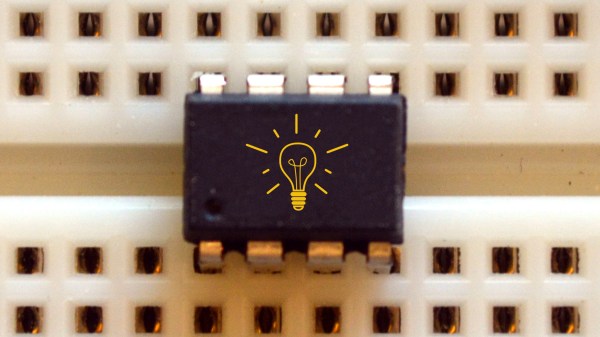
Deep in the heart of your latest project lies a little silicon brain. Much like the brain inside your own bone-plated noggin, your microcontroller needs protection from the outside world from time to time. When it comes to isolating your microcontroller’s sensitive little pins from high voltages, ground loops, or general noise, nothing beats an optocoupler. And while simple on-off control of a device through an optocoupler can be as simple as hooking up an LED, they are not perfect digital devices.
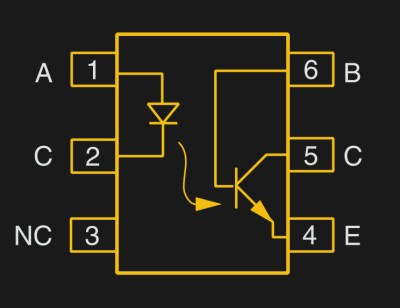
But first a step back. What is an optocoupler anyway? The prototype is an LED and a light-sensitive transistor stuck together in a lightproof case. But there are many choices for the receiver side: photodiodes, BJT phototransistors, MOSFETs, photo-triacs, photo-Darlingtons, and more.
So while implementation details vary, the crux is that your microcontroller turns on an LED, and it’s the light from that LED that activates the other side of the circuit. The only connection between the LED side and the transistor side is non-electrical — light across a small gap — and that provides the rock-solid, one-way isolation.
In two weeks the Hackaday Community is gathering in Belgrade for Europe’s greatest hardware con, The Hackaday Belgrade Conference — an event not to be missed — but of course the city itself is a spectacular place to visit and has the perfect feel for those who like to build electronics. Why not join us for your own geek world tour to Serbia? Here’s a few of the things you’ll want to see while in Belgrade.
Belgrade is a tech center and a hidden jewel of Europe. Need proof? Fly into Belgrade, and you’ll land at Nikola Tesla Airport. Pick up a car at the airport and you’ll pass a great glass torus housing Serbia’s Museum of Aviation. Here, you’ll find aircraft from both sides of the cold war, Sabres and MiGs, Hurricanes and Messerschmitts, a quite rare Sud Caravelle, and the canopy of the only stealth bomber ever to be shot down. It’s an aviation geek’s paradise, and you haven’t even left the airport.
What else is in store for you when you visit Belgrade? For the Hackaday crowd, the most interesting bit will probably be the Nikola Tesla Museum. You might know of Nikola Tesla from a webcomic, but he’s actually the greatest inventor of all time, even more so than Elon Musk. Tesla invented radio, even though Marconi got the credit. Tesla invented radar and discovered x-rays. The only person they could find to portray a figure like Tesla in The Prestige was David Bowie. Nikola Tesla is the most iconic inventor to ever live (change my mind), and his museum is in Belgrade.




 But first a step back. What is an optocoupler anyway? The prototype is an LED and a light-sensitive transistor stuck together in a lightproof case. But there are many choices for the receiver side: photodiodes, BJT phototransistors, MOSFETs, photo-triacs, photo-Darlingtons, and more.