Stecchino Game Is All About Balancing A Big Toothpick

Stecchino demo by the creator

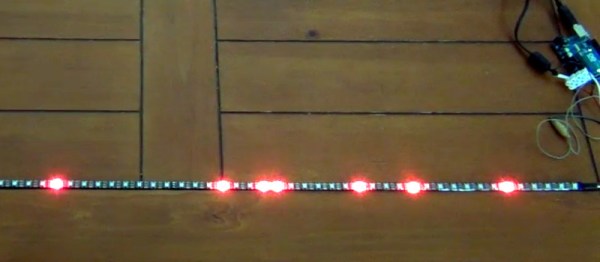
Self-described “Inventor Dad” [pepelepoisson]’s project is called Stecchino (English translation link here) and it’s an Arduino-based physical balancing game that aims to be intuitive to use and play for all ages. Using the Stecchino (‘toothpick’ in Italian) consists of balancing the device on your hand and trying to keep it upright for as long as possible. The LED strip fills up as time passes, and it keeps records of high scores. It was specifically designed to be instantly understood and simple to use by people of all ages, and we think it has succeeded in this brilliantly.

To sense orientation and movement, Stecchino uses an MPU-6050 gyro and accelerometer board. An RGB LED strip gives feedback, and it includes a small li-po cell and charger board for easy recharging via USB. The enclosure is made from a few layers of laser-cut and laser-engraved material that also holds the components in place. The WS2828B WS2812B LED strip used is technically a 5 V unit, but [pepelepoisson] found that feeding them direct from the 3.7 V cell works just fine; it’s not until the cell drops to about three volts that things start to glitch out. All source code and design files are on GitHub.

Games are great, and the wonderful options available to people today allow for all kinds of interesting experimentation like a blind version of tag, or putting new twists on old classics like testing speed instead of strength.

Arduino Clock Jots Down The Time, In UV

We’re big fans of the impractical around here at Hackaday. Sure there’s a certain appeal to coming up with the most efficient method to accomplish your goal, the method that does exactly what it needs to do without any superfluous elements. But it’s just not as much fun. If at least one person doesn’t ask “But why?”, then you probably left something on the table, design wise.

So when we saw this delightfully complex clock designed by [Tucker Shannon], we instantly fell in love. Powered by an Arduino, the clock uses an articulated arm with a UV LED to write out the current time on a piece of glow-in-the-dark material. The time doesn’t stay up for long depending on the lighting in the room, but at least it only takes a second or two to write out once you press the button.

Things are pretty straightforward inside the 3D printed case. There’s an Arduino coupled with an RTC module to keep the time, which is connected to the two standard hobby servos mounted in the front panel. A UV LED and simple push button round out the rest of the Bill of Materials. The source code is provided, so you won’t have to figure out the kinematics involved in getting the two servos to play nicely together if you want to try this one at home.

We’ve seen many clocks powered by Arduinos over the years, occasionally they even have hands. But few can boast their own robotic arm.

Continue reading “Arduino Clock Jots Down The Time, In UV”

Parts Bin Spooky Eye Build

Halloween is a great holiday for hacks, bringing out the creativity in even the most curmudgeonly wielder of a soldering iron. [tdragger] was looking to have some good old fashioned Halloween fun, and got to thinking – putting together this great Spooky Eyes build in their attic window.

The effect itself is simple – just two glowing orange LEDs spaced the right distance apart, placed in the highest window in the house. As every young child knows, the attic is almost the spookiest room in the house, second only to the basement.

Various effects were programmed in to the Arduino running the show, like breathing and blinking effects, to give that frightful character. For maintenance and programming purposes, [tdragger] wanted to have the Arduino remotely mounted, and searched for a solution. Rather than leaning on a wireless setup or something modern and off-the-shelf, instead some old RJ11 telephone extension cables were pressed into service. These allowed the eyes to be placed in the window, allowing the Arduino to be placed in a more accessible location.

It’s a basic project, but one that has a good fun factor. Sometimes it’s good to use what you’ve got to hand, so that the buzz of enjoyment isn’t dampened by the long wait for shipping. For something bigger, check out this giant staring eyeball.

Pipe Your Way Through The Jams

Playing the bagpipes is an art that takes a significant effort to master, both in keeping a constant air supply through balancing blowstick and bag and in learning the finger positions on the chanter. This last task we are told requires constant finger practice, and a favorite place for this is on the steering wheel as a would-be piper drives. [DZL] therefore took this to the next level, placing touch sensors round a car steering wheel that could be interpreted by an Arduino Pro Mini to produce a passable facsimile of a set of bagpipes via an in-car FM transmitter. It lacks the drone pipes of the real thing, but how many other Škodas feature inbuilt piping?

We’ve covered an unexpected number of bagpipe projects over the years, but never had a close look at this rather fascinating musical instrument. If you are curious, the US Coast Guard pipe band has a short guide to its parts, and we’ve brought you a set of homemade pipes built from duct tape and PVC pipe. They may once have been claimed as an instrument of war, but they seem to also be a favorite instrument of hardware hackers.

Thanks [Sophi] for the tip.

Balloons And Bubbles Make For Kid-Friendly Robot Deathmatch

Because nothing says “fun for kids” like barbed wire and hypodermic needles, here’s an interactive real-world game that everyone can enjoy. Think of it as a kinder, gentler version of Robot Wars, where the object of the game is to pop the balloon on the other player’s robot before yours get popped. Sounds simple, but the simple games are often the most engaging, and that sure seems to be the case here.

The current incarnation of “Bubble Blast” stems from a project [Niklas Roy] undertook for a festival in Tunisia in 2017. That first version used heavily hacked toy RC cars controlled with arcade joysticks. It was a big hit with the crowd, so [Niklas] built a second version for another festival, and incorporated lessons learned from version 1.0. The new robots are built from scratch from 3D-printed parts. Two motors drive each bot, with remote control provided by a 433-MHz transceiver module. The UI was greatly improved with big trackballs, also scratch built. The game field was expanded and extra obstacles were added, including a barbed wire border as a hazard to the festooned bots. And just for fun, [Niklas] added a bubble machine, also built from scratch.

The game looks like a ton of fun, and seems like one of those things you’ve got to shoo the adults away from so the kids can enjoy it too. But if you need more gore from your robot deathmatch than a limp balloon, here’s a tabletop robot war that’s sure to please.

Continue reading “Balloons And Bubbles Make For Kid-Friendly Robot Deathmatch”

Programming Linux Devices With Arduino And The Cloud

Back in the olden days, when the Wire library still sucked, the Arduino was just a microcontroller. Now, we have single board computers and cheap microcontrollers with WiFi built in. As always, there’s a need to make programming and embedded development more accessible and more widely supported among the hundreds of devices available today.

At the Embedded Linux Conference this week, [Massimo Banzi] announced the beginning of what will be Arduino’s answer to the cloud, online IDEs, and a vast ecosystem of connected devices. It’s Arduino Create, an online IDE that allows anyone to develop embedded projects and manage them remotely.

As demonstrated in [Massimo]’s keynote, the core idea of Arduino Create is to put a connected device on the Internet and allow over-the-air updates and development. As this is Arduino, the volumes of libraries available for hundreds of different platforms are leveraged to make this possible. Right now, a wide variety of boards are supported, including the Raspberry Pi, BeagleBone, and several Intel IoT boards.

The focus of this development is platform-agnostic and focuses nearly entirely on ease of use and interoperability. This is a marked change from the Arduino of five years ago; there was a time when the Arduino was an ATmega328p, and that’s about it. A few years later, you could put Arduino sketches on an ATtiny85. A lot has changed since then. We got the Raspberry Pi, we got Intel stepping into the waters of IoT devices, we got a million boards based on smartphone SoCs, and Intel got out of the IoT market.

While others companies and organizations have already made inroads into an online IDE for Raspberry Pis and other single board computers, namely the Adafruit webIDE and Codebender, this is a welcome change that already has the support of the Arduino organization.

You can check out [Massimo]’s keynote below.

Continue reading “Programming Linux Devices With Arduino And The Cloud”