Making A Motorized Turntable Portable

[Robin Reiter] needed a better way to show off his work. He previously converted an electric TV stand into a full 360-degree display turntable, but it relied on an external power supply to get it spinning. It was time to give it an upgrade.

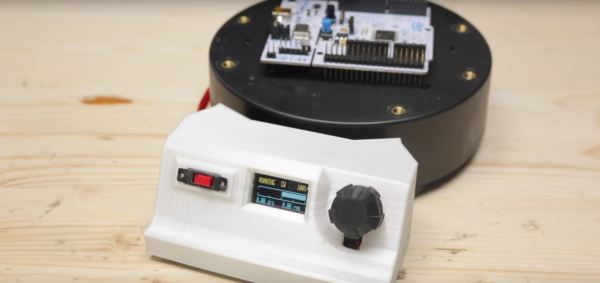
Putting his spacial organization skills to work, [Reiter] has crammed a mini OLED display, rotary encoder, a LiPo 18650 battery and charging circuit, a pair of buck converters, a power switch, and an Arduino pro mini into the small control console. To further maximize space, [Reiter] stripped out the pin headers and wired the components together directly. It attaches to the turntable in question with magnets, so it can be removed out of frame, or for displaying larger objects!

When first powered on, the turntable holds in pause mode giving [Reiter] time to adjust the speed and direction. He also took the time to add an optical rotary encoder disk to the turntable and give the gearing a much needed cleaning. Check out the project video after the break!

Continue reading “Making A Motorized Turntable Portable”

Flip-Dot Display Brought Out Of Retirement By New Drivers

LED matrix displays and flat-screen monitors have largely supplanted old-school electromechanical models for public signage. We think that’s a shame, but it’s also a boon for the tinkerer, as old displays can be had for a song these days in the online markets.

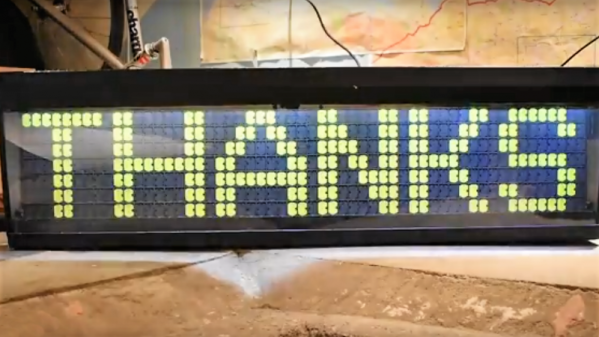
Such was the case for [John Whittington] and his flip-dot display salvaged from an old bus. He wanted to put the old sign back to work, but without a decent driver, he did what one does in these situations — he tore it down and reverse engineered the thing. Like most such displays, his Hannover Display 7 x 56-pixel flip-dot sign is electromechanically interesting; each pixel is a card straddling the poles of a small electromagnet. Pulse the magnet and the card flips over, changing the pixel from black to fluorescent green. [John] used an existing driver for the sign and a logic analyzer to determine the protocol used by the internal electronics to drive the pixels, and came up with a much-improved method of sending characters and graphics. With a Raspberry Pi and power supply now resident inside the case, a web-based GUI lets him display messages easily. The video below has lots of details, and the code is freely available.

You may recall [John] from a recent edge-lit Nixie-like display. Looks like he’s got a thing for eye-catching displays, and we’re fine with that.

Continue reading “Flip-Dot Display Brought Out Of Retirement By New Drivers”

The Nixie Tube Killer That Never Was

With the wealth of Nixie projects out there, there are points at which Hackaday is at risk of becoming Nixieaday. Nixie clocks, Nixie calculators, Nixie weather stations, and Nixie power meters have all graced our pages. And with good reason – Nixie tubes have a great retro look, and the skills needed to build a driver are a cut above calculating the right value for a series resistor for an LED display.

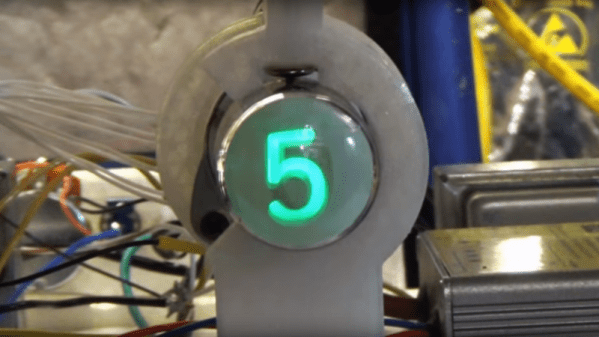
But not everyone loved Nixies back in the day, and some manufacturers did their best to unseat the venerable cold cathode tubes. [Fran Blanche] came across one of these contenders, a tiny cathode ray tube called the Nimo, and after a long hiatus in storage, she decided to put the tube to the test. After detailing some of the history of the Nimo and its somewhat puzzling marketing — its manufacturer, IEE, was already making displays to compete with Nixies, and seven-segment LEDs were on the rise at the time — [Fran] goes into the dangerous details of driving the display. With multiple supply voltages required, including a whopping 1,700 V DC for the anode, the Nimo was anything but trivial to integrate into products, which probably goes a long way to explaining why it never really caught on.

If you happen to have one of these little bits of solid unobtanium, [Fran]’s video below will go a long way to bringing back its ghostly green glow. You might say that [Fran] has a thing for oddball technologies of the late 60s — after all, she’s recreating the Apollo DSKY electroluminescent display, and she recently helped a model Sputnik regain its voice.

Continue reading “The Nixie Tube Killer That Never Was”

We Are Now At DEFCON 2

If you had a working DEFCON meter that reported on real data, would it be cool or distressing?

Before we get ahead of ourselves: no, not that DEF CON. Instructables user [ArthurGuy] is a fan of the 1983 movie  War Games, and following a recent viewing –hacker senses a-tingling — he set to work building his own real-time display.

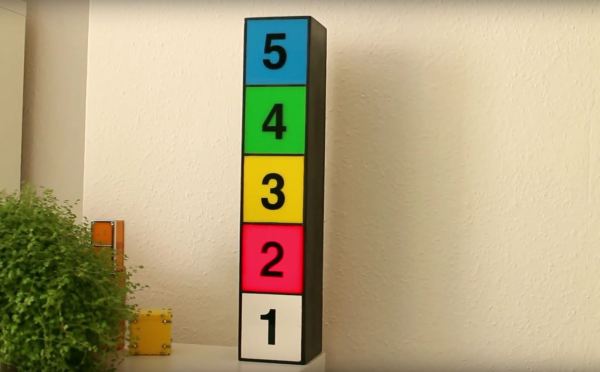
Making use of some spare wood, [ArthurGuy] glued and nailed together a 10x10x50cm box for the sign. Having been painted white already at some point, the paint brilliantly acted as a reflector for the lights inside each section. The five DEF CON level panels were cut from 3mm pieces of coloured acrylic with the numbers slapped on after a bit of work from a vinyl cutter.

Deviating from a proper, screen-accurate replica, [ArthurGuy] cheated a little and used WS2812 NeoPixel LED strips — 12 per level — and used a Particle Photon to control them. A quick bit of code polls the MI5 terrorism RSS feed and displays its current level — sadly, it’s currently at DEFCON 2.

Continue reading “We Are Now At DEFCON 2”

Hacked Headset Brings VR To The Commodore 64

The venerable Commodore 64 got a lot of people started in computers, and a hard core of aficionados keeps the platform very much alive to this day. But a C64 just doesn’t have the horsepower to do anything more than some retro 8-bit graphics games, right?

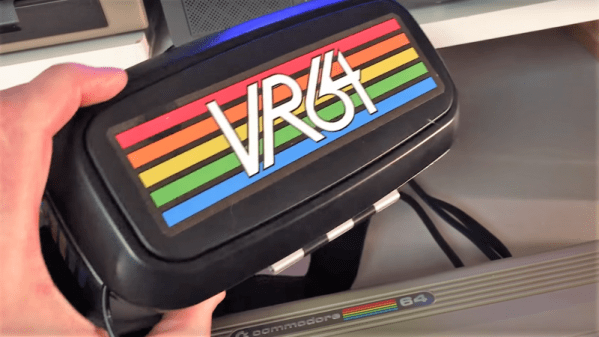
Not if [jim_64] has anything to say about it. He’s created a pair of virtual-reality goggles for the C64, and the results are pretty neat. Calling them VR is a bit of a stretch, since that would imply the headset is capable of sensing the wearer’s movements, which it’s not. With just a small LCD screen tucked into the slot normally occupied by a smartphone in the cheap VR goggles [jim64] used as a foundation for his build, this is really more of a 3D wearable display — so far. The display brings 3D-graphics to the C64, at least for the “Street Defender” game that [jim64] authored, a demo of which can be seen below. We’ll bet position sensing could be built into the goggles to control the game too. Even then it won’t be quite the immersive (and oft-times nauseating) experience that VR has become, but for a 35-year old platform, it’s not too shabby.

Looking for more C64 love? We’ve got a million of ’em — case mods, C64 laptops, tablets, even CPU upgrades.

Continue reading “Hacked Headset Brings VR To The Commodore 64”

A Detailed Guide For 3D Printing Enclosures

We’ve all have projects that are done, but not complete. They work, but they’re just a few PCBs wired together precariously on our desks. But fear not! A true maker’s blog has gifted us with a detailed step-by-step guide on how to make a project enclosure.

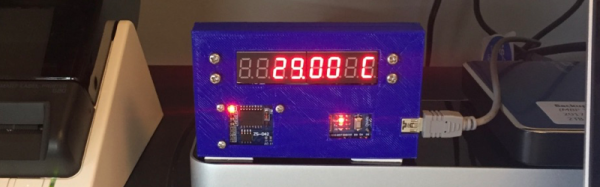
Having purchased an MP Select Mini 3D Printer, there was little to do but find something practical to print. What better than an enclosure for a recently finished Time/Date/Temperature display Arduino based device?

The enclosure in this guide, while quite nice, isn’t the main attraction here. The real feature is the incredibly detailed instructions for how to design, model and print an enclosure for any project. For the veterans out there, it seems simple. Sketch something on the back of a napkin and take a nap on your keyboard with OpenSCAD open. When you wake, BAM: perfect 3D model. However, for newcomers, the process can seem daunting. With incredibly specific instructions (an example is “Open up a new workspace by clicking CREATE NEW DESIGN,” notice the accurate capitalization!), it should ease the barrier of the first enclosure, turning the inexperienced into the kind-of-experienced.

If you’ve been printing enclosures since the dawn of time or plastic simply isn’t your style, boy, do we have you covered. Why not check out FR4 (aka PCB) enclosures? Or what about laser cut enclosures from eagle files? Maybe two-piece boxes are more your thing.

Hacking Touch Screens To Count Pulses

Heart rate sensors available for DIY use employ photoplethysmography which illuminates the skin and measures changes in light absorption. These sensors are cheap, however, the circuitry required to interface them to other devices is not. [Petteri Hyvärinen] is successfully investigating the use of capacitive touchscreens for heart rate sensing among other applications.

The capacitive sensor layer on modern-day devices has a grid of elements to detect touch. Typically there is an interfacing IC that translates the detected touches into filtered digital numbers that can be used by higher level applications. [optisimon] first figured out a way to obtain the raw data from a touch screen. [Petteri Hyvärinen] takes the next step by using a Python script to detect time variations in the data obtained. The refresh rate of the FT5x06 interface is adequate and the data is sent via an Arduino in 35-second chunks to the PC over a UART. The variations in the signal are very small, however, by averaging and then using the autocorrelation function, the signal was positively identified as a pulse.

A number of applications could benefit from this technique if the result can be replicated on other devices. Older devices could possibly be recycled to become low-cost medical equipment at a fraction of the cost. There is also the IoT side of things where the heart-rate response to media such as news, social media and videos could be used to classify content.

Check out our take on the original hack for capacitive touch imaging as well as using a piezoelectric sensor for the same application.