Servos Do The Plucking In This MIDI Music Box

It started with a cheap, punch-card programmable manual music box. Thirty-one hobby servos later, it ended as an automated MIDI music box, with a short pit stop as a keyboard-driven MIDI device.

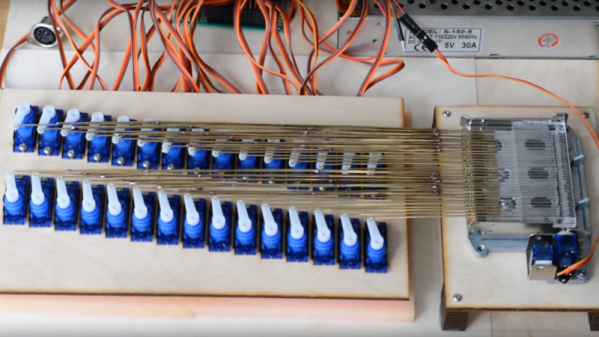
If you think you’ve seen the music box in [Mitxela]’s video below before, you’re right. [Martin], musician, inventor, and father of the marvelous marble music machine, took an interest in these music boxes and their programming a while back. Like [Martin], [Mitxela] started his music box project with punch card programming, but he quickly grew tired of the bothersome process, even after automating production with a laser cutter. He decided to do away with the punch cards completely and devised a method to pluck all 30 notes using a few large handfuls of hobby servos. One servo, converted to continuous rotation, spins the drum, with the rest linked to small laser-cut acrylic plectrums via stiff brass wire. The fingers imitate the punched holes passing over the drum and pluck the notes according to MIDI messages. The whole thing can draw quite a bit of current, so in addition to a beefy power supply, [Mitxela] optimized the code to minimize power requirements. This had the happy consequence of reducing the latency enough to allow the music box to be played from a MIDI keyboard in real time.

A lot of work went into this one, but [Mitxela] isn’t resting on his laurels; he has a full slate of improvements that he wants to tackle, not least of which is SD card support for MIDI files to turn this into a jukebox. We’re looking forward to the updates.

Continue reading “Servos Do The Plucking In This MIDI Music Box”

Google Builds A Synthesizer With Neural Nets And Raspberry Pis.

AI is the new hotness! It’s 1965 or 1985 all over again! We’re in the AI Rennisance Mk. 2, and Google, in an attempt to showcase how AI can allow creators to be more… creative has released a synthesizer built around neural networks.

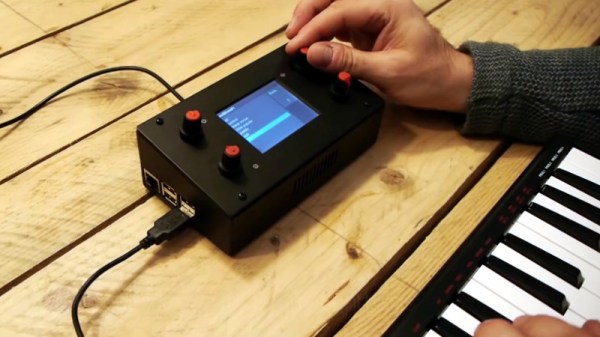
The NSynth Super is an experimental physical interface from Magenta, a research group within the Big G that explores how machine learning tools can create art and music in new ways. The NSynth Super does this by mashing together a Kaoss Pad, samples that sound like General MIDI patches, and a neural network.

Here’s how the NSynth works: The NSynth hardware accepts MIDI signals from a keyboard, DAW, or whatever. These MIDI commands are fed into an openFrameworks app that uses pre-compiled (with Machine Learning™!) samples from various instruments. This openFrameworks app combines and mixes these samples in relation to whatever the user inputs via the NSynth controller. If you’ve ever wanted to hear what the combination of a snare drum and a bassoon sounds like, this does it. Basically, you’re looking at a Kaoss pad controlling rompler that takes four samples and combines them, with the power of Neural Networks. The project comes with a set of pre-compiled and neural networked samples, but you can use this interface to mix your own samples, provided you have a beefy computer with an expensive GPU.

Not to undermine the work that went into this project, but thousands of synth heads will be disappointed by this project. The creation of new audio samples requires training with a GPU; the hardest and most computationally expensive part of neural networks is the training, not the performance. Without a nice graphics card, you’re limited to whatever samples Google has provided here.

Since this is Open Source, all the files are available, and it’s a project that uses a Raspberry Pi with a laser-cut enclosure, there is a huge demand for this machine learning Kaoss pad. The good news is that there’s a group buy on Hackaday.io, and there’s already a seller on Tindie should you want a bare PCB. You can, of course, roll your own, and the Digikey cart for all the SMD parts comes to about $40 USD. This doesn’t include the OLED ($2 from China), the Raspberry Pi, or the laser cut enclosure, but it’s a start. Of course, for those of you who haven’t passed the 0805 SMD solder test, it looks like a few people will be selling assembled versions (less Pi) for $50-$60.

Is it cool? Yes, but a basement-bound producer that wants to add this to a track will quickly learn that training machine learning algorithms cost far more than playing with machine algorithms. The hardware is neat, but brace yourself for disappointment. Just like AI suffered in the late 60s and the late 80s. We’re in the AI Renaissance Mk. 2, after all.

Continue reading “Google Builds A Synthesizer With Neural Nets And Raspberry Pis.”

There’s Now A New MIDI Spec, And Drones

MIDI, the Musical Instrument Digital Interface, was released in 1983 in a truly bizarre association between musical instrument manufacturers. At no other time, before or since, has there been such cooperation between different manufacturers to define a standard. Since then, the MIDI spec has been expanded with SysEx messages, the ability to dump samples via MIDI, redefining the tuning of instruments via MIDI to support non-Western music, and somewhere deep in the spec, karaoke machines.

Now there’s a new update to the MIDI spec (Gearnews link, here’s the official midi.org announcement but their website requires registration and is a hot garbage fire). At this year’s NAMM, the place where MIDI was first demonstrated decades ago,  the MIDI Manufacturers Association announced an update to MIDI that makes instruments and controllers smarter, and almost self-learning.

There are three new bits to the new update to the MIDI spec. The first is Profile Configuration, a way to auto-configure complex controller mappings, described as, ‘MIDI Learn on steroids’. The second update is Property Exchange, and allows MIDI devices to set device properties like, ‘product name, configuration settings, controller names, and patch data’. This is effectively setting metadata in controllers and devices. The third new bit is Protocol Negotiation, a way to automatically push future, next-gen protocols over a DIN-5 connector.

What does this all mean? Drones. No, I’m serious. The MIDI association is tinkering around with some Tiny Whoops and Phantoms, and posted a video of drones being controlled by a MIDI controller. Play a glissando up, and the drone goes up. You can check out a video of that below.

Continue reading “There’s Now A New MIDI Spec, And Drones”

Pulling Music Out Of Thin Air With A Raspberry Pi

Pianos are great instruments, but being rather heavy and requiring a fair amount of space they are certainly not known for their convenience. Sure, there are more portable varieties available, but they rarely resemble the elegance and classiness of a grand piano. One option is of course to build a downscaled version yourself — and since you’re already customizing the instrument, why stop at the way you play it. [2fishy] didn’t stop there either and ended up with a wooden, space friendly, light controlled piano housing a Raspberry Pi.

Inspired by the concept of a laser harp, [2fishy] followed the same principle but chose a simpler and safer alternative by using LEDs instead. For each playable tone, a LED is mounted opposite a light dependent resistor, creating an array of switches that is then connected to the Raspberry Pi’s GPIO pins. A Python script is handling the rest, polling the GPIO states and — with a little help from pygame, triggering MIDI playback whenever the light stream is interrupted.

There are enough LED/LDR pairs to play one full octave and have some additional control inputs for menu and octave shifting. This concept will naturally require some adjustments to your playing — you can get an idea of it in the demonstration video after the break. And if this design is still not the right size for you, or if you prefer to play in total darkness, this similar MIDI instrument using ultrasonic distance sensors could be of interest.

Continue reading “Pulling Music Out Of Thin Air With A Raspberry Pi”

Putting The Pi In Piano

Working on a PhD in composition, [Stephen Coyle] spends a fair bit of time at his electric keyboard. Setting himself up to work can be a bit of a task, so he felt he could improve the process and make it easy as Pi.

Finding it an odious task indeed to use notation software, connecting his laptop to his keyboard is a must — avoiding a warren of wires in the move is a similar priority. And, what if he could take advantage of the iPad’s unique offerings too? Well, a Raspberry Pi Zero W running Ravelox — an RTP MIDI protocol — makes  his music available on his network to record on whichever device he pleases.

Continue reading “Putting The Pi In Piano”

Swarm Of Servos Plays This Robotic Glockenspiel

It’s the happiest sounding instrument in the marching band, and it’s got the best name to boot. It’s the glockenspiel, and if this robotic glockenspiel has anything to say about it, the days of human glockenspielists are numbered.

In its present prototype form, [Averton Engineering]’s “Spielatron” looks a little like something from a carousel calliope or an animatronic pizza restaurant band. Using a cast-off glockenspiel from a school music room as a base, the Spielatron uses four mallets to play all the notes. Each key is struck by a mallet secured to a base made of two servos. For lack of more descriptive mallet terminology, these servos provide pan and tilt so the mallet can strike the proper keys. The video below shows the Spielatron’s first recital.

An Arduino runs the servos and a MIDI interface; unfortunately, this version can’t play chords and is a little limited on note length, but upgrades are on the way. We’ve seen a robotic glockenspiel before with a similar design that might have some ideas for increasing performance. But if you’re looking for a more sublime sound, check out this dry ice-powered wind chime.

Continue reading “Swarm Of Servos Plays This Robotic Glockenspiel”

Pocket Woodwind MIDI Controller Helps You Carry A Tune

It’s easy to become obsessed with music, especially once you start playing. You want to make music everywhere you go, which is completely impractical. Don’t believe me? See how long you can get away with whistling on the subway or drumming your hands on any number of bus surfaces before your fellow passengers revolt. There’s a better way, and that way is portable USB MIDI controllers.

[Johan] wanted a pocket-sized woodwind MIDI controller, but all the existing ones he found were too big and bulky to carry around. With little more than a Teensy and a pressure sensor, he created TeensieWI.  It uses the built-in cap sense library to read input from the copper tape keys, generate MIDI messages, and send them over USB or DIN. Another pair of conductive pads on the back allow for octave changes. [Johan] later added a PSP joystick to do pitch bends, modulation, and glide. This is a simple build that creates a versatile instrument.

You don’t actually blow air into the mouthpiece—just let it escape from the sides of your mouth instead. That might take some getting used to if you’ve developed an embouchure. The values are determined by a pressure sensor that uses piezoresistivity to figure out how hard you’re blowing. There’s a default breath response value that can be configured in the settings.

TeensiWI should be easy to replicate or remix into any suitable chassis, though the UV-reactive acrylic looks pretty awesome. [Johan]’s documentation on IO is top-notch and includes a user guide with a fingering chart. For all you take-my-money types out there, [Johan] sells ’em ready to rock on Tindie. Check out the short demo clips after the break.

We saw a woodwind MIDI controller a few years ago that was eventually outfitted with an on-board synthesizer. Want to build a MIDI controller ? , like this beautiful build that uses hard drive platters as jog wheels.

Continue reading “Pocket Woodwind MIDI Controller Helps You Carry A Tune”