Homebrew SNES Mini Aims For Historical Accuracy

While “normies” are out fighting in the aisles of Walmart to snap up one of the official “Classic Mini” consoles that Nintendo lets slip out onto the market every once and awhile, hackers have been perfecting their own miniature versions of these classic gaming systems. The “Classic Mini” line is admittedly a very cool way to capitalize on nostalgic masses who have now found themselves at the age where they have disposable income, but the value proposition is kind of weak. Rather than being stuck with the handful of generation-limited games that Nintendo packed into the official products, these homebrew consoles can play thousands of ROMs from systems that stretch across multiple generations and manufacturers.

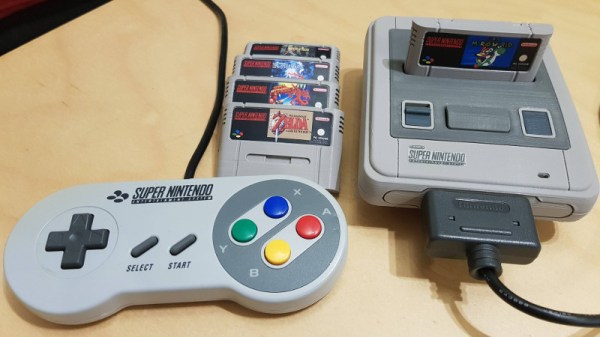
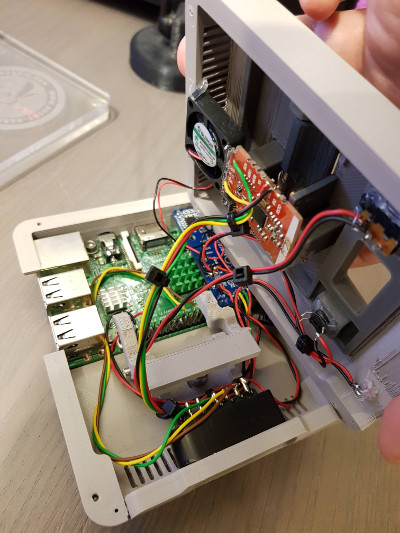
But for those old enough to remember playing on one of these systems when they first came out, these modern reincarnations always lack a certain something. It never feels quite right. That vaguely uncomfortable feeling is exactly what [ElBartoME] is aiming to eliminate with his very slick miniature SNES build. His 3D printed case doesn’t just nail the aesthetics of the original (PAL) console, but the system also uses real SNES controllers in addition to NFC “cartridges” to load different ROMs.

The project’s page on Thingiverse has all the wiring diagrams and kernel configuration info to get the internal Raspberry Pi 3 to read an original SNES controller via the GPIO pins. He also gives a full rundown on the hardware and software required to get the NFC-enabled cartridges working with EmulationStation to launch the appropriate game when inserted. Though he does admit this is quite a bit trickier than the controller setup.

[ElBartoME] has put a video up on YouTube that shows him inserting his mock cartridges and navigating the menus with an original SNES controller. If it wasn’t for the fact that the console is the size of a smartphone and the on-screen display is generations beyond what the SNES could pull off, you’d think he was playing on the real thing.

We’ve seen some incredibly impressive emulation boxes based on the Raspberry Pi, and builds which tried to embrace original hardware components, but this particular project may represent the best of both worlds.

Continue reading “Homebrew SNES Mini Aims For Historical Accuracy”

Reverse Engineering The Nintendo Switch Joy-Cons

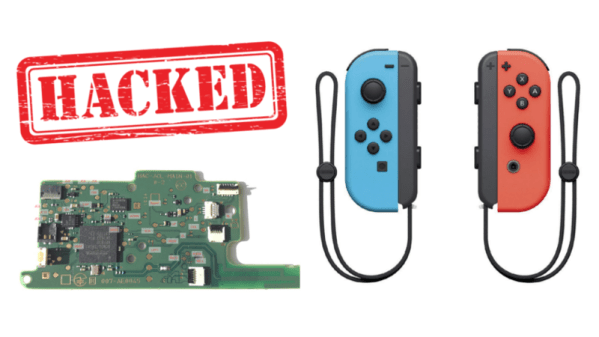
The Switch is Nintendo’s latest effort in the console world. One of its unique features is the Joy-Cons, a pair of controllers that can either attach directly to the console’s screen or be removed and used individually. But how do they work? [dekuNukem] decided to find out.

The reverse engineering efforts begin with disassembly. Surprisingly, there is no silkscreen present on the board to highlight test points or part numbers. This is likely to conflate intended to stymie community efforts to work with the hardware, as different teams may create their own designations for components. Conversely, the chips inside still have their identifying markings present, which does ease identification somewhat.

There are some interesting choices made – the majority of the buttons are scanned in a matrix configuration by the on-board microcontroller, making it harder to spoof button presses. The controllers communicate over Bluetooth, switching to a physical serial connection when attached directly to the screen. This runs at a blistering 3,125,000 BPS after the initial handshake is completed.

Overall it’s a fairly comprehensive reverse engineering effort, and [dekuNukem] has provided excellent detail in the writeup for anyone else looking to get involved. There’s still some work left to do, like investigating the rumble messages, but it’s an excellent start and very comprehensive.

Perhaps you’re more interested in older Nintendo hardware? Check out this comprehensive effort to figure out NES console-to-cartridge security methods.

Nintendo Power Glove Achieves Its Promise As Vive Controller

You have to hand it to Nintendo, for blazing the virtual reality trail in consumer products a couple of decades before everyone else, even if the best that can be said for their efforts in that direction is that they weren’t exactly super-successful. Their 1989 Power Glove became little more than a difficult-to-use peripheral for everyday console games, and their 1995 Virtual Boy console was streets ahead of its time but had a 3D effect that induced discomfort in its players.

Many years later though, the Power Glove remains an intriguing product, and one that can be readily found second-hand. The folks at Teague Labs think that perhaps its time has come as the basis of a peripheral for modern VR systems, as a controller for the HTC Vive.

They’ve taken a Power Glove, and through an Arduino Due with a custom shield, interfaced it to the Vive controller mounted where the buttons would have been in its Nintendo days. The Vive provides positional data, while the Nintendo sensors provide hand data. Thus they’ve made an accomplished glove peripheral with a lot less heartache than they would have seen had they done so from scratch.

They show us a couple of environments using the glove, an iPad simulation which we’re having a little difficulty getting our heads round, and a rock/paper/scissors game which looks rather fun. If you are interested in further work, all their code is on GitHub.

We’ve shown you another hugely-upgraded Power Glove in the past, but how about one controlling a quadcopter?

An Old Video Game Controller On Even Older Computer

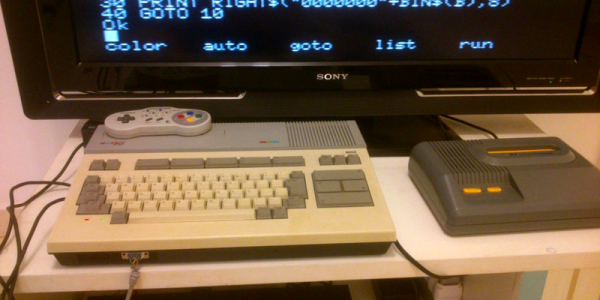
For those of us not old enough to remember, and also probably living in the States, there was a relatively obscure computer built by Microsoft in the early 80s that had the strong Commodore/Atari vibe of computers that were produced before PCs took over. It was known as the MSX and only saw limited release in the US, although was popular in Japan and elsewhere. If you happen to have one of these and you’d like to play some video games on it, though, there’s now a driver (of sorts) for SNES controllers.

While the usefulness of this hack for others may not help too many people, the simplicity of the project is elegant for such “ancient” technology. The project takes advantage of some quirks in BASIC for reading a touch-pad digitizer connected to the joystick port using the SPI protocol. This is similar enough to the protocol used by NES/SNES controllers that it’s about as plug-and-play as 80s and 90s hardware can get. From there, the old game pad can be used for anything that the MSX joystick could be used for.

We’ve seen a handful of projects involving the MSX, so while it’s not as popular as Apple or Commodore, it’s not entirely forgotten, either. In fact, this isn’t even the first time someone has retrofitted a newer gaming controller to an MSX: the Wii Nunchuck already works for these machines.

Radio Decoding Swiss Army Knife In A NES Controller

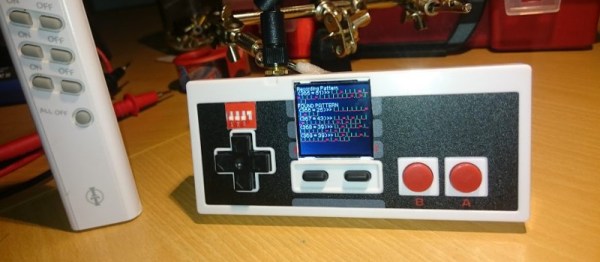
If you wanted to name a few things that hackers love, you couldn’t go wrong by listing off vintage console controllers, the ESP system-on-chip platform, and pocket tools for signal capture and analysis. Combine all of these, and you get the ESP32Thang.

At its heart, the ESP32Thang is based around a simple concept – take an ESP32, wire up a bunch of interesting sensors and modules, add an LCD, and cram it all in a NES controller which helpfully provides some buttons for input. [Mighty Breadboard] shows off the device’s basic functionality by using an RFM69HW module to allow the recording and replay of simple OOK signals on the 433 MHz band. This is a band typically used by all sorts of unlicenced radio gear – think home IoT devices, wireless doorbells and the like. If you want to debug these systems when you’re out and about, this is the tool for you.

This is a fairly straightforward build at the lower end of complexity, but it gets the job done with style. The next natural step up is a Raspberry Pi with a full software defined radio attached, built into a Nintendo DS. If you build one, be sure to let us know. This project might serve as some inspiration.

With the wide availability of SPI and I2C modules these days, combined with the ease of programming provided by the Arduino environment, this is a project that just about any hacker could tackle after passing the blinking LED stage. The fact that integrating such hardware is so simple these days is truly a testament to the fact that we are standing on the shoulders of giants.

Super Mario World Jailbreak Requires No External Hardware

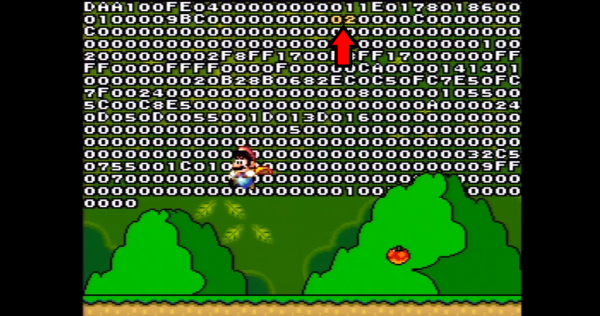
[SethBling] has released a Super Mario World jailbreak that allows players to install a hex editor, then write, install and run their own game mods. What’s more is this all works on unmodified cartridges and SNES hardware. No hardware hacks required.

[Seth] is quick to say he didn’t do all this alone. This mod came to be thanks to help from [Cooper Harasyn] who discovered a save file corruption glitch, [MrCheese] who optimized the hex editor, and [p4plus2] who wrote some awesome mods.

While no soldering and programming of parts are required, installing this mod still requires quite a bit of hardware. Beyond the SNES and cartridge, you’ll need two multitaps, three controllers, and clamps to hold down buttons on the controllers. Even then the procedure will take about an hour of delicate on-screen gymnastics. Once the jailbreak is installed though, it is kept in savegame C, so you only have to do it once.

What does a hex editor allow you to do? Anything you want. Mario’s powerup state can be edited, one memory location can be modified to complete a level anytime you would like. It’s not just modifying memory locations though – you can write code that runs, such as [p4plus2’s] sweet telekinesis mod that allows Mario to grab and move around any enemy on the screen.

It’s always awesome to see old video game hardware being hacked on by a new generation of hackers. We’ve seen similar work done on Super Mario Brothers 3, and an original GameBoy used to pilot a drone, just to name a couple.

Continue reading “Super Mario World Jailbreak Requires No External Hardware”

HDMI Out On The Gameboy Advance

The Gameboy line of handheld systems from Nintendo have been wildly popular, but lack one major thing – a video output. This can be troublesome if you’d like to view the games on a bigger screen, for more comfortable gaming sessions or detail work like producing chiptunes. One option is to use the Gameboy Player for the Gamecube, however that system’s age means you’re out of luck if you want a crisp, clear picture on a modern digital display. Wouldn’t it be great if you could get HDMI output from a Gameboy Advance Instead?

A family resemblance?

When it comes to working with video signals, FPGAs can’t be beat. [Stephen] leverages an FPGA in this project to read the GBA’s video signals and convert them to the modern digital format. Unfortunately, it’s not a seamless install – limited space means the GBA’s screen must be entirely removed, replaced with the adapter in a manner resembling the terrifying Facehugger.

Packaging aside, the output from the device is nothing short of stunning – the graphics are absolutely crystal clear when displayed on a modern HDMI television. This is because the FPGA is capturing the exact digital output from the GBA, and piping it out as HDMI – there’s no analog fuzziness, conversions or noise to spoil the image. Output is a tasty 1280×720, upscaled from the GBA’s original resolution. For more details, check out the forum thread where [Stephen] runs through the build.

The only thing missing  is details – we’d love to know more about the exact hardware used, and any trials and tribulations during the build! As far as we can tell, the build doesn’t stop at just video – a SNES controller is used instead of the original buttons, and we have a feeling sound is being passed over the HDMI channel as well sound is piped to the TV from the GBA’s headphone port.

It’s great to see these projects for old hardware come out – modern hardware has the muscle to achieve things previously unthinkable on retro consoles. We’ve seen similar projects before – like adding VGA to an original Game Boy.

Continue reading “HDMI Out On The Gameboy Advance”