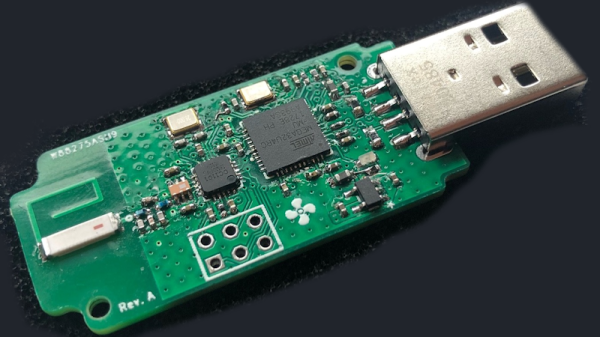
The module on a green PCB, connected to the Pixhawk controller, powering the servo rail

Anxieties Of Hardware Bringup During Parts Shortage

[Dirksavage88] tells us a story about developing a simple BEC in times of chip shortage. He needed a small 5V/3A regulator board for a servo rail on his drone, and decided to use one of the new integrated-inductor modules from Texas Instruments. Hardly requiring any external parts, such modules are exceptionally nice to use for all your power rail needs, albeit at a slightly increased cost – the downside is that, as the parts shortage hit, most of them have been out of stock. Originally priced at about $7 USD, the asking price for these specific modules, LMZM33603, has climbed as high as $800. Somehow, he obtained a few of these modules nevertheless, and went on designing a board.

It can be daunting to test your very first PCBs when the silicon you’re putting on it is effectively irreplaceable for your purposes. TI is known for their wacky footprints, and this module is no exception – the solder paste application took a bit of time, and seeing small solder balls around the module after reflow didn’t exactly reassure him. Thankfully, when he powered it all up, the module worked wonders, and took its rightfully earned spot in his drone’s servo turret. He says we can expect the next revision of his design in 2024, or whenever it is that the reported 100 week lead time is due. In case some of us could use them, Eagle files are available on GitHub!

Quite a few of us are lucky enough to have enough crucial parts for what we need, but most of us got a good few projects shelved until better times – take this WiFi-enabled wall charger project, for instance. Even bigger projects are suffering, from SmoothieBoard to Raspberry Pi. Just a year ago, we had our readers share their chip shortage stories.

Continue reading “Anxieties Of Hardware Bringup During Parts Shortage”

The LED tree itself , filmed in the dark - a myriad of small orbs glowing mictures of green, blue and warm white

Kaleidoscope – Feelings Turned Into LED Tree

In 2020, [Eddie] found himself with a few hundred RGB LEDs left after a pandemic-interrupted project, and a slew of emotions he wanted to express – so he turned to the language of hardware, and started sculpting his feelings into an art project. He set out to build an LED tree around a piece of wood he picked for its cool shape, and trying out a long-shelved idea of his, while at it – using different resistors to mix colors of the RGB LEDs. The end result, pictured above, has earned “The Most Important Device” spot in our recent Sci-Fi contest, fair and square.

Initially, he wanted to use ATTiny microcontrollers and PWM all the lights in parallel. Having built an intermediate prototype, a small LED flower, he scrapped the idea due to technical problems, and then simplified it by hard-wiring RGB LEDs with randomly selected colors instead. As for the glowing orbs themselves, he made these just by pouring hot glue into silicon orb molds, a simple technique any of us could repeat. After 90 hours of work between him and an assistant he hired, the LEDs were wired up, each with random resistors connected to green and blue LED colors, and some warm white LEDs added into the mix.

He wanted to mostly use blue and green colors, as symbols of a world revived and revitalized – something we can’t help but keep our fingers crossed for. Before putting it all together, they wouldn’t know which colors each of the LEDs would power up in – part of the charm for this art piece, and no doubt a pleasant surprise. In the end, it turned out to be a futuristic decoration that we’re glad a camera could capture properly! If you like what you see, the build logs linked above have a bit more insights into how it all came together.

LED-adorned plants are fun projects that bring joy for a long time after you’ve finished them. You can easily make a LED tree out of what you have on hand, and if you get real fancy, you can create an intricate bonsai, too. And, if you’re ever interested to experiment with castellations, you can design yourself some PCB cube flowers!

This project was an entry into the 2022 Sci-Fi Contest. Check out all of the winning entries here.

Moon moving from inside a large glass sphere into screens of two vintage television sets

Blending Pepper’s Ghost, Synths, And Vintage TVs

We were recently tipped off to the work of [Joshua Ellingson], and digging in, we found an extensive collection of art and ongoing experiments, with synthesizers deforming and driving old black-and-white clips played on vintage television sets, objects jumping from screens into the real world and back, and cathode ray tube oscilloscopes drawing graphics in the air (loud sound!) (nitter). It’s recommended that you check out the short showcase videos we embedded below before you continue reading, because transcribing these visuals into words won’t do them justice.

In case you’re not up for a video, however, we shall try transcribing them anyway. Animals, shapes and figures appear in the real world, bound by glass spheres and containers, using the technique known as Pepper’s Ghost. A variety of screens used for creating that illusion – sometimes it’s a tablet, and sometimes it’s an old television set rested upside down on top of a glass aquarium. Vintage television sets are involved quite often in [Ellingson]’s experiments, typically found playing movie scenes and clips from their appropriate eras, or even used as one of the locations that a Pepper’s Ghost-enchanted object could move into — firmly a part of the same imaginary world turned real.

It’s not always that things move from a TV screen into their glass boundary, gaining an extra dimension in the process, but when it happens, the synchronization is impeccable. All of that is backed by — and usually controlled by — Moog synthesizer sounds, knob turns driving video distortions or aspects of an object movement. Not all of his clips have synthesizers, old TVs, or Pepper’s Ghost illusion in them, but every experiment of his contains at least two out of these three, working in unison to create impressions. And as much as the art value is undeniable, [Ellingson] also adds a whole lot of hacker value for us to take away!

[Ellingson] understands what goes into building optical illusions like Pepper’s Ghost — using a variety of different glassware, from Erlenmeyer flasks to teapots, producing a consistent and ongoing stream of new ideas with unique spins on them. His aim is to share and create beyond what his art can achieve, which is why he encourages us to try it out ourselves — with this one minute video of a quick Pepper’s Ghost build, using nothing but a generic tablet, an emptied-out plastic snow globe and a piece of cheap transparency film used for school projectors. If you want to go beyond, he’s made an extensive tutorial on illusions of the kind he does, their simplicities and complexities, and all the different ways you can build one.

We all benefit when an artist finds a technology and starts playing with it, closing the divide between technology and art – and by extension, the divide between technology and nature. Sometimes, it’s flowing light art installations where you are a boulder in route of plankton’s movement, other times, it’s through-hole component-packed printed circuit birds that sing not unlike the non-printed-circuit ones, or manipulation of CRT displays with function generator-driven coils to offset the beam and turn the image into a pattern of lines.

Continue reading “Blending Pepper’s Ghost, Synths, And Vintage TVs”

The TinyPICO board and the rocker switch soldered together showing a complete device, shown being held in the air by a crocodile clip

Simple Hardware Switch For OS Dualbooting, Thanks To RP2040

Dualbooting your computer can be a chore, the more switching between OSes you have to do – which is why virtualization or having separate computers are the go-to for many. Failing that, we have no choice but to smooth over our dualbooting experience with various workarounds and helpers. [William Somsky] shares one such helper tool with us – an elegant device made with a RP2040-sporting TinyPICO board and a three-way rocker switch, directing GRUB to boot into either Windows or Linux automatically, or leave us with the usual boot menu. This way, you can just flip the switch, hit “reboot” and walk away, coming back to your PC booted into OS of your choice, instead of timing your presence just so that you can catch the boot menu on time.

All you need to do is to solder a rocker switch to your RP2040 board of choice, then flash the RP2040 with code that detects the state of the switch, and creates a mass storage device hosting a file setting a Grub variable to either one of the 0, 1 or 2. [William] describes his journey, fighting mysterious caching problems, but tells us he got it working in the end. Sadly, [William] hasn’t shared the RP2040-side code with us, but he has at least put the Grub’s custom.cfg file in the ‘Files’ section of the Hackaday.io project.

Readily accessible microcontrollers with mass storage functions sure help make such hacks simple – earlier, we’ve seen dualboot switching like this done by modifying assembly code of the MBR. Dualbooting is a hacker’s rite of passage, and certain OSes of late can make it harder than other ones. Even if you don’t want to dualboot your PC, however, you sure can dualboot an Arduino!

Screenshot of a logic analyzer software, showing the SDA channel being split into three separate traces

I2C Tap Helps Assign Blame For SDA Conflicts

If you’ve ever debugged a misbehaving I2C circuit, you probably know how frustrating it can be. Thankfully [Jim] over at Hackaday.io, has a proto-boardable circuit that can help!

Inter-integrated circuit bus (aka I2C) uses open collector outputs on a two wire interface. Open collector means a device connected to the I2C bus can only pull the bus down to ground. Chips never drive a logic “HIGH” on the wires. When nothing is driving the lines low, a weak resistor pulls the lines up to VCC. This is a good thing, because I2C is also a multidrop bus — meaning many devices can be connected to the bus at the time. Without open collector outputs, one chip could drive a high, while another drives a low – which would create a short circuit, possibly damaging both devices.

Even with all this protection, there can be problems. The SCL and SDA lines in the I2C communication protocol are bidirectional, which means either a controller or a peripheral can pull it low. Sometimes, when tracing I2C communications you’ll need to figure out which part is holding the line low. With many devices sharing the same bus, that can become nigh-impossible. Some folks have tricks with resistors and analog sampling, but the tried and true method of de-soldering and physically lifting chip pins off the bus often comes into play.

[Jim’s] circuit splits SDA signal into controller-side and peripheral-side, helping you make it clear who is to blame for hiccups and stray noise. To do that, he’s using 6N137 optoisolators and LMV393 comparators. [Jim] shared a NapkinCAD schematic with us, meant to be replicate-able in times of dire need. With this design, you can split your I2C bus into four separate channels – controller-side SDA, peripheral-side SDA, combined SDA and SCL. 4 Channels might be a lot for a scope, but this is no problem for today’s cheap logic analyzers.

Continue reading “I2C Tap Helps Assign Blame For SDA Conflicts”

The eurorack rail piece, just printed in white plastic, not yet folded, with a folded example in the upper right corner

Bend Your Prints To Eliminate Supports

When designing even a reasonably simple 3D-printable part, you need to account for all the supports it will require to print well. Strategic offsetting, chamfering, and filleting are firmly in our toolkits. Over time we’ve learned to dial our settings in so that, hopefully, we don’t have to fumble around with a xacto knife after the bed has cooled down. On Twitter, Chris shows off his foldable 3D print experiments (nitter) that work around the support problem by printing the part as a single piece able to fold into a block as soon as you pop it off the bed.

The main components of this trick seem to be the shape of the place where the print will fold, and the alignment of bottom layer lines perpendicular to the direction of the fold lines. [Chris] shows a cross-section of his FreeCad design, sharing the dimensions he has found to work best.

Of course, this is Twitter, so other hackers are making suggestions to improve the design — like this sketch of a captive wedge likely to improve alignment. As for layer line direction alignment, [Chris] admits to winging it by rotating the part in the slicer until the layer lines are oriented just right. People have been experimenting with this for some time now, and tricks like these are always a welcome addition to our toolkits. You might be wondering – what kinds of projects are such hinges useful for?

The example Chris provides is a Eurorack rail segment — due to the kind of overhangs required, you’d be inclined to print it vertically, taking a hit to the print time and introducing structural weaknesses. With this trick, you absolutely don’t have to! You can also go way further and 3D print a single-piece foldable Raspberry Pi Zero case, available on Printables, with only two extra endcaps somewhat required to hold it together.

Foldable 3D prints aren’t new, though we typically see them done with print-in-place hinges that are technically separate pieces. This trick is a radical solution to avoiding supports and any piece separation altogether. In laser cutting, we’ve known about similar techniques for a while, called a “living hinge”, but we generally haven’t extended this technique into 3D printing, save for a few manufacturing-grade techniques. Hinges like these aren’t generally meant to bend many times before they break. It’s possible to work around that, too — last time we talked about this, it was an extensive journey that combined plastic and fabric to produce incredibly small 3D printed robots!

We thank [Chaos] for sharing this with us!

Plants compared side-by-side, with LED-illuminated plants growing way more than the sunlight-illuminated plants

Plant Growth Accelerated Tremendously With LEDs

[GreatScott!] was bummed to see his greenhouse be empty and lifeless in winter. So, he set out to take the greenhouse home with him. Well, at least, a small part of it. First, he decided to produce artificial sunlight, setting up a simple initial experiment for playing with different wavelength LEDs. How much can LEDs affect plant growth, really? This is the research direction that Würth Elektronik, supporting his project, has recently been expanding into. They’ve been working on extensive application notes, explaining the biological aspects of it for us — a treasure trove of resources available at no cost, that hackers can and should learn from.

Initially, [GreatScott!] obtained LEDs in four different colors – red, ‘hyper red’, deep blue, and daylight spectrum. The first three are valued because their specific wavelengths are absorbed well by plants. The use of daylight LEDs though has been controversial.  Nevertheless, he points out that the plant might require different wavelengths for things other than photosynthesis, and the daylight LEDs sure do help assess the plants visually as the experiment goes on.Four cut tapes of the LEDs used in this experiment, laid out side by side on the desk

Next, [GreatScott!] borrowed parts of Würth’s LED driver designs, creating an Arduino PWM driver with simple potentiometers. He used this to develop his own board to host the LEDs.

An aluminum PCB increases heat dissipation, prolonging the LEDs lifespan. [GreatScott!] reflowed the LEDs onto it with solder paste, only to find that the ‘hyper red’ LEDs died during the process. Thankfully, by the time this problem reared its head, he managed to obtain the official horticulture devkit, with an LED panel ready to go.

[GreatScott!’s] test subjects were Arugula plants, whose leaves you often find on prosciutto pizza. Having built a setup with two different sets of flower pots, one LED-adorned and one LED-less, he put both of them on his windowsill. The plants were equally exposed to sunlight and equally watered. The LED duty cycle was set to ballpark values.

The results were staggering, as you can see in the picture above — no variable changing except the LEDs being used. This experiment, even including a taste test with a pizza as a test substrate, was a huge success, and [GreatScott!] recommends that we hit Würth up for free samples as we embark on our own plant growth improvement journeys.

Horticulture (aka plant growing) is one of the areas where hackers, armed with troves of freely available knowledge, can make big strides — and we’re not even talking about the kind of plants our commenters are sure to mention. The field of plant growth is literally fruitful and ripe for the picking. You can accomplish a whole lot of change with surprisingly little effort. The value of the plants on your windowsill doesn’t have to be purely decorative, and a small desk-top setup you hack together, can easily scale up! Some hackers understand that, and we’ve started seeing automated growing solutions way before Raspberry Pi was even a thing. The best part is, that you only need a few LEDs to start.

Continue reading “Plant Growth Accelerated Tremendously With LEDs”