Metal Detector Gets Help From Smartphone

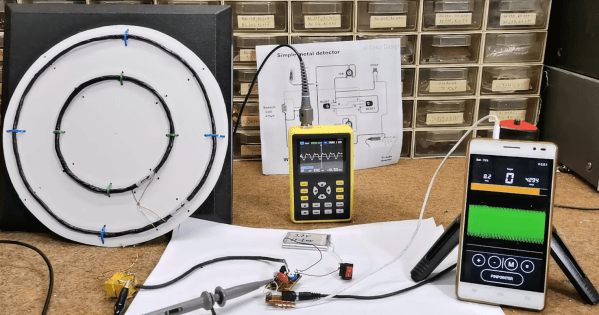
[mircemk] is quite a wizard when it comes to using coils of wires in projects, especially when their application is within easy-to-build metal detectors. There are all kinds of ways to send signals through coiled wire to detect metal objects in the ground, and today [mircemk] is demonstrating a new method he is experimenting with which uses a smartphone to detect the frequency changes generated by the metal detector.

Like other metal detectors, this one uses two coils of wire with an oscillator circuit and some transistors. The unique part of this build, though, is how the detector alerts the user to a piece of metal. Normally there would be an audible alert as the frequencies of the circuit change when in the presence of metal, but this one uses a smartphone to analyze the frequency information instead. The circuit is fed directly into the headphone jack on the smartphone and can be calibrated and used from within an Android app.

Not only can this build detect metal, but it can discriminate between different types of metal. [mircemk] notes that since this was just for experimentation, it needs to be calibrated often and isn’t as sensitive as others he’s built in the past. Of course this build also presumes that your phone still has a headphone jack, but we won’t dig up that can of worms for this feature. Instead, we’ll point out that [mircemk] has shown off other builds that don’t require any external hardware to uncover buried treasure.
Continue reading “Metal Detector Gets Help From Smartphone”

Pocket Computer Reminds Us Of PDAs

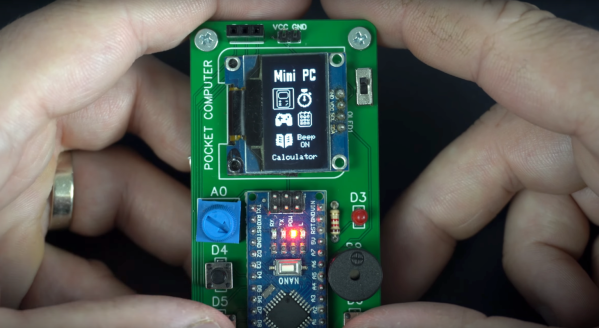
Before smartphones exploded on the scene in the late 00s, there was still a reasonable demand for pocket-sized computers that could do relatively simple computing tasks. Palm Pilots and other PDAs (Personal Digital Assistants) were all the rage in the ’90s and early ’00s, although for cutting-edge tech from that era plenty of these devices had astronomical price tags. This Arduino-based PDA hearkens back to that era, albeit with a much more accessible parts list.

The build is based around an Arudino Nano with an OLED screen and has the five necessary functions for a PDA: calculator, stopwatch, games, phonebook, and a calendar. With all of these components on such a small microcontroller, memory quickly became an issue when using the default libraries. [Danko] uses his own custom libraries in order to make the best use of memory which are all available on the project’s GitHub page. The build also includes a custom PCB to keep the entire pocket computer pocket-sized.

There are some other features packed into this tiny build as well, like the breakout game that can be played with a potentiometer. It’s an impressive build that makes as much use of the microcontroller’s capabilities as is possible, and if you enjoy projects where a microcontroller is used as if it is a PC take a look at this Arduino build with its own command-line interface.

Continue reading “Pocket Computer Reminds Us Of PDAs”

Teensy Spectrum Analyzer Has 170 Channels

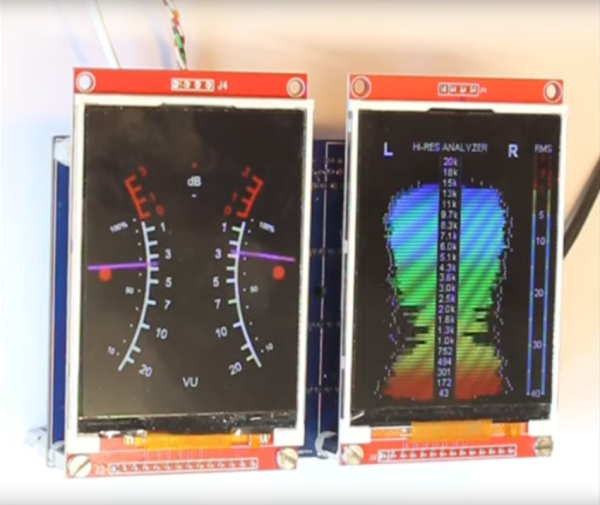
While high-fidelity audio has come a long way in the past several decades, a lot of modern stereo equipment is still missing out on some of the old analog meters that were common on amplifiers and receivers of the 60s through the 80s. Things like VU meters don’t tend to be common anymore, but it is possible to build them back in to your sound system with the help of some microcontrollers. [Mark] shows us exactly how to reclaim some of the old-school functionality with this twin audio visualizer display.

Not only does this build include two displays, but the microcontroller is keeping up with 170 channels in real-time in order to drive the display. What’s more impressive is that it’s being done all on a Teensy 4.1. To help manage all of the data and keep the speed as fast as possible it uses external RAM soldered to the board, and a second Teensy audio board is used to do the real time FFT analysis. Most of the channels are sent to the display hosting the spectrum analyzer but two are reserved for left and right stereo VU meters on the second display.

The project from [Mark] is originally based on this software from [DIYLAB] so everything is open-source. While it was originally built for a specific piece of hardware, [Mark] has it set up with a line in and line out plus a microphone input so it can be used for virtually any audio hardware now. For another take on the classic VU meter, take a look at this design based on an Arudino instead.

Continue reading “Teensy Spectrum Analyzer Has 170 Channels”

Helium Recovery System Saves Costs

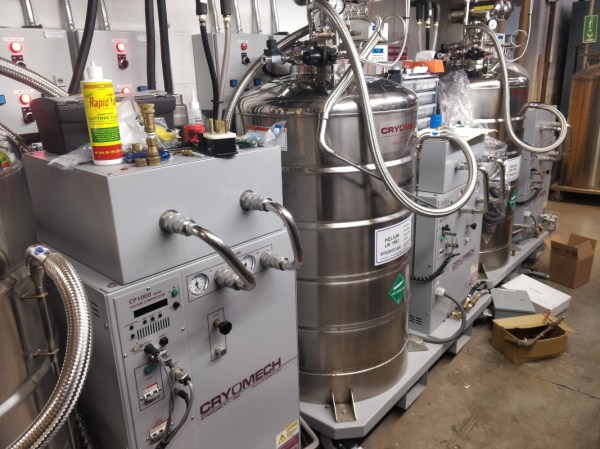
Helium is the most common element in the universe besides hydrogen, but despite this universal abundance it is surprisingly difficult to come across on Earth. Part of the problem is that it is non-renewable, so unless it is specifically captured during mining its low density means that it simply escapes the atmosphere. For that reason [Meow] maintains a helium recovery system for a lab which is detailed in this build.

The purpose of the system is to supply a refrigerant to other projects in the lab. Liquid helium is around 4 Kelvin and is useful across a wide variety of lab tests, but it is extremely expensive to come across. [Meow]’s recovery system is given gaseous helium recovered from these tests, and the equipment turns it back into extremely cold liquid helium in a closed-cycle process. The post outlines the system as a whole plus goes over some troubleshooting that they recently had to do, and shows off a lot of the specialized tools needed as well.

Low-weight gasses like these can be particularly difficult to deal with as well because their small atomic size means they can escape fittings, plumbing, and equipment quite easily compared to other gasses. As a result, this equipment is very specialized and worth a look. For a less lab-based helium project, though, head on over to this helium-filled guitar instead.

Porting DOOM To A Forgotten Apple OS

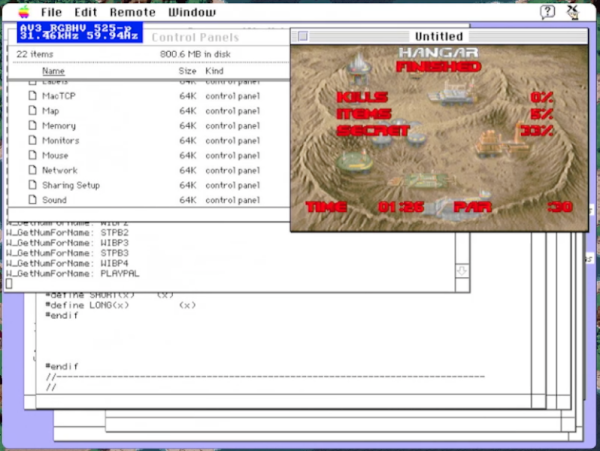
Apple hasn’t always had refined user experiences in their operating systems. In the distant past of the ’90s they were still kind of clunky computers that were far from the polished, high-end consumer machines of the modern era. That wasn’t all that Apple offered back then, though. They had a long-forgotten alternative operating system that was called A/UX designed for government applications, and [Keriad] is here to show us this relic operating system and port DOOM to it.

A/UX was designed in the pre-PowerPC days when Macintosh computers ran on Motorola 68000 chips. Luckily, [Keriad] has a Mac Quadra 800 with just such a chip that is still fully-functional. DOOM was developed with the NeXTSTEP operating system which can run on old Macs thanks to another tool called MacX which allows X11 applications to run on Mac. A version of gcc for A/UX was found as well and with the source code in hand they were eventually able to compile a binary. There were several hiccups along the way (including the lack of sound) but eventually DOOM was running on this forgotten operating system.

The main problem with the build in the end, besides the lack of sound, is that the game only runs at 2 – 3 frames per second. [Keriad] speculates that this is due to all of the compatibility layers needed to compile and run the game at all, but it’s still impressive. As far as we know, [Keriad] is the first person to port DOOM to this OS, although if you’re looking for something more straightforward we would recommend this purpose-built Linux distribution whose sole task is to get you slaying demons as quickly as possible.

A Linux Distribution For DOOM

If you’ve gone further into the Linux world than the standard desktop distributions like Ubuntu or Fedora, you have undoubtedly come across some more purpose-built distributions. Some examples are Kali for security testing, DragonOS for software-defined radio, or Hannah Montana Linux for certain music fans. Anyone can roll their own Linux distribution with the right tools, including [Shadly], who recently created one which only loads enough software to launch the 1993 classic DOOM.

The distribution is as simple as possible and loads no bloat other than what’s needed to launch the game. It loads the Linux kernel and the standard utilities via BusyBox, then runs fbDOOM, which is a port of the game specifically designed to run on the Linux framebuffer with minimal dependencies. After most of that, the only thing left is to use GRUB to boot the distribution, and in just a moment, Doomguy can start slaying demons. The entire distribution is placed into a bootable ISO file that can be placed on any bootable drive.

As far as DOOM hacks go, we’re used to seeing the game running on hardware it was never intended for like the NES  or on an office phone. This one, on the other hand, gives us a little more insight into just how little is needed for a full-fledged Linux distribution, as long as what you need to do is relatively straightforward.

Continue reading “A Linux Distribution For DOOM

Induction Heater Uses New Coil

Induction cook tops are among the most efficient ways of cooking in the home that are commercially available to the average person. Since the cook surface uses magnetic fields to generate heat in the cookware itself, there is essentially no heat wasted. There are some other perks too, such as faster cooking times and more fine control, not to mention that it’s possible to build your own induction stove. All you need is some iron, wire, and a power source, and you can have something like this homemade induction cooker.

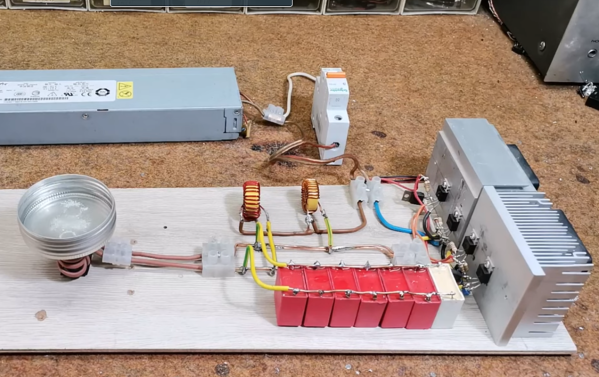
This induction heater has a trick up its sleeve, too. Instead of using an air coil to generate heat in the cookware, this one uses an iron core instead. The project’s creator [mircemk] built an air core induction stove in the past, and this new one is nearly identical with the exception of the addition of the iron core. This allows for the use of less wire, and uses a driver circuit called a Mazzilli ZVS driver running through some power MOSFETs to power the device. A couple inductors limit the current to 20A, but it appears to work just as well as the previous stove.

This build puts a homemade induction stove well within reach of anyone with an appropriate power supply and enough wire and inductors to build the coils. [mircemk] has made somewhat of a name for himself involving project that use various coils of wire, too, like this project we featured recently which uses two overlapping air-core coils to build an effective metal detector.

Continue reading “Induction Heater Uses New Coil”