N-Gage Controller Uses All The Buttons

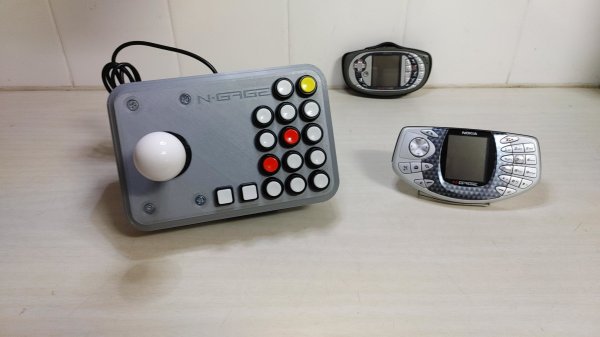
If there’s anything you can guarantee about a video game system, it’s that in 20 years after one suffers a commercial failure there will be a tiny yet rabid group of enthusiasts obsessed with that system. It’s true for the Virtual Boy, the Atari Jaguar, and of course, the Nokia N-Gage. For those not familiar, this was a quirky competitor of the Game Boy Advance that was also a cell phone. And for that reason it had more buttons than a four-player arcade cabinet, which has led to things like this custom controller.

Most N-Gage gaming these days takes place on emulators, this build is specifically built for the emulator experience. The original system had so many buttons that it’s difficult to get even a standard 102-key keyboard mapped comfortably to it, so something custom is almost necessary. [Lvaneede], the creator of this project, took some parts from an existing arcade cabinet he had and 3D printed the case in order to craft this custom controller. The buttons he chose are a little stiff for his liking, but it’s much better than using a keyboard.

In the video below, [Lvaneede] demonstrates it with a few of the N-Gage’s games. It seems to hold up pretty well. With backing from Sony and Sega, it’s a shame that these gaming platforms weren’t a bigger hit than they were, but there are plenty of people around with original hardware who are still patching and repairing them so they can still play some of these unique games.

Thanks to [Michael] for the tip!
Continue reading “N-Gage Controller Uses All The Buttons”

Run UNIX On Microcontrollers With PDP-11 Emulator

C and C++ are powerful tools, but not everyone has the patience (or enough semicolons) to use them all the time. For a lot of us, the preference is for something a little higher level than C. While Python is arguably more straightforward, sometimes the best choice is to work within a full-fledged operating system, even if it’s on a microcontroller. For that [Chloe Lunn] decided to port Unix to several popular microcontrollers.

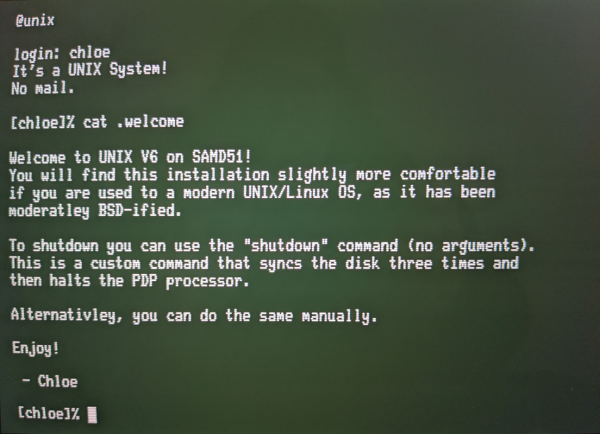
This is an implementation of the PDP-11 minicomputer running a Unix-based operating system as  an emulator. The PDP-11 was a popular minicomputer platform from the ’70s until the early 90s, which influenced a lot of computer and operating system designs in its time. [Chloe]’s emulator runs on the SAMD51, SAMD21, Teensy 4.1, and any Arduino Mega and is also easily portable to any other microcontrollers. Right now it is able to boot and run Unix but is currently missing support for some interfaces and other hardware.

[Chloe] reports that performance on some of the less-capable microcontrollers is not great, but that it does run perfectly on the Teensy and the SAMD51. This isn’t the first time that someone has felt the need to port Unix to something small; we featured a build before which uses the same PDP-11 implementation on a 32-bit STM32 microcontroller.

Change Desktop Environments On… IOS?

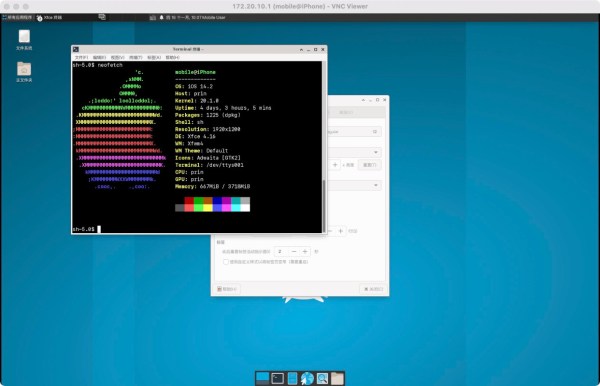
While Apple’s modern operating systems may seem like they exist independently of the rest of the computing world, they are actually close cousins of modern versions of Linux. The primary link between the two is that Apple’s offerings are Unix-based and even though Linux isn’t Unix in the strict sense, it’s built to be extremely Unix-like. Plenty of Linux software is POSIX-compliant, meaning it is effectively compatible with true Unix. But what can we do with that information? Well, to start, we can run Linux desktop environments on top of an iOS install on your favorite iPhone or iPad.

To be sure, we will be filing this hack in the “because you can” category. [Torrekie], the creator of this project, has plenty of builds (Google translate from Chinese) where the boundaries between things like Linux and Unix are either blurred or nonexistant. In this particular project, a jailbroken iOS device is essentially gifted a ported version of XFCE which is able to run fairly well on iOS thanks to its compatibility with Unix environments. Details on how this was accomplished are sparse without a full investigation of the source code right now, but you can head over to the repository if you are curious enough to try this for yourself. [Torrekie] does note that this will only work with iOS devices that have been jailbroken using the “unc0ver” jailbreak only though.

To be sure, the relationship between modern Apple operating systems and Linux is about as close as modern Porsches and the Volkswagen Beetle, but either way the two are close enough to get interesting and impressive mashups like this project. For now only time will tell if using XFCE on iOS will be useful for anyone, but other projects bridging the gap between Linux and Apple are sure to be more immediately fruitful.

Privacy Report: What Android Does In The Background

We’ve come a long way from the Internet of the 90s and early 00s. Not just in terms of technology, capabilities, and culture, but in the attitude most of us take when accessing the ‘net. In those early days most users had a militant drive to keep any personal or identifying information to themselves beyond the occasional (and often completely fictional) a/s/l, and before eBay and Amazon normalized online shopping it was unheard of to even type in a credit card number. On today’s internet we do all of these things with reckless abandon, and to make matters worse most of us carry around a device which not only holds all of our personal information but also reports everything about us, from our browsing habits to our locations, back to databases to be stored indefinitely.

It was always known that both popular mobile operating systems for these devices, iOS and Android, “phone home” or report data about us back to various servers. But just how much the operating systems themselves did was largely a matter of speculation, especially for Apple devices which are doing things that only Apple can really know for sure. While Apple keeps their mysteries to themselves and thus can’t be fully trusted, Android is much more open which paradoxically makes it easier for companies (and malicious users) to spy on users but also makes it easier for those users to secure their privacy on their own. Thanks to this recent privacy report on several different flavors of Android (PDF warning) we know a little bit more on specifically what the system apps are doing, what information they’re gathering and where they’re sending it, and exactly which versions of Android are best for those of us who take privacy seriously.

Continue reading “Privacy Report: What Android Does In The Background”

Linux: Coming Soon To M1 Macbooks

Regardless of the chipset or original intended use of any computer system, someone somewhere is going to want to try and run Linux on it. And why not? Linux is versatile and free to use as well as open-source, so it’s quite capable of running on almost anything. Of course, it takes a little while for the Linux folk to port the software to brand new hardware, but it’s virtually guaranteed that it’s only a matter of time before Linux is running on even the most locked-down of hardware, like the M1 MacBooks.

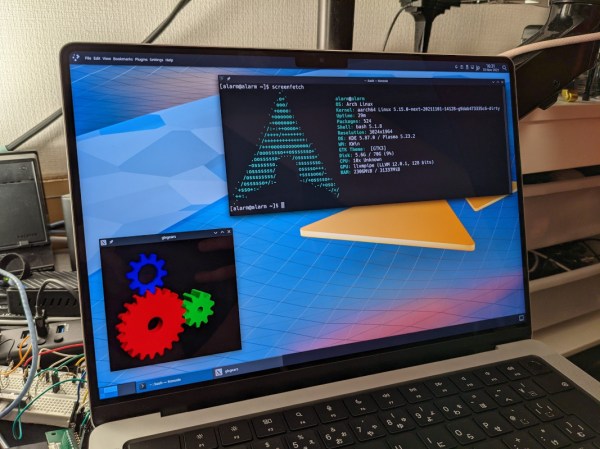
[Hector Martin] aka [marcan] has been hard at work getting Linux up and running on the latest Apple offerings with their ARM-based M1 processors. Since these are completely divorced from their x86 product line the process had to be worked from the ground up which included both booting Linux and modifying the kernel to include support for the hardware. [marcan] has a lot of hardware working such as the USB ports and the SD card slot, and notes that his setup is even compatible with the webcam notch included in the latest batch of MacBooks.

There are a few things still missing. He’s running Arch and doesn’t have the GPU configured yet, so all of the graphics are rendered in software. But he has put the computer through the wringer including running some computationally-intense software for nearly a full day before realizing that the machine wasn’t charging, which did not make much difference in performance. These machines are indeed quite capable with their new ARM chipsets and hopefully his work going forward will bring Linux to the rest of us who still use Macs even if they don’t want to run macOS.

Adding Brakes To Actuated Fingers

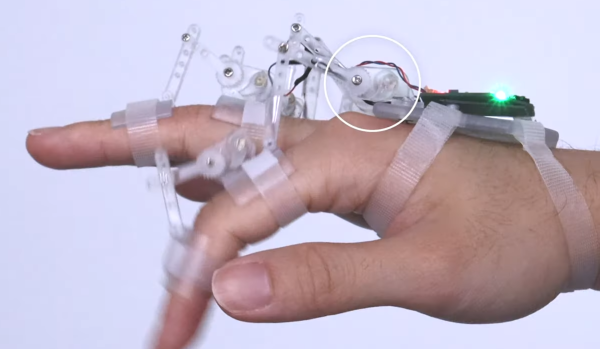
Building exoskeletons for people is a rapidly growing branch of robotics. Whether it’s improving the natural abilities of humans with added strength or helping those with disabilities, the field has plenty of room for new inventions for the augmentation of humans. One of the latest comes to us from a team out of the University of Chicago who recently demonstrated a method of adding brakes to a robotic glove which gives impressive digital control (PDF warning).

The robotic glove is known as DextrEMS but doesn’t actually move the fingers itself. That is handled by a series of electrodes on the forearm which stimulate the finger muscles using Electrical Muscle Stimulation (EMS), hence the name. The problem with EMS for manipulating fingers is that the precision isn’t that great and it tends to cause oscillations. That’s where the glove comes in: each finger includes a series of ratcheting mechanisms that act as brakes which can position the fingers precisely enough to make intelligible signs in sign language or even play a guitar or piano.

For anyone interested in robotics or exoskeletons, the white paper is worth a read. Adding this level of precision to an exoskeleton that manipulates something as small as the fingers opens up a brave new world of robotics, but if you’re looking for something that operates on the scale of an entire human body, take a look at this full-size strength-multiplying exoskeleton that can help you lift superhuman amounts of weight.

Continue reading “Adding Brakes To Actuated Fingers”

Prepare For Wildfire Season With An Air Quality Monitor

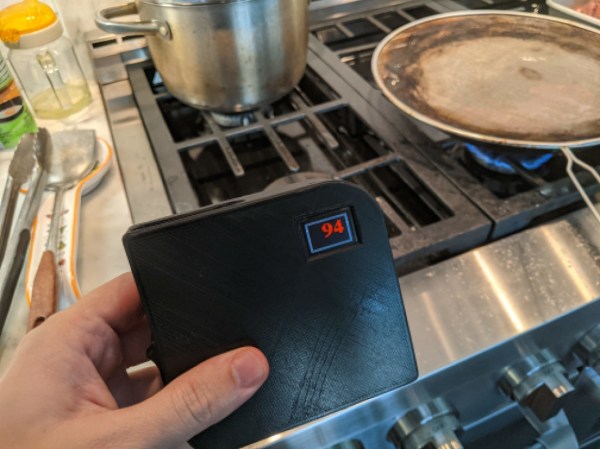
For some reason, wildfire seasons in Australia, North America, and other places around the world seem to happen more and more frequently and with greater and greater fervor. Living in these areas requires special precautions, even for those who live far away from the fires. If you’re not sure if the wildfires are impacting your area or not, one of the tools you can build on your own is an air quality meter like [Costas Vav] shows us in this latest build.

The air quality indicator is based around an Adafruit Feather RP2040 which is in turn based on the 32-bit Cortex M0+ dual core processor. This makes for a quite capable processor in a small package, and helps accomplish one of the design goals of a rapid startup time. Another design goal was to use off-the-shelf components so that anyone could easily build one for themselves, so while the Feather is easily obtained the PMS5003 PM2.5 air quality sensor needed to be as well. From there, all of the components are wrapped up in an easily-printed enclosure and given a small (and also readily-available) OLED screen.

[Costas Vav] has made all of the files needed to build one of these available, from the bill of materials to the software running on the Pi-compatible board to the case designs. It’s a valuable piece of technology to have around even if you don’t live in fire-prone areas. Not only can wildfire smoke travel across entire continents but simple household activities such as cooking (especially with natural gas or propane) can decimate indoor air quality. You can see that for yourself with an army of ESP32-based air quality sensors.