Cryptocurrency Mining Post-Bitcoin

While the age of using your own computer to mine Bitcoin during spare CPU cycles has long passed, average folks aren’t entirely shut out of the cryptocurrency game yet. Luckily, Bitcoin isn’t the only game in town anymore, and with GPUs coming down in price it’s possible to build a mining rig for other currencies like Etherium.

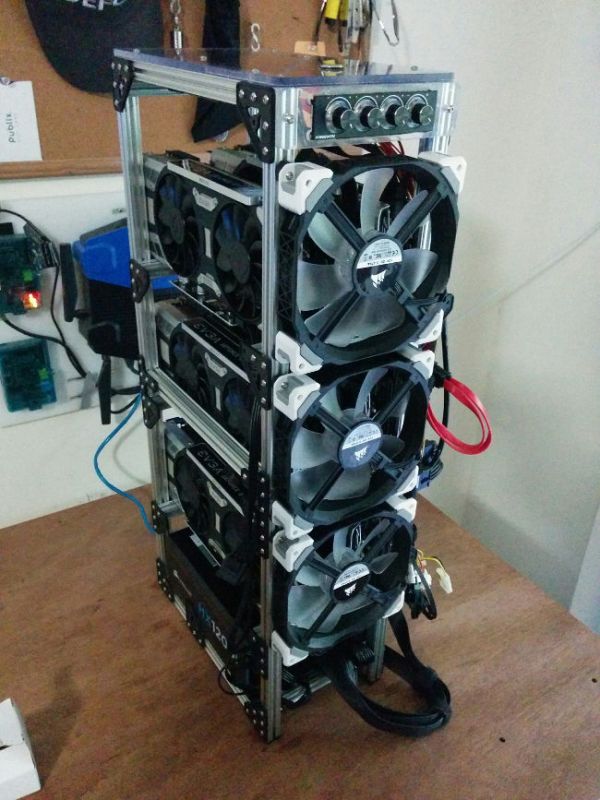
[Chris]’s build starts with some extruded aluminum and a handful of GPUs. He wanted to build something that didn’t take up too much space in the small apartment. Once the main computer was installed, each GPU was installed upwards in the rack, with each set having its own dedicated fan. After installing a fan controller and some plexiglass the rig was up and running, although [Chris] did have to finagle the software a little bit to get all of the GPUs to work properly.

While this build did use some tools that might only be available at a makerspace, like a mill and a 3D printer, the hardware is still within reason with someone with a little cash burning a hole in their pockets. And, if Etherium keeps going up in value like it has been since the summer, it might pay for itself eventually, providing that your electric utility doesn’t charge too much for power.

And if you missed it, we just ran a feature on Etherium.  Check it out.

The Last Interesting Chrysler Had A Gas Turbine Engine

The piston engine has been the king of the transportation industry for well over a century now. It has been manufactured so much that it has become a sort of general-purpose machine that can be used to do quite a bit more than merely move people and cargo from one point to another. Running generators, hydraulic systems, pumps, and heavy machinery are but a few examples of that.

Scale production of this technology also had the effect of driving prices for these engines down, and now virtually everyone in the developed world has cheap and easy access to them. In the transportation world, at least, it looks like its reign might finally be coming to a slow, drawn-out conclusion as electric cars capture more and more market share.

Electric motors aren’t the first technology to try to topple the piston engine from its apex position on top of our modern transportation industry, though. In the 1960s another technology, the gas turbine engine, tried to replace it — and failed.

Continue reading “The Last Interesting Chrysler Had A Gas Turbine Engine”

Power Planer Brought Back To Life

Having the right tool for the right job is not always possible, but it’s an ideal that’s nice to try to live up to. The problem is that a lot of the time, the right tool is often very expensive. We have found lots of ways around this, though, from building our own CNC machines to finding new ways to electroplate metal. Sometimes, though, the right tool for the job doesn’t have to be improvised or built from scratch, it just falls in your lap.

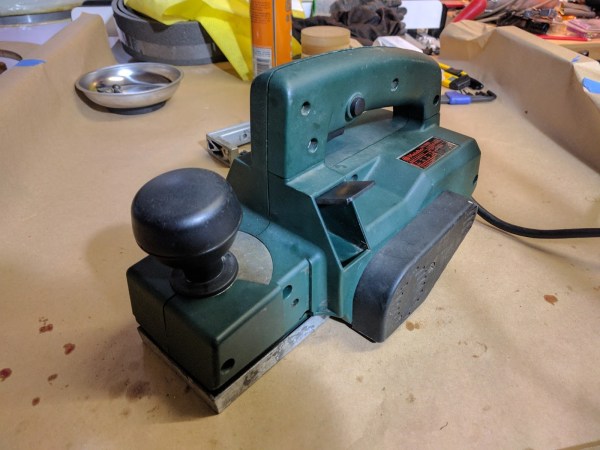
Admittedly, [Sam]’s power planer didn’t literally fall into her lap, but she did pull this neglected tool from the garbage. With no idea what was wrong with it, [Sam] let it sit on the shelf for years until she finally needed it. Assuming there was a major problem with the tool, she set about replacing the blades and bearings only to find that the likely culprit behind why the planer was thrown away in the first place was a faulty switch. This was likely a deal and circuit-breaker for someone who would use it all day, but not so for someone who only needs it for occasional use.

While some might not consider this a “hack”, it is at least a reminder that one man’s trash is another man’s treasure, especially if that trash only needs new bearings and a switch. There are two lessons here: first, that tools aren’t usually beyond repair, and that it’s possible to find all kinds of tools in the dumpster from people who don’t heed this advice.

Handheld Gimbal With Off-The-Shelf Parts

For anything involving video capture while moving, most videographers, cinematographers, and camera operators turn to a gimbal. In theory it is a simple machine, needing only three sets of bearings to allow the camera to maintain a constant position despite a shifting, moving platform. In practice it’s much more complicated, and gimbals can easily run into the thousands of dollars. While it’s possible to build one to reduce the extravagant cost, few use 100% off-the-shelf parts like [Matt]’s handheld gimbal.

[Matt]’s build was far more involved than bolting some brackets and bearings together, though. Most gimbals for filming are powered, so motors and electronics are required. Not only that, but the entire rig needs to be as balanced as possible to reduce stress on those motors. [Matt] used fishing weights to get everything calibrated, as well as an interesting PID setup.

Be sure to check out the video below to see the gimbal in action. After a lot of trial-and-error, it’s hard to tell the difference between this and a consumer-grade gimbal, and all without the use of a CNC machine or a 3D printer. Of course, if you have access to those kinds of tools, there’s no limit to the types of gimbals you can build.

Continue reading “Handheld Gimbal With Off-The-Shelf Parts”

The Hackaday Prize: Exoskeletons For The Masses

While medical facilities continue to improve worldwide, access to expensive treatments still eludes a vast amount of people. Especially when it comes to prosthetics, a lot of people won’t be able to afford something so personalized even though the need for assistive devices is extremely high. With that in mind, [Guillermo Herrera-Arcos] started working on ALICE, a robotic exoskeleton that is low-cost, easy to build, and as an added bonus, 100% Open Source.

ALICE’s creators envision that the exoskeleton will have applications in rehabilitation, human augmentation, and even gaming. Also, since it’s Open Source, it could also be used as a platform for STEM students to learn from. Currently, the team is testing electronics in the legs of the exoskeleton, but they have already come a long way with their control system and getting a workable prototype in place. Moving into the future, the creators, as well as anyone else who develops something on this platform, will always be improving it and building upon it thanks to the nature of Open Source hardware.

Laser Cut Enclosures From Eagle Files

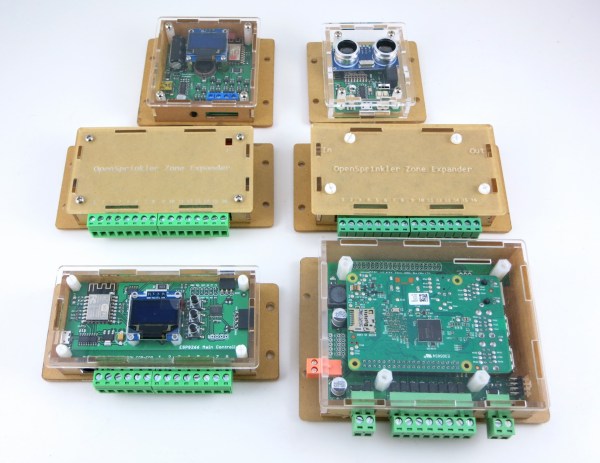
Once a project is finished, it might still need a decent enclosure. While it’s possible to throw a freshly soldered PCB in a standard enclosure, or piece of Tupperware, or cardboard box, these options don’t have the fit and finish of something custom-made. If you have a laser cutter sitting around, it’s a simple matter to cut your own enclosure, but now that process is much easier thanks to [Ray]’s latest project.

Since [Ray] was already using Eagle to design his PCBs, it seemed like a short step to using the Eagle files to design the enclosure as well. The script runs from those files and creates everything necessary to send to the laser cutter for manufacturing. Right now, [Ray] points out that the assembly time for each enclosure can be high, and this method might not be suited for large numbers of enclosures. Additionally, some of the calculations still need to be done by hand, but there are plans to automate everything in the future.

For single projects, though, this script could cut a lot of time off of designing an enclosure and building it from scratch, and could also help improve aesthetics over other options like 3D printed enclosures. Of course, if you have a quality 3D printer around but no laser cutter, there are options for custom enclosures as well.

Starter Guide To Linux Forensics

The old saying is if your data isn’t backed up at least twice, it’s not backed up at all. For those not wise enough to heed this adage, there are a number of options available to you if you wish your data to be recovered. Assuming the drive itself is just corrupted somehow (maybe a malicious attack, maybe a user error) and not damaged beyond physical repair, the first step is to connect the drive to another computer. If that fails, it might be time to break out the computer forensics skills.

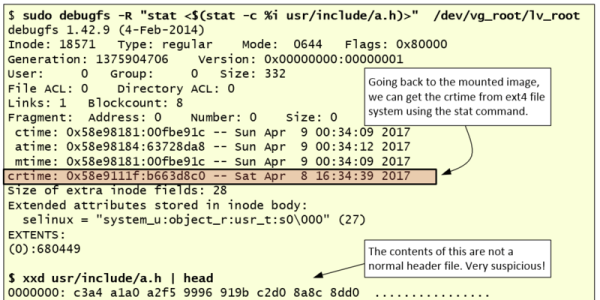
[Luis]’s guide is focused on Linux-specific drives and recovery tools, so this isn’t necessarily a general-purpose how-to. That being said, there is a lot of information in this guide such as how to mount the target drive’s partitions, how to set up various timelines, and which of the Linux system’s logs are important for the forensic analysis. This specific example in the guide also goes into detail about noticing which of the recent files had been accessed, what they might have done, and different approaches to piecing the mystery of this corrupted drive together.

[Luis] points out that the world of Linux forensics is much different from that of Windows, but for anyone looking to get started he suggests starting with a clean Linux install and going from there. There are many other avenues of digital forensics, as well; the field has as many avenues of exploration as there are different types of computers.