Bicycle-Powered Wimshurst Machine

A lot of great pieces of real technology were inspired (or, at least, look like) pieces of technology from science fiction of the past. Like the smartphones of today have a surreal resemblance to the Star Trek communicators of the 60s, [Steve] took inspiration from a story about a bicycle racing in space and set out to make his own.

In the story, the bicycle wheels are replaced by electrostatic generators that power a type of (fictional) ion drive. Since an ion drive wouldn’t add much thrust to a bicycle operated on the Earth, [Steve] used the electrostatic generator he built to create a sparking light show. The generator is called a Wimshurst machine and has two counter-rotating discs which collect charge. The charge is dissipated across a spark gap which is placed where the bike light would normally go.

We don’t know if the sparks from the Wimshurst generator are enough for a proper headlight, but it’s definitely a cool effect. [Steve] also points out that it might also work as a bug zapper, but either way you should check out the video after the break to see it in action! While it’s not quite a tricorder it’s still a pretty impressive sci-fi-inspired build, and something that’s definitely unique in the bicycle realm.

There’s quite a collection of these Wimshurst projects beginning to come together. Here’s one made using a trio of soda bottles, and another example which used 3D printing.

Continue reading “Bicycle-Powered Wimshurst Machine”

Raspberry Pi And Kindle Together Again

We’ve seen a lot of projects recently that take advantage of the Raspberry Pi 2’s augmented abilities. With the increased processor power and double the memory, it puts a lot more utility in the user’s hands. The latest project that takes advantage of this is the Pi-nk, which combines a Pi with a Kindle for some text-based awesomeness. [Edit: Use the Wayback Machine.]

[Guillaume] has put together this detailed how-to which, unlike other builds we’ve seen in the past, uses wireless instead of USB for almost all of the connections, including the keyboard. Granted, this isn’t a new idea, but he’s presenting the way that he did it. To that end, all of the commands you’ll need to use are extremely well documented on the project page if you want to build your own. When everything is said and done, you’ll be SSHing into the Pi from the Kindle and using the popular “screen” program to get the Pi to use the Kindle as its display.

Additionally, [Guillaume] has posted some schematics for custom enclosures for the Pi-Kindle pair if you’re more ambitious. He points out that the e-ink display is great if the Pi is being run in text or command-line mode, and we’d have to agree. This is a very clean pairing of these devices and puts the strengths of both to great use!

Use A Lamp To See Into The Future

We’ve heard of magic lamps before, but this one is actually real. [Alex] has created a wall-mounted lamp that can tell you what the future will be like; at least as far as the weather is concerned. It is appropriately named “Project Aladdin” and allows you to tell a great deal about the weather at a glance as you walk out of the door.

The lamp consists of twelve LED strips arranged vertically. The bottom strip represents the current hour, and each strip above represents another hour in the future. The color of each strip indicates the temperature, and various animations of the LEDs within each strip indicate wind speed and precipitation.

The system uses a weather forecasting backend built-in Java, which is available on the project’s page. The LEDs are controlled by an application that is written in C, and the entire set of LEDs are enclosed in a translucent housing which gives it a very professional appearance. Be sure to check out the demo video after the break. Be sure to check out some other takes on weather lamps which use regular desk lamps instead of intricate scratch-made LED lamps.

Continue reading “Use A Lamp To See Into The Future”

Modern Spin On An Old Technology

It seems that the longer a technology has been around, the more likely it is that all of the ideas and uses for that technology will be fleshed out. For something that’s been around for around 5500 years it must be especially rare to teach an old dog new tricks, but [Sebastian] has built a sundial that’s different from any we’ve ever seen.

Once done with all of the math for the sundial to compute its angles and true north based on his latitude and longitude, [Sebastian] used Autodesk Inventor to create a model. From there it was 3D printed, but the interesting part here is that the 3D printer allowed for him to leave recesses for numbers in the sundial. The numbers are arranged at such angles inside the sundial so that when it’s a particular hour, the number of the hour shines through the shadow of the sundial which creates a very unique effect. This would be pretty difficult to do with any machine tools but is easily accomplished via 3D printing.

[Sebastian] wanted a way to appreciate the beauty of time, and he’s certainly accomplished that with this new take on  the sundial! He also wonders what it would be like if there was a giant one in a park. This may also be the first actual sundial build we’ve featured. What does that mean? Check out this non-pv, sun-powered clock that isn’t a sundial.

Thanks to [Todd] for the tip!

Switch Mains Power With An ESP8266

Before we begin, we must begin with an obligatory disclaimer: handling mains voltage can be very dangerous. Do not do so unless you are qualified! You could burn your house down. (Without the lemons.) That being said, [TJ] has created an interesting dev board for controlling mains voltage over WiFi with the now-ubiquitous ESP8266 module. At only 50mm x 25mm, it is easily small enough to fit inside a junction box!

Called the MPSMv2, the core of the project is the ESP8266 module. The dev board itself can support anything with GPIO pins, whether it’s an Arudino, Raspberry Pi, or anything else with those features. Flashing the NodeMCU firmware is pretty much all that needs to be done in order to get the device up and running, and once you get the device connected to your WiFi you’ll be able to control whatever appliances you want.

The device uses a triac to do the switching, and is optically isolated from mains. Be sure to check out the video after the break to see the device in action. All in all, this could be a great way to get started with home automation, or maybe just do something simple like build a timer for your floor lamp. Anything is possible!

Continue reading “Switch Mains Power With An ESP8266”

Wireless Trackpad Looks Like Fingernail Polish

All hands are on deck over at MIT where a very handy new trackpad has been created that will be able to give users a free hand to do other tasks. The device is called the NailO and attaches to one’s thumbnail, which allows the user an easy and reportedly natural way to use a trackpad while your hands are full, dirty, or otherwise occupied.

The device reportedly works like any normal trackpad, but is about the size of a quarter and attaches to the thumbnail in such a way that it takes advantage of the natural motion of running an index finger over the thumbnail. It communicates via Bluetooth radio, and has four layers which all go hand-in-hand: an artistic covering (to replicate the look of a painted fingernail), the sensors, the circuitry, the battery, and presumably an adhesive of some sort.

Details are quite sparse, but the device is scheduled to make its debut at the Computer Human Interaction conference in Seoul, South Korea very soon. If it can be made less bulky (although it’s somewhat uncomfortable to call something smaller than a quarter “bulky”) this might be, hands down, the next greatest evolution in mouse technology since multi-touch. We have to hand it to MIT for coming up with such a unique wearable!

Automated Weatherproof Timelapse System With DSLR And Raspberry Pi

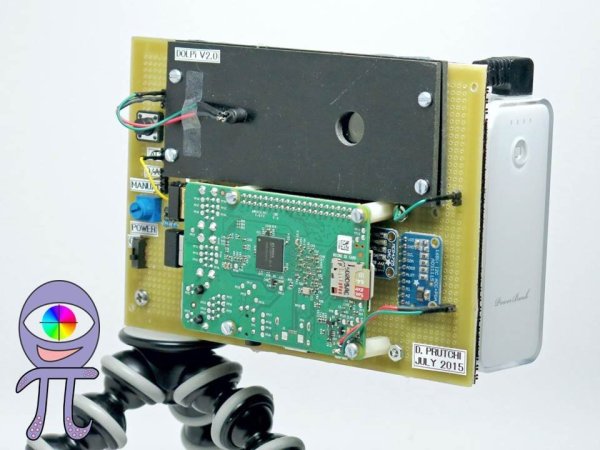
[madis] has been working on time lapse rigs for a while now, and has gotten to the point where he has very specific requirements to fill that can’t be done with just any hardware. Recently, he was asked to take time lapse footage of a construction site and, due to the specifics of this project, used a Raspberry Pi and a DSLR camera to take high quality time lapse photography of a construction site during very specific times.

One of his earlier rigs involved using a GoPro, but he found that while the weatherproofing built into the camera was nice, the picture quality wasn’t very good and the GoPro had a wide-angle lens that wouldn’t suit him for this project. Luckily he had a DSLR sitting around, so he was able to wire it up to a Raspberry Pi and put it all into a weatherproof case.

thumbOnce the Pi was outfitted with a 3G modem, [madis] can log in and change the camera settings from anywhere. It’s normally set up to take a picture once every fifteen minutes, but ONLY during working hours. Presumably this saves a bunch of video editing later whereas a normal timelapse camera would require cutting out a bunch of nights and weekends.

The project is very well constructed as well, and [madis] goes into great detail on his project site about how he was able to build everything and configure the software, and even goes as far as to linking to the sites that helped him figure out how to do everything. If you’ve ever wanted to build a time lapse rig, this is probably the guide to follow. It might even be a good start for building a year-long time lapse video. If you want to take it a step further and add motion to it, check out this time lapse motion rig too!