Hackaday Links Column Banner

Hackaday Links: May 24, 2020

We’re saddened to learn of the passing of Gershon Kingsley in December 2019 at the age of 97. The composer and electronic music pioneer was not exactly a household name, but the things he did with the Moog synthesizer, especially the surprise hit “Pop Corn”, which he wrote in 1969, are sure to be familiar. The song has been covered dozens of times, in the process of which the spelling of the name changed to “Popcorn.” We’re most familiar with the 1972 cover by Hot Butter, an earworm from our youth that doesn’t hide the Moog as deeply in the backing instruments as Kingsley did in the original. Or, perhaps you prefer the cover done by a robotic glockenspiel, because robotic glockenspiel.

A few months back, we covered the audacious plan to recover the radio gear from the Titanic. At the time, the potential salvors, Atlanta-based RMS Titanic, Inc., were seeking permission to cut into the submerged remains of the Titanic‘s Marconi room to remove as much of the wireless gear as possible. A federal judge granted permission for the salvage operation last Friday, giving the company the green light to prepare an expedition for this summer. The US government, through the National Oceanic and Atmospheric Administration and the National Park Service, argued strenuously to leave the wreck be and treat it as a tomb for the 1,527 victims. For our part, we had a great discussion about the merits in the comments section of the previous article. Now that it’s a done deal, we’d love to hear what you have to say about this again.

Although life appears to be slowly returning to what passes for normal, that doesn’t mean you might not still have some cycles to spare, especially when the time spent can bolster your skillset. And so if you’re looking to adding FPGAs to your resume, check out this remote lab on FPGA vision systems offered by Bonn-Rhein-Sieg University. The setup allows you to watch lectures, download code examples, and build them on your local computer, and then upload the resulting binaries to real hardware running on the lab’s servers in Germany. It sounds like a great way to get access to FPGA hardware that you’d otherwise have a hard time laying hands on. Or, you know, you could have just come to the 2019 Hackaday Superconference.

Speaking of skill-builders, oscilloscope owners who want to sharpen their skills could do worse than to listen to the advice of a real scope jockey like Allen Wolke. He recently posted a helpful video listing the five most common reasons for your scope giving “wrong” voltage readings. Spoiler alert: the instrument is probably doing exactly what you told it to do. As a scope newbie, we found the insights very helpful, and we can imagine even seasoned users could make simple mistakes like using the wrong probe attenuation or forgetting that scope response isn’t flat across its bandwidth.

Safety tip for the gearheads among us: your jack stands might be unsafe to use. Harbor Freight, the stalwart purveyor of cheap tools, has issued a recall of two different models of its jack stands. It seems that the pawls can kick out under the right conditions, sending the supported load crashing to the ground. This qualifies as a Very Bad Day for anyone unlucky enough to be working underneath when it happens. Defective jack stands can be returned to Harbor Freight for store credit, so check your garage and be safe out there in the shop.

And finally, because everyone loves a good flame war, Ars Technica has come up with a pronunciation guide for common tech terms. We have to admit that most of these are not surprising; few among the technology literate would mispronounce “Linux” or “sudo”. We will admit to a non-fanboy level of ignorance on whether the “X” in “iOS X” was a Roman numeral or not, but learning that the “iOS” part is correctly pronounced as three syllables, not two was a bit shocking. It’s all an exercise in pedantry that reminds us of a mildly heated discussion we had around the secret Hackaday writers’ bunker and whether “a LED” or “an LED” is the correct style. If the Internet was made for anything, it was stuff like this.


Matrix Of Resistors Forms The Hot Hands Behind This Thermochromic Analog Clock

If you’re going to ditch work, you might as well go big. A 1,024-pixel thermochromic analog clock is probably on the high side of what most people would try, but apparently [Daniel Valuch] really didn’t want to go to work that day.

The idea here is simple: heat up a resistor by putting some current through it, lay a bit of thermochromic film over it, and you’ve got one pixel. The next part was not so simple: expanding that single pixel to a 32 by 32 matrix.

To make each pixel square-ish, [Daniel] chose to pair up the 220-ohm SMD resistors for a whopping 2,048 components. Adding to the complexity was the choice to drive them with a 1,024-bit shift register made from discrete 74LVC1G175 flip flops. With the Arduino Nano and all the other support components, that’s over 3,000 devices with the potential to draw 50 amps, were someone to be foolish or unlucky enough to turn on every pixel at once. Luckily, [Daniel] chose to emulate an analog clock here; that led to additional problems, like dealing with cool-down lag in the thermochromic film when animating the hands, which had to be dealt with in software.

We’ve seen other thermochromic displays before, including recently with this temperature and humidity display. This one may not be the highest resolution display out there, but it’s big and bold and slightly dangerous, and that makes it a win in our book.

From Zero To LED Cube In Less Than Seven Months

We know that LED video cubes are so last year, but that doesn’t mean we don’t still love to see them. Any project that incorporates over 24,000 LEDs is bound to be impressive, after all. But the more interesting bit about [Mike Cann]’s self-contained LED cube has more to do with the process he chose to get to the finished product.

There are two ways to approach a new project, especially when you’re new to hardware hacking like [Mike] is. One is to jump in with both feet and just see what happens, for good or for ill. The other is is to ease into it with a starter project, to find out where your limitations lay and work around them gradually. [Mike Cann] wisely chose the latter approach with his LED cube project, starting with an LED sand toy. The single 64 x 64 LED panel was a bit easier to work with, and got him up to speed on the care and feeding of such hardware, as well as the code needed to drive it. The video below tells the tale of scaling that project up by a factor of six to make the cube, a process that had its share of speedbumps. Everything ended up fitting together great, though, letting [Mike] get on to the software side. That’s where this project really shines — the smartphone app running the cube is really slick, and the animations are great.

There’s clearly room for new features on [Mike]’s cube, so here’s hoping he can carve out some time to make a great build even better. For inspiration he might want to check out this side-scrolling Castlevania cube, or perhaps read up on the finer points of OpenGL for LED cubes.

Continue reading “From Zero To LED Cube In Less Than Seven Months”

Brass And Nickel Work Together In This Magnetostrictive Earphone

When you go by a handle like [Simplifier], you’ve made a mission statement about your projects: that you’ll take complex processes and boil them down to their essence. So tackling the rebuilding of the humble speaker, a device he himself admits is “both simplified and optimized already,” would seem a bit off-topic. But as it turns out, the principle of magnetostriction can make the lowly speaker even simpler.

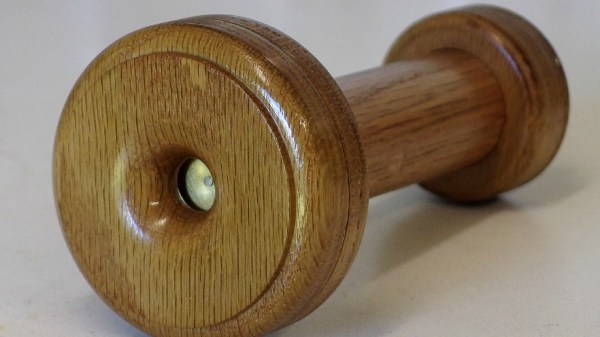
Most of us are familiar with the operation of a speaker. A powerful magnet sits at the center of a coil of wire, which is attached to a thin diaphragm. Current passing through the coil builds a magnetic field that moves the diaphragm, creating sound waves. Magnetostriction, on the other hand, is the phenomenon whereby ferromagnetic materials change shape in a magnetic field. To take advantage of this, [Simplifier] wound a coil of fine copper wire around a paper form, through which a nickel TIG electrode welding filler rod is passed. The nickel rod is anchored on one end and fixed to a thin brass disc on the other. Passing a current through the coil causes the rod to change length, vibrating the disc to make sound. Give it a listen in the video below; it sounds pretty good, and we love the old-time look of the turned oak handpiece and brass accouterments.

You may recall [Simplifier]’s recent attempt at a carbon rod microphone; while that worked well enough, it was unable to drive this earphone directly. If you need to understand a little more about magnetostriction, [Ben Krasnow] explained its use in anti-theft tags a couple of years back.

Continue reading “Brass And Nickel Work Together In This Magnetostrictive Earphone”

Looking For Pi In The 8087 Math Coprocessor Chip

Even with ten fingers to work with, math can be hard. Microprocessors, with the silicon equivalent of just two fingers, can have an even harder time with calculations, often taking multiple machine cycles to figure out something as simple as pi. And so 40 years ago, Intel decided to give its fledgling microprocessors a break by introducing the 8087 floating-point coprocessor.

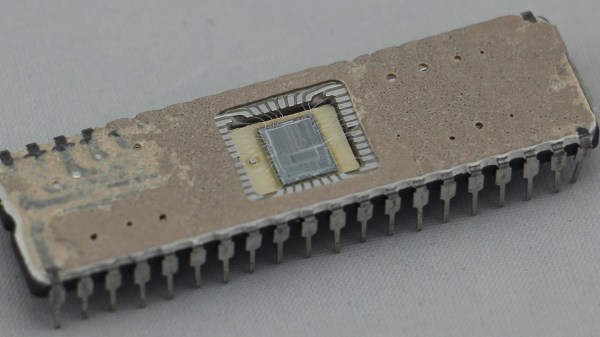
If you’ve ever wondered what was going on inside the 8087, wonder no more. [Ken Shirriff] has decapped an 8087 to reveal its inner structure, which turns out to be closely related to its function. After a quick tour of the general layout of the die, including locating the microcode engine and ROM, and a quick review of the NMOS architecture of the four-decade-old technology, [Ken] dug into the meat of the coprocessor and the reason it could speed up certain floating-point calculations by up to 100-fold. A generous portion of the complex die is devoted to a ROM that does nothing but store constants needed for its calculation algorithms. By carefully examining the pattern of NMOS transistors in the ROM area and making some educated guesses, he was able to see the binary representation of constants such as pi and the square root of two. There’s also an extensive series of arctangent and log2 constants, used for the CORDIC algorithm, which reduces otherwise complex transcendental calculations to a few quick and easy bitwise shifts and adds.

[Ken] has popped the hood on a lot of chips before, finding butterflies in an op-amp and reverse-engineering a Sinclair scientific calculator. But there’s something about seeing constants hard-coded in silicon that really fascinates us.

Bricking Your 3D Printer, In A Good Way

In our vernacular, bricking something is almost never good. It implies that something has gone very wrong indeed, and that your once-useful and likely expensive widget is now about as useful as a brick. Given their importance to civilization, that seems somewhat unfair to bricks, but it gets the point across.

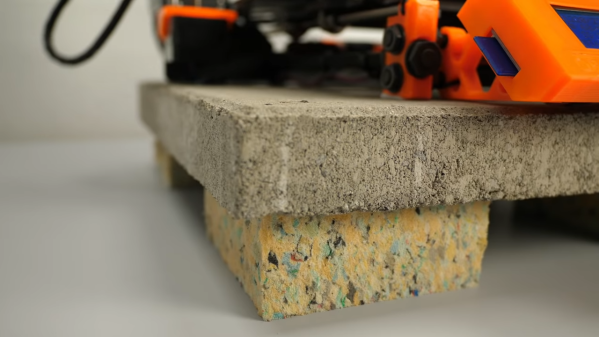
It turns out, though, that bricks can play an important role in 3D-printing in terms of both noise control and print quality. As [Stefan] points out in the video below, living with a 3D printer whirring away on a long print can be disturbing, especially when the vibrations of the stepper motors are transmitted into and amplified by a solid surface, like a benchtop. He found that isolating the printer from the resonant surface was the key. While the stock felt pad feet on his Original Prusa i3 Mk 3S helped, the best results were achieved by building a platform of closed-cell packing foam and a concrete paver block. The combination of the springy foam and the dampening mass of the paver brought the sound level down almost 8 dBA.

[Stefan] also thoughtfully tested his setups on print quality. Machine tools generally perform better with more mass to damp unwanted vibration, so it stands to reason that perching a printer on top of a heavy concrete slab would improve performance. Even though the difference in quality wasn’t huge, it was noticeable, and coupled with the noise reduction, it makes the inclusion of a paver and some scraps of foam into your printing setup a no-brainer.

Not content to spend just a couple of bucks on a paver for vibration damping? Then cast a composite epoxy base for your machine — either with aluminum or with granite.

Continue reading “Bricking Your 3D Printer, In A Good Way”

A French Cleat Twist On Electronics Bench Organization

For some of us, our workbench is where organization goes to die. Getting ready to tackle a new project means sweeping away a pile of old projects, exposing exactly as much bench space needed to plop down the new parts. On the other end of the spectrum lie those for whom organization isn’t a means to an end, but an end itself. Their benches are spotless, ready to take on a new project at a moment’s notice.

[Eric Gunnerson]’s new French-cleat electronics bench is somewhere in between those two extremes, although nowhere near as over-organized as the woodworking organizer that inspired it. If you’ve never heard of a French cleat, Google around a bit and you’ll see some amazing shops where the system of wall-mounted, mitered cleats with mating parts on everything from shelves to cabinets are put to great use. A properly built French cleat can support tremendous loads; [Eric]’s system is scaled down a bit in deference to the lighter loads typically found in the electronics shop. His cleats are 2″ x 3″ pieces of pine, attached to a sheet of plywood that was then screwed to the wall. His first pass at fixtures for the cleats used a Shaper Origin CNC router, but when that proved to be slow he turned to laser-cut plywood. The summary video below shows a few of the fixtures he’s come up with so far; we particularly like the oscilloscope caddy, and the cable hangers are a neat trick too.

What we like about this is the flexibility it offers, since you can change things around as workflows develop or new instruments get added. Chalk one up for [Eric] for organization without overcomplication.

Continue reading “A French Cleat Twist On Electronics Bench Organization”