Youngster’s ESP32 Jukebox Uses RFID To Queue Tunes

Though kids today have an incredible knack for figuring out modern phones and tablets, there’s still something to be said for offering a simple physical user interface for little hands. To that end, [Martin Hierholzer] has put together a whimsical jukebox that his two year old daughter can use to listen to her favorite songs. With just a few simple buttons, no display to read, and the ability to stop and start songs using RFID tags embedded into 3D printed figures, it’s a perfect interface for tiny humans just getting the hang of interacting with technology.

While the Raspberry Pi might have been the more obvious choice to base this project around, [Martin] decided to go the ESP32 route for improved energy efficiency. The popular microcontroller is more than powerful enough to play MP3s, and its integrated WiFi connectivity allows the player to download new tracks from the network occasionally. He added a micro SD slot to provide some mass storage, a PCM5102 I2S DAC with a PAM8403 amplifier to handle the audio side of things, and a MFRC522 RFID receiver that can pick up tags placed on the top of the player. Power is provided by parts salvaged from a USB battery bank, and everything is housed on a custom PCB.

The relatively low power requirements of the ESP32 means the jukebox can keep the party going for many hours (perhaps even days) when in active use. When the RFID token is removed and there are no songs to play, some clever coding kicks the chip into low-power mode to greatly extend the player’s standby time. [Martin] says it can sleep for months without having to be recharged, and considering some of the impressive feats of battery-sipping we’ve previously seen from the ESP32, we don’t doubt it.

Even if you don’t have any young music lovers at home, the documentation [Martin] has put together for this project is absolutely worth a look. Whether its how he configures the server side to push songs and firmware updates to the player, how he wrangled the ESP32’s Ultra-Low Power coprocessor (ULP), or the woodworking tips used to produce the charming enclosure, you’re sure to pick up a trick or two.

The children of hackers and makers always seem to get the coolest stuff, and we’re looking forward to seeing what [Martin] comes up with next. After all, kids grow up fast and pretty soon his daughter is going to need something new to entertain her.
AM/FM Radio Gets Bluetooth Upgrade

For many commercial broadcast radio has lost its luster, leaving an unknowable number of perfectly serviceable AM/FM radios to lie dormant. But they don’t have to. As [Dan Gebhardt] shows in his recent hack, integrating a Bluetooth audio receiver into portable radio may be easier than you think.

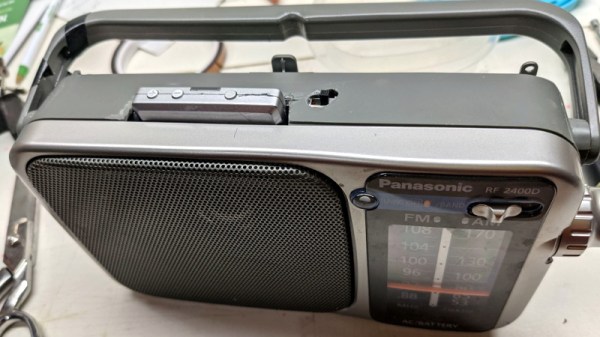
For this project, [Dan] wanted to make sure no original functionality was lost. The radio still functions on the AM/FM bands, but now with the flip of a switch, he can listen to the audio coming his way courtesy of a Apt-X low-latency Bluetooth receiver. It sounds like the link is quick enough that he can even use this as a wireless speaker for watching TV, which isn’t always possible with cheaper chipsets that introduce a noticeable lag.

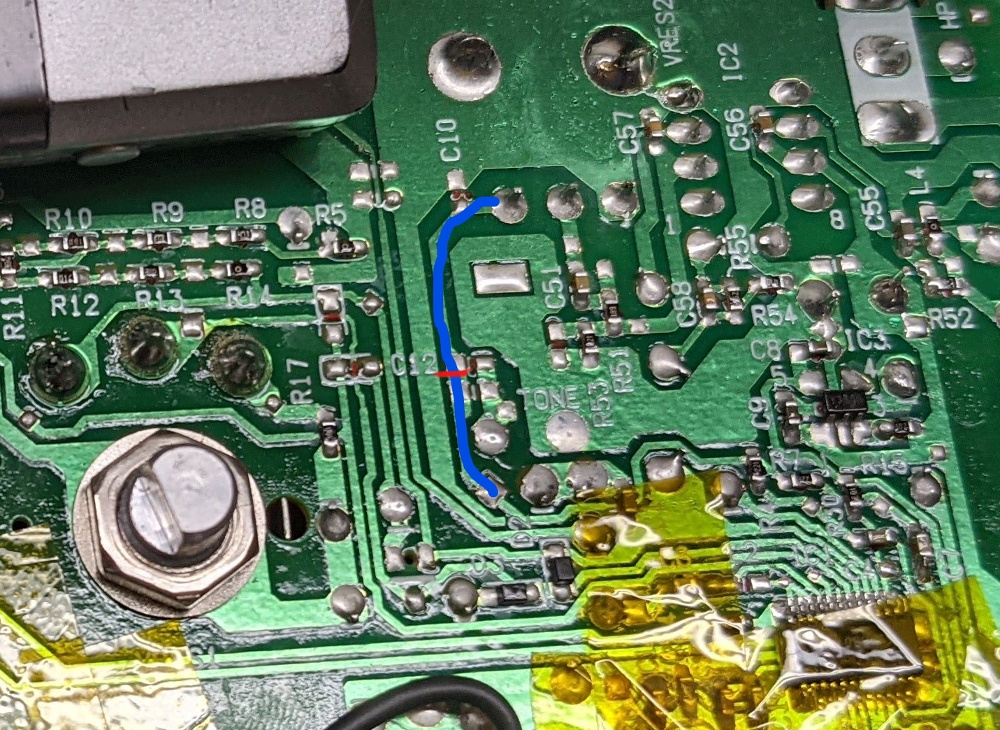
Isolating the audio trace.

The trick was to track down the receiver IC, a Silicon Labs chip similar to ones we’ve seen used in a few DIY radio projects previously. A peek at the datasheet told him which pins were carrying the audio signal, and after following them around the board, he found a convenient spot to cut the trace before it went into the volume control. From there is was just a matter of wiring in a SPDT slide switch that allowed him to select which device was passed through to the radio’s audio hardware.

While he had everything apart, [Dan] exorcised the Apt-X’s original 300 mAh LiPo pouch and replaced it with a DC-DC converter connected to the radio’s battery compartment. This allows him to run all of the hardware off of the same set of rechargeable NiMH cells, and also provides considerably improved runtime for the Bluetooth receiver.

Now as for physically integrating the Apt-X into the case of the radio…well, what can we say? [Dan] admits it’s a bit rough, but then the point was never to enter the thing into beauty pageants. It works well enough for his purposes, and in the end that’s all that matters.

Handy Tool Drains 18650 Cells So You Don’t Have To

Draining a battery is easy. Just put a load across the terminals, maybe an incandescent bulb or a beefy power resistor, and wait. What’s quite a bit trickier is doing so safely. Put too large a load on, or leave it connected for longer than necessary, and you can end up doing damage to the cell. Not convinced he’d always remember to pull the battery out of his jury-rigged discharger at the opportune moment, [Jasper Sikken] decided to come up with a simple tool that could automatically handle the process with the cold and calculating precision of silicon.

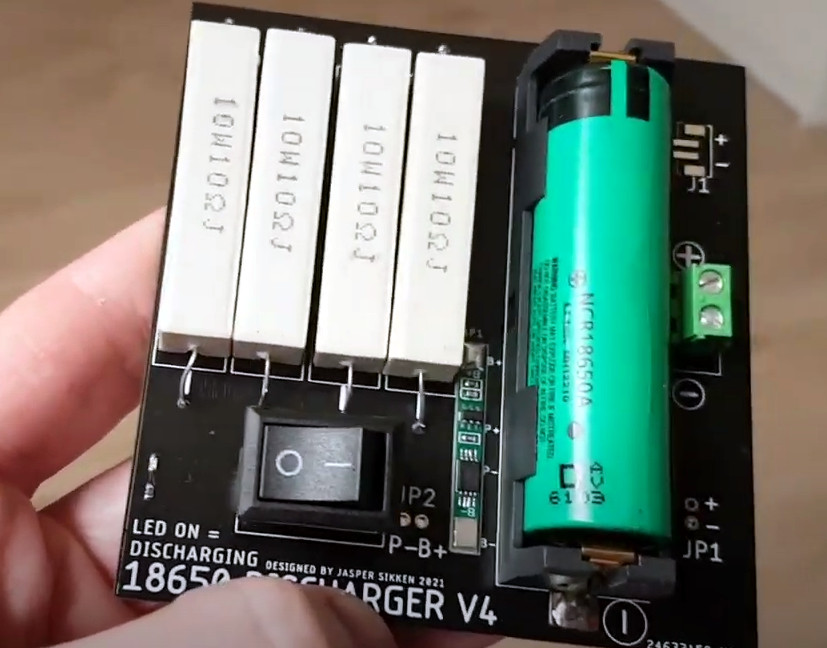
V4 used the protection module from a pouch battery.

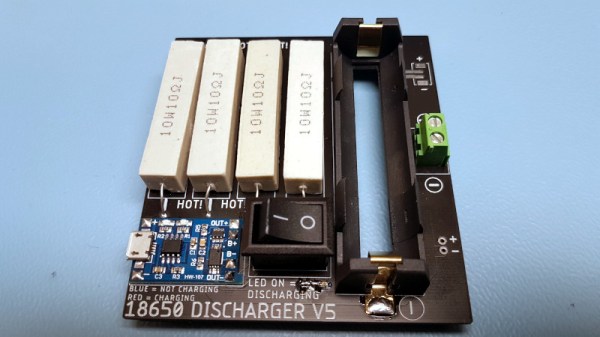
At a glance we can see the major components you’d expect in a discharger: a fairly simple PCB, four ceramic power resistors, a holder for a single 18650 cell, and a rocker switch to connect it all together. But wait, what’s that a TP4056 charging module doing in there?

While its presence technically makes this device a battery charger, [Jasper] is actually using it for the onboard protection IC. With the charging module between the cell and the power resistors, it will cut the connection when the voltage drops to 2.4 V. Oh yeah, and it can charge the battery back up if you connect up a USB cable.

[Jasper] says his little tool works great, with the resistor array putting just enough load on the battery to pull it down quickly without getting so hot that they’re dangerous to have exposed. He estimates the BOM for this gadget runs around $2 USD, and is considering offering it as a kit on Tindie in the near future.

If you’re looking for something a bit more advanced, [Jasper] built a programmable load a few years back that can discharge batteries and test power supplies all while logging the data to your computer for later analysis.

Continue reading “Handy Tool Drains 18650 Cells So You Don’t Have To”

Sirius XM Satellite Failure A Reminder That Space Is Risky (And That Satellite Insurance Is A Thing)

It’s easy to imagine that once a spacecraft leaves Earth’s atmosphere and is in a stable orbit, the most dangerous phase of the mission is over. After all, that’s when we collectively close the live stream and turn our attentions back to terrestrial matters. Once the fire and fury of the launch is over with, all the excitement is done. From that point on, it’s just years of silently sailing through the vacuum of space. What’s the worst that could happen?

Unfortunately, satellite radio provider Sirius XM just received a harsh reminder that there’s still plenty that can go wrong after you’ve slipped Earth’s surly bonds. Despite a flawless launch in early December 2020 on a SpaceX Falcon 9 and a reportedly uneventful trip to its designated position in geostationary orbit approximately 35,786 km (22,236 mi) above the planet, their brand new SXM-7 broadcasting satellite appears to be in serious trouble.

Maxar Technologies, prime contractor for the SXM-7, says they’re currently trying to determine what’s gone wrong with the 7,000 kilogram satellite. In a statement, the Colorado-based aerospace company claimed they were focused on “safely completing the commissioning of the satellite and optimizing its performance.” But the language used by Sirius XM in their January 27th filing with the U.S. Securities and Exchange Commission was notably more pessimistic. No mention is made of bringing SXM-7 online, and instead, the company makes it clear that their existing fleet of satellites will be able to maintain service to their customers until a replacement can be launched.

So what happened, and more importantly, is there any hope for SXM-7? Neither company has released any concrete details, and given the amount of money on the line, there’s a good chance the public won’t get the full story for some time. But we can theorize a bit based on what we do know, and make some predictions about where things go from here.

Continue reading “Sirius XM Satellite Failure A Reminder That Space Is Risky (And That Satellite Insurance Is A Thing)”

Nissan Gives Up Root Shell Thanks To Hacked USB Drive

For the impatient Nissan owners who may be joining us from Google, a hacker by the name of [ea] has figured out how to get a root shell on the Bosch LCN2kai head unit of their 2015 Xterra, and it looks like the process should be the same for other vehicles in the Nissan family such as the Rogue, Sentra, Altima, and Frontier. If you want to play along at home, all you have to do is write the provided image to a USB flash drive and insert it.

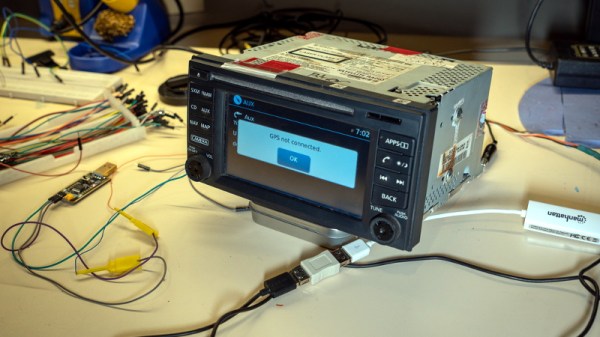
Now for those of us who are a more interested in how this whole process works, [ea] was kind of enough to provide a very detailed account of how the exploit was discovered. Starting with getting a spare Linux-powered head unit out of a crashed Xterra to experiment with, the write-up takes the reader through each discovery and privilege escalation that ultimately leads to the development of a non-invasive hack that doesn’t require the user to pull their whole dashboard apart to run.

The early stages of the process will look familiar to anyone who’s messed with embedded Linux hacking. The first step was to locate the board’s serial port and connect it to the computer. From there, [ea] was able to change the kernel parameters in the bootloader to spawn an interactive shell. To make things a little easier, the boot scripts were then modified so the system would start up an SSH server accessible over a USB Ethernet adapter. With full access to the system, the search for exploits could begin.

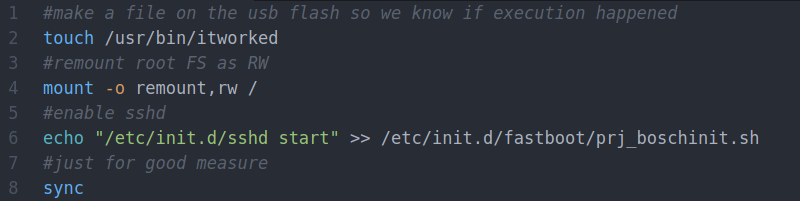
A simple script on the flash drive enables the SSH server.

After some poking, [ea] discovered the script designed to mount USB storage devices had a potential flaw in it. The script was written in such a way that the filesystem label of the device would be used to create the mount point, but there were no checks in place to prevent a directory traversal attack. By crafting a label that read ../../usr/bin/ and placing a Bash script on the drive, it’s possible to run arbitrary commands on the head unit. The provided script permanently adds SSHd to the startup process, so when the system reboots, you’ll be able to log in and explore.

So what does [ea] want to do with this new-found exploit? It looks like the goal is to eventually come up with some custom programs that extend the functionality of the in-dash Linux system. As it seems like these “infotainment” systems are now an inescapable feature of modern automobiles, we’re certainly excited to see projects that aim to keep them under the consumer’s control.

USB-C Charging On Your ThinkPad, One Step At A Time

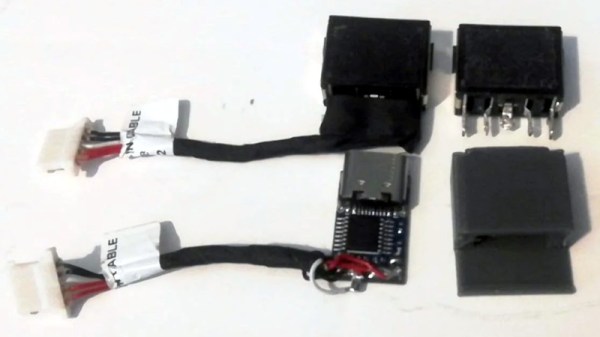
Hackers love their ThinkPads. They’re easy to work on, well documented, and offer plenty of potential for upgrades. For the more daring, there’s also a wide array of community-developed modifications available. For example, [Berry Berry Sneaky] has recently put together a step-by-step guide on swapping the common ThinkPad rectangular charging port (also used on ThinkBooks and other Lenovo machines) for USB-C Power Delivery.

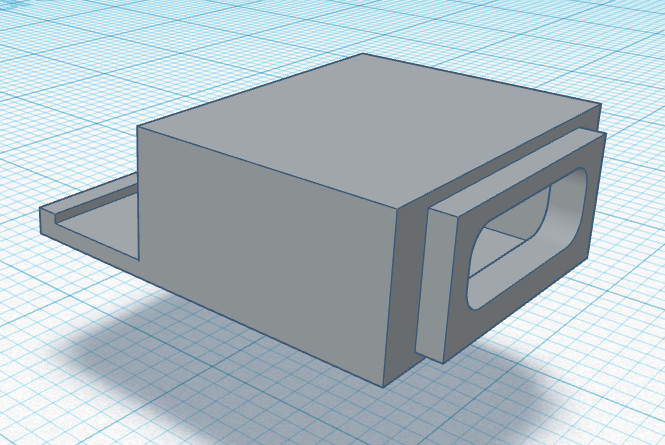
Now to be clear, this is not a new concept. But between freely sharing the STL for the 3D printed adapter, providing a full parts list, and providing clear instructions on how to put it all together, [Berry Berry Sneaky] has done a fantastic job of making this particular modification as approachable as possible. For the cost of a common PDC004 Power Delivery “trigger” module and a bit of PETG filament, you can add yet another device to the list of things that work with your shiny new USB-C charger.

While not strictly necessary, [Berry Berry Sneaky] recommends getting yourself a replacement DC input cable for your particular machine before you crack open the case. That will let you assemble everything ahead of time, making the installation a lot quicker. It will also let you keep the original rectangular power jack intact so you can swap it back in if something goes wrong or you decide this whole unified charging thing isn’t quite what you hoped for.

Not a member of the ThinkPad Army? No worries. We’ve seen a lot of interest in using these configurable USB-C trigger modules to upgrade all manner of devices to the new Power Delivery standard or sometimes put together custom battery chargers for their older mobile gadgets.

A Physical Front Panel For Oscilloscope Software

For hackers on a tight budget or with limited bench space, a USB oscilloscope can be a compelling alternative to a dedicated piece of hardware. For plenty of hobbyists, it’s a perfectly valid option. But while the larger discussion about the pros and cons of these devices is better left for another day, there’s one thing you’ll definitely miss when the interface for your scope is a piece of software: the feel of physical buttons and knobs.

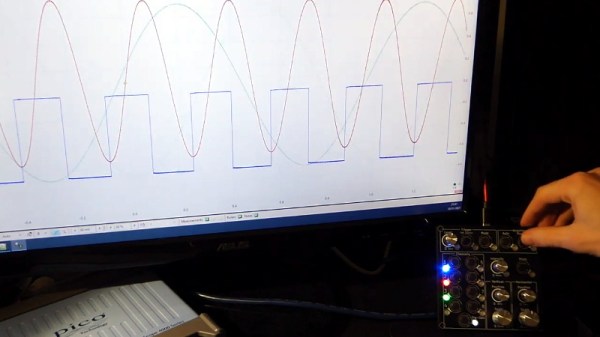
But what if it doesn’t have to be that way? The ScopeKeypad by [Paul Withers] looks to recreate the feel of a nice bench oscilloscope when using a virtual interface. Is such a device actually necessary? No, of course not. Although one could argue that there’s a certain advantage to the feedback you get when spinning through the detents on a rotary encoder versus dragging a slider on the screen. Think of it like a button box for a flight simulator: sure you can fly the plane with just the keyboard and mouse, but you’re going to have a better time with a more elaborate interface.

The comparison with a flight simulator panel actually goes a bit deeper, since that’s essentially what the ScopeKeypad is. With an STM32 “Blue Pill” microcontroller doing its best impression of a USB Human Interface Device, the panel bangs out the prescribed virtual key presses when the appropriate encoder is spun or button pressed. The project is designed with PicoScope in mind, and even includes a handy key map file you can load right into the program, but it can certainly be used with other software packages. Should you feel so inclined, it could even double as a controller for your virtual spaceship in Kerbal Space Program.

Affordable USB oscilloscopes have come a long way over the years, and these days, using one is hardly the mark of shame it once was. But the look and feel of the classic bench scope is about as timeless as it gets, so we can certainly see the appeal of a project that tries to combine the best of both worlds.

Continue reading “A Physical Front Panel For Oscilloscope Software”