Dissecting A Mechanical Voltage Regulator

When the fuel gauge of his 1975 Triumph Spitfire started going off the scale, the collected knowledge of the Internet indicated that [smellsofbikes] needed to replace a faulty voltage regulator behind the dash. For most people, that would be the end of the story. But he, like everyone who’s reading this right now, really wanted to see what the inside of a 45 year old voltage regulator looked like.

After prying open the metal case, he discovered that not only is the regulator mechanical in nature, but there’s even a tiny screw that allows you to adjust the output voltage. Luckily for us, not only is [smellsofbikes] curious enough to open it up, but he’s also got the tools and knowledge to explain how it works in the video after the break.
Put simply, the heart of the regulator is a bimetallic strip with a coil of wire wrapped around it. When power from the battery is passed through the coil it acts as a heater, which makes the strip move up and break the connection to the adjustable contact. With the connection broken and the heating coil off the strip rapidly cools, and in doing so returns to its original position and reconnects the heater; thus starting the process over again.

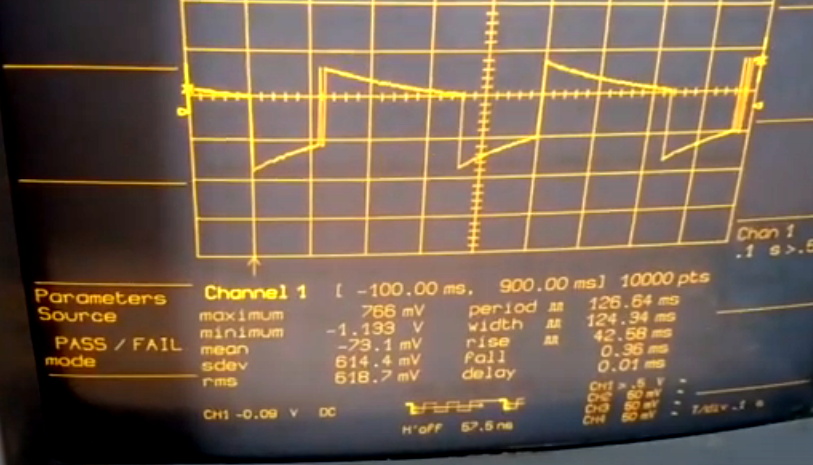
These rapid voltage pulses average out to around 10 VDC, though [smellsofbikes] notes that you can’t actually measure the output voltage of the regulator with a meter because it moves around too much to get any sort of accurate reading. He also mentions a unique quirk of this technology: due to the force of gravity acting on the bimetallic strip, the output of the regulator will actually change depending on its mounting orientation.

On the oscilloscope, [smellsofbikes] is able to show us what the output actually looks like. As you might expect, it looks like a mess to 21st century eyes. But these were simpler times, and it should go without saying there aren’t any sensitive electronics in a sports car from 1975. Interestingly, he says he’s now replaced the mechanical assembly with a modern regulator chip. Here’s hoping we’re around long enough to see if he gets another 50 years out of it.

Continue reading “Dissecting A Mechanical Voltage Regulator”
Reverse Engineering A Saab’s In-Dash Display

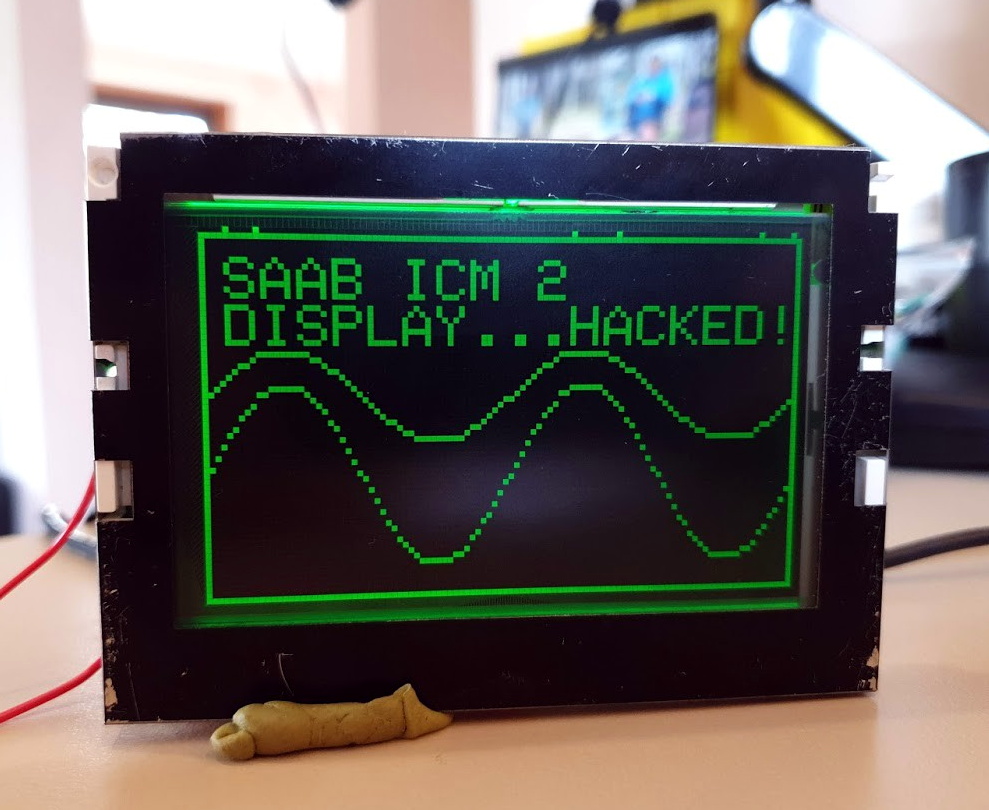
For [Leigh Oliver], there’s something undeniably appealing about the green on black instrumentation of the 2003 Saab 9-3 Gen2. Perhaps it’s because the Infotainment Control Module 2 (ICM2) screen brings a bit of that classic Matrix vibe to the daily commute. Whatever the reason, it seemed the display deserved better than to be stuck showing the nearly 20 year old stock user interface. Luckily, you can control it via I2C.

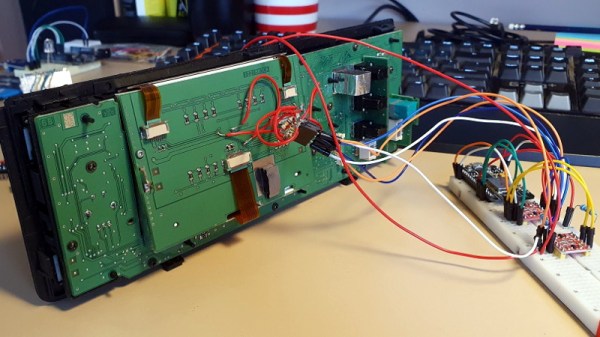
Though as you might expect, that fact wasn’t obvious at first. [Leigh] had to start by taking the ICM2 apart and reverse engineering the display board. With a multimeter and high resolution photographs of both sides of the PCB, all of the traces were mapped out and recreated in KiCAD. This might not have been strictly necessary, but it did serve as good practice for using KiCAD; a worthwhile tip for anyone else looking to build practical experience creating schematics.

With everything mapped out, [Leigh] was able to connect a BusPirate V3 up to the board and pretty quickly determine it was using I2C to control the display. As far as figuring out how to repurpose existing displays goes, this was perhaps the best possible scenario. It even allowed for creating a display library based on Adafruit_GFX which offers graphical capabilities far beyond what the ICM2 module itself is capable of.

Even with so much progress made, this project is really just getting started. [Leigh] has managed to put some impressive imagery on the black and green Saab display, but the hardware side of things is still being worked on. For example, there’s some hope that an I2C multiplexer would allow the display to easily and quickly be switched between “stock” mode and whatever enhanced version comes about thanks to the new libraries and an ESP8266 hiding behind the dashboard.

If you don’t have a sufficiently vintage Saab to take advantage of this project, don’t worry. Tapping into the OBD port with an OLED display can get you similar results on a wide range of vehicles.

SpaceX Offers NASA A Custom Moon Freighter

Under the current Administration, NASA has been tasked with returning American astronauts to the Moon as quickly as possible. The Artemis program would launch a crewed mission to our nearest celestial neighbor as soon as 2024, and establish a system for sustainable exploration and habitation by 2028. It’s an extremely aggressive timeline, to put it mildly.

To have any chance of meeting these goals, NASA will have to enlist the help of not only its international partners, but private industry. There simply isn’t enough time for the agency to design, build, and test all of the hardware that will eventually be required for any sort of sustained presence on or around the Moon. By awarding a series of contracts, NASA plans to offload some of the logistical components of the Artemis program to qualified companies and agencies.

Artist’s Rendering of the Dragon XL

For anyone who’s been following the New Space race these last few years, it should come as no surprise to hear that SpaceX has already been awarded one of these lucrative logistics contracts. They’ve been selected as the first commercial provider for cargo deliveries to Gateway, a small space station that NASA intendeds to operate in lunar orbit. Considering SpaceX already has a contract to resupply the International Space Station, they were the ideal candidate to offer similar services for a future lunar outpost.

But that certainly doesn’t mean it will be easy. The so-called “Gateway Logistics Services” contract stipulates that providers must be able to deliver at least 3,400 kilograms (7,500 pounds) of pressurized cargo and 1,000 kilograms (2,200 pounds) of unpressurized cargo to lunar orbit. That’s beyond the capabilities of SpaceX’s Dragon spacecraft, which was only designed to service low Earth orbit.

To complete this new mission, the company is proposing a new vehicle they’re calling the Dragon XL that would ride to orbit on the Falcon Heavy booster. But even for this New Space darling, there’s not a lot of time to design, test, and build a brand-new spacecraft. To get the Dragon XL flying as quickly as possible, SpaceX is going to need to strip the craft down to the bare minimum.

Continue reading “SpaceX Offers NASA A Custom Moon Freighter”

CPAP Firmware Hack Enables BiPAP Mode; Envisions Use As Temporary Ventilator

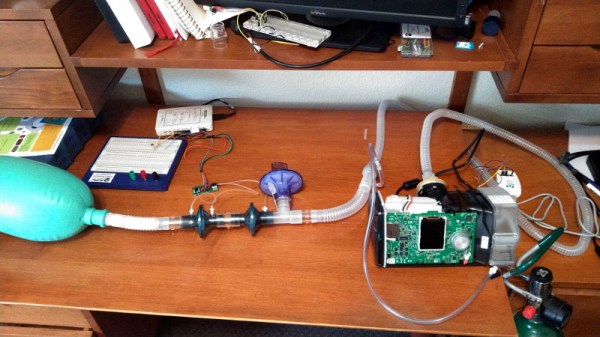
Operating under the idea that a Constant Positive Airway Pressure (CPAP) machine isn’t very far removed electrically or mechanically from a proper ventilator, [Trammell Hudson] has performed some fascinating research into how these widely available machines could be used as life support devices in an emergency situation. While the documentation makes it clear the project is a proof of concept and is absolutely not intended for human use in its current state, the findings so far are certainly very promising.

For the purposes of this research, [Trammell] has focused on the Airsense S10 which currently retails for around $600 USD. Normally the machine is used to treat sleep apnea and other disorders by providing a constant pressure on the lungs, but as this project shows, it’s also possible for the S10 to function in what’s known as Bi-level Positive Airway Pressure (BiPAP) mode. Essentially this means that the machine detects when the user is attempting to inhale, and increases the air pressure to support their natural breathing.

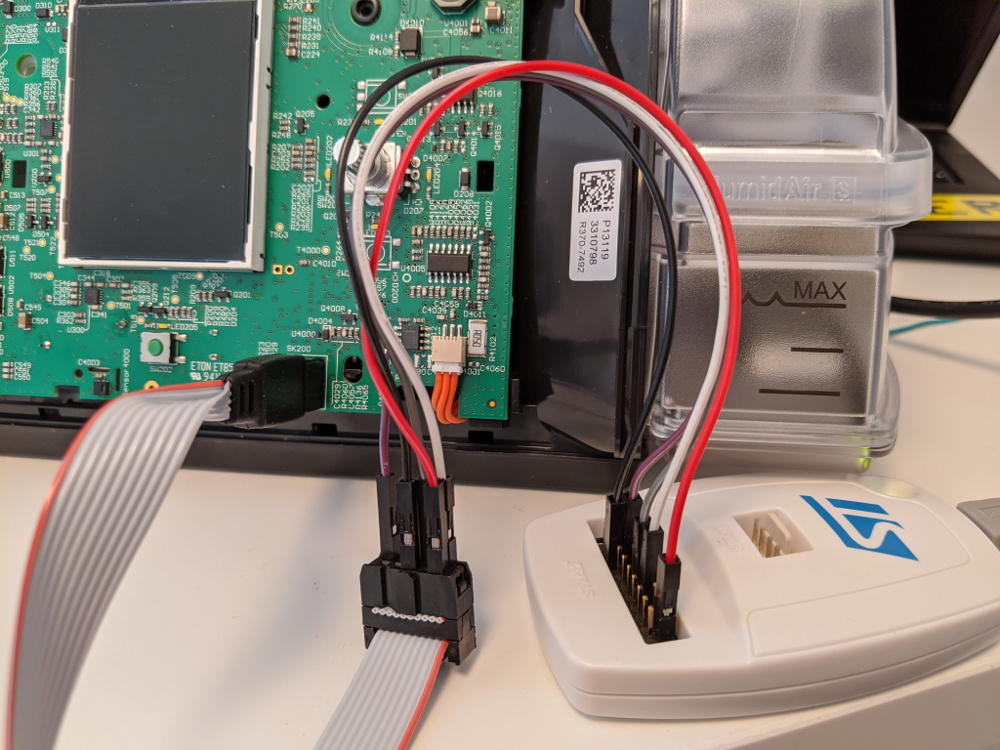
Reflashing the firmware on the S10 CPAP

Critically, this change is made entirely through modifications to the S10 firmware. No additional hardware is required, and outside of opening up the device to attach an STM32 programmer (a process which [Trammell] has carefully documented), there’s nothing mechanically that needs to be done to the machine for it to operate in this breathing support function. It seems at least some of the functionality was already included via hidden diagnostic menus which can be enabled through a firmware patch.

As many of these CPAP machines feature cellular data connections for monitoring and over-the-air updates, [Trammell] believes it should be possible for manufacturers to push out a similarly modified firmware on supported devices. Of course, the FDA would have to approve of something like that before the machines could actually be used as emergency, non-invasive ventilators. They would also need to have viral filters installed and some facility for remote control added, but those would be relatively minor modifications.

Learn more about the efforts being put into ventilators right now. Start with this excellent hardware overview called Ventilators 101 and then take a look at some of the issues with trying to build a ventilator from scratch.

Capture Device Firmware Hack Unlocks All The Pixels

According to [Mike Walters], the Elgato Cam Link 4K is a great choice if you’re looking for a HDMI capture device that works under Linux. But the bad news is, it wouldn’t work with any of the video conferencing software he tried to use it with because they expect the video stream to be in a different pixel format. For most people, that would probably have been the end of the story. But you’re reading this on Hackaday, so obviously he didn’t give up without a fight.

Early on, [Mike] found there was a software workaround for this exact issue. The problem isn’t that the Elgato can’t generate the desired format, it’s that the video conferencing programs just don’t know how to ask it to switch modes. The software fix is to create a dummy Video4Linux device and use that to change the format in real-time using ffmpeg. It’s a clever trick if you’ve got a conference call coming up in a few minutes, but it does waste CPU resources and adds some unnecessary hoop jumping.

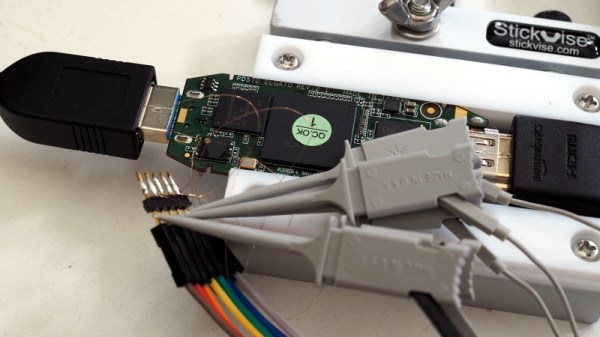
Putting the device into bootloader mode.

Inspired by the software fix, [Mike] wondered if there was a way he could simply force the Elgato to output video in the desire format by default. He found a firmware dump for the device online, and found where the pixel formats were referenced by searching for their names in ASCII with hexdump. Looking through the source for the Linux USB Video Class (UVC) driver, he was then able to determine what the full 16 byte sequence should be for each video mode was so he could zero out the unwanted ones. Then it was just a matter of flashing his modified firmware back to the hardware.

But there was a problem: with the modified firmware installed, the device stopped working. After investigating the obvious culprits, [Mike] broke out the oscilloscope and hooked it up to the Elgato’s flash chip. It turns out that due to a bug in the program he was using, the SPI erase commands weren’t getting sent during the flash. This lead to corrupted firmware which was keeping the Elgato from booting. After making a pull request with his fixes, the firmware flashed without incident and the capture device now does double-duty as a webcam when necessary.

We could certainly think of easier and quicker was to roll your own webcam, but we’re glad that [Mike] took the time to modify his Elgato Cam Link 4K and document it. It’s a fantastic example of practical firmware hacking, even if you’re not in the market for a new high-definition video conferencing rig.

Reverse Engineering An RGB Keyboard Under Linux

Hardware support under Linux is far better than it ever has been in the past. These days, most things “just work” out of the box, and you probably won’t have to compile any custom kernel modules. Certainly a far cry from where things were a decade ago. But that doesn’t mean everything will work to 100% of its abilities. Take for example, the Duck keyboard that [Cynthia Revström] has. Sure it works as a basic keyboard under any OS, but getting those fancy RGB LEDs working is another story entirely.

Don’t get the wrong idea here, [Cynthia] isn’t just trying to get the keyboard to flash along to music; the goal was to use the RGB lighting of the Ducky keyboard for notifications that the user can’t possibly ignore. Even the most laser-focused among us would have a hard time not noticing that the entire keyboard is blinking red. But the “DuckyRGB” software that you need to do something like that is Windows-only and apparently distributed via a sketchy Google Drive link. Yikes.

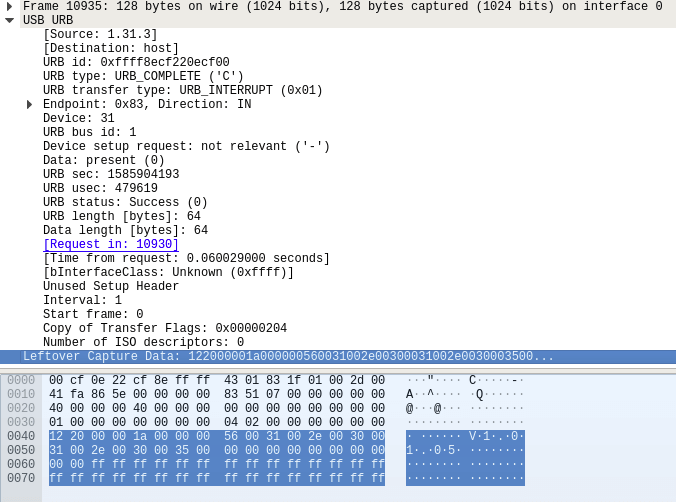
The first step to creating an alternative was to spin up a Windows VM and install DuckyRGB. From there, Wireshark could listen in between the virtual computer and the Ducky keyboard to see what the software was sending over the wire. After identifying a version number being sent in the clear, [Cynthia] was able to isolate the LED commands by searching for the hex color codes. From there, it was a relatively simple matter of writing some glue code to connect it up to an alert service and get notifications going.

There was only one problem; the keyboard didn’t work anymore. Turns out the tool that [Cynthia] wrote to control the keyboard’s LEDs was claiming the device so the kernel couldn’t access it for normal input. It took a detour with HIDAPI to get everyone playing together nicely, and now changing the color of your Ducky keyboard on Linux doesn’t turn it into a paperweight.

Even if you don’t have a Ducky keyboard, or aren’t particularly interested in having its LEDs blinked at you if you do, this project is a phenomenal example of practical USB reverse engineering. [Cynthia] says the inspiration for this project came from friend [Ben Cox], who’s write-up on creating USB userspace drivers we covered last year. If you’ve got and old USB gadget with Windows-only drivers, maybe it’s time you take a crack at unlocking it.

Using Spiral Mode To Rapidly Print Enclosures

We’ve often said that one of the best applications of desktop 3D printing is the production of custom enclosures. A bespoke case adds a touch of professionalism to any project, and considering the materials needed to print one will cost less than even the cheapest generic project box, it’s a no-brainer. There’s only one problem: it can take hours to print even a simple case.

To try and speed things up, [Electrobob] has been experimenting with running off enclosures using spiral or “vase” mode on his 3D printer. Unlike the normal layer-by-layer approach, in this mode, the printer’s hotend continually rises at a steady rate during the entire print. Think of it as akin to printing out a Slinky and you should get the idea.

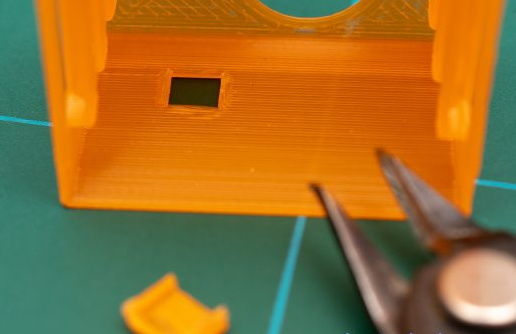
Spiral printed boxes may need manual retouching

As you might expect, there are some trade-offs here. For one, the walls of the box can’t be very thick since the printer is only making one pass. The nozzle on most printers is 0.4 mm, but in his experiments, [Electrobob] has found he’s able to reliably double that to a wall thickness of 0.8 mm by adjusting the extrusion rate.

You also need to approach the design a bit differently during the CAD phase. Printing holes in the side of the enclosure, which would be easy enough to do normally, doesn’t really work when running in spiral mode. For those situations, [Electrobob] recommends designing a “pocket” into the side that you can come back and cut out with a knife. It will add a little time to the post-processing stage, but the time saved during the print will more than make up for it.

So how much faster are we talking about? In the example [Electrobob] shows in his write-up, the print time went from nearly two hours to just 18 minutes. The resulting enclosure obviously looks a bit different than the traditionally printed version, and isn’t as strong, but the concept still clearly holds promise for some applications. If you’re building a sensor network that needs a bunch of enclosures, those time savings will really add up.