FPGA Computer Covers A To Z

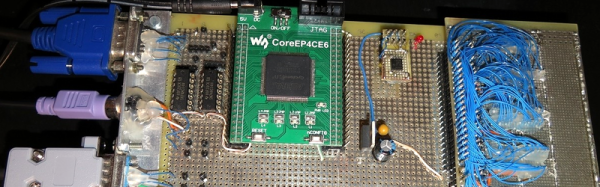
[F4HDK] calls his new computer A2Z because he built everything from scratch (literally, from A to Z). Well, strictly speaking, he did start with an FPGA, but you have to have some foundation. The core CPU is a 16-bit RISC processor with a 24-bit address bus and a 128-word cache. The computer sports 2 megabytes of RAM, a boot ROM, a VGA port and keyboard, and some other useful I/O. The CPU development uses Verilog.

Software-wise, the computer has a simple operating system, a filesystem, and basic programs like a text editor and an image viewer. Development software includes an assembler and a compiler for a BASIC-like language that resides on the PC. You can also run an emulator to experiment with A2Z without hardware. You can see a “car game” running on A2Z in the video below. You can also see videos of some other applications.

Continue reading “FPGA Computer Covers A To Z”

Crippled Calculator Features Unlocked With Automated Help

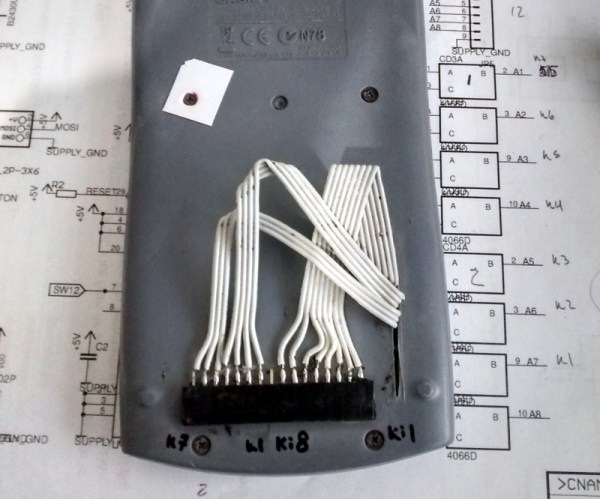
[Aguilera Dario] likes his Casio fx-82ES calculator. However, it was missing a few functions, including complex numbers. A Casio fx-991ES has more functions but, of course, costs more. A quick Google revealed that if you press the right buttons, though, you can transform an fx-82ES into an fx-991ES.

Because it is apparently a buffer overflow exploit, the hack involves a lot of keys and once you cycle the power you have to do it again. [Aguilera] realized this would be a good candidate for automation and added a microcontroller to push his buttons. You can see a video of a breadboard version below. He also has a PCB version in the works that should be better integrated.

Continue reading “Crippled Calculator Features Unlocked With Automated Help”

Retro ZX Spectrum Lives A Spartan Existence

FPGAs (like Xilinx’s Spartan series) are great building blocks. They often remind us of the 100-in-1 electronic kits we used to get as kids. Lots of components you can mix and match to make nearly anything. However, like a bare microcontroller, they usually don’t have much in the way of peripheral devices. So the secret sauce is what components you can surround the chip with.

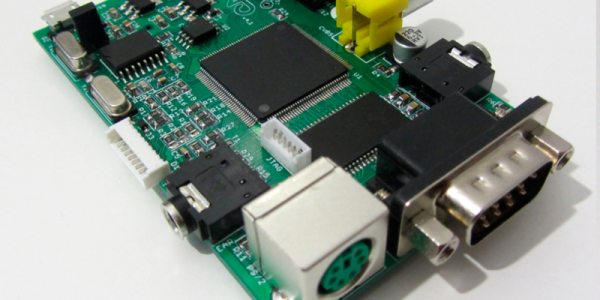
If you are interested in retro computing, you ought to have a look at the ZX-Uno board. It hosts a Spartan 6 FPGA. They are for sale, but the design is open source and all the info is available if you prefer to roll your own or make modifications. You can see a video of the board in action, below (as explained in the video, the color issues are due to the capture card trying to deal with the non-standard sync rate).

Here are the key specifications:

  • FPGA Xilinx Spartan XC6SLX9-2TQG144C
  • Static Memory 512Kb, AS7C34096A-10TIN
  • 50MHz Oscillator
  • Video output (composite)
  • PS/2 keyboard
  • Stereo audio jack
  • EAR jack connector (for reading cassette tapes)
  • Connectors for JTAG and RGB
  • Slot for SD Cards
  • Expansion port with 3 male pin strips
  • Micro-USB power connector
  • PCB Size: 86×56 mm. (Compatible with Raspberry Pi cases)

Continue reading “Retro ZX Spectrum Lives A Spartan Existence”

X Marks The Clock

There’s no shortage of Arduino-based clocks around. [Mr_fid’s] clock, though, gets a second look because it is very unique looking. Then it gets a third look because it would be very difficult to read for the uninitiated.

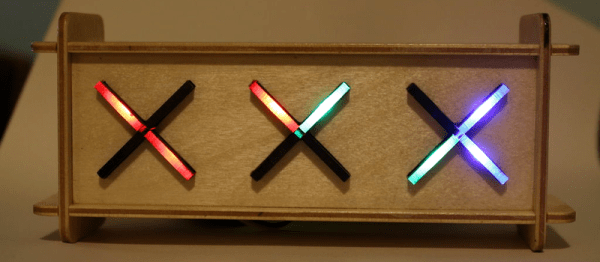
The clock uses three Xs made of LEDs. There is one X for the hours (this is a 24-hour clock), another for the minutes, and one for the seconds. The left side of each X represents the tens’ digit of the number, while the right-side is the units.

But wait… even with two segments on each side of the X, that only allows for numbers from 0 to 3 in binary, right? [Mr_fid] uses another dimension–color–to get around that limitation. Although he calls this a binary clock, it is more accurately a binary-coded-decimal (BCD) clock. Red LEDs represent the numbers one to three. Green LEDs are four to six. Two blue segments represent seven to nine. It sounds complicated, but if you watch the video, below, it will make sense.

Continue reading “X Marks The Clock”

Hack A Whiteboard And Never Lose Screws Again

If you are reading this, it is a fair bet you like to take things apart. Sometimes, you even put them back together. There are two bad moments that can occur when you do this. First, when you get done and there is some stuff left over. That’s usually not good. The other problem is when you are trying to find some little tiny bolt and a washer and you can’t find it. SMD parts are especially easy to lose.

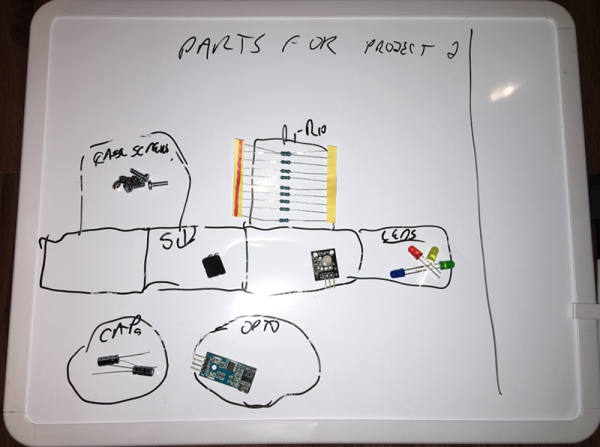
A few months ago, I was browsing through a local store and I saw a  neat idea. It was basically a small whiteboard with lines dividing it into cells. It was magnetic and the idea is you’d put your small loose (and ferrous) parts like screws, bolts, nuts, and resistors on the board. Since it was a marker board, you could make notes about what each cell contained. Great idea! But the thing was about $20 and I thought I could do better than that. As you might guess from the picture, I was successful. I spent about $5, although I had some rare-earth magnets hanging around. If you don’t, strong magnets aren’t that expensive and you can often raid them out of hard drives.

Continue reading “Hack A Whiteboard And Never Lose Screws Again”

Encoders Spin Us Right Round

Rotary encoders are great devices. Monitoring just a few pins you can easily and quickly read in rotation and direction of a user input (as well as many other applications). But as with anything, there are caveats. I recently had the chance to dive into some of the benefits and drawbacks of rotary encoders and how to work with them.

I often work with students on different levels of electronic projects. One student project needed a rotary encoder. These come in mechanical and optical variants. In a way, they are very simple devices. In another way, they have some complex nuances. The target board was an ST Nucleo. This particular board has a small ARM processor and can use mbed environment for development and programming. The board itself can take Arduino daughter boards and have additional pins for ST morpho boards (whatever those are).

The mbed system is the ARM’s answer to Arduino. A web-based IDE lets you write C++ code with tons of support libraries. The board looks like a USB drive, so you download the program to this ersatz drive, and the board is programmed. I posted an intro to mbed awhile back with a similar board, so if you want a refresher on that, you might like to read that first.

Reading the Encoder

The encoder we had was on a little PCB that you get when you buy one of those Chinese Arduino 37 sensor kits. (By the way, if you are looking for documentation on those kinds of boards, look here.; in particular, this was a KY-040 module.) The board has power and ground pins, along with three pins. One of the pins is a switch closure to ground when you depress the shaft of the encoder. The other two encode the direction and speed of the shaft rotation. There are three pull-up resistors, one for each output.

I expected to explain how the device worked, and then assist in writing some code with a good example of having to debounce, use pin change interrupts, and obviously throw in some other arcane lore. Turns out that was wholly unnecessary. Well… sort of.

Continue reading “Encoders Spin Us Right Round”

Custom Zynq/CMOS Camera Unlocks Astrophotography

Around here we love technology for its own sake. But we have to admit, most people are interested in applications–what can the technology do? Those people often have the best projects. After all, there’s only so many blinking LED projects you can look at before you want something more.

[Landingfield] is interested in astrophotography. He was dismayed at the cost of commercial camera sensors suitable for work like this, so he decided he would create his own. Although he started thinking about it a few years ago, he started earnestly in early 2016.

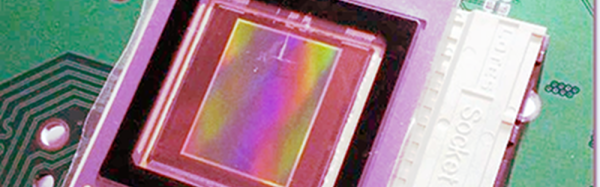
The project uses a Nikon sensor and a Xilinx Zynq CPU/FPGA. The idea is the set up and control the CMOS sensor with the CPU side of the Zynq chip, then receive and process the data from the sensor using the FPGA side before dumping it into memory and letting the CPU take over again. The project stalled for a bit due to a bug in the vendor’s tools. The posts describe the problem which might be handy if you are doing something similar. There’s still work to go, but the device has taken images that should appear on the same blog soon.

Continue reading “Custom Zynq/CMOS Camera Unlocks Astrophotography”