Firmware Hints That Tesla’s Driver Camera Is Watching

Currently, if you want to use the Autopilot or Self-Driving modes on a Tesla vehicle you need to keep your hands on the wheel at all times. That’s because, ultimately, the human driver is still the responsible party. Tesla is adamant about the fact that functions which allow the car to steer itself within a lane, avoid obstacles, and intelligently adjust its speed to match traffic all constitute a driver assistance system. If somebody figures out how to fool the wheel sensor and take a nap while their shiny new electric car is hurtling down the freeway, they want no part of it.

So it makes sense that the company’s official line regarding the driver-facing camera in the Model 3 and Model Y is that it’s there to record what the driver was doing in the seconds leading up to an impact. As explained in the release notes of the June 2020 firmware update, Tesla owners can opt-in to providing this data:

Help Tesla continue to develop safer vehicles by sharing camera data from your vehicle. This update will allow you to enable the built-in cabin camera above the rearview mirror. If enabled, Tesla will automatically capture images and a short video clip just prior to a collision or safety event to help engineers develop safety features and enhancements in the future.
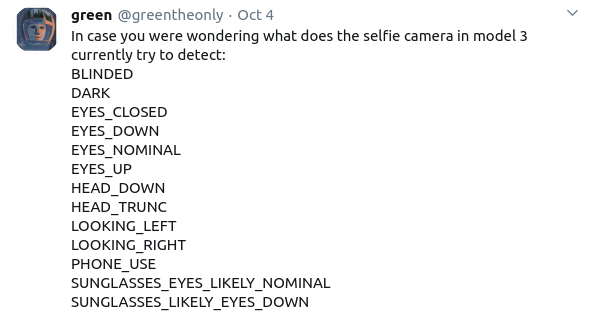
But [green], who’s spent the last several years poking and prodding at the Tesla’s firmware and self-driving capabilities, recently found some compelling hints that there’s more to the story. As part of the vehicle’s image recognition system, which usually is tasked with picking up other vehicles or pedestrians, they found several interesting classes that don’t seem necessary given the official explanation of what the cabin camera is doing.

If all Tesla wanted was a few seconds of video uploaded to their offices each time one of their vehicles got into an accident, they wouldn’t need to be running image recognition configured to detect distracted drivers against it in real-time. While you could make the argument that this data would be useful to them, there would still be no reason to do it in the vehicle when it could be analyzed as part of the crash investigation. It seems far more likely that Tesla is laying the groundwork for a system that could give the vehicle another way of determining if the driver is paying attention.

Continue reading “Firmware Hints That Tesla’s Driver Camera Is Watching”

The Potatoes Of DOOM

Over the years, the 1993 classic Doom has gained an almost meme-like status where it can seemingly run on anything. Everything from printers to smartwatches has been shown off running the now-iconic first level of Doom. Looking to up the bar, [Equalo] set out to run Doom on potatoes. However until we develop full biological computers, he had to settle for running Doom on a device powered by potatoes. (Video, embedded below.)

As we’ve seen with other hacks before, potatoes are a decent power source that just requires potato, zinc, and copper. Some have attempted to make it easier to scale potato power and others have focused on making the individual potatoes more powerful. The biggest obstacle when working with potatoes as a battery is that even though each potato can put out almost a volt, the current is laughably small.

The lack of current is what drove [Equalo] to dramatically scale up the typical potato battery. With a target device of a Raspberry Pi Zero requiring around 100 mA at 4.5V, this means he needed over 700 potato slices. After boiling hundreds of potatoes and with a bit of help from friends and family, the giant potato battery was constructed, and we can’t help but marvel at the sheer scale and audacity. The challenge of scaling up a potato battery is that by the time you’re wiring up the 400th potato, your first potato has already started to corrode.

Next time you’re looking for some inspiration for a monumental task, perhaps watch the tale of [Equalo’s] giant potato battery and remember what can be accomplished with some determination and a hundred pounds of spuds.

Continue reading “The Potatoes Of DOOM”

USB Adaptor Isolates Multiple Serial Interfaces

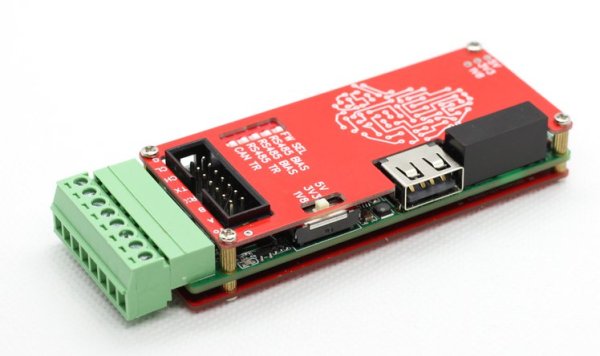
You need a Swiss Army knife of serial communications? Ollie is a compact isolated USB adaptor that provides USB, CAN bus, and two UARTs at logic, RS-232, and RS-485 signaling levels, as well as an isolated power supply.  [Slimelec] has managed to squeeze all this into a package the size of a harmonica.  We like the technique of making the enclosure from PCB material, complete with clearly labeled switch, LED and connector pinout names.

So far, only the compiled firmware is available for this project, but hardware files, and presumably the source code and documentation, are coming soon.

The central themes here are  isolation and flexibility. We can’t find the isolation voltage in the project specifications, but the CANable project on which this adaptor is based provides 2.5 kV galvanic isolation.  A single isolated USB interface is also provided over a standard Type A connector. The four-wire logic-level UART signals are available on a 2 x 7 box header, and are voltage selectable.  The RS-232, RS-485, and CAN signals are on an 8-pin pluggable screw terminal block, or you can use a DB9 connector with a pluggable adaptor board.

Whether you need a troubleshooting aid for field testing, are using CAN bus on your projects, or just want to isolate your expensive computer from sketchy prototype hardware, have a look at this project.

Retro Computer Trainer Gets A Raspberry Pi Refit

We know what you’re thinking: this is yet another one of those “Gut the retro gear for its cool old case and then fill it up with IoT junk” projects. Well, rest assured that extending and enhancing this 1970s computer trainer is very much an exercise in respecting the original design, and while there’s a Pi inside,  it doesn’t come close to spoiling the retro goodness.

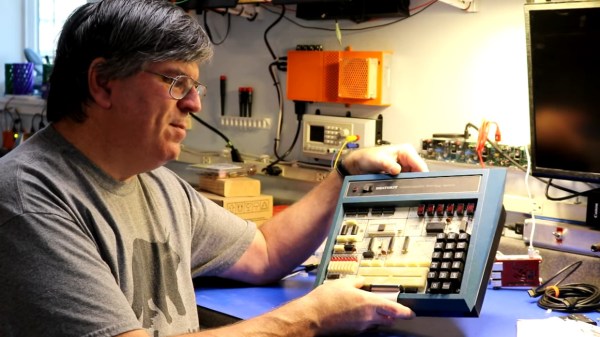
Like many of a similar vintage as [Scott M. Baker], the Heathkit catalog was perhaps only leafed through marginally less than the annual Radio Shack catalog. One particularly desirable Heathkit item was the ET-3400 microcomputer learning system, which was basically a 6800-based computer surrounded by a breadboarding area for experimentation. [Scott] got a hold of one of these, but without the optional expansion accessory that would allow it to do interesting things such as running BASIC or even supporting a serial port. So [Scott] decided to roll his own expansion board.

The expansion card that [Scott] designed is not strictly a faithful reproduction, at least in terms of the original BOM. He turned to more modern — and more readily available — components, but still managed to provide the serial port, cassette interface, and RAM/ROM expansion of the original unit. The Raspberry Pi is an optional add-on, which just allows him to connect wirelessly if he wants. The card fits into a 3D-printed case that sits below the ET-3400 and maintains the original trainer’s look and feel. The longish video below shows the build and gives a tour of the ET-3400, both before and after the mods.

It looks as though trainers like these and other artifacts from the early days of the PC revolution are getting quite collectible. Makes us wish we hadn’t thrown some things out.

Continue reading “Retro Computer Trainer Gets A Raspberry Pi Refit”

An Up-To-Date Datasette For Commodore TED Series

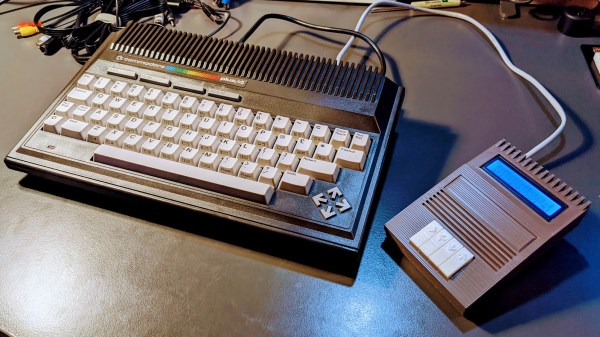
Retro computer enthusiast [Steven Combs] documents his adventure building the TEDuino, a modern replacement for the Commodore Datasette which uses an SD card instead of audio tape. He based the design on [Peter Edwards]’s Tapuino project, which was featured by Hackaday back in 2014. [Steven] took the aesthetic design to a new level, and also modified it to work with his Plus/4 and other TED series Commodores.  We are amazed that he was able to design this enclosure in SketchUp, and impressed with the results from his Creality Ender 3. He went to great lengths to match the color and style of the Plus/4, and pulled it off quite well. [Steven] also applied some interesting design features in this enclosure. The PCB modules are snap-fit, the buttons are made as a single piece – not unlike a living hinge. The 3D-printed strain relief for the cable is a nice finishing touch, and we cannot disagree with [Steven]’s sage advice – “Gorilla anything is just cool”.

This is only part 1 of the project. Stay tuned for future improvements, tweaks and embellishments.

Continue reading “An Up-To-Date Datasette For Commodore TED Series”

World’s Smallest Version Of World’s Fastest Bumper Car

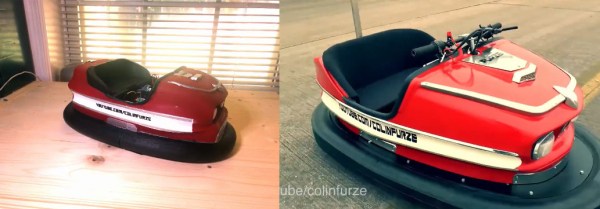
A few years ago, YouTubing madman [Colin Furze] took an old bumper car and made a 600-horsepower beast of a go-kart that managed to clock 100MPH with a headwind. This isn’t that. It’s a miniaturized, remote-control homage to [Colin]’s go-kart that is equally awesome.

[Forsyth Creations] started by CAD-modeling the chassis right on top of a still from the video. The entire body is 3D-printed in four large pieces, which took several days because each piece took around 24 hours. Inside the car there’s an Arduino brain driving a motor in the back and a servo in the front. This bad boy runs on a couple of rechargeable battery packs and can be controlled with either a Wii balance board or a PS2 controller. This thing really moves, although it doesn’t quite reach 100MPH. Watch it zoom around in the video after the break.

Got a Segway lying around that just doesn’t do it for you anymore? You could always turn it into a go-kart. Never had a Segway to begin with? Just roll your own.

Continue reading “World’s Smallest Version Of World’s Fastest Bumper Car”

Fail Of The Week: Putting Guitar Strings On A Piano

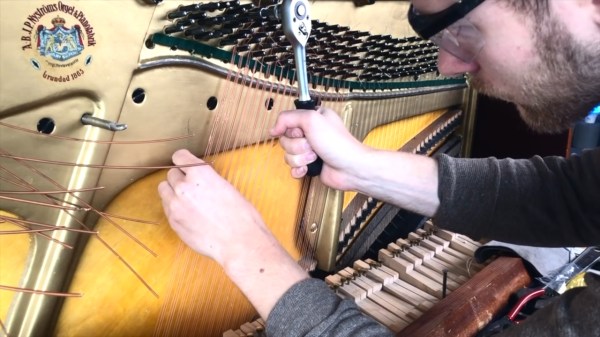
The piano is a bit of an oddball within the string instrument family. Apart from rarely seeing people carry one around on the bus or use its case to discretely conceal a Tommy Gun, the way the strings are engaged in the first place — by having little hammers attached to each key knock the sound of of them — is rather unique compared to the usual finger or bow movement. Still, it is a string instrument, so it’s only natural to wonder what a piano would sound like if it was equipped with guitar strings instead of piano wire. Well, [Mattias Krantz] went on to actually find out the hard way, and shows the results in this video.

After a brief encounter with a bolt cutter, the point of no return was reached soon on. Now, the average piano has 88 keys, and depending on the note, a single key might have up to three strings involved at once. In case of [Mattias]’ piano — which, in his defense, has certainly seen better days — a total of 210 strings had to be replaced for the experiment. Guitars on the other hand have only six, so not only did he need 35 packs of guitar strings, the gauge and length variety is quite limited on top. What may sound like a futile endeavor from the beginning didn’t get much better over time, and at some point, the strings weren’t long enough anymore and he had to tie them together. Along with some inevitable breakage, he unfortunately ran out of strings and couldn’t finish the entire piano, though it seems he still managed to roughly cover a guitar’s frequency range, so that’s an appropriate result.

We’re not sure if [Mattias] ever expected this to actually work, but it kinda does — there is at least some real sound. Are the results more than questionable though? Oh absolutely, but we have to admire the audacity and perseverance he showed to actually pull through with this. It took him 28 hours just to get the guitar strings on, and another good amount of time to actually get them all in tune. Did it pay off? Well, that depends how you look at it. It definitely satisfied his and other’s curiosity, and the piano produces some really unique and interesting sounds now — but check for yourself in the video after the break. But that might not be for everyone, so luckily there are less final ways to change a piano’s sound. And worst case, you can always just turn it into a workbench.

(Thanks for the tip, [Keith])

Continue reading “Fail Of The Week: Putting Guitar Strings On A Piano”