Dumping A Zelda SNES ROM, And Learning A Few Things Along The Way

For many of us, being given a big old DIP ROM from nearly thirty years ago and being told to retrieve its contents would be a straightforward enough task. We’d simply do what we would have done in the 1980s, and hook up its address lines to a set of ports, pull its chip select line high, and harvest what came out of the data lines for each address.

But imagine for a minute that an old-fashioned parallel ROM is a component you aren’t familiar with, as [Brad Dettmer] did with the ROM from a SNES Zelda cartridge. We’ve seen plenty of reverse engineering stories with ancient computing gear as their subject, but perhaps it’s time to accept that some of the formerly ubiquitous devices are edging towards that sort of status.

So [Brad] takes us through the process of using the Saleae logic analyser to interrogate the chip while an Arduino stepped through its address lines, and the lesson is probably that while it seems like a sledgehammer to crack a nut it is important to factor in that unfamilarity. If you’d never worked with a 1980s ROM, it would make sense to use the tool you are familiar with, wouldn’t it?

Anyway, all’s well that ends well. While we’re on the subject of Nintendo ROMs, have a read about extracting the boot ROM from a cloned Game Boy.

Optimizing Screen Time To Heart Beats

Kids spend too much time in front of a screen these days. They also won’t get off my lawn, and music today is just a bunch of static. They don’t respect their elders, either. While kids today are terrible, we can fix that first problem — sitting in front of a screen all day. For his Hackaday Prize entry, [Donovan] has created a device that optimizes screen time to reduce sensory overload. It’s the Optimote, the combination of a remote control and biofeedback.

The idea behind the Optimote is to actually to reduce stimulation when watching something on a screen. For many people, including people on the autism spectrum, watching TV or YouTube videos can often result in debilitating sensory overload. You can’t relax in this state, you can’t learn, and you certainly can’t get any entertainment value out of the glowing rectangle in front of your face.

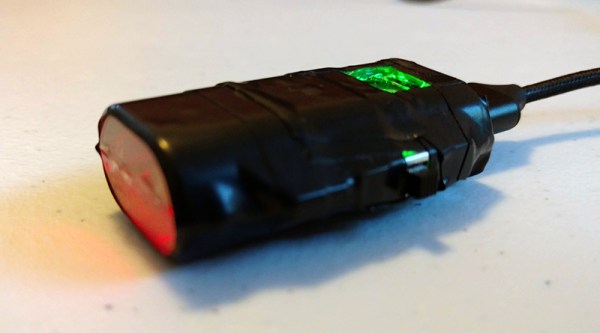
The Optimote uses a pulse sensor, an Arduino, an incredible break-away cable that seems to be missing from any other wearable device like this, and a software stack that interacts with VLC. During periods of high pulse rate, the video skips to low-intensity footage. There’s a ‘calm’ mode that puts media volume and tempo in sync with heart rate. The ‘thrill’ mode plays an eerie scene looping with the Jaws theme.

So far, the prototype is a success, and [Donovan] is looking forward to large-scale user experience testing to determine how effective and enjoyable this technology can become.

Learn FPGA With This Persistence Of Vision Hack

Everybody wants to give FPGA development a try and here’s a great way to get into it. You can build your own Persistence of Vision display using a $30 dev board. It’s a fun project, and you’ll learn quite a bit about designing for an FPGA, as well as using the Quartus design software.

The inspiration for this article comes from [vpecanins] who did an example project where you wave the board back and forth and a message appears in mid air. This uses the MAX1000, a pretty powerful yet odd FPGA board for about $30. It contains an Intel MAX10 (when did Intel start making FPGAs? Remember, Intel bought Alterra back in 2015). I find the board odd because it also holds an accelerometer that you can talk to using SPI. That’s a little strange for a generic FPGA board, but paired with eight on-board LEDs it’s perfect for this demo.

Since I didn’t find any written documentation for this example, I thought we’d help out and take you on a step-by-step tour of the project. What’s more, in a future installment, I’ll show you how to make some significant changes to the tutorial that will make it even more practical as a base for other projects.

Continue reading “Learn FPGA With This Persistence Of Vision Hack”

New Mooltipass Begins Development With Call For Collaborators

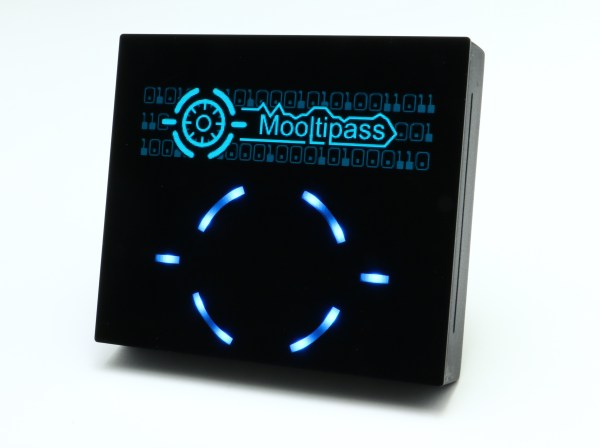
One of the most interesting aspects of our modern world is the ability to work collaboratively despite the challenges of geography and time zones. Distributed engineering is a trend which we’ve watched pick up steam over the years. One such example is the Mooltipass offline password keeper which was built by a distributed engineering team from all over the world. The project is back, and this time the goal is to add BLE to the mini version of the hardware. The call for collaborators was just posted on the project page so head over and check out how the collaboration works.

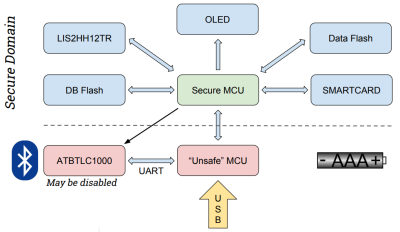
The key to the hardware is the use of a smartcard with proven encryption to store your passwords. Mooltipass is a secure interface between this card and a computer via USB. The new version will be a challenge as it introduces BLE for connectivity with smart phones. To help mitigate security risks, a second microcontroller is added to the existing design to act as a gatekeeper between the secure hardware and the BLE connection.


Mathieu Stephan is the driving force behind the Mooltipass project, which was one of the first projects on Hackaday.io and has been wildly successful in crowd funding and on Tindie. Mathieu and five other team members already have a proof of concept for the hardware. However, more collaborators are needed to help see all aspects of the project — hardware, firmware, and software — through to the end. This is a product, and in addition to building something awesome, the goal is to turn a profit.

How do you reconcile work on an Open Source project with a share of the spoils? Their plan is to log hours spent bringing the new Mooltipass to life and share the revenue using a site like colony.io. This is a tool built on the Ethereum blockchain to track contributions to open projects, assigning tokens that equate to value in the project. It’s an interesting approach and we’re excited to see how it takes shape.

You can catch up on the last few years of the Mooltipass adventure my checking out Mathieu’s talk during the 2017 Hackaday Superconference. If this article has you as excited about distributed engineer as we are, you need to check out the crew that’s building this year’s Open Hardware Summit badge!

Make Your Python Prettier With Decorators

Many Pythonistas are familiar with using decorators, but far fewer understand what’s happening under the hood and can write their own. It takes a little effort to learn their subtleties but, once grasped, they’re a great tool for writing concise, elegant Python.

This post will briefly introduce the concept, start with a basic decorator implementation, then walk through a few more involved examples one by one.

Continue reading “Make Your Python Prettier With Decorators”

Single-Rotor Drone: A Thrust-Vectoring Monocopter

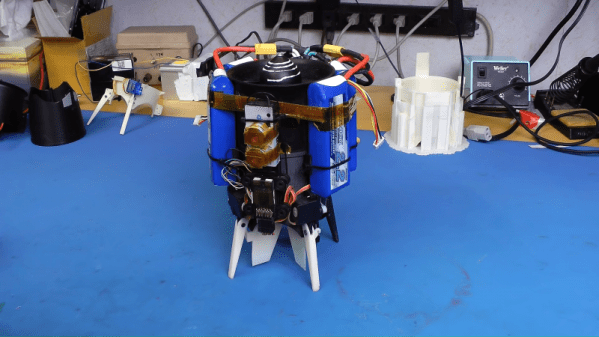
We’re not entirely sure what to call this one. It’s got the usual trappings of a drone, but with only a single rotor it clearly can’t be called by any of the standard multicopter names. Helicopter? Close, but not quite, since the rotor blades are fixed-pitch. We’ll just go with “monocopter” for now and sort out the details later for this ducted-fan, thrust-vectored UAV.

Whatever we choose to call it — builder [tesla500] dubbed it the simultaneously optimistic and fatalistic “Ikarus” — it’s really unique. The monocopter is built around a 90-mm electric ducted fan mounted vertically on a 3D-printed shroud. The shroud serves as a mounting point for the landing legs and for four servos that swivel vanes within the rotor wash. The vanes deflect the airstream and provide the thrust vectoring that gives this little machine its control.


Coming to the correct control method was not easy, though. Thanks mainly to the strong gyroscopic force exerted by the rotor, [tesla500] had a hard time getting the flight controller to cooperate. He built a gimballed test stand to work the problem through, and eventually rewrote LibrePilot to deal with the unique forces on the craft and tuned the PID loops accordingly. Check out the results in the video below.

Some attempts to reduce the number of rotors work better than others, of course, but this worked out great, and we’re looking forward to the promised improvements to come.

Continue reading “Single-Rotor Drone: A Thrust-Vectoring Monocopter”

Science Shows Green Lasers Might Be More Than You Bargained For

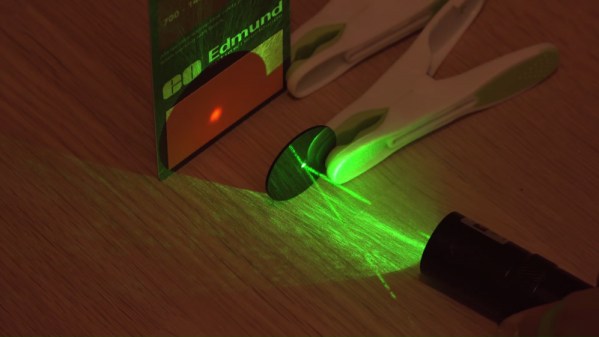
This may come as a shock, but some of those hot screaming deals on China-sourced gadgets and goodies are not all they appear. After you plunk down your pittance and wait a few weeks for the package to arrive, you just might find that you didn’t get exactly what you thought you ordered. Or worse, you may get a product with unwanted bugs features, like some green lasers that also emit strongly in the infrared wavelengths.

Sure, getting a free death ray in addition to your green laser sounds like a bargain, but as [Brainiac75] points out, it actually represents a dangerous situation. He knows whereof he speaks, having done a thorough exploration of a wide range of cheap (and not so cheap) lasers in the video below. He explains that the paradox of an ostensibly monochromatic source emitting two distinct wavelengths comes from the IR laser at the heart of the diode-pumped solid state (DPSS) laser inside the pointer. The process is only about 48% efficient, meaning that IR leaks out along with the green light. The better quality DPSS laser pointers include a quality IR filter to remove it; cheaper ones often fail to include this essential safety feature. What wavelengths you’re working with are critical to protecting your eyes; indeed, the first viewer comment in the video is from someone who seared his retina with a cheap green laser while wearing goggles only meant to block the higher frequency light.

It’s a sobering lesson, but an apt one given the ubiquity of green lasers these days. Be safe out there; educate yourself on how lasers work and take a look at our guide to laser safety. Continue reading “Science Shows Green Lasers Might Be More Than You Bargained For”