Code On Your Phone With CircuitPython Editor

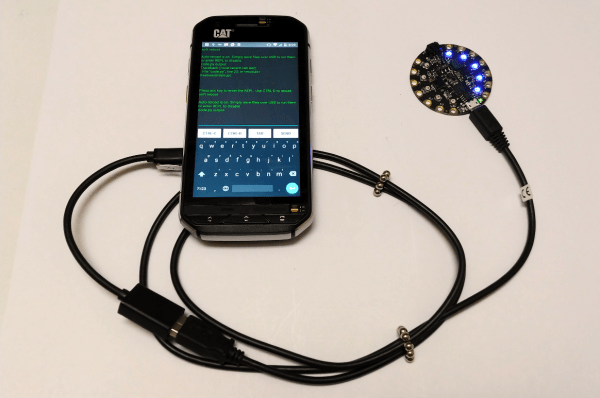
[foamyguy] loves Python and messing around with electronics. Boards such as Adafruit’s Circuit Playground Express make it easy for him to take both anywhere. He recently found himself wanting to program Circuit Python boards in the field, but doesn’t always have a laptop on him. So he created an Android app to make on-the-go programming fast and easy.

Using CircuitPython Editor and one or two USB cables, you can program Circuit Python boards with most Android device, including Tinkerboards. It features serial communication, a basic code editor, and a REPL sandbox for code-based castle building. [foamyguy]’s most recent addition to this work in progress is a macro creation tool that lets you edit and store modular, repeatable tasks, like turning all the NeoPixels blue, or lighting them up in a smiley face pattern. The Circuit Python board will draw its power from the Android device, so keep that in mind before you program some crazy light show.

You can get the app in the Play store or download it directly from the ‘hub. If you have any trouble setting it up, check out [foamyguy]’s Adafruit guide.

An Electronic Love Letter To The Wind

Home weather stations are a great way for hackers and makers to put their skills to practical use. After all, who wants to hear the current conditions for the whole city when they could setup their own station which drills that information down to their very own street? Such a setup doesn’t need to be any more complex than a temperature sensor wired up to a microcontroller, but then not all of us are quite the weather fanatic that [Richard] clearly is.

The system he’s built to monitor the wind over his home is, to put it mildly, incredible. We might not all share the obsession [Richard] apparently has with the wind, but we can certainly respect the thought and design that went into this comprehensive system. From his scratch built anemometer to the various ways he’s come up with to display the collected environmental data throughout his home, if this build doesn’t inspire you to hack together your own weather station then nothing will.
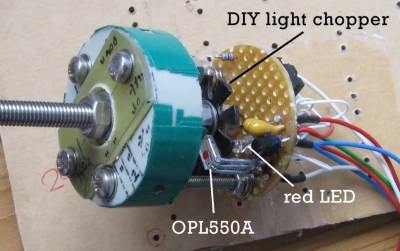
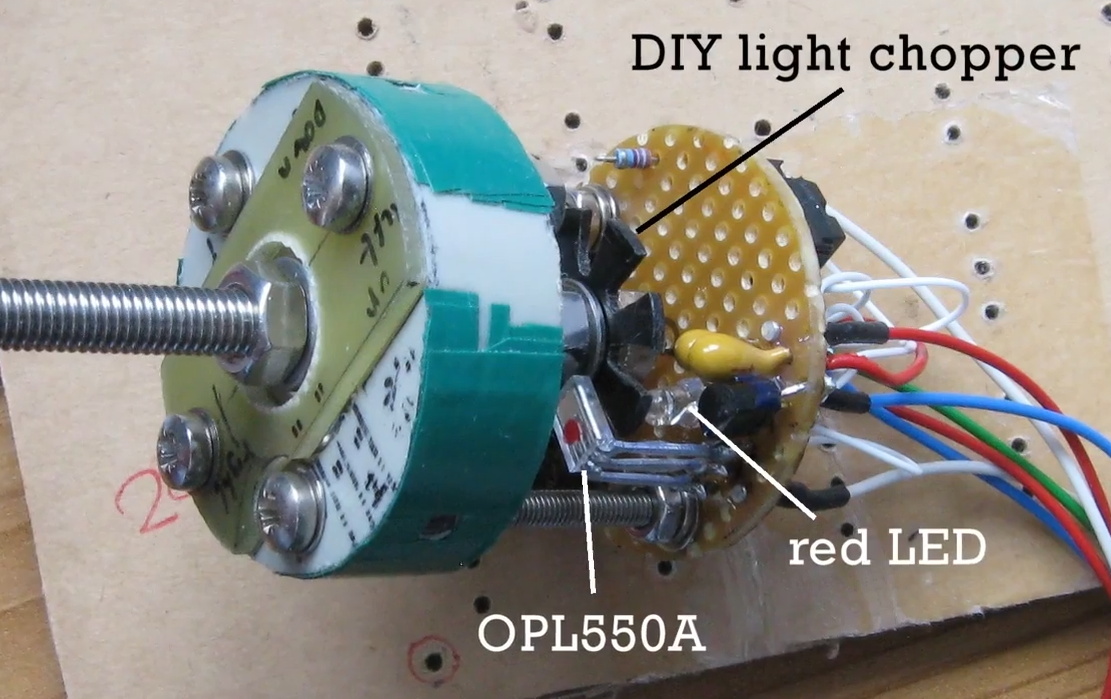
At the heart of the system is the anemometer itself, which makes use of several scavenged parts such as the bottom halves of plastic Easter eggs as wind cups. The cups spin on a short length of M5 threaded rod inside of a 635ZZ bearing, which ultimately rotates a “light chopper” placed between a red LED and a OPL550A optical sensor. In a particularly nice touch, [Richard] has even included a few power resistors arranged around the moving parts to use as a heater which keeps the device from freezing up when the temperature drops. The sensor creates eight digital pulses per revolution, and feeds data into the base station though a 30 meter (98 feet) cable.

From there, the base station uses an ESP8266 to upload wind and temperature data to ThingSpeak and Weather Underground to be viewed through their respective web interfaces and applications. The project really could have ended here and still been impressive in its own right, but the station also includes 433 MHz and NRF24L01 transmitters to send the data to the other display devices which [Richard] has designed.

The 433 MHZ display is built into the frame of a lantern, and shows the current time and temperature on an LED readout as well as historical wind and temperature graphs on a 2.2 inch ILI9341 TFT screen which [Richard] has rotated into a portrait layout. There’s a red light on top that blinks whenever a signal is received to show that the system is working, and even a touch sensor which can be used to turn off the TFT screen at a tap if you’re not interested in seeing the full charts.

The other display, which [Richard] calls the “picture frame” utilizes a dizzying array of single LEDs, a handful of digital LED readouts, and even an OLED screen for good measure. They all work together to show the current wind speed as well the averages for the past day in three hour segments. As this display features a real time display of current wind conditions and averages for as short a period of two minutes, it uses the NRF24L01 receiver to get data from the base station at a rate of 3 Hz.

In the past we’ve seen 3D printed weather stations, and of course some pretty simple affairs using little more than an ESP8266 board and some sensors. But few have ever put so much thought into how to present the collected data to the user. If you’re serious about knowing what it’s like outside the confines of your bunker, [Richard] has got some tricks to show you.

Continue reading “An Electronic Love Letter To The Wind”

Building An ESP8266 Doorbell On Hard Mode

It certainly seems as though it should be an easy enough project; all [Miguel De Andrade] wanted was to receive a notification when somebody was pressing his doorbell, and thought it would be a good project to get his feet wet in the wonderful world of ESP8266 hacking. But as fate would have it, not everything went according to plan. In the end he got it sorted out, but it’s an interesting look at how even the “easy” projects can call the gremlins out of hiding.

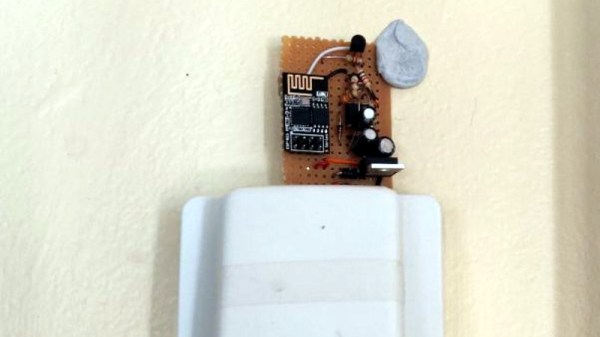
Arguably, the problems started when [Miguel] picked up an ESP-01 module from a local electronics retailer. While the convenience of buying the hardware in a brick and mortar store can’t be overstated, it did mean he was stuck with a slightly more spartan experience compared to the more common ESP “development boards”. Programming it externally with a Teensy ended up not being much of an obstacle, but it did mean he was stuck with only two GPIO pins.

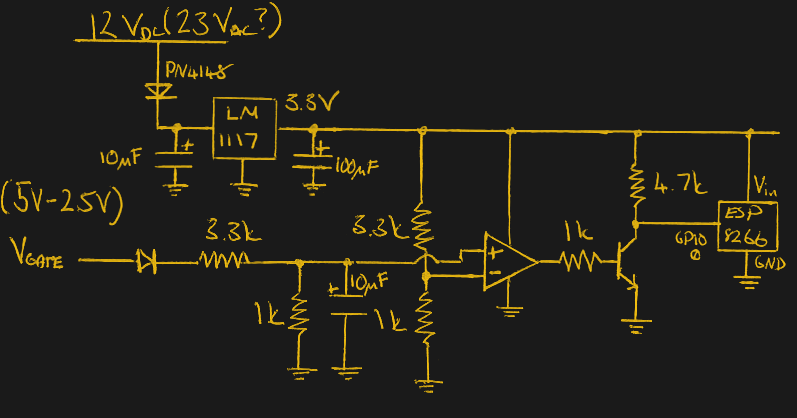
At any rate, with ESP in hand, the next step was figuring out how the existing bell and intercom system even worked. Unfortunately, after some experimentation [Miguel] found there was a bit more going on there than he’d hoped. According to his multimeter, the one line from the intercom sits at approximately 5 VDC when it’s open, and drops down to 2.5 VDC when pressed. If that wasn’t bad enough, picking up the handset to answer the intercom sent the voltage up to a microcontroller-killing 12 VDC. To complicate maters further, the supply line for the intercom was 23 VAC, so he’d need to rectify that somehow if he wanted to avoid a separate power supply for the ESP.

To turn this jumble of voltages into a nice clean 0 – 3.3 V signal for the ESP8266, he came up with a circuit based around the LM358 comparator that utilizes an LM117 regulator to power itself and the ESP at the same time. A couple of diodes are there to block the AC component from causing trouble, and an A2N2222A transistor is used as a buffer amplifier to boost the output of the comparator so it registers as a digital HIGH on the ESP. The circuit took a bit of fiddling to get sorted out, but in the end [Miguel] says it seems to get the job done.

You might think the problems were solved, but this is where it gets really annoying. The system would work fine for awhile, and then inexplicably go silent. In diagnosing the problem he realized that his circuit connected to GPIO_0 was inadvertently putting the ESP8266 into programming mode, since it was holding the pin LOW unless the intercom button was pressed. He assumed he could just move the circuit to the other GPIO pin, but as that one has the board’s LED on it, that caused its own problems. For now, [Miguel] hasn’t come up with a solution to this issue, and has learned to live with the fact that the system won’t come back up cleanly should it lose power for any reason.

If you’re looking for a slightly classier look than a scrap of perfboard stuck on the wall with what appears to be chewing gum, we’ve also seen the ESP8266 used in some more ornate doorbell setups. Of course if you still haven’t gotten your head wrapped around the whole Internet-connected button thing, you can always start with something a little easier.

Underclocking The ESP8266 Leads To WiFi Weirdness

Sometimes the best hacks come from the most basic of questions. In this case, [CNLohr] was wondering what would happen if he started to reduce the clock speed of the ESP8266’s Baseband PLL (BBPLL) while still trying to communicate with it. You know, as one does. The results ended up being fairly surprising, and while it’s not immediately clear if there’s a practical application for this particular trick, it’s certainly worth some additional research.

Code for stepping through clock speeds

The idea here is that the BBPLL is the reference clock for the entire system, including all of the peripherals. So underclocking it doesn’t just slow down code execution as you might expect, but it also slows down the chip’s interactions with the outside world. [CNLohr] demonstrates this concept in the video below, showing how the baud rate used to view the serial output from the ESP8266 needs to be adjusted to match the chip’s frequency or else you’ll only get garbage on the line.

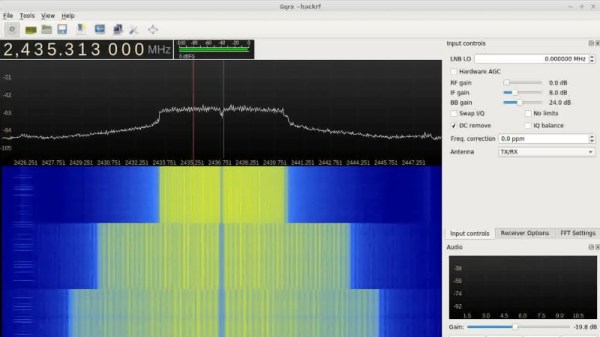
But what happens to the WiFi? As [CNLohr] discovered, while the center frequency itself doesn’t change, the channel width gets narrower as the clock rate is lowered. When viewed on the waterfall display of a software defined radio (SDR), the transmission can be seen “compressing” in a step pattern as the clock rate is reduced. As one might expect, the 802.11 packets become indecipherable to a normal WiFi device running in monitor mode. The signal is still at the correct frequency, but the devices can no longer understand each other.

Now it was time for another of those basic questions. What would happen if you did the same thing to a second ESP8266? Much to his surprise, [CNLohr] discovered that the two devices could still communicate successfully as long as their BBPLL clock speed was the same. From an outsider’s perspective it looked like gibberish, but to the two ESPs which had been slowed by the same amount, everything worked as expected even though the 802.11 standards say it shouldn’t.

So what can you do with this? The most obvious application is a “stealth” WiFi connection between ESP8266s which wouldn’t show up to normal devices, a communications channel invisible to all but the most astute eavesdropper. [CNLohr] has made all the source code to pull this trick off public on GitHub, and it should be interesting to see what kind of applications (if any) hackers find for this standards-breaking behavior.

If your thing is devices being forced into operations they were never intended to by particularly twisted hackers, check out our recent coverage of the USB serial adapter turned SDR by [Ted Yapo].

Continue reading “Underclocking The ESP8266 Leads To WiFi Weirdness”

Return Of The Logic Probe

We live in a day when it is very inexpensive to buy an oscilloscope, especially one with modest performance that hooks to a laptop. However, there was a time when even a surplus scope was out of reach for many people who liked to build things. A common alternative was the logic probe. At the low end, this could be an inverter and an LED, although it was more common to have a little extra circuitry to actually do a comparison to a reference voltage and present some indication of fast pulses — you might not be able to tell the frequency of a clock, but you could tell it wasn’t stuck. Of course, today with a microcontroller you can make a very sophisticated probe with less circuitry than a classic probe. We’ve seen a few takes on this and the latest is the DigiLogicProbe from [TheRadMan].

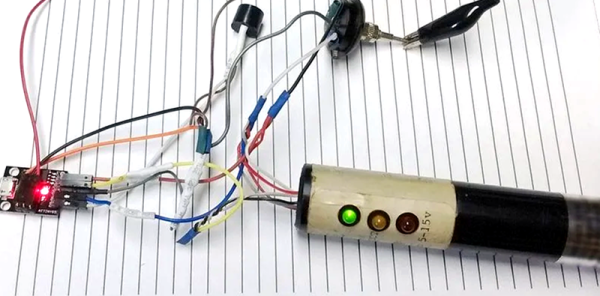
The probe is just a ATtiny85 board with a handful of components. A resistor and diode help protect the probe and the circuit under test. There are also a few LEDs and a buzzer. The rest of the project is software.

Continue reading “Return Of The Logic Probe”

Compiling NodeMCU For The ESP32 With Support For Public-Private Key Encryption

When I began programming microcontrollers in 2003, I had picked up the Atmel STK-500 and learned assembler for their ATtiny and ATmega lines. At the time I thought it was great – the emulator and development boards were good, and I could add a microcontroller permanently to a project for a dollar. Then the ESP8266 came out.

I was pretty blown away by its features, switched platforms, except for timing-sensitive applications, and it’s been my chip of choice for a few years. A short while ago, a friend gave me an ESP32, the much faster, dual core version of the ESP8266. As I rarely used much of the computing power on the ESP8266, none of the features looked like game changers, and it remained a ‘desk ornament’ for a while.

About seven weeks ago, support for the libSodium Elliptic Curve Cryptography library was added. Cryptography is not the strongest feature of IoT devices, and some of the methods I’ve used on the ESP8266 were less than ideal. Being able to more easily perform public-private key encryption would be enough for me to consider switching hardware for some projects.

However, my preferred automated build tool for NodeMCU wasn’t available on the ESP32 yet. Compiling the firmware was required – this turned out to be a surprisingly user-friendly experience, so I thought I’d share it with you. If I had known it would be so quick, this chip wouldn’t have sat on my desk unused quite so long!  Continue reading “Compiling NodeMCU For The ESP32 With Support For Public-Private Key Encryption”

Picovoice Puts Smarts Offline In 512K Of Memory

We live in the future. You can ask your personal assistant to turn on the lights, plan your commute, or set your thermostat. If they ever give Alexa sudo, she might be able to make a sandwich. However, you almost always see these devices sending data to some remote server in the sky to do the analysis and processing. There are some advantages to that, but it isn’t great for privacy as several recent news stories have pointed out. It also doesn’t work well when the network or those remote servers crash — another recent news story. But what’s the alternative? If Picovoice has its way, you’ll just do all the speech recognition offline.

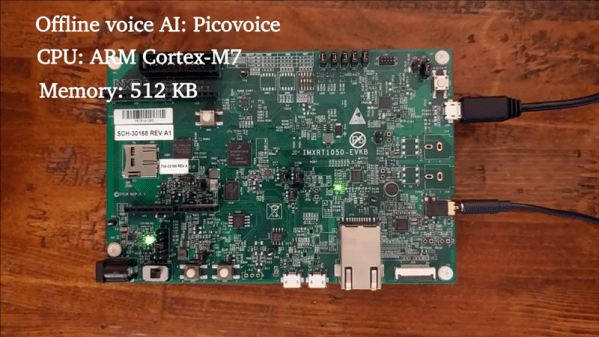
Have a look at the video below. There’s an ARM board not too different from several we have lying around in the Hackaday bunker. It is listening for a wake-up phrase and processing audio commands. All in about 512K of memory. The libraries are apparently quite portable and the Linux and Raspberry Pi versions are already open source. The company says they will make other platforms available in upcoming releases and claim to support ARM Cortex-M, Cortex-A, Android, Mac, Windows, and WebAssembly.

Continue reading “Picovoice Puts Smarts Offline In 512K Of Memory”