Skateboard

On Your Phone While Driving An Electric Skateboard

Skateboards are fun, but you have to do all that pesky kicking in order to get anywhere. That’s why [Nick] decided to build his own electric skateboard. Not only is the skateboard powered with an electric motor, but the whole thing can be controlled from a smart phone.

[Nick] started out with a long board deck that he had made years ago. After cleaning it up and re-finishing it, the board was ready for some wheels. [Nick] used a kit he found online that came with the trucks, wheels, and a belt. The trucks have a motor mount welded in place already. [Nick] used a Turnigy SK3 192KV electric motor to drive the wheels. He also used a Turnigy electronic speed controller to make sure he could vary the speed of the board while riding.

Next [Nick] needed some interface between a smart phone and the motor controller. He chose to use an Arduino Nano hooked up to a Bluetooth module. The Nano was able to directly drive the motor controller, and the Bluetooth module made it easy to sync up to a mobile phone. The Android app was written using MIT’s App Inventor software. It allows for basic control over the motor speed so you can cruise in style. Check out the video below for a slide show and some demonstration clips.

It’s a popular project, and eerily similar to the one we saw a couple months back.

Continue reading “On Your Phone While Driving An Electric Skateboard” →

Bringing A Century Stereo Into The 21st Century

Way back in the previous century, people used to use magnetized strips of tape to play music. It might be hard to believe in today’s digital world, but these “cassette” tapes were once all the rage. [Steve] aka [pinter75] recently found a Bang & Olufsen stereo with this exact type of antequated audio playback device, and decided to upgrade it with something a little more modern.

Once the unit arrived from eBay and got an electronic tune-up, [pinter75] grabbed a Galaxy S3 out of his parts drawer and got to work installing it in the old cassette deck location. He used a laser cutter to make a faceplate for the phone so it could be easily installed (and removed if he decides to put the tape deck back in the future).

The next step was wiring up power and soldering the audio output directly to the AUX pins on the stereo. Once everything was buttoned up [pinter75] found that everything worked perfectly, and mounted the stereo prominently on his wall. It’s always great when equipment like this is upgraded and repaired rather than thrown out.

Hackaday Links Column Banner

Hackaday Links: May 24, 2015

A few months ago, we heard about a random guy finding injection molds for old Commodore computers. He did what the best of us would do and started a Kickstarter to remanufacture these cool old cases. It’s the best story on retrocomputing this year, and someone else figured out they could remanufacture Commodore 64 keycaps. If you got one of these remanufactured cases, give the keycaps a look.

Remember this Android app that will tell you the value of resistors by reading their color code. Another option for the iOS crowd was presented at Maker Faire last weekend. It’s called ResistorVision, and it’s perfect for the colorblind people out there. An Android version of ResistorVision will be released sometime in the near future.

A few folks at Langly Research Center have a very cool job. They built a hybrid electric tilt wing plane with eight motors on the wing and two on the tail. It’s ultimately powered by two 8 hp diesel engines that charge Liion batteries. When it comes to hydrocarbon-powered hovering behemoths, our heart is with Goliath.

A bottom-of-the-line avionics panel for a small private plane costs about $10,000. How do you reduce the cost? Getting rid of FAA certification? Yeah. And by putting a Raspberry Pi in it. It was expoed last month at the Sun ‘N Fun in Florida, and it’s exactly what the pilots out there would expect: a flight system running on a Raspberry Pi. It was installed in a Zenith 750, a 2-seat LSA, registered as an experimental. You can put just about anything in the cabin of one of these, and the FAA is okay with it. If it’ll ever be certified is anyone’s guess.

Reading Resistors With OpenCV

Here’s a tip from a wizened engineer I’ve heard several times. If you’re poking around a circuit that has failed, look at the resistor color codes. Sometimes, if a resistor overheats, the color code bands will change color – orange to brown, blue to black, and so forth. If you know your preferred numbers for resistors, you might find a resistor with a value that isn’t made. This is where the circuit was overheating, and you’re probably very close to discovering the problem.

The problem with this technique is that you have to look at and decode all the resistors. If automation and computer vision is more your thing, [Parth] made an Android app that will automatically tell you the value of a resistor by pointing a camera at it.

The code uses OpenCV to scan a small line of pixels in the middle of the screen. Colors are extracted from this, and the value of the resistor is displayed on the screen. It’s perfect for scanning through a few hundred through hole resistors, if you don’t want to learn the politically correct mnemonic they’re teaching these days.

Video below, and the app is available for free on the Google Play store.

Continue reading “Reading Resistors With OpenCV” →

Wildlife Camera

Remote Controlled Wildlife Camera With Raspberry Pi

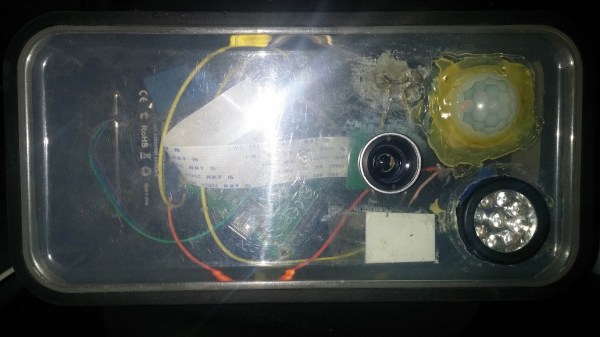
If you are interested in local wildlife, you may want to consider this wildlife camera project (Google cache). [Arnis] has been using his to film foxes and mice. The core components of this build are a Raspberry Pi and an infrared camera module specifically made for the Pi. The system runs on a 20,000 mAh battery, which [Arnis] claims results in around 18 hours of battery life.

[Arnis] appears to be using a passive infrared (PIR) sensor to detect motion. These sensors work by detecting sudden changes in the amount of ambient infrared radiation. Mammals are good sources of infrared radiation, so the sensor would work well to detect animals in the vicinity. The Pi is also hooked up to a secondary circuit consisting of a relay, a battery, and an infrared light. When it’s dark outside, [Arnis] can enable “night mode” which will turn on the infrared light. This provides some level of night vision for recording the furry critters in low light conditions.

[Arnis] is also using a Bluetooth dongle with the Pi in order to communicate with an Android phone. Using a custom Android app, he is able to connect back to the Pi and start the camera recording script. He can also use the app to sync the time on the Pi or download an updated image from the camera to ensure it is pointed in the right direction. Be sure to check out the demo video below.

If you like these wildlife cameras, you might want to check out some older projects that serve a similar purpose. Continue reading “Remote Controlled Wildlife Camera With Raspberry Pi” →

OK Google, Open Sesame

There are a myriad of modern ways to lock and unlock doors. Keypads, Fingerprint scanners, smart card readers, to name just a few. Quite often, adding any of these methods to an old door may require replacing the existing locking mechanism. Donning his Bollé sunglasses allowed [Dheera] to come up with a slightly novel idea to unlock doors without having to change his door latch. Using simple, off the shelf hardware, a Smartwatch, some code crunching and a Google Now app, he was able to yell “OK Google, Open Sesame” at his Android Wear smartwatch to get his apartment  door to open up.

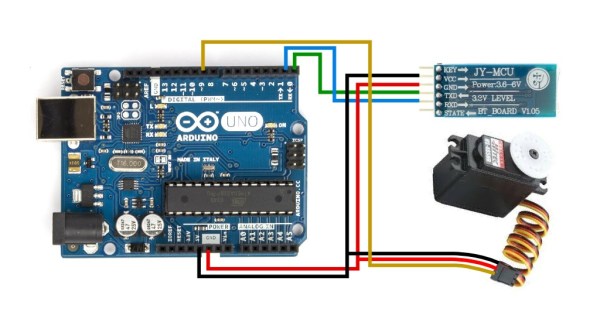
The hardware, in his own words, is trivial. An Arduino, an HC-05 bluetooth module and a servo. The servo is attached to his door latch using simple hardware that looks sourced from the closest hardware store. The code is split in to two parts. The HC-05 listens for a trigger signal, and informs the Arduino over serial. The Arduino in turn activates the servo to open the door. The other part is the Google Now app. Do note that the code, as he clearly points out, is “barebones”. If you really want to implement this technique, it would be wise to add in authentication to prevent all and sundry from opening up your apartment door and stealing your precious funky Sunglasses. Watch a video of how he put it all together after the break. And if you’re interested, here are a few other door lock hacks we’ve featured in the past.

Continue reading “OK Google, Open Sesame” →

Automatic Garage Door Opener Works For Your Cat

Using an Arduino or Raspberry Pi to perform a task in the real world is certainly a project we’ve seen here before, and certainly most of these projects help to make up the nebulous “Internet of Things” that’s all the rage these days. Once in a while though, a project comes along that really catches our eye, as is the case with [Jamie’s] meticulously documented automatic garage door opener.

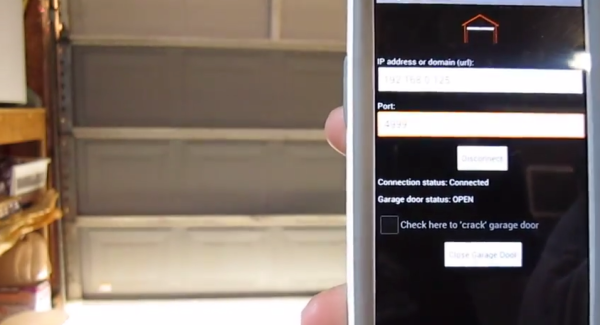
This garage door opener uses an ATMega328 to connect the internet to the garage door. A reed switch is installed which lets the device sense the position of the door, which is relayed back to the internet. [Jamie] wrote an Android app that can open and close the door and give the user the information on the door’s status. One really interesting feature is the ability to “crack” the garage door. This is done by triggering the garage door opener twice with a delay in between. From the video after the break we’d say this is how [Jamie’s] cat gets in and out.

We love seeing projects that are extremely well documented so that anyone who wants to make one can easily figure out how. Internet-connected garage door openers have been featured in other unique ways before too, but we’ve also seen ways to automatically open blinds or chicken coops!